Examen complet de Dropbox pour 2026 avec fonctionnalités et tarifs
Cet examen de Dropbox couvre le stockage cloud, la recherche IA, la collaboration, les tarifs et la sécurité pour vous aider à décider si cela vous suffit ou si vous avez besoin d'un SGD.
Le stockage cloud existe depuis plus de 20 ans. Il était utilisé pour stocker des photos personnelles, des documents aléatoires, puis il a été intégré aux entreprises.
Dropbox était l'une des plateformes les plus populaires en matière de stockage cloud.
Au fil des ans, il a évolué et a ajouté des fonctionnalités de collaboration et des mesures de sécurité supplémentaires afin de pouvoir être utilisé efficacement en entreprise.
Pour certaines personnes, Dropbox semblait être l'outil de productivité parfait, mais pour d'autres, il était insuffisant.
Dans cet examen de Dropbox, nous vous aiderons à décider si le stockage cloud vous suffit ou si vous bénéficieriez davantage d'une gestion complète des documents.
Qu'est-ce que Dropbox ?
Dropbox est une plateforme populaire de stockage cloud et de partage de fichiers. À l'origine, elle a été conçue pour faciliter le stockage de fichiers en ligne et leur synchronisation sur plusieurs appareils.
Aujourd'hui, elle inclut des outils de collaboration documentaire, d'édition de PDF, de signatures électroniques, de recherche basée sur l'IA et de flux de travail de révision créative, transformant la plateforme en un outil plus productif.
Vous pouvez partager des documents avec des collègues, collaborer en temps réel et connecter Dropbox à de nombreuses applications tierces, notamment Microsoft 365, Google Workspace, Slack, Adobe et Zoom.
Dropbox s'est étendu à un écosystème de productivité plus large grâce à des produits comme Dropbox Dash pour la recherche basée sur l'IA, Dropbox Sign pour les signatures électroniques et Dropbox Replay, vous permettant de transformer votre système de stockage statique en une plateforme interactive.
Cependant, malgré ces fonctionnalités de productivité, Dropbox reste fondamentalement une plateforme de stockage cloud plutôt qu'un système de gestion de documents.
Son objectif principal est de vous aider à stocker, synchroniser et partager des fichiers, et non de gérer les cycles de vie des documents, d'appliquer la gouvernance ou d'automatiser les processus métier.
À qui Dropbox convient-il le mieux ?
La bonne solution dépend de la façon dont votre équipe travaille.
Dropbox est un bon choix pour les organisations qui ont besoin d'un stockage cloud flexible et d'une collaboration, mais les entreprises ayant des exigences documentaires plus complexes pourraient éventuellement avoir besoin d'un système de gestion de documents dédié.
Dropbox est particulièrement adapté pour :
Les particuliers et les freelances
Les professionnels de la création qui travaillent avec de gros fichiers multimédias
Les petites entreprises
Les équipes qui collaborent fréquemment avec des clients et partenaires externes
Cependant, les grandes organisations et les entreprises peuvent constater que le simple stockage et le partage de fichiers ne suffisent pas.
Les organisations des secteurs réglementés ou à forte intensité documentaire exigent souvent un contrôle accru sur la gestion de l'information.
C'est particulièrement vrai pour les organisations dans les domaines suivants :
Santé
Juridique
Comptabilité
Services financiers
Fabrication
Gouvernement
Ressources humaines
Ces entreprises ont souvent besoin de capacités telles que la gestion de la conformité, la gestion des archives, les flux de travail d'approbation, les politiques de rétention des documents, les pistes d'audit détaillées et les processus métier automatisés.
Bien que Dropbox offre des fonctionnalités de collaboration et de productivité utiles, il n'est pas conçu pour fournir la gouvernance structurée et la gestion du cycle de vie des documents que les plateformes SGD dédiées offrent.
Fonctionnalités de Dropbox
Dropbox a évolué bien au-delà du simple stockage cloud en ajoutant des outils qui prennent en charge la collaboration, la création de contenu et la productivité.
Vous pouvez stocker des fichiers en toute sécurité, collaborer entre équipes, rechercher des documents et connecter Dropbox à des centaines d'applications métier.
Stockage et synchronisation de fichiers
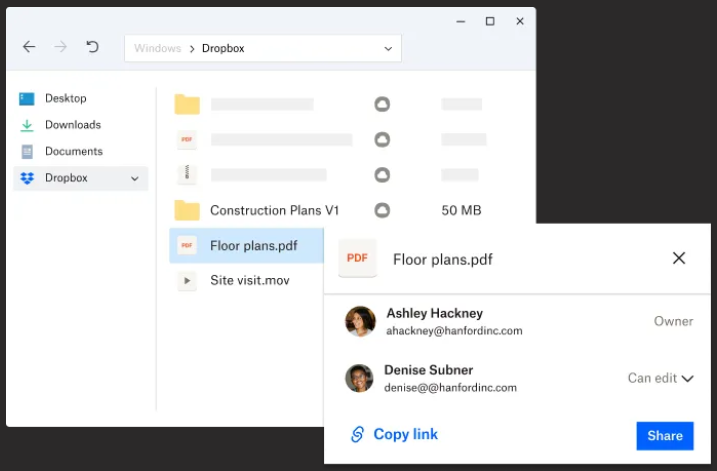
Dans Dropbox, les fichiers se synchronisent automatiquement sur votre ordinateur de bureau, votre navigateur web et vos appareils mobiles, de sorte que vos documents sont mis à jour sur tous les appareils.
L'application de bureau crée des dossiers sur votre ordinateur, tandis que les applications mobiles vous permettent de visualiser, de télécharger et de partager des fichiers en déplacement. Vous pouvez également marquer des fichiers pour un accès hors ligne.
Dropbox inclut la sauvegarde cloud, la récupération de fichiers et la restauration de fichiers supprimés, ce qui facilite la récupération de documents accidentellement supprimés ou écrasés dans la fenêtre de récupération de votre forfait.
Cependant, certains utilisateurs signalent des problèmes de connexion occasionnels, tandis que la récupération de fichiers supprimés au-delà de la période de rétention peut être frustrante.
La limite de stockage de 2 Go du forfait gratuit est également restrictive par rapport à la quantité de stockage que de nombreux utilisateurs attendent aujourd'hui.
Collaboration
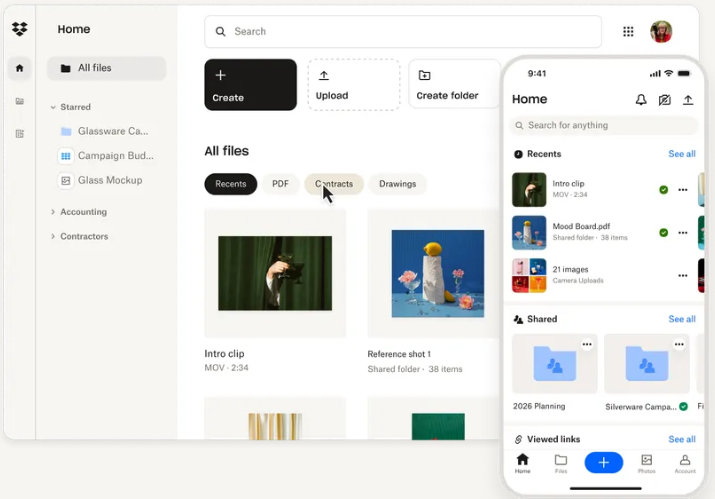
Dropbox facilite la collaboration avec des collègues et des partenaires externes.
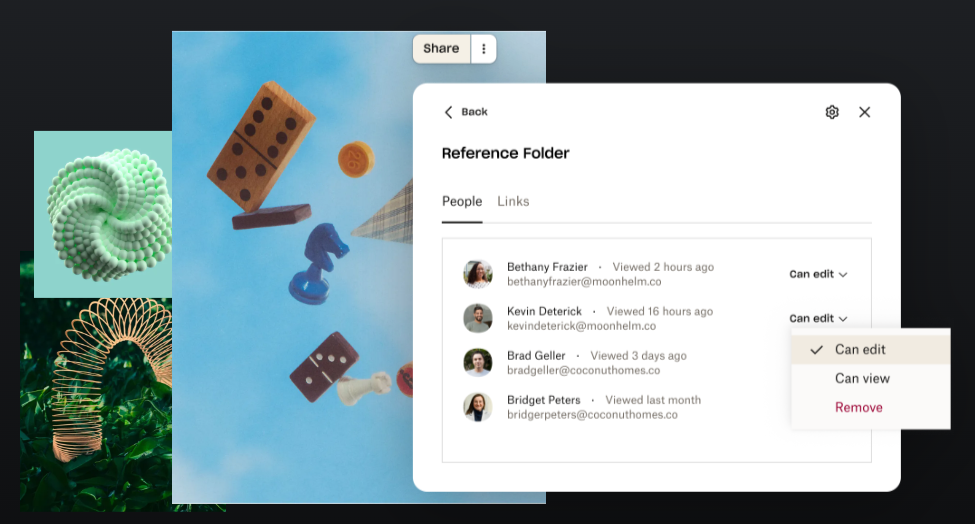
Vous pouvez partager des fichiers ou des dossiers, définir des autorisations de visualisation ou de modification, laisser des commentaires et travailler ensemble sur des documents. L'intégration avec Microsoft Office et Google Workspace permet à plusieurs utilisateurs de modifier des fichiers sans avoir à télécharger et re-télécharger constamment des documents.
Dropbox Paper offre un espace de travail collaboratif pour les notes, la planification de projets et la documentation légère, tandis que les dossiers partagés simplifient la collaboration continue entre les équipes.
Sécurité
Dropbox protège les fichiers avec le chiffrement et prend en charge des fonctionnalités de sécurité telles que l'authentification multifacteur, la gestion des appareils, les contrôles d'administrateur et les intégrations avec des outils de gestion de mots de passe.
Les forfaits Business offrent également une supervision administrative supplémentaire pour la gestion des utilisateurs et des autorisations de partage.
Il est important de comprendre, cependant, que Dropbox ne fournit pas de chiffrement de bout en bout pour les fichiers utilisateur standard.
Bien que vos données soient chiffrées lorsqu'elles sont stockées sur les serveurs de Dropbox, Dropbox gère les clés de chiffrement, ce qui signifie qu'il peut techniquement accéder au contenu chiffré dans certaines circonstances.
Donc, si vous traitez des documents très sensibles et confidentiels, cela devrait être une préoccupation.
Certains utilisateurs ont également exprimé des préoccupations concernant la fiabilité de la connexion et l'accès au compte, contribuant à des discussions plus larges sur la sécurité et la protection des données.
Intégrations
Dropbox offre un vaste écosystème d'intégration.
Il se connecte de manière transparente avec Microsoft 365, Google Workspace, Slack, Zoom, Adobe, Salesforce et des centaines d'autres applications via le Centre d'applications Dropbox.
Ces intégrations vous permettent de modifier des documents, de partager des fichiers, de lancer des réunions, de gérer des projets créatifs et de rationaliser le travail quotidien sans avoir à basculer constamment entre les plateformes.
Pour les organisations qui dépendent de plusieurs applications métier, Dropbox offre une flexibilité nettement supérieure aux solutions de stockage cloud liées à un seul écosystème.
Extensions Dropbox
Dropbox propose plusieurs produits complémentaires qui s'ajoutent à un simple outil de stockage de fichiers.
Ces outils sont conçus pour améliorer la productivité afin que vous puissiez réellement utiliser ces documents au sein de Dropbox.
Dropbox Dash (Recherche IA)
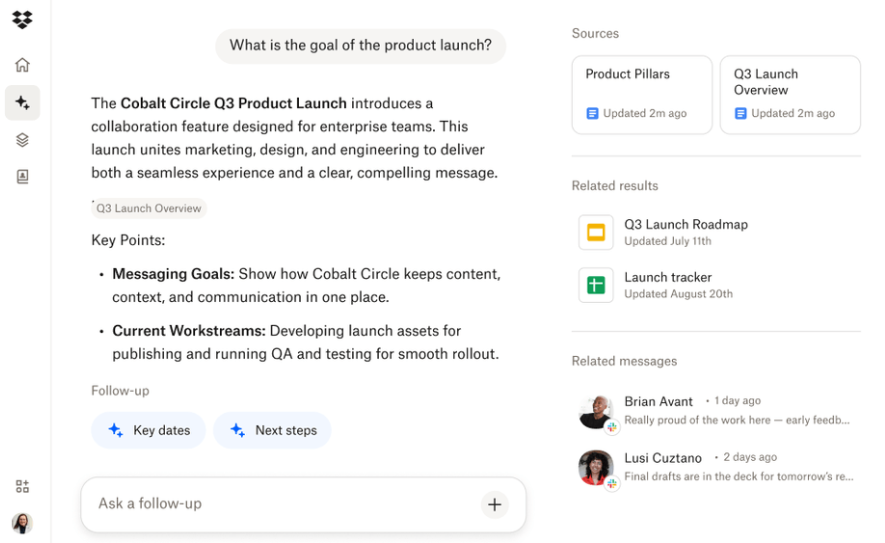
Dropbox Dash est un outil de recherche universelle basé sur l'IA qui vous aide à trouver des informations sur Dropbox et les applications métier connectées.
Vous pouvez utiliser des requêtes en langage naturel pour localiser des documents, des notes de réunion, des présentations et d'autres contenus stockés dans votre espace de travail.
Dash peut réduire considérablement le temps passé à rechercher des fichiers en regroupant les résultats dans une seule interface.
Dropbox Replay
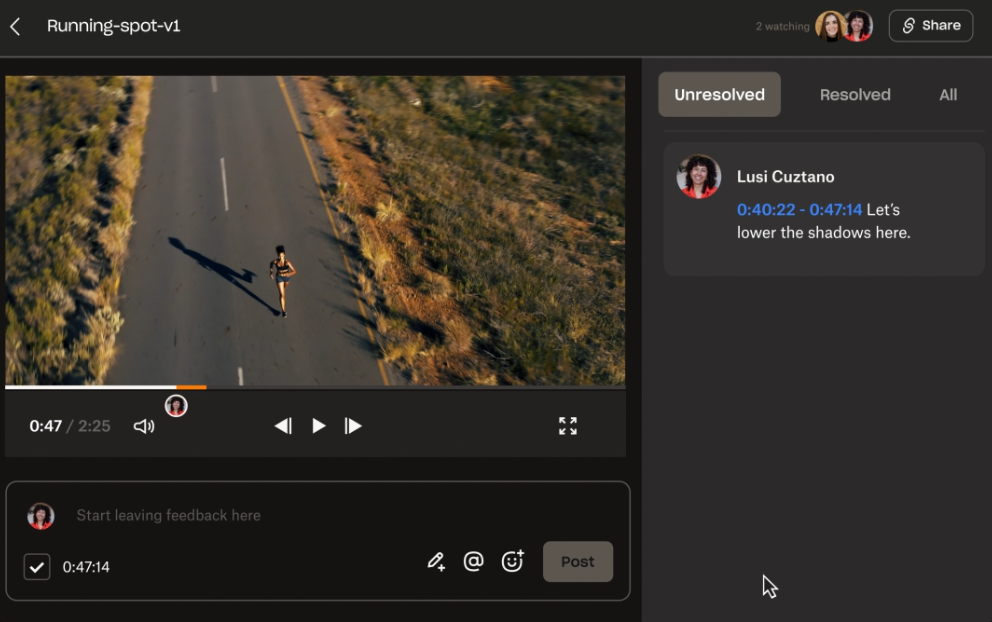
Dropbox Replay est conçu spécifiquement pour les équipes créatives qui travaillent avec des fichiers vidéo, audio et autres fichiers multimédias.
Il permet aux réviseurs de laisser des commentaires horodatés directement sur le contenu, ce qui facilite la collecte de commentaires, le suivi des révisions et l'approbation des actifs créatifs sans de longues chaînes d'e-mails.
Dropbox Sign
Dropbox Sign ajoute des capacités de signature électronique à la plateforme Dropbox, vous permettant d'envoyer des documents pour signature, de demander des signatures à plusieurs destinataires et de signer des documents vous-même sans créer de copies supplémentaires du même document.
Pour de nombreuses petites entreprises, ces fonctionnalités sont suffisantes pour gérer les contrats et formulaires quotidiens.
Scanner de documents avec OCR
Dropbox inclut plusieurs fonctionnalités qui facilitent la recherche de documents.
Le produit Document Scanner pour l'application mobile offre la technologie OCR pour rendre le texte des documents numérisés et des PDF consultable, tandis que la recherche par mots-clés vous aide à localiser rapidement les fichiers par nom ou contenu.
Tarifs de Dropbox
Dropbox propose cinq plans tarifaires différents qui varient en prix, fonctionnalités et capacité de stockage.
Les trois principaux plans tarifaires sont Plus, Standard et Advanced. Bien qu'ils incluent tous des fonctionnalités telles que l'édition de PDF et les signatures, seul le plan Advanced inclut des mesures de sécurité comme le chiffrement de bout en bout et la gestion avancée des clés.
Plus → 11,9 $ par mois avec 2 To de stockage
Standard → 14,50 $ par mois avec 3 To de stockage
Advanced → 21,50 $ par mois avec 15 To de stockage
Vous pouvez également sélectionner le plan Basic, qui est gratuit et offre 2 Go de stockage, ou contacter l'équipe Dropbox pour un devis personnalisé pour le plan Enterprise.
Avis des clients
⭐⭐⭐⭐ Évaluations
G2 4.4/5 | Capterra 4.5/5
Dropbox est une plateforme de stockage cloud populaire sur le marché, en particulier parmi les petites entreprises qui apprécient la flexibilité et la collaboration multiplateforme.
En même temps, il est important de comprendre où ses capacités s'arrêtent et où un système de gestion de documents dédié devient le meilleur choix.
Avantages
Interface claire et intuitive, facile à apprendre
Synchronisation fiable des fichiers sur les appareils de bureau, web et mobiles
Excellente compatibilité multiplateforme avec Microsoft, Google, Apple et d'autres écosystèmes
Vastes intégrations tierces via le Centre d'applications Dropbox
La recherche basée sur l'IA avec Dropbox Dash améliore la découverte de fichiers
Dropbox Replay simplifie la révision multimédia et la collaboration créative
Signatures électroniques intégrées avec Dropbox Sign
Fonctionnalités robustes de partage de fichiers et de collaboration en temps réel
Inconvénients
Plus cher que de nombreux services de stockage cloud concurrents
Le plan gratuit n'inclut que 2 Go de stockage
Les fichiers utilisateur standard ne sont pas protégés par un chiffrement de bout en bout
Non conçu pour gérer les documents tout au long de leur cycle de vie
L'automatisation des flux de travail est limitée par rapport aux plateformes SGD dédiées
Les capacités de métadonnées et d'organisation des documents sont relativement basiques
Certains utilisateurs signalent des problèmes occasionnels de connexion et de récupération de fichiers
Stockage cloud vs gestion de documents
Même si Dropbox a évolué pour devenir bien plus qu'un simple stockage de base où vous pouvez stocker des photos et des contrats que vous ne voulez pas perdre, il est important de faire une distinction claire entre les outils de stockage cloud et les systèmes de gestion de documents.
Le stockage cloud est conçu pour faciliter la sauvegarde, la synchronisation, l'accès et le partage des fichiers. Il répond à des questions comme : Où est mon fichier ? Puis-je y accéder depuis un autre appareil ? Puis-je le partager avec un collègue ?
La gestion de documents se concentre sur l'ensemble du cycle de vie d'un document.
Au-delà du stockage, un SGD aide les organisations à organiser les informations avec des métadonnées, à automatiser les flux de travail, à appliquer les politiques de rétention, à maintenir des pistes d'audit, à gérer les archives et à respecter les exigences réglementaires.
Un SGD contrôle la façon dont les documents sont créés, révisés, approuvés, conservés et archivés.
Pour les particuliers et les petites équipes, le stockage cloud est souvent suffisant. Cependant, dans une organisation ou une entreprise plus grande, la gestion des documents par le biais de dossiers et de liens partagés devient de plus en plus difficile.
Certaines des principales différences entre les deux outils incluent :
Fonctionnalité | Dropbox | SGD dédié |
|---|---|---|
Stockage cloud | ✓ | ✓ |
Synchronisation de fichiers | ✓ | ✓ |
Partage de fichiers | ✓ | ✓ |
OCR | Basique | Avancé |
Recherche IA | ✓ | ✓ |
Métadonnées | Limité | ✓ |
Automatisation des flux de travail | Limité | ✓ |
Gestion des archives | ✗ | ✓ |
Politiques de rétention | Limité | ✓ |
Pistes d'audit | Basique | Complètes |
Contrôles de conformité | Limité | ✓ |
Automatisation des processus métier | ✗ | ✓ |
En fin de compte, Dropbox vous aide à collaborer sur des fichiers.
Un système de gestion de documents vous aide à contrôler, gouverner et automatiser les documents au sein de votre organisation.
Dropbox vs Dokmee
Dropbox et Dokmee aident tous deux les entreprises à gérer le contenu numérique, mais ils sont conçus avec des objectifs différents.
Dropbox est construit autour du stockage cloud et de la collaboration.
Il facilite la synchronisation des fichiers, le partage de contenu, la collaboration avec des utilisateurs internes et externes, et l'extension des fonctionnalités via des produits comme Dash, Replay et Sign. Ces outils améliorent la productivité, mais ils fonctionnent indépendamment plutôt que dans le cadre d'un processus structuré de gestion de documents.
Dokmee, en revanche, est conçu pour gérer les documents de la capture de documents à la suppression future.
Dokmee combine la capture de documents, l'indexation intelligente, l'automatisation des flux de travail, la gestion des archives, les contrôles de conformité et les rapports d'audit dans une seule plateforme, permettant aux organisations de standardiser et d'automatiser les processus basés sur les documents.
Capacité | Dropbox | Dokmee |
|---|---|---|
Stockage cloud | ✓ | ✓ |
OCR | Basique | OCR avancé et capture de documents |
Gestion des métadonnées | Limité | Métadonnées et indexation complètes |
Indexation IA | Limité | ✓ Indexation assistée par l'IA |
Automatisation des flux de travail | Limité | ✓ |
Gestion des archives | ✗ | ✓ |
Pistes d'audit | Basique | Complètes |
Politiques de rétention | Limité | ✓ |
Formulaires électroniques | ✗ | ✓ |
Support de conformité | Limité | Outils de gouvernance et de conformité intégrés |
Déploiement | Cloud | Cloud, sur site ou hybride |
Automatisation des processus métier | ✗ | ✓ |
Dropbox est-il suffisant pour votre entreprise ?
Dropbox a parcouru un long chemin depuis ses origines en tant que simple service de synchronisation de fichiers.
Aujourd'hui, il offre une plateforme de productivité complète avec une recherche basée sur l'IA via Dropbox Dash, des signatures électroniques avec Dropbox Sign, une collaboration multimédia à l'aide de Dropbox Replay et des intégrations transparentes avec des centaines d'applications métier.
Ces ajouts le rendent bien plus performant que de nombreux fournisseurs de stockage cloud traditionnels.
Pour les particuliers, les freelances, les équipes créatives et les petites entreprises, Dropbox est plus que suffisant.
Son interface intuitive, sa synchronisation fiable des fichiers et sa compatibilité multiplateforme facilitent la collaboration avec les collègues et les clients, quels que soient les outils de productivité qu'ils utilisent.
La question clé n'est pas de savoir si Dropbox est une bonne plateforme de stockage cloud. La question est de savoir si le stockage cloud seul répond aux besoins de gestion de documents de votre organisation.
Avec un volume de documents relativement élevé, leur gestion nécessitera plus que le simple stockage et le partage de fichiers. Vous aurez besoin de mesures de sécurité de premier ordre, de flux de travail structurés, d'une organisation basée sur les métadonnées, de la gestion des archives, de politiques de rétention, de contrôles de conformité et de pistes d'audit détaillées.
Ces capacités sont intégrées aux plateformes SGD plutôt qu'ajoutées en tant qu'outils de productivité distincts.
Si vous recherchez un système de gestion de documents plus complet, Dokmee vous fournira le contrôle et la gouvernance que les plateformes de stockage cloud ne sont pas conçues pour offrir.