Why Document Deletion Matters In A DMS
Written by Christina Miranda
Document deletion is the final process of your documents’ lifecycle and requires its permanent disposal. Learn how it can affect your DMS and how to automate the process.
Document deletion is the final process of your documents’ lifecycle and requires its permanent disposal. Learn how it can affect your DMS and how to automate the process.
60% of audits fail due to wrong document management.
What many people don’t realize is that document deletion is also a vital step of the process.
Deleting documents inaccurately can lead to obsolete documents, duplicates, lack of version control, and more.
Why Should Documents Be Deleted?
Document deletion is the final step in a document’s lifecycle and an important step in document management to guarantee security and compliance.
First of all, storing all your files and documents permanently can lead to a severely cluttered document management system, higher costs, and complexity.
A cluttered document filing system slows down your teams’ operations and makes it harder to find the right information. Duplicate files, outdated versions, and irrelevant records can lead to confusion, errors, and wasted time.
Deleting specific documents regularly helps you keep an organized, efficient system where users can quickly locate current and accurate files.
A clean DMS improves productivity, reduces storage costs, and supports better decision-making.
A structured deletion policy ensures that your organization only retains documents that provide business, legal, or operational value.
Additionally, outdated or unnecessary documents are a common security liability.
Old contracts, employee records, financial statements, and customer data often contain sensitive information that can be exploited if accessed by unauthorized users.
The more data you store, the larger your attack surface becomes.
Deleting documents that are no longer needed reduces the risk of data breaches, insider misuse, and accidental exposure. This is especially important for organizations handling personally identifiable information (PII), financial data, or intellectual property.
Archiving vs. Permanent Deletion
Not all documents should be treated the same way.
In some cases, archiving is the best option. Archived documents are no longer actively used but must be retained for legal, regulatory, or historical reasons and can be retrieved when necessary.
In other situations, permanent deletion is required.
Documents that have reached the end of their retention period, contain outdated sensitive data, or no longer serve any legal or business purpose should be securely deleted.
Properly distinguishing between archiving and deletion is essential for compliance and risk management.
For example, documents you should archive include completed financial statements, closed project records, and signed contracts that must be retained for audit or regulatory purposes. While you should delete expired drafts, duplicate files, outdated employee applications, and customer data that has exceeded its retention period.
What Types of Documents Should Be Deleted Permanently?
Permanent deletion should follow a clear retention policy and applicable regulations. Common document types that often qualify for permanent deletion include:
Expired contracts and agreements Once contractual obligations have ended and legal retention periods have passed, keeping these files only increases risk.
Outdated financial records Financial documents beyond statutory retention requirements should be securely deleted to prevent misuse or confusion.
Old employee records Former employee files, resumes, and evaluations should be deleted once labor law retention periods expire.
Duplicate documents Multiple versions of the same file increase error risk. Only the final, approved version should be retained.
Customer and client data no longer required Regulations such as GDPR require organizations to delete personal data when it is no longer necessary for its original purpose.
Temporary working files Drafts, notes, and internal working documents that are no longer needed should be removed to keep systems clean.
Each deletion should be supported by documented policies to ensure consistency and compliance.
How To Delete a Document in a DMS
A DMS is designed to manage your document through their entire lifecycle, every single step of the way.
DMS platforms are designed to maintain accountability, traceability, and compliance.
This means that deletion is a step that is recorded in audit trails, where the system logs who deleted the document, when it was deleted, and what action was taken.
These audit trails keep regulatory compliance, internal governance and accountability.
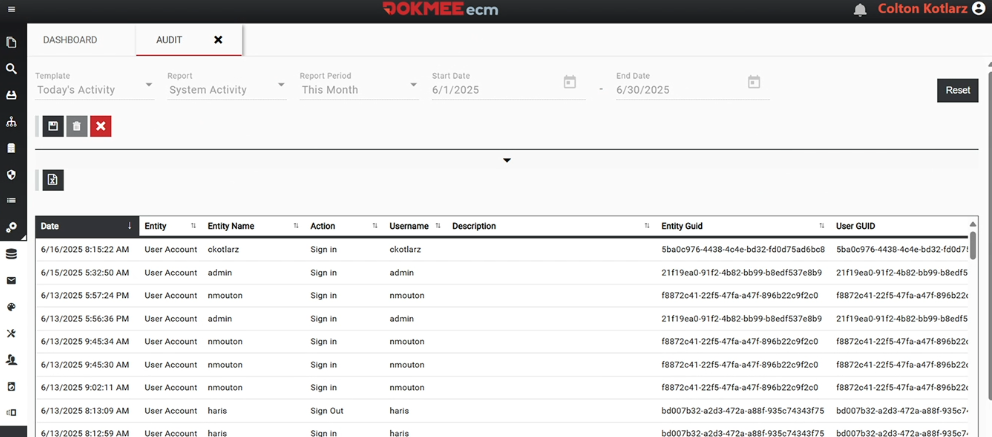
Deleting a document in a DMS might vary depending on the platform you use, however, it can typically be done in 2 different ways following simple steps.
Manual document deletion
While the exact steps may vary by system, the typical document deletion process in a DMS follows a controlled and auditable workflow:
Step 1: Locate the document
Use metadata fields, advanced search, filters, or folder structures to identify the correct document. This reduces the risk of deleting the wrong file, especially in systems with large file cabinets.
Step 2: Review document details
Before deletion, review the document’s metadata, version history, and classification. Confirm that it is the correct file and that no active workflows, approvals, or dependencies are tied to it.
Step 3: Verify user permissions
The DMS checks whether you have the required role or authorization to delete the document. Role-based access control ensures that only approved users can perform deletion actions.
Step 4: Check retention and compliance rules
Many DMS platforms automatically validate retention schedules and compliance requirements. If a document is still under a mandatory retention period, deletion may be blocked or require special approval.
Step 5: Delete your document
Select the delete option within the DMS interface.
Some systems offer soft deletion, moving the document to a recycle bin or pending deletion state rather than immediate removal.
A confirmation prompt helps prevent accidental deletions. In some organizations, an additional approval step may be required for sensitive or high-risk documents.
Once the document has been deleted, the DMS automatically logs the deletion event, capturing who deleted the document, when it was deleted, and any related notes or approvals. This audit trail supports internal audits and regulatory inspections.
Automated document deletion
This process can also be automated with advanced DMS and ECM platforms, to guarantee that you don’t delete the wrong document and to ensure that it is disposed of at the appropriate time.
Dokmee’s workflow automation allows organizations to enforce consistent, policy-driven document deletion without relying on manual intervention.
A typical automated deletion workflow includes the following steps:
Step 1: Define retention and deletion rules
Configure document retention periods based on document type, department, or regulatory requirements.
These rules determine when a document becomes eligible for deletion.
Step 2: Classify documents at ingestion
Apply metadata, document types, and retention categories when documents are uploaded or indexed. Accurate classification ensures the correct deletion rules are triggered later.
Step 3: Set workflow triggers
Create automated triggers based on conditions such as retention expiration, workflow completion, contract end dates, or status changes (e.g., “Closed” or “Expired”).
Once conditions are met and approvals are completed, the workflow automatically initiates the document deletion or moves the document to a pending deletion state.
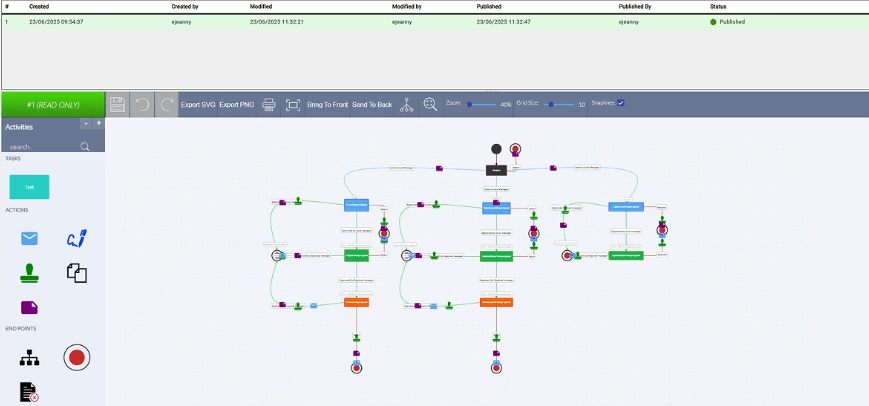
Dokmee records all workflow actions, including approvals and deletions, capturing timestamps and user details for compliance and audit readiness.
This automated approach reduces human error, ensures consistent enforcement of retention policies, and strengthens overall document governance.
Delete Documents Securely With Dokmee
Dokmee’s DMS and ECM provide a secure, compliant, and user-friendly approach to document deletion.
With built-in retention policies, permission controls, and detailed audit trails, Dokmee ensures that documents are deleted safely and in accordance with regulatory requirements.
Dokmee allows organizations to distinguish clearly between archived documents and permanently deleted files, helping reduce risk while maintaining compliance. Automated workflows and role-based access ensure that only authorized users can delete sensitive documents.
Thanks to version control, you don’t run the risk of accumulating duplicates as documents can be edited and signed in-app, simplifying deletion processes.
If you’re ready to automate deletion and turn it into a strategy for higher efficiency and security, book a demo now.