Complete Dokmee ECM Review for 2026
Written by Christina Miranda · Reviewed by  Dokmee
This Dokmee review covers its DMS and ECM features, AI-powered indexing and search, integrations, deployment options, pricing, pros, cons, and ideal users.
Choosing a DMS is much more than finding somewhere to store your files.
Once you’re dealing with large document volumes, multiple users, approvals, compliance requirements, and different business processes, you need a system that can organize information and help you manage what happens to it.
Dokmee combines document management and enterprise content management with features for document capture, indexing, search, collaboration, workflows, retention, e-signatures, and AI-powered document processing.
In this Dokmee review, we look at features, AI capabilities, integrations, deployment options, pricing, and pros and cons to help you decide if it’s the right platform for you.
What is Dokmee?
Dokmee is a DMS and ECM platform that is designed to manage all our documents in all stages from a unique interface through storage, integrations, and other collaboration features.
Rather than simply providing somewhere to put files, Dokmee connects document storage with the processes surrounding those files.
You can capture paper documents using OCR, organize them with metadata and indexing, search across your repository, collaborate on files, route documents through workflows, control access, maintain audit trails, and apply retention policies.
Dokmee takes a modular approach where you pay for what you need, so it also offers different products and deployment options, including ECM, document management, Cloud ECM, Mobile ECM, document capture, electronic forms, and AI Chat.
Other basic document management capabilities you can find in Dokmee include:
AI-powered indexing
Metadata and unlimited indexing fields
Document storage and organization
Version control
File retention
Workflow automation
E-signatures
Audit trails
Role-based permissions
Microsoft Office integration
Mobile ECM
The result is a system designed to take documents from capture through to storage, collaboration, approval, and eventual retention or deletion.
Dokmee can be used in over 50 different languages and is fully customizable. This ensures your document management system is built to your exact needs and specifications.
Who is Dokmee for?
Dokmee is designed for businesses that need more control over their documents than a basic cloud storage platform can provide.
It is particularly suited to small and mid-sized businesses that want a document management system that completely matches their needs thanks to it’s full customization capabilities.
Dokmee can also work well for document-heavy teams and industries, including legal, healthcare, financial services, education, government and professional services.
Dokmee makes more sense when you need structured document management, stronger control and automation alongside storage and sharing.
Dokmee features
Dokmee has a broad and customizable feature set that aims to manage your documents from the moment they arrive to the organization until they are eventually destroyed.
Although it does include all the features you would typically expect to find in a document management system, we will highlight some of our favorites.
Collaboration and document editing
Dokmee is designed to keep document work within the same controlled environment, reducing the need to move files between different applications.
Users can view, edit, annotate, and collaborate on Microsoft Word, Excel, and PowerPoint files within the platform.
Version control helps prevent teams from working on outdated copies, while annotations, stamps, and other editing tools support document review.
E-signatures are also built into document workflows, making it possible to sign contracts, approvals, HR documents, invoices, and other paperwork without taking the document out of its existing workflow.
Dokmee also integrates with DocuSign for remote signing, allowing signed documents to return to the document management environment as part of the same record.
Try this free e-signature generator to see how it works:
AI-powered indexing and search
Dokmee uses AI to reduce manual indexing and make large document repositories easier to search and understand.
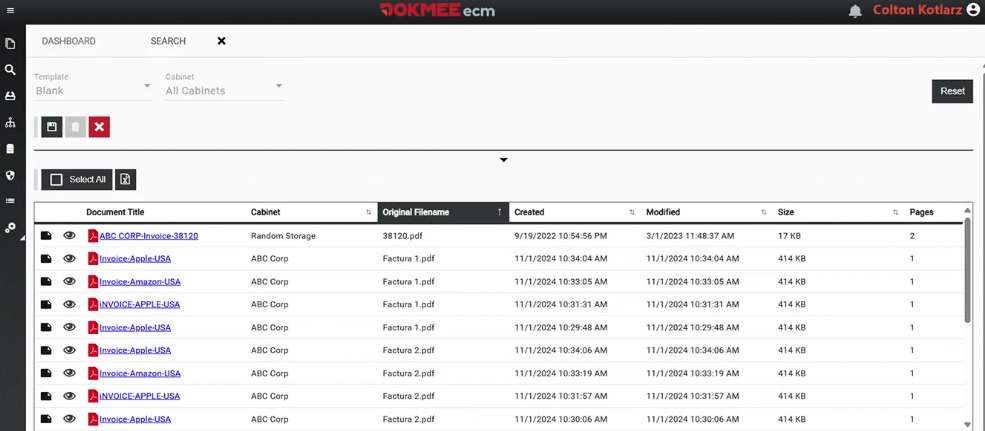
Dokmee Capture combines OCR, AI-powered indexing, and automated data extraction to process documents including PDFs, images, handwriting, and tables, while supporting unlimited indexing fields so you can structure metadata around your own requirements.
Each document is classified into its appropriate file cabinet where you can easily access it at any time.
Once documents are indexed and classified, AI Search uses semantic search and natural-language queries to find information based on meaning rather than exact keywords.
You can ask questions about your documents without knowing the file name or constructing complex searches, with answers linked back to the relevant source documents and pages.
Automated document workflows
Dokmee's workflow builder uses a no-code, drag-and-drop approach, allowing teams to build processes without relying on developers for every change.
You can create workflows for processes such as invoice approvals, document reviews, signing, notifications, and other internal approvals.
More importantly, workflows can incorporate conditional routing.
For example, an invoice could be sent to a different approver depending on its value, department, or vendor. A document that requires several approvals can move between multiple users before being completed.
You can also configure automatic notifications when an action is required and manage approvals from mobile devices.
For more complicated requirements, Dokmee's team can also help design and implement workflows.
Dokmee integrations
A document management system shouldn't force you to abandon the tools your business already uses.
Dokmee integrates with popular business tools, allowing documents and processes to move between systems.
Current integrations include:
Microsoft Office → work with Word, Excel, and PowerPoint within Dokmee.
QuickBooks → connect invoices and financial records.
Salesforce and SAP → connect documents with CRM and ERP processes.
DocuSign → send and capture electronic signatures within document workflows.
Active Directory and SSO → connect access management with existing identity systems.
Open API → connect Dokmee with other business applications and internal systems.
Dokmee is designed to work alongside your existing technology rather than replacing your entire software stack.
The Open API is particularly important if you have a more customized technology environment and need documents to move between multiple tools.
Choose the capabilities you need
Dokmee allows you to build the system that you need, whether you need simple storage or more advanced automation.
Which is why you can choose either a DMS or an ECM platform.
Dokmee takes a modular approach, allowing you to choose the core document management capabilities you need and add additional tools as your requirements grow.
This means you can use Dokmee as a DMS for centralized document storage, indexing, search, security, and retrieval, or build it into a broader ECM environment with additional products and capabilities.
Some popular additions include:
Document capture and OCR
If your organization still has paper documents or large volumes of scanned files, getting those documents into your ECM efficiently is essential.
Dokmee Capture is designed for this part of the process.
Its OCR capabilities convert scanned documents and images into searchable text, while AI-powered capture can extract information and assist with classification.
The system supports typed text, handwriting, tables, and other unstructured information.
Dokmee also supports automated indexing, barcode recognition, zone recognition, and multiple export formats.
One notable difference is its unlimited scanning model. Dokmee Capture does not use per-click scanning fees, which can make costs more predictable if you need to process large document volumes or plan your migration to a DMS.
Dokmee e-Forms
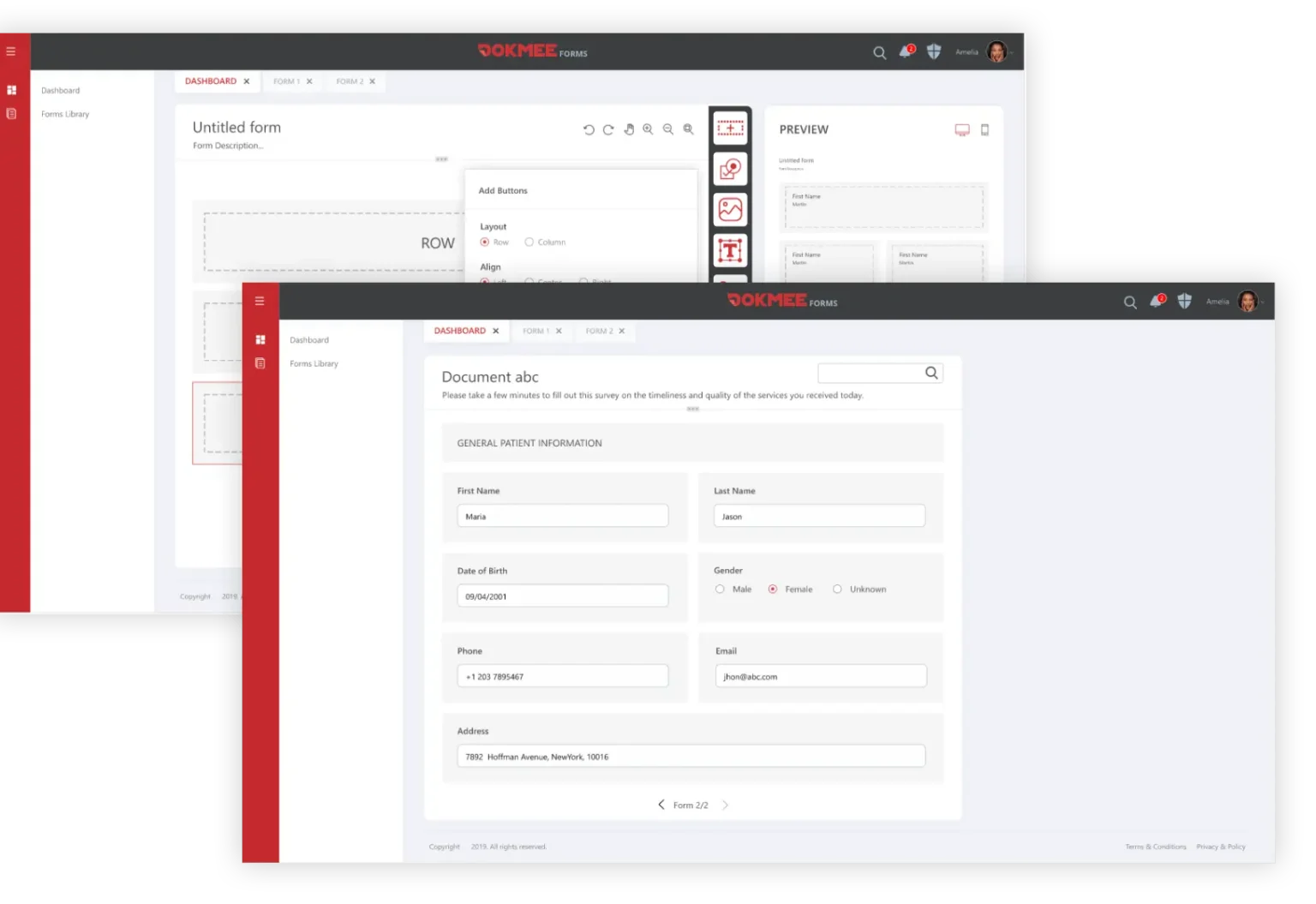
Dokmee Forms lets you replace paper and manual forms with digital forms that can feed directly into your document and workflow processes.
The drag-and-drop builder lets you create forms without coding, with support for custom fields, file uploads, e-signatures, branding, and mobile-friendly submissions.
Submitted information can then be connected to Dokmee workflows.
This makes Forms useful for processes such as HR applications, customer information, compliance documentation, surveys, and internal requests.
Dokmee AI Chat
Dokmee AI Chat adds a conversational layer to your document library, allowing you to ask questions about your documents using natural language.
You can ask questions as you would ask a colleague, without needing to know specific keywords or search operators. AI Chat understands the intent and context of a question, using semantic search to find relevant information based on meaning rather than just matching words.
It can also summarize long contracts, reports, and case files, helping you get to the relevant information without reading every page. Importantly, answers include citations to the source documents and pages they came from, so users can verify the information and access the full context when needed.
AI Chat is permission-aware, meaning it only surfaces documents that the you is authorized to access according to the pre-established roles and permissions.
It also supports more than 100 languages, allowing users to ask questions in one language and retrieve information from documents in another.
Where can you deploy Dokmee?
One of Dokmee's biggest advantages is deployment flexibility.
You can choose between:
On-premise
Cloud
Hybrid
The right option depends on your infrastructure, security requirements, IT resources, and how your employees need to access documents.
An on-premise deployment keeps the software and document infrastructure within your organisation's environment.
This can make sense if you have strict data governance requirements, existing infrastructure, or a need for greater control over how the system is configured and maintained.
Dokmee Cloud provides a managed ECM environment accessible through a browser, with document storage, search, workflows, security, and collaboration capabilities available remotely.
This can be a better fit for SMBs, distributed teams, and organisations that want to avoid maintaining their own ECM infrastructure.
You can also go for a hybrid deployment which can be useful when some information needs to remain within your organization's infrastructure while other content or processes can take advantage of cloud access.
Pricing
Dokmee offers three main pricing options, covering its standard cloud platform through to fully customised enterprise deployments.
Cloud plans are priced per user and billed annually, while Enterprise pricing is provided on request.
Plan | Price | Key features |
|---|---|---|
Dokmee Cloud | $31/user/month, billed annually | 200GB cloud storage, Office 365 integration, Dokmee Forms, unlimited cabinets, user controls, and Dokmee AI Search |
Dokmee Cloud+ | $47/user/month, billed annually | 400GB cloud storage, everything in Cloud, file retention, workflows, and AI capabilities |
Dokmee Enterprise | Contact Sales | Dedicated environment, private cloud or on-premises deployment, custom integrations, dedicated resources, controlled upgrades, and custom compliance and security policies |
User reviews, pros, and cons
Ratings ⭐⭐⭐⭐⭐
G2 4.5/5 | Capterra 4.7/5 | Software Advice 4.7/5
Dokmee offers a broad set of document management and ECM capabilities, but that does not necessarily mean every organization will need all of them. Its modular approach, deployment flexibility, automation, and growing use of AI make it adaptable to different document management requirements.
It is a useful tool particularly for storage and collaboration. Users highlight the fact that documents within Dokmee can be shared both internally and externally, which allows close collaboration with clients for feedback, notices, and contracts.
As with any ECM implementation, getting the most from features such as workflows, indexing, permissions, and integrations may also require some initial configuration.
✔️ Pros | ✖️ Cons |
|---|---|
Broad DMS and ECM capabilities | Smaller teams can find add-ons excessive |
AI-powered document management | Initial setup takes planning |
Flexible deployment | More advanced features may require configuration |
Strong workflow automation | Learning curve for broader functionality |
Integrated document collaboration | Implementation may benefit from support |
Extensive capture capabilities | Not every feature will be relevant to every organization |
Integration options | Broader ECM deployments require more governance |
Is Dokmee the best choice?
Dokmee is a strong option if you’re looking for more than basic cloud file storage.
Its value comes from bringing together the different stages of document management: capture, indexing, storage, search, collaboration, workflows, approvals, retention, and security.
Its newer AI capabilities make the platform more interesting if you’re dealing with large document repositories. AI-powered indexing can reduce manual classification work, while AI Search and document summarisation make it easier to retrieve and understand information once it is stored.
The workflow builder is another notable strength. Instead of treating automation as something that always requires a developer, Dokmee allows you and your team to build as many workflows as you need using a no-code, drag-and-drop interface.
Its integration capabilities also mean you don't necessarily need to replace the rest of your technology stack. Microsoft Office, QuickBooks, Salesforce, SAP, DocuSign, Active Directory, SSO, and API connectivity can help Dokmee fit into existing business processes.
Cloud, on-premise, hybrid, and mobile options add further flexibility.
That doesn't mean Dokmee will be the right fit for every business.
If you need simple file storage with no governance or configuration, Dokmee might be overkill.
For organizations that need a serious document management system with automation, security, flexible deployment, and increasingly intelligent search and document processing, however, Dokmee is worth considering.
To get an exact estimate of Dokmee’s profitability, test Dokmee’s free ECM ROI calculator.
ECM ROI Calculator ... ... document, to match another tool already on the site that's built that way. That broke button interactivity on the live page. If the CMS inlines Custom HTML directly into the page's DOM (rather than loading it into its own iframe), a stray partway through the page can push the browser's parser into an "after body" state for everything that follows in the source, which can silently break other scripts on the page. A plain fragment, like this one, is safe either way. BRAND COLORS: confirmed against the "Paper-to-Digital Volume Estimator" tool already live on the site (#c41230 / #a00f28). Swap the --dr-red values below if your design system has since moved on from these. ASSUMPTIONS USED IN THE MATH (documented so they're easy to defend/tune): - Time savings: 60% reduction applied to the fully-loaded cost of the hours/week staff currently spend searching, filing, and retrieving documents (hours converted to a share of annual salary via a 2,080 hour work year). - Paper & printing reduction: 70% applied to reported monthly paper/ toner/filing spend. - Storage consolidation: 40% applied to reported monthly physical + digital storage spend. These three percentages are the same ones already named in the original "Annual Savings Breakdown" copy, they're illustrative planning estimates, not guarantees, and the widget says so under the results. --> #dokmeeRoiWidget { --dr-red: #C41230; --dr-red-dark: #A00F28; --dr-red-tint: #FDEAEC; --dr-ink: #1A1A1A; --dr-gray: #5B6270; --dr-gray-light: #8A909B; --dr-border: #E7E5E4; --dr-bg-soft: #F7F7F5; --dr-radius: 16px; all: initial; display: block; font-family: -apple-system, BlinkMacSystemFont, "Segoe UI", Roboto, Helvetica, Arial, sans-serif; color: var(--dr-ink); box-sizing: border-box; max-width: 880px; margin: 32px auto; } #dokmeeRoiWidget *, #dokmeeRoiWidget *::before, #dokmeeRoiWidget *::after { box-sizing: border-box; font-family: inherit; } #dokmeeRoiWidget .dr-card { background: #FFFFFF; border: 1px solid var(--dr-border); border-radius: 20px; padding: 36px; box-shadow: 0 1px 2px rgba(20,20,20,0.04), 0 8px 24px rgba(20,20,20,0.06); } #dokmeeRoiWidget .dr-eyebrow { display: inline-flex; align-items: center; gap: 6px; background: var(--dr-red-tint); color: var(--dr-red-dark); font-size: 12px; font-weight: 700; letter-spacing: 0.04em; text-transform: uppercase; padding: 5px 12px; border-radius: 999px; margin: 0 0 14px 0; } #dokmeeRoiWidget h2 { font-size: 26px; line-height: 1.2; font-weight: 800; margin: 0 0 6px 0; letter-spacing: -0.01em; } #dokmeeRoiWidget .dr-sub { font-size: 15px; color: var(--dr-gray); margin: 0 0 28px 0; line-height: 1.5; max-width: 60ch; } #dokmeeRoiWidget fieldset { border: none; margin: 0 0 24px 0; padding: 0; } #dokmeeRoiWidget legend { font-size: 13px; font-weight: 700; text-transform: uppercase; letter-spacing: 0.04em; color: var(--dr-red-dark); padding: 0 0 12px 0; width: 100%; border-bottom: 1px solid var(--dr-border); margin-bottom: 16px; } #dokmeeRoiWidget .dr-grid { display: flex; flex-wrap: wrap; gap: 16px 20px; } #dokmeeRoiWidget .dr-field { flex: 1 1 calc(50% - 10px); min-width: 220px; } #dokmeeRoiWidget .dr-field label { display: block; font-size: 13px; font-weight: 600; color: var(--dr-ink); margin-bottom: 6px; } #dokmeeRoiWidget .dr-field .dr-hint { display: block; font-size: 12px; font-weight: 400; color: var(--dr-gray-light); margin-top: 4px; } #dokmeeRoiWidget input[type="number"], #dokmeeRoiWidget select { width: 100%; font-size: 15px; padding: 10px 12px; border: 1px solid var(--dr-border); border-radius: 10px; background: #FFFFFF; color: var(--dr-ink); } #dokmeeRoiWidget input[type="number"] { appearance: none; -webkit-appearance: none; -moz-appearance: textfield; } #dokmeeRoiWidget input[type="number"]::-webkit-inner-spin-button, #dokmeeRoiWidget input[type="number"]::-webkit-outer-spin-button { -webkit-appearance: none; margin: 0; } #dokmeeRoiWidget select { padding-right: 12px; } #dokmeeRoiWidget input[type="number"]:focus-visible, #dokmeeRoiWidget select:focus-visible, #dokmeeRoiWidget button:focus-visible, #dokmeeRoiWidget a.dr-cta:focus-visible { outline: 2px solid var(--dr-red); outline-offset: 2px; } #dokmeeRoiWidget .dr-actions { display: flex; align-items: center; gap: 16px; flex-wrap: wrap; margin-top: 4px; } #dokmeeRoiWidget button.dr-primary { background: linear-gradient(135deg, var(--dr-red) 0%, var(--dr-red-dark) 100%); color: #FFFFFF; border: none; font-size: 15px; font-weight: 700; padding: 13px 26px; border-radius: 999px; cursor: pointer; transition: transform 0.15s ease, box-shadow 0.15s ease; } #dokmeeRoiWidget button.dr-primary:hover { transform: translateY(-1px); box-shadow: 0 4px 12px rgba(196,18,48,0.3); } #dokmeeRoiWidget button.dr-primary:active { transform: translateY(0) scale(0.98); } #dokmeeRoiWidget button.dr-ghost { background: none; border: none; color: var(--dr-gray); font-size: 14px; font-weight: 600; text-decoration: underline; cursor: pointer; padding: 4px; } #dokmeeRoiWidget .dr-error { font-size: 13px; color: var(--dr-red-dark); margin-top: 10px; display: none; } #dokmeeRoiWidget .dr-error.dr-show { display: block; } #dokmeeRoiWidget .dr-results { margin-top: 32px; padding-top: 28px; border-top: 1px solid var(--dr-border); opacity: 0; max-height: 0; overflow: hidden; transition: opacity 0.35s ease, max-height 0.45s ease; } #dokmeeRoiWidget .dr-results.dr-visible { opacity: 1; max-height: 2000px; } @media (prefers-reduced-motion: reduce) { #dokmeeRoiWidget .dr-results { transition: none; } } #dokmeeRoiWidget .dr-results h3 { font-size: 18px; font-weight: 800; margin: 0 0 16px 0; } #dokmeeRoiWidget .dr-stat-grid { display: flex; flex-wrap: wrap; gap: 12px; margin-bottom: 28px; } #dokmeeRoiWidget .dr-stat { flex: 1 1 calc(25% - 9px); min-width: 140px; background: var(--dr-red-tint); border-radius: 14px; padding: 16px 14px; } #dokmeeRoiWidget .dr-stat.dr-stat-net { background: var(--dr-red); color: #FFFFFF; } #dokmeeRoiWidget .dr-stat-label { font-size: 11px; font-weight: 700; text-transform: uppercase; letter-spacing: 0.03em; color: var(--dr-red-dark); margin: 0 0 6px 0; } #dokmeeRoiWidget .dr-stat.dr-stat-net .dr-stat-label { color: rgba(255,255,255,0.85); } #dokmeeRoiWidget .dr-stat-value { font-size: 20px; font-weight: 800; font-variant-numeric: tabular-nums; letter-spacing: -0.01em; } #dokmeeRoiWidget .dr-breakdown-row { display: flex; align-items: center; gap: 14px; margin-bottom: 12px; font-size: 14px; } #dokmeeRoiWidget .dr-breakdown-label { flex: 0 0 170px; color: var(--dr-ink); font-weight: 600; } #dokmeeRoiWidget .dr-breakdown-label .dr-pct { color: var(--dr-gray-light); font-weight: 400; } #dokmeeRoiWidget .dr-bar-track { flex: 1 1 auto; background: var(--dr-bg-soft); border-radius: 999px; height: 10px; overflow: hidden; } #dokmeeRoiWidget .dr-bar-fill { height: 100%; background: var(--dr-red); border-radius: 999px; width: 0%; transition: width 0.6s ease; } @media (prefers-reduced-motion: reduce) { #dokmeeRoiWidget .dr-bar-fill { transition: none; } } #dokmeeRoiWidget .dr-breakdown-value { flex: 0 0 110px; text-align: right; font-weight: 700; font-variant-numeric: tabular-nums; } #dokmeeRoiWidget .dr-total-row { display: flex; justify-content: space-between; align-items: center; margin-top: 16px; padding-top: 16px; border-top: 1px solid var(--dr-border); font-size: 15px; font-weight: 800; } #dokmeeRoiWidget .dr-disclaimer { font-size: 12px; color: var(--dr-gray-light); line-height: 1.5; margin: 20px 0 0 0; } #dokmeeRoiWidget .dr-cta-row { margin-top: 24px; display: flex; align-items: center; justify-content: space-between; flex-wrap: wrap; gap: 16px; background: var(--dr-bg-soft); border-radius: 14px; padding: 18px 20px; } #dokmeeRoiWidget .dr-cta-copy { font-size: 14px; color: var(--dr-ink); font-weight: 600; } #dokmeeRoiWidget a.dr-cta { display: inline-block; background: linear-gradient(135deg, var(--dr-red) 0%, var(--dr-red-dark) 100%); color: #FFFFFF !important; text-decoration: none !important; font-size: 14px; font-weight: 700; padding: 11px 20px; border-radius: 999px; white-space: nowrap; transition: transform 0.15s ease, box-shadow 0.15s ease; } #dokmeeRoiWidget a.dr-cta:hover { transform: translateY(-1px); box-shadow: 0 4px 12px rgba(196,18,48,0.3); } @media (max-width: 640px) { #dokmeeRoiWidget .dr-card { padding: 24px 18px; } #dokmeeRoiWidget .dr-field { flex: 1 1 100%; } #dokmeeRoiWidget .dr-stat { flex: 1 1 calc(50% - 6px); } #dokmeeRoiWidget .dr-breakdown-row { flex-wrap: wrap; gap: 6px; } #dokmeeRoiWidget .dr-breakdown-label { flex: 1 1 100%; } #dokmeeRoiWidget .dr-bar-track { flex: 1 1 auto; } #dokmeeRoiWidget .dr-breakdown-value { flex: 0 0 auto; text-align: left; } #dokmeeRoiWidget .dr-cta-row { flex-direction: column; align-items: flex-start; } } ECM ROI Calculator Calculate Your Return on Investment Estimate what a document management system could save your organization over three years, based on your team size, current document overhead, and expected implementation cost. Company Profile Number of Users Industry General Business Legal Healthcare Finance/Accounting Government Manufacturing Current Costs Avg. Salary ($/year) Hours/Week on Docs Paper Cost ($/month) Paper, toner, filing Storage Cost ($/month) Physical + digital ECM Investment Est. Annual License ($) Contact Dokmee for a quote Implementation ($) One-time setup cost Calculate My ROI Try example numbers Enter at least your number of users and average salary to calculate ROI. Your 3-Year ROI 3-Year Savings $0 3-Year Cost $0 Net Benefit $0 Monthly Return $0 Annual Savings Breakdown Time savings (60% efficiency gain) $0 Paper & printing reduction (70% reduction) $0 Storage consolidation (40% reduction) $0 Total Annual Savings $0 Estimates only, based on the efficiency and reduction rates shown above applied to the figures you entered. Actual results vary by organization, document volume, and how the rollout is run. Get a personalized ROI analysis from Dokmee Request Custom Quote → (function () { var root = document.getElementById('dokmeeRoiWidget'); if (!root) return; var $ = function (id) { return root.querySelector('#' + id); }; var results = $('drResults'); var errorEl = $('drError'); var resizeFrame = function () { if (window.frameElement) { window.frameElement.style.height = document.documentElement.scrollHeight + 'px'; } }; var fmtUSD = function (n) { var sign = n " style="width:100%;border:none;display:block;overflow:hidden;" height="980" scrolling="no" >
If you want to evaluate the platform for your own organization, you can request a Dokmee demo.