What Is AI Document Indexing and How Does It Work?
Written by Christina Miranda
Stop wasting hours searching for files. AI document indexing automates organization and makes information instantly accessible.
Poor data quality costs organizations an average of $12.9 million every year.
For most organizations, critical business information is fragmented across disconnected file servers and inboxes. This forces employees to spend up to a full workday per week manually searching for documents.
AI document indexing solves these problems.
What is AI document indexing?
AI document indexing uses artificial intelligence to automatically analyze, categorize, and tag information within your documents.
Instead of relying on adding metadata fields manually to your documents, AI can extract relevant information from documents and use it to organize files for faster retrieval.
AI-powered indexing goes beyond traditional keyword-based indexing as it combines OCR and AI technologies.
OCR converts text from scanned documents and images into machine-readable data, while AI can analyze the content and context of that information to help classify and index documents more efficiently.
Traditional manual indexing, by comparison, requires someone to review each document and assign the relevant tags or metadata. This can be time-consuming and introduces the risk of human error.
One analysis estimates that, without verification processes, manual data entry can result in an error rate of around 1–4%.
At scale, even a relatively small error rate can have a significant impact.
For example, processing 10,000 documents with a 1–4% error rate could result in 100 to 400 indexing errors. Incorrect or missing information can make documents harder to retrieve, create additional administrative work, and potentially affect compliance and decision-making.
AI-powered indexing helps reduce the amount of manual data entry involved and provides a more consistent way to organize large document collections.
Plus, manual indexing has ben proven to be the most expensive part of a migration to a DMS platform.
Capability | Traditional manual indexing | AI document indexing |
|---|---|---|
Process | An employee reviews each document and manually assigns tags or metadata. | AI analyzes document content and can automatically extract and assign relevant information. |
Speed | Time-consuming, particularly when processing large document volumes. | Can process large volumes of documents much faster than manual indexing. |
Accuracy | Susceptible to typos, inconsistent tagging, and other human errors. | Reduces manual entry and helps apply indexing rules more consistently. |
Searchability | Search typically depends on the metadata and keywords entered by users. | AI can use extracted information and semantic understanding to make documents easier to locate. |
Scalability | Requires additional staff time as document volumes increase. | Can handle growing document volumes without increasing manual indexing work at the same rate. |
How does AI document indexing work?
AI document indexing combines document capture, OCR, data extraction, classification, and metadata generation to turn unstructured files into searchable, organized information.
A modern ECM platform such as Dokmee can automate much of this process by following this basic workflow:
Step 1. Ingest documents
The process begins when a document enters the system, it can be received via email, shared folder, scanner, or direct uploads.
Instead of downloading each attachment and manually adding it to the document repository, the system can bring your files into the indexing workflow automatically.
2. Capture documents and extract data with OCR
Once a document has been ingested, the system needs to parse the information it contains to identify metadata.
This can be straightforward for a digital PDF that contains selectable text, but scanned documents and images require optical character recognition.
OCR converts text within images into machine-readable text.
This allows the system to work with scanned invoices, forms, contracts, photographs of documents, and other image-based files rather than treating them simply as pictures.
Dokmee Capture combines OCR with AI-powered indexing and automated data extraction. It can process PDFs, images, handwriting, and tables, helping turn information that would otherwise be difficult to search or classify into structured, usable data.
3. Extract relevant information
After the document has been converted into machine-readable content, AI can identify relevant information for each index field.
Rather than treating every word in a document equally, the system can identify specific fields and pieces of information that are relevant to the organization's filing requirements.
Depending on the document type, this could include information such as an invoice number, customer name, supplier, contract date, document type, or reference number.
This is where AI can significantly reduce manual indexing work.
4. Classify the document
The extracted information can then be used to determine what type of document the system is dealing with.
For example, AI might recognize that a file contains the characteristics of a contract rather than an invoice or HR document. It can then apply the appropriate document classification and indexing rules.
Classification is important because it gives the system context about how the document should be handled.
Different document types will require different metadata, workflows, permissions, retention rules, or storage locations.
5. Generate metadata and index the document
Once the document has been analyzed and classified, the relevant information can be added as metadata.
Metadata is the information used to describe and identify a document. This could include fields such as document type, customer, supplier, department, date, contract number, or status.
For example, a contract could be classified as a Contract, with metadata identifying the client name, effective date, and contract status. The document can then be indexed according to the organisation's filing structure and made available for search and retrieval.
The final result is a document library where files are indexed according to their content and metadata rather than simply being stored by filename.
Dokmee also uses AI-powered search to help users retrieve information based on the meaning and context of their queries. This means you don't necessarily need to remember the exact filename or keyword used in a document to locate relevant information.
The benefits of AI document indexing
AI document indexing can do more than speed up the filing process.
By automatically extracting information, applying metadata, and making documents easier to retrieve, it can reduce repetitive administrative work while giving teams better access to the information they need.
Other benefits include:
Reduce manual errors
Manual indexing relies on employees or external service providers to read documents, identify relevant information, and enter metadata correctly.
Every additional manual step creates an opportunity for typos, inconsistent naming, missing information, or incorrect classification.
AI-powered indexing reduces the amount of manual data entry required by extracting information from documents and applying predefined indexing rules.
The benefit becomes more apparent as document volumes increase. Processing thousands of documents manually means thousands of individual opportunities for information to be entered incorrectly.
Make documents easier to find
The value of indexing isn't just getting documents into the right place. It's making sure you can find the right information exactly when you need it.
Traditional searches often depend on remembering a document's filename, location, or exact keywords. AI-powered search can add another layer by interpreting the meaning and context of a query.
For example, instead of searching for a specific contract number, you could search for information relating to contracts approaching their renewal date.
Scale document management
New documents come in daily in any organizations, if these are being indexed manually, it means that someone will have to go through documents every single day.
Now, if you have sporadic documents coming in, this could be manageable, but it is not a scalable solution.
AI-powered indexing provides a way to automate repetitive processing as those volumes increase.
This doesn't mean AI replaces human oversight. Some documents or extracted information may still require review, particularly where accuracy is critical.
The advantage is that your team can spend its time checking exceptions and handling more complex cases rather than manually processing every document.
Reduce cost of migration to a DMS
If your organisation already has large document backlog, those documents may need to be scanned, digitized, cleaned, classified, and indexed before they can be managed effectively in the new system.
There may also be costs associated with metadata mapping, system configuration, data migration, and implementation support.
AI reduces some of the manual work involved in this process. OCR can convert scanned documents into searchable text, while AI-powered extraction and classification can help identify information and apply the appropriate metadata.
Additionally, service providers typically include only a couple index fields, with automation, you can add as many index fields as you need with no extra cost at all.
Calculate the ROI of using an ECM for free with Dokmee’s calculator:
ECM ROI Calculator ... ... document, to match another tool already on the site that's built that way. That broke button interactivity on the live page. If the CMS inlines Custom HTML directly into the page's DOM (rather than loading it into its own iframe), a stray partway through the page can push the browser's parser into an "after body" state for everything that follows in the source, which can silently break other scripts on the page. A plain fragment, like this one, is safe either way. BRAND COLORS: confirmed against the "Paper-to-Digital Volume Estimator" tool already live on the site (#c41230 / #a00f28). Swap the --dr-red values below if your design system has since moved on from these. ASSUMPTIONS USED IN THE MATH (documented so they're easy to defend/tune): - Time savings: 60% reduction applied to the fully-loaded cost of the hours/week staff currently spend searching, filing, and retrieving documents (hours converted to a share of annual salary via a 2,080 hour work year). - Paper & printing reduction: 70% applied to reported monthly paper/ toner/filing spend. - Storage consolidation: 40% applied to reported monthly physical + digital storage spend. These three percentages are the same ones already named in the original "Annual Savings Breakdown" copy, they're illustrative planning estimates, not guarantees, and the widget says so under the results. --> #dokmeeRoiWidget { --dr-red: #C41230; --dr-red-dark: #A00F28; --dr-red-tint: #FDEAEC; --dr-ink: #1A1A1A; --dr-gray: #5B6270; --dr-gray-light: #8A909B; --dr-border: #E7E5E4; --dr-bg-soft: #F7F7F5; --dr-radius: 16px; all: initial; display: block; font-family: -apple-system, BlinkMacSystemFont, "Segoe UI", Roboto, Helvetica, Arial, sans-serif; color: var(--dr-ink); box-sizing: border-box; max-width: 880px; margin: 32px auto; } #dokmeeRoiWidget *, #dokmeeRoiWidget *::before, #dokmeeRoiWidget *::after { box-sizing: border-box; font-family: inherit; } #dokmeeRoiWidget .dr-card { background: #FFFFFF; border: 1px solid var(--dr-border); border-radius: 20px; padding: 36px; box-shadow: 0 1px 2px rgba(20,20,20,0.04), 0 8px 24px rgba(20,20,20,0.06); } #dokmeeRoiWidget .dr-eyebrow { display: inline-flex; align-items: center; gap: 6px; background: var(--dr-red-tint); color: var(--dr-red-dark); font-size: 12px; font-weight: 700; letter-spacing: 0.04em; text-transform: uppercase; padding: 5px 12px; border-radius: 999px; margin: 0 0 14px 0; } #dokmeeRoiWidget h2 { font-size: 26px; line-height: 1.2; font-weight: 800; margin: 0 0 6px 0; letter-spacing: -0.01em; } #dokmeeRoiWidget .dr-sub { font-size: 15px; color: var(--dr-gray); margin: 0 0 28px 0; line-height: 1.5; max-width: 60ch; } #dokmeeRoiWidget fieldset { border: none; margin: 0 0 24px 0; padding: 0; } #dokmeeRoiWidget legend { font-size: 13px; font-weight: 700; text-transform: uppercase; letter-spacing: 0.04em; color: var(--dr-red-dark); padding: 0 0 12px 0; width: 100%; border-bottom: 1px solid var(--dr-border); margin-bottom: 16px; } #dokmeeRoiWidget .dr-grid { display: flex; flex-wrap: wrap; gap: 16px 20px; } #dokmeeRoiWidget .dr-field { flex: 1 1 calc(50% - 10px); min-width: 220px; } #dokmeeRoiWidget .dr-field label { display: block; font-size: 13px; font-weight: 600; color: var(--dr-ink); margin-bottom: 6px; } #dokmeeRoiWidget .dr-field .dr-hint { display: block; font-size: 12px; font-weight: 400; color: var(--dr-gray-light); margin-top: 4px; } #dokmeeRoiWidget input[type="number"], #dokmeeRoiWidget select { width: 100%; font-size: 15px; padding: 10px 12px; border: 1px solid var(--dr-border); border-radius: 10px; background: #FFFFFF; color: var(--dr-ink); } #dokmeeRoiWidget input[type="number"] { appearance: none; -webkit-appearance: none; -moz-appearance: textfield; } #dokmeeRoiWidget input[type="number"]::-webkit-inner-spin-button, #dokmeeRoiWidget input[type="number"]::-webkit-outer-spin-button { -webkit-appearance: none; margin: 0; } #dokmeeRoiWidget select { padding-right: 12px; } #dokmeeRoiWidget input[type="number"]:focus-visible, #dokmeeRoiWidget select:focus-visible, #dokmeeRoiWidget button:focus-visible, #dokmeeRoiWidget a.dr-cta:focus-visible { outline: 2px solid var(--dr-red); outline-offset: 2px; } #dokmeeRoiWidget .dr-actions { display: flex; align-items: center; gap: 16px; flex-wrap: wrap; margin-top: 4px; } #dokmeeRoiWidget button.dr-primary { background: linear-gradient(135deg, var(--dr-red) 0%, var(--dr-red-dark) 100%); color: #FFFFFF; border: none; font-size: 15px; font-weight: 700; padding: 13px 26px; border-radius: 999px; cursor: pointer; transition: transform 0.15s ease, box-shadow 0.15s ease; } #dokmeeRoiWidget button.dr-primary:hover { transform: translateY(-1px); box-shadow: 0 4px 12px rgba(196,18,48,0.3); } #dokmeeRoiWidget button.dr-primary:active { transform: translateY(0) scale(0.98); } #dokmeeRoiWidget button.dr-ghost { background: none; border: none; color: var(--dr-gray); font-size: 14px; font-weight: 600; text-decoration: underline; cursor: pointer; padding: 4px; } #dokmeeRoiWidget .dr-error { font-size: 13px; color: var(--dr-red-dark); margin-top: 10px; display: none; } #dokmeeRoiWidget .dr-error.dr-show { display: block; } #dokmeeRoiWidget .dr-results { margin-top: 32px; padding-top: 28px; border-top: 1px solid var(--dr-border); opacity: 0; max-height: 0; overflow: hidden; transition: opacity 0.35s ease, max-height 0.45s ease; } #dokmeeRoiWidget .dr-results.dr-visible { opacity: 1; max-height: 2000px; } @media (prefers-reduced-motion: reduce) { #dokmeeRoiWidget .dr-results { transition: none; } } #dokmeeRoiWidget .dr-results h3 { font-size: 18px; font-weight: 800; margin: 0 0 16px 0; } #dokmeeRoiWidget .dr-stat-grid { display: flex; flex-wrap: wrap; gap: 12px; margin-bottom: 28px; } #dokmeeRoiWidget .dr-stat { flex: 1 1 calc(25% - 9px); min-width: 140px; background: var(--dr-red-tint); border-radius: 14px; padding: 16px 14px; } #dokmeeRoiWidget .dr-stat.dr-stat-net { background: var(--dr-red); color: #FFFFFF; } #dokmeeRoiWidget .dr-stat-label { font-size: 11px; font-weight: 700; text-transform: uppercase; letter-spacing: 0.03em; color: var(--dr-red-dark); margin: 0 0 6px 0; } #dokmeeRoiWidget .dr-stat.dr-stat-net .dr-stat-label { color: rgba(255,255,255,0.85); } #dokmeeRoiWidget .dr-stat-value { font-size: 20px; font-weight: 800; font-variant-numeric: tabular-nums; letter-spacing: -0.01em; } #dokmeeRoiWidget .dr-breakdown-row { display: flex; align-items: center; gap: 14px; margin-bottom: 12px; font-size: 14px; } #dokmeeRoiWidget .dr-breakdown-label { flex: 0 0 170px; color: var(--dr-ink); font-weight: 600; } #dokmeeRoiWidget .dr-breakdown-label .dr-pct { color: var(--dr-gray-light); font-weight: 400; } #dokmeeRoiWidget .dr-bar-track { flex: 1 1 auto; background: var(--dr-bg-soft); border-radius: 999px; height: 10px; overflow: hidden; } #dokmeeRoiWidget .dr-bar-fill { height: 100%; background: var(--dr-red); border-radius: 999px; width: 0%; transition: width 0.6s ease; } @media (prefers-reduced-motion: reduce) { #dokmeeRoiWidget .dr-bar-fill { transition: none; } } #dokmeeRoiWidget .dr-breakdown-value { flex: 0 0 110px; text-align: right; font-weight: 700; font-variant-numeric: tabular-nums; } #dokmeeRoiWidget .dr-total-row { display: flex; justify-content: space-between; align-items: center; margin-top: 16px; padding-top: 16px; border-top: 1px solid var(--dr-border); font-size: 15px; font-weight: 800; } #dokmeeRoiWidget .dr-disclaimer { font-size: 12px; color: var(--dr-gray-light); line-height: 1.5; margin: 20px 0 0 0; } #dokmeeRoiWidget .dr-cta-row { margin-top: 24px; display: flex; align-items: center; justify-content: space-between; flex-wrap: wrap; gap: 16px; background: var(--dr-bg-soft); border-radius: 14px; padding: 18px 20px; } #dokmeeRoiWidget .dr-cta-copy { font-size: 14px; color: var(--dr-ink); font-weight: 600; } #dokmeeRoiWidget a.dr-cta { display: inline-block; background: linear-gradient(135deg, var(--dr-red) 0%, var(--dr-red-dark) 100%); color: #FFFFFF !important; text-decoration: none !important; font-size: 14px; font-weight: 700; padding: 11px 20px; border-radius: 999px; white-space: nowrap; transition: transform 0.15s ease, box-shadow 0.15s ease; } #dokmeeRoiWidget a.dr-cta:hover { transform: translateY(-1px); box-shadow: 0 4px 12px rgba(196,18,48,0.3); } @media (max-width: 640px) { #dokmeeRoiWidget .dr-card { padding: 24px 18px; } #dokmeeRoiWidget .dr-field { flex: 1 1 100%; } #dokmeeRoiWidget .dr-stat { flex: 1 1 calc(50% - 6px); } #dokmeeRoiWidget .dr-breakdown-row { flex-wrap: wrap; gap: 6px; } #dokmeeRoiWidget .dr-breakdown-label { flex: 1 1 100%; } #dokmeeRoiWidget .dr-bar-track { flex: 1 1 auto; } #dokmeeRoiWidget .dr-breakdown-value { flex: 0 0 auto; text-align: left; } #dokmeeRoiWidget .dr-cta-row { flex-direction: column; align-items: flex-start; } } ECM ROI Calculator Calculate Your Return on Investment Estimate what a document management system could save your organization over three years, based on your team size, current document overhead, and expected implementation cost. Company Profile Number of Users Industry General Business Legal Healthcare Finance/Accounting Government Manufacturing Current Costs Avg. Salary ($/year) Hours/Week on Docs Paper Cost ($/month) Paper, toner, filing Storage Cost ($/month) Physical + digital ECM Investment Est. Annual License ($) Contact Dokmee for a quote Implementation ($) One-time setup cost Calculate My ROI Try example numbers Enter at least your number of users and average salary to calculate ROI. Your 3-Year ROI 3-Year Savings $0 3-Year Cost $0 Net Benefit $0 Monthly Return $0 Annual Savings Breakdown Time savings (60% efficiency gain) $0 Paper & printing reduction (70% reduction) $0 Storage consolidation (40% reduction) $0 Total Annual Savings $0 Estimates only, based on the efficiency and reduction rates shown above applied to the figures you entered. Actual results vary by organization, document volume, and how the rollout is run. Get a personalized ROI analysis from Dokmee Request Custom Quote → (function () { var root = document.getElementById('dokmeeRoiWidget'); if (!root) return; var $ = function (id) { return root.querySelector('#' + id); }; var results = $('drResults'); var errorEl = $('drError'); var resizeFrame = function () { if (window.frameElement) { window.frameElement.style.height = document.documentElement.scrollHeight + 'px'; } }; var fmtUSD = function (n) { var sign = n " style="width:100%;border:none;display:block;overflow:hidden;" height="980" scrolling="no" >
Use cases of AI-powered indexing
AI document indexing is most useful when you need to process large volumes of documents, extract specific information, and make that information easier to organize and retrieve.
Rather than being limited to a particular industry, the technology can be applied to many document-heavy business processes.
Some use cases include:
Organizing contracts and agreements
Contracts often contain information that needs to be retrieved long after the document has been signed. AI indexing can extract details such as contract type, parties, effective dates, expiry dates, and other relevant fields and associate them with the document as metadata.
This allows legal, procurement, and finance teams to filter and search contract repositories without opening every agreement individually.
For example, you could retrieve contracts associated with a particular supplier or identify agreements approaching their expiry date.
Managing employee records
HR departments can use AI indexing to organize documents throughout the employee lifecycle, including CVs, employment contracts, onboarding forms, performance reviews, and other personnel records.
AI can identify information such as employee names, departments, document types, and dates and use these fields to classify documents consistently.
Processing forms and applications
AI indexing can extract information from electronic forms and use it to classify and organize each submission.
For example, a financial services organisation could process loan applications by identifying application forms, proof of income, bank statements, and other supporting documents and associating them with the correct applicant or application record.
Retrieving documents from file cabinets
By combining extracted metadata with semantic search, AI can help users locate relevant information based on the meaning of their query rather than requiring an exact filename or keyword.
Routing documents through workflows
Once AI identifies a document and extracts its relevant fields, those details can be used to trigger a workflow.
For example, an invoice could be classified according to its department or value and automatically routed to the appropriate approver. A completed form could be sent to the relevant team, while a contract could be routed for review based on its document type.
Dokmee automated indexing
Dokmee automates document indexing by combining AI, OCR, data extraction, and metadata to make documents easier to organize, search, and retrieve.
The system uses AI and OCR to read documents, extract key information, and automatically apply enriched metadata before classifying each file. This reduces the amount of manual indexing required while creating a consistent structure for managing large document repositories.
You can add as many indexing fields as you need and work with documents in more than 50 languages, allowing the indexing structure to be customized to your organisation's requirements.
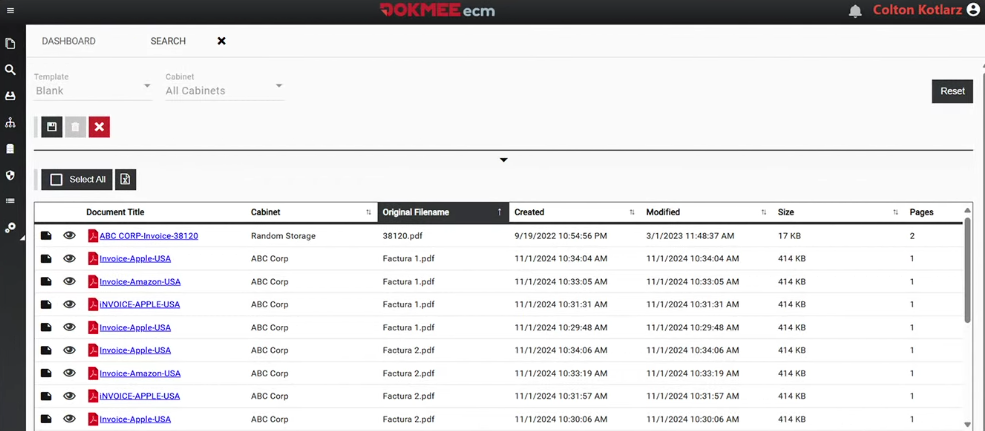
Additionally, Dokmee AI Search changes how you interact with indexed documents by turning traditional keyword searches into a more intelligent, conversational experience.
You can use natural-language queries and progressively refine your results.
For example, you could first retrieve all invoices from a particular supplier and then ask questions about spending patterns within that set of documents. The AI can analyse those documents to provide information such as total spending by department, the number of invoices, or additional costs.
Index your documents automatically with Dokmee
AI-powered indexing automates the more tedious part of document management, making large document libraries easier to organize, search, and manage.
Dokmee combines OCR, AI-powered indexing, automated data extraction, metadata, and semantic search to reduce the manual work involved in processing documents.
Its ECM platform can also connect indexing with workflows, collaboration, security, retention, and other document management processes.
Dokmee can help turn unstructured documents into searchable, organised information.
If you're considering AI document indexing for your organization, contact Dokmee to discuss your requirements and see how the platform can fit into your existing document management processes.