Examen complet de Microsoft OneDrive pour 2026
Lisez notre examen de OneDrive pour comparer ses fonctionnalités, ses tarifs, sa sécurité et ses outils de collaboration. Découvrez comment il se compare à un système de gestion de documents dédié.
Choisir entre le stockage cloud et la gestion de documents n'est pas toujours simple.
OneDrive offre la synchronisation de fichiers, le partage et la collaboration, ce qui peut être suffisant pour les petites entreprises.
Cependant, lorsque vous devez gérer de grandes bibliothèques de documents ou des informations réglementées, vous pourriez avoir besoin de capacités qui vont au-delà du simple stockage de fichiers.
Cet examen de OneDrive vous aide à déterminer si OneDrive convient à votre organisation.
Qu'est-ce que Microsoft OneDrive ?
Microsoft OneDrive est la plateforme de stockage cloud de Microsoft qui vous permet de stocker, d'accéder et de partager des fichiers depuis pratiquement n'importe quel appareil.
Comme SharePoint, OneDrive est étroitement intégré à Microsoft 365, ce qui facilite la sauvegarde, l'édition et la collaboration sur les fichiers Word, Excel, PowerPoint et autres fichiers Microsoft.
OneDrive est conçu pour simplifier le stockage et l'accès aux fichiers.
Cependant, il est important de comprendre ce qu'est OneDrive et ce qu'il n'est pas.
OneDrive est principalement un service de stockage cloud et de synchronisation de fichiers.
Bien qu'il inclue des fonctionnalités de collaboration utiles telles que le partage de fichiers, l'historique des versions et la co-édition en temps réel dans les applications Microsoft Office, il n'est pas conçu pour gérer des cycles de vie de documents complexes, automatiser des processus métier ou appliquer une gouvernance documentaire à l'échelle de l'entreprise.
OneDrive pour les entreprises vs usage personnel
Microsoft propose OneDrive dans des éditions personnelles et professionnelles, mais elles répondent à des objectifs différents.
La version personnelle est conçue pour les utilisateurs individuels qui souhaitent un endroit sécurisé pour stocker des fichiers personnels, des photos et des documents. Elle offre une sauvegarde cloud, une synchronisation de fichiers et un partage, ce qui la rend idéale pour une utilisation quotidienne sur plusieurs appareils.
OneDrive for Business s'appuie sur ces capacités de base avec des fonctionnalités conçues pour les organisations.
Il offre des allocations de stockage plus importantes, une administration centralisée, une gestion des utilisateurs et des autorisations, des contrôles de sécurité plus stricts et une intégration transparente avec les applications professionnelles Microsoft 365 telles que Teams, Outlook et SharePoint.
L'édition professionnelle prend également en charge des autorisations de partage plus granulaires et facilite la collaboration des équipes sur les fichiers Office en temps réel.
Cependant, ces fonctionnalités de collaboration sont toujours axées sur le stockage et le partage de documents plutôt que sur la gestion de processus métier structurés.
Bien que OneDrive for Business soit nettement plus performant que la version personnelle, il reste une plateforme de stockage cloud plutôt qu'un système complet de gestion de documents.
À qui s'adresse OneDrive ?
OneDrive convient mieux aux utilisateurs qui ont besoin d'un stockage cloud fiable, d'un partage de fichiers simple et d'une collaboration transparente au sein de l'écosystème Microsoft.
Que ce soit la bonne solution pour votre organisation dépend en grande partie de la taille de votre équipe, de la complexité de vos processus documentaires et de vos exigences de conformité.
OneDrive est un bon choix pour les particuliers, les freelances, les startups et les petites entreprises qui ont principalement besoin d'un endroit sécurisé pour stocker et accéder à leurs fichiers.
Si votre organisation utilise déjà Microsoft 365, OneDrive s'intègre naturellement à votre flux de travail existant, vous permettant de collaborer sur des documents Office sans introduire une autre plateforme.
Il est particulièrement bien adapté aux équipes de moins de 10 employés qui n'ont pas besoin de processus formels d'approbation de documents ou de contrôles documentaires avancés.
Les entreprises qui peuvent utiliser OneDrive
Les entreprises des secteurs tels que la santé, la comptabilité, le droit, la fabrication, le gouvernement et les ressources humaines traitent généralement de grands volumes de documents sensibles qui nécessitent plus qu'un simple stockage cloud et un partage de fichiers.
Si votre organisation a besoin de flux de travail d'approbation, de politiques de rétention de documents, de rapports d'audit, de contrôles de conformité, d'automatisation des processus métier ou d'un accès étroitement contrôlé aux documents, les capacités de OneDrive peuvent rapidement devenir limitantes.
Bien que Microsoft propose des outils supplémentaires tels que SharePoint et Power Automate pour répondre à certains de ces besoins, si vous gérez des cycles de vie de documents complexes, vous bénéficierez davantage d'un SGE dédié.
Fonctionnalités de OneDrive
Bien que OneDrive soit fondamentalement une plateforme de stockage cloud, il inclut plusieurs fonctionnalités qui chevauchent les fonctionnalités de base d'un système de gestion de documents.
Vous pouvez stocker des fichiers en toute sécurité, collaborer avec des collègues, rechercher des documents et récupérer des versions précédentes si nécessaire. Pour de nombreuses petites entreprises, ces capacités sont plus que suffisantes pour soutenir le travail quotidien.
Stockage de fichiers
Le stockage de fichiers est la plus grande force de OneDrive.
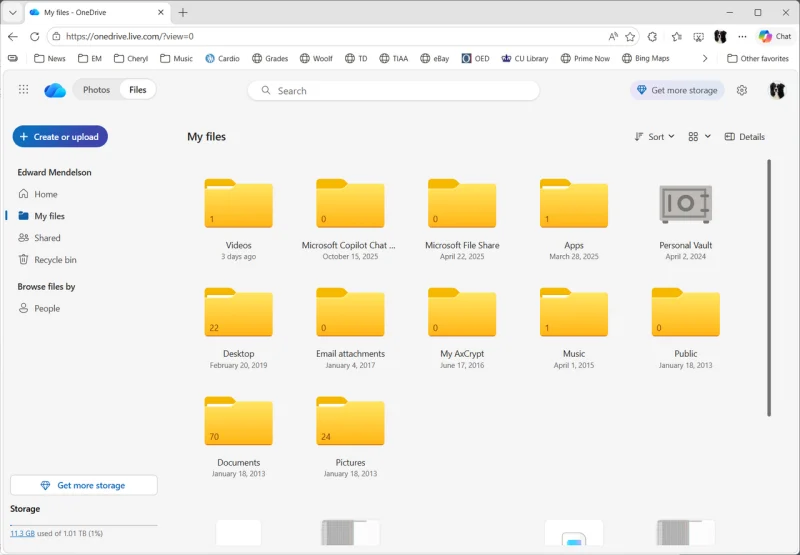
Les documents sont automatiquement synchronisés entre votre bureau, votre navigateur web et vos appareils mobiles, vous permettant d'accéder à la dernière version d'un fichier depuis pratiquement n'importe où.
Si vous travaillez sans connexion Internet, OneDrive vous permet de garder certains fichiers disponibles hors ligne et synchronise automatiquement vos modifications une fois que vous êtes de nouveau en ligne.
Cela dit, l'expérience de synchronisation n'est pas toujours parfaite.
Les entreprises avec de grandes bibliothèques de documents ou des structures de dossiers profondément imbriquées rencontrent parfois des conflits de synchronisation, des fichiers en double ou des vitesses de synchronisation plus lentes.
Collaboration
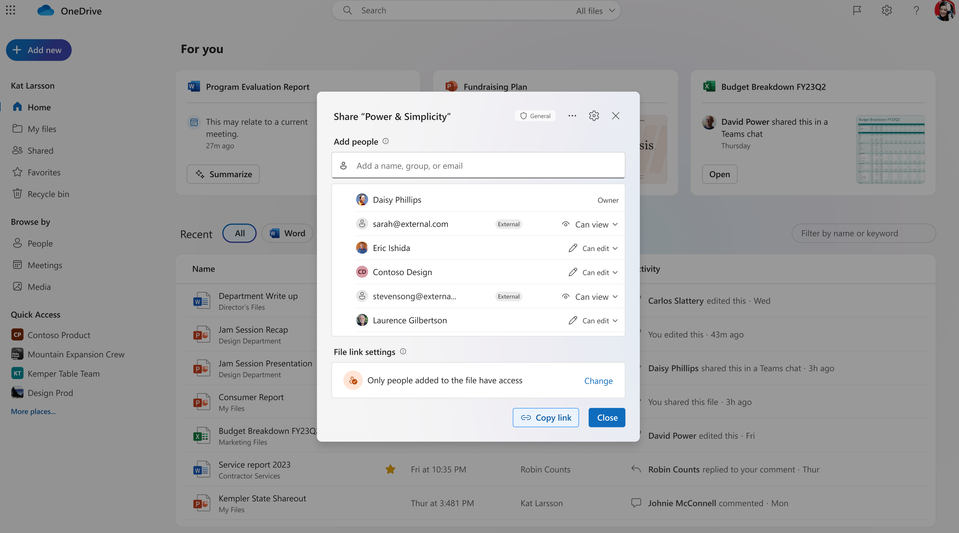
Avec OneDrive, vous pouvez partager des fichiers en interne ou en externe, contrôler qui peut consulter ou modifier des documents, et collaborer en temps réel à l'aide de Word, Excel et PowerPoint.
L'intégration avec Microsoft Teams simplifie davantage le partage de documents en permettant aux utilisateurs d'accéder et de modifier des fichiers directement dans les conversations et les réunions.
OneDrive offre une co-édition en temps réel où plusieurs utilisateurs peuvent modifier le même document Office simultanément, laisser des commentaires et voir les mises à jour au fur et à mesure, réduisant ainsi le besoin d'échanger des fichiers par e-mail.
Cependant, la collaboration est largement centrée sur l'édition de documents plutôt que sur la gestion des processus métier.
OneDrive ne fournit pas de flux de travail documentaires structurés, de routage d'approbation avancé ou d'étapes de révision intégrées sur lesquelles de nombreuses organisations s'appuient.
Source: Microsoft
Recherche
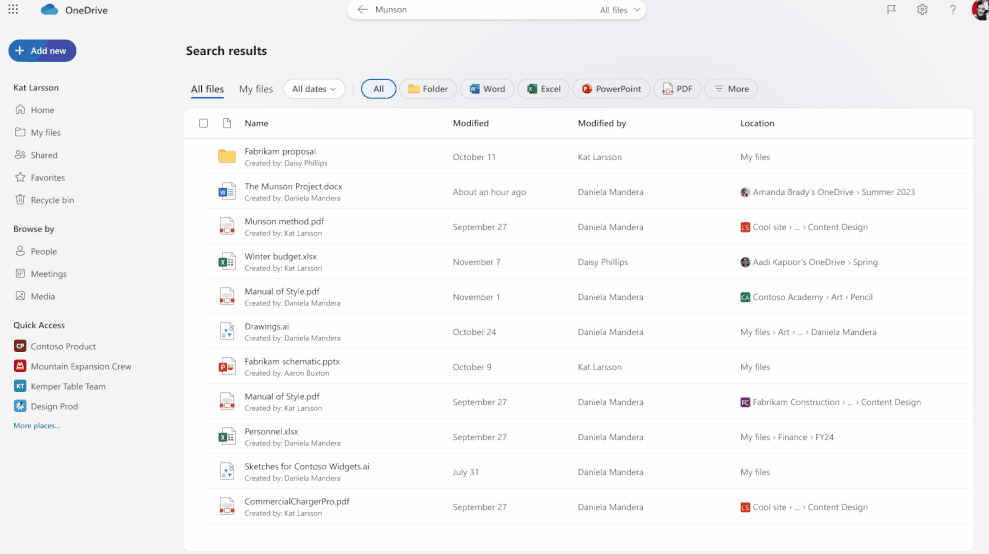
Trouver des documents dans OneDrive est rapide et intuitif pour la plupart des utilisateurs.
Microsoft Search indexe vos fichiers et vous permet de rechercher par nom de document, mots-clés, type de fichier et activité récente. Les fichiers pris en charge peuvent également bénéficier de l'OCR, permettant de rendre le texte des documents numérisés et des images consultable.
OneDrive inclut un support de métadonnées de base et des options de filtrage, ce qui facilite l'affinage des résultats de recherche par type de fichier, propriétaire ou date de modification.
Les fichiers récents et les recommandations personnalisées vous aident également à revenir rapidement aux documents sur lesquels vous avez récemment travaillé.
Bien que ces capacités soient efficaces pour la récupération quotidienne de fichiers, elles n'offrent pas le même niveau d'organisation qu'un système de gestion de documents dédié.
Les plateformes SGE d'entreprise s'appuient généralement sur des métadonnées structurées, une indexation avancée, une classification de documents et des règles de classement personnalisables qui permettent aux organisations de localiser des documents en fonction d'informations spécifiques à l'entreprise.
Source: Microsoft
Sécurité
OneDrive offre une base de sécurité solide, en particulier pour les organisations déjà investies dans l'écosystème Microsoft.
Les fichiers sont chiffrés en transit et au repos, et les administrateurs peuvent renforcer la protection des comptes à l'aide de l'authentification multifacteur, des politiques d'accès conditionnel et des outils de sécurité Microsoft Defender.
Les utilisateurs professionnels bénéficient également de fonctionnalités de détection et de récupération de rançongiciels, tandis que Microsoft 365 fournit des journaux d'audit qui aident les administrateurs à surveiller l'activité des fichiers et l'accès des utilisateurs.
Il convient de noter, cependant, que de nombreuses capacités avancées de sécurité, de conformité et de gouvernance de Microsoft sont liées à la licence Microsoft 365 plutôt qu'à OneDrive lui-même.
Contrôle de version
OneDrive enregistre automatiquement les versions précédentes des fichiers pris en charge, ce qui facilite la restauration d'une révision antérieure si des modifications sont effectuées par erreur.
Combiné aux outils de récupération de fichiers, cela offre un filet de sécurité précieux pour la collaboration quotidienne et réduit le risque de perdre un travail important.
Vous pouvez consulter les versions précédentes, comparer les modifications et restaurer des fichiers sans conserver plusieurs copies du même document.
Cependant, le contrôle de version de OneDrive est relativement simple par rapport à un système complet de gestion de documents. Il se concentre sur l'enregistrement des révisions de fichiers plutôt que sur la gestion du cycle de vie complet des documents.
Stockage cloud vs gestion de documents
Après avoir examiné les fonctionnalités de OneDrive, une chose est claire : il existe une différence entre le stockage cloud et les systèmes de gestion de documents.
Avec un stockage cloud de base, vous pouvez stocker des documents en toute sécurité, collaborer avec des collègues, récupérer des versions de fichiers précédentes et rechercher facilement dans votre contenu. Pour de nombreux particuliers et petites entreprises, c'est exactement ce qu'il faut.
Le stockage cloud est conçu pour garder vos fichiers accessibles, synchronisés et faciles à partager sur tous les appareils. Il répond à des questions telles que : Où est mon document ? Puis-je y accéder ? Puis-je le partager avec quelqu'un d'autre ?
D'autre part, la gestion de documents va plusieurs étapes plus loin.
Au lieu de simplement stocker des fichiers, elle se concentre sur la façon dont les documents circulent dans votre organisation.
Un système de gestion de documents organise le contenu à l'aide de métadonnées, automatise les processus métier, applique des politiques de rétention, maintient des pistes d'audit complètes et aide à garantir que les documents sont traités de manière cohérente de la création à l'archivage ou à l'élimination.
Cette distinction devient de plus en plus importante lorsque le volume de documents commence à poser problème.
Plus vous avez d'employés, de départements et de processus réglementés, plus il devient difficile de gérer les documents critiques pour l'entreprise en utilisant uniquement des dossiers et le partage de fichiers.
Fonctionnalité | OneDrive | SGE dédié |
|---|---|---|
Stockage cloud | ✓ | ✓ |
Synchronisation de fichiers | ✓ | ✓ |
Partage de fichiers | ✓ | ✓ |
Gestion des métadonnées | Limitée | ✓ |
OCR | Basique | Avancée |
Indexation automatisée | Limitée | ✓ |
Flux de travail d'approbation | Limités | ✓ |
Politiques de rétention | Basiques | ✓ |
Gestion des enregistrements | Limitée | ✓ |
Piste d'audit | Basique | Complète |
Automatisation des processus métier | ✗ | ✓ |
En fin de compte, la différence réside dans l'objectif.
OneDrive vous aide à stocker des fichiers et à collaborer dessus, tandis qu'un SGE vous aide à organiser, gouverner, automatiser et contrôler les documents dans toute votre organisation.
Si vous cherchez à passer à un SGE complet ou si vous pensez que OneDrive ne serait pas suffisant, nous avons deux alternatives :
SharePoint si vous souhaitez rester dans le package Microsoft 365
Dokmee pour des fonctionnalités ECM plus étendues et personnalisables sans renoncer à de solides intégrations Microsoft
OneDrive vs SharePoint
OneDrive et SharePoint sont souvent mentionnés ensemble car ils font tous deux partie de Microsoft 365.
Considérez OneDrive comme votre espace de travail personnel. C'est là que vous enregistrez vos propres fichiers, brouillons et documents sur lesquels vous travaillez activement.
Bien que vous puissiez partager des fichiers avec des collègues, le contenu est généralement détenu et géré par un utilisateur individuel.
SharePoint, d'autre part, est conçu pour la collaboration d'équipe.
Il fournit des bibliothèques de documents partagées auxquelles plusieurs utilisateurs peuvent accéder, des sites spécifiques aux départements, des intranets d'entreprise et du contenu centralisé qui appartient à l'organisation plutôt qu'à un individu.
SharePoint offre également une gestion des autorisations plus robuste et sert de base à de nombreuses expériences collaboratives de Microsoft 365.
Plutôt que de remplacer OneDrive, SharePoint fonctionne à ses côtés. Les employés créent et travaillent généralement sur des documents dans OneDrive avant de les déplacer vers SharePoint lorsqu'ils doivent être partagés entre les équipes ou gérés comme contenu organisationnel.
Fonctionnalité | OneDrive | SharePoint |
|---|---|---|
Objectif principal | Stockage cloud personnel | Collaboration d'équipe et gestion de contenu |
Stockage | Fichiers individuels | Bibliothèques de documents partagées |
Propriété | Utilisateur individuel | Organisation ou département |
Collaboration | Partage de fichiers et co-édition | Collaboration à l'échelle de l'équipe |
Capacités intranet | ✗ | ✓ |
Sites de département | ✗ | ✓ |
Gestion des autorisations | Autorisations de partage de base | Autorisations avancées d'équipe et de site |
OneDrive vs Dokmee
Bien que OneDrive et Dokmee aident tous deux les organisations à travailler avec des documents numériques, ils résolvent des problèmes commerciaux différents.
OneDrive est conçu pour stocker des fichiers en toute sécurité, les synchroniser sur tous les appareils et faciliter la collaboration au sein de l'écosystème Microsoft.
Dokmee est spécifiquement conçu pour gérer des documents commerciaux à grande échelle en offrant un contrôle documentaire structuré, l'automatisation, la conformité et la gouvernance sur une seule plateforme.
À mesure que les volumes de documents augmentent et que les processus métier deviennent plus complexes, les différences entre le stockage cloud et la gestion de documents deviennent beaucoup plus apparentes.
Capacité | OneDrive | Dokmee |
|---|---|---|
Stockage de fichiers | ✓ | ✓ |
OCR | Basique | OCR avancée et capture de documents |
Gestion des métadonnées | Limitée | Métadonnées et indexation complètes |
Indexation IA | Limitée | ✓ Indexation assistée par IA |
Contrôle de version | Historique de version de base | Contrôle de version avancé et historique d'audit |
Automatisation des flux de travail | Limitée | ✓ |
Gestion des enregistrements | Limitée | ✓ |
Pistes d'audit | Basiques | Complètes |
Politiques de rétention | Basiques (dépend de Microsoft 365) | ✓ |
Formulaires électroniques | ✗ | ✓ |
Automatisation des processus métier | ✗ | ✓ |
Support de conformité | Dépend de Microsoft 365 | Outils de gouvernance et de conformité intégrés |
Déploiement | Cloud | Cloud, sur site ou hybride |
OneDrive est un bon choix si votre objectif principal est le stockage cloud sécurisé et la collaboration transparente au sein de Microsoft 365.
Cependant, si votre organisation doit gérer de grands volumes de documents commerciaux, automatiser les approbations, appliquer des politiques de rétention, maintenir des pistes d'audit détaillées ou prendre en charge des processus métier réglementés, un SGE dédié offre un contrôle nettement supérieur.
Dokmee est conçu pour gérer de grands volumes de documents commerciaux avec des flux de travail structurés, des contrôles de conformité et une gestion du cycle de vie des documents.
Consultez la comparaison complète Dokmee vs SharePoint pour une analyse plus détaillée
Tarifs de OneDrive
OneDrive est disponible via plusieurs plans, le rendant accessible aux utilisateurs individuels et aux entreprises de toutes tailles.
Microsoft propose une version gratuite qui inclut une quantité limitée de stockage cloud, ce qui en fait un bon point de départ pour le stockage de fichiers personnels et le partage de base.
OneDrive propose trois autres plans payants :
Microsoft 365 Basic 1,99 $ par mois
Microsoft 365 Personal 9,99 $ par mois
Microsoft 365 Family 12,99 $ par mois
Ces plans regroupent le stockage cloud avec les versions de bureau et web des applications Office familières, ce qui en fait une option attrayante pour les particuliers et les foyers déjà investis dans l'écosystème Microsoft.
La plupart des plans sont conçus pour une seule personne. Sauf pour le plan Famille. De plus, c'est le seul plan où vous pouvez accéder aux fonctionnalités d'IA, mais elles sont exclusives au propriétaire de l'abonnement.
Dans la catégorie Business, vous pouvez choisir parmi deux plans différents :
Microsoft 365 Business Basic pour 7,00 $ par utilisateur et par mois
Microsoft 365 Business Standard avec Copilot 23,50 $ par utilisateur et par mois
Ces plans ajoutent une administration centralisée, des contrôles de sécurité améliorés et de meilleures capacités de collaboration.
Étant donné que Microsoft met régulièrement à jour ses plans, ses allocations de stockage et ses options de licence, il est préférable de consulter les derniers tarifs de Microsoft 365 avant de prendre une décision d'achat.
Plus important encore, déterminez si vous payez uniquement pour le stockage cloud ou si votre organisation a également besoin de capacités de gestion de documents, d'automatisation des flux de travail et de conformité qui peuvent nécessiter des services Microsoft supplémentaires ou une plateforme de gestion de documents dédiée.
Avis des utilisateurs
⭐⭐⭐⭐
G2 4.3/5 | Capterra 4.5/5
Comme la plupart des produits Microsoft, OneDrive excelle lorsqu'il est utilisé au sein de l'écosystème Microsoft 365 plus large.
Il offre un stockage cloud fiable, un partage de fichiers intuitif et une excellente collaboration pour les documents Office. Cependant, les organisations à la recherche d'une gestion de documents structurée finiront par rencontrer ses limites.
✔️ Avantages
Intégration native avec Microsoft 365
Synchronisation automatique des fichiers sur les appareils de bureau, web et mobiles
Collaboration et co-édition en temps réel solides pour les documents Office
Historique de version et récupération de fichiers intégrés
Stockage cloud sécurisé avec chiffrement et prise en charge de l'authentification multifacteur
Interface familière pour les utilisateurs Microsoft
✖️ Inconvénients
Conçu pour le stockage cloud plutôt que pour une gestion complète des documents
Capacités limitées d'automatisation des flux de travail et d'approbation de documents
Gestion des métadonnées de base par rapport aux plateformes SGE dédiées
De nombreuses fonctionnalités avancées de conformité et de gouvernance nécessitent une licence Microsoft 365 supérieure
Des conflits de synchronisation et des fichiers en double peuvent survenir dans les bibliothèques de documents volumineuses ou complexes
L'organisation basée sur les dossiers devient plus difficile à gérer à mesure que les volumes de documents et les équipes augmentent
Quand OneDrive est-il une bonne solution de stockage ?
Microsoft OneDrive est l'une des plateformes de stockage cloud les plus populaires disponibles aujourd'hui.
Son intégration transparente avec Microsoft 365, sa synchronisation de fichiers fiable et sa collaboration en temps réel en font un excellent choix pour les particuliers, les freelances, les startups et les petites entreprises.
Si votre équipe a principalement besoin d'un stockage cloud sécurisé et d'une édition collaborative pour les documents Office, OneDrive offre une valeur considérable avec très peu de complexité.
La situation change à mesure que votre organisation grandit.
Les grandes équipes ont souvent besoin de plus que du stockage et du partage de fichiers ; elles ont besoin d'une organisation documentaire structurée, de flux de travail d'approbation, de politiques de rétention, de gestion des enregistrements et de pistes d'audit détaillées.
Bien que Microsoft propose des outils supplémentaires tels que SharePoint, Power Automate et Purview pour répondre à certaines de ces exigences, leur gestion sur plusieurs produits peut ajouter de la complexité et des coûts de licence.
Si votre organisation commence à dépasser les dossiers, la synchronisation de fichiers et la collaboration de base, il est peut-être temps d'envisager un système de gestion de documents dédié.
Des plateformes comme Dokmee sont spécialement conçues pour gérer les documents commerciaux tout au long de leur cycle de vie, offrant un contrôle documentaire centralisé, une indexation intelligente, l'automatisation des flux de travail, la conformité et la gouvernance dans une solution unique.
En fin de compte, le bon choix dépend de vos besoins commerciaux.
OneDrive est une plateforme de stockage cloud exceptionnelle. Cependant, si votre priorité est une gestion complète des documents, vous bénéficierez probablement d'une solution conçue spécifiquement à cet effet plutôt que de vous fier uniquement au stockage cloud.
Si vous êtes prêt pour une mise à niveau, réservez une démo avec Dokmee dès aujourd'hui.