Dokmee vs SharePoint: Which One Is Right for Your Business?
Compare Dokmee vs. Sharepoint across document storage, workflow automation, AI features, and usability to understand which solution better supports your organization.
Dokmee and SharePoint get compared as if they're solving the same problem. They're not, not entirely.
SharePoint is a broad Microsoft 365 collaboration and intranet platform that happens to include document management. Dokmee is a document management platform built for exactly one job.
This Dokmee vs. SharePoint guide breaks down where each one actually wins, including where SharePoint has the edge, so you can decide which fits what you're actually trying to solve.
👍 If you'd like to explore each platform in depth, check out our complete Dokmee and Microsoft SharePoint reviews.
Is Dokmee or SharePoint right for you? It depends on whether documents or collaboration is your actual bottleneck.
SharePoint is the stronger pick if your priority is team collaboration, intranets, and staying inside the Microsoft 365 ecosystem.
Dokmee is the stronger pick if your priority is dedicated document management: OCR capture, AI-assisted indexing, retention automation, and audit-ready compliance.
SharePoint comes bundled into Microsoft 365 Business plans; Dokmee is a separate, purpose-built purchase with published pricing.
SharePoint has no native OCR or document capture; Dokmee has no team-sites or intranet equivalent.
For most organizations weighing this seriously, the decision comes down to which of those two gaps actually costs them more.
What Is Dokmee?
Dokmee is a document management system (DMS) and enterprise content management (ECM) platform built to capture, store, secure, and retrieve digital documents and records.
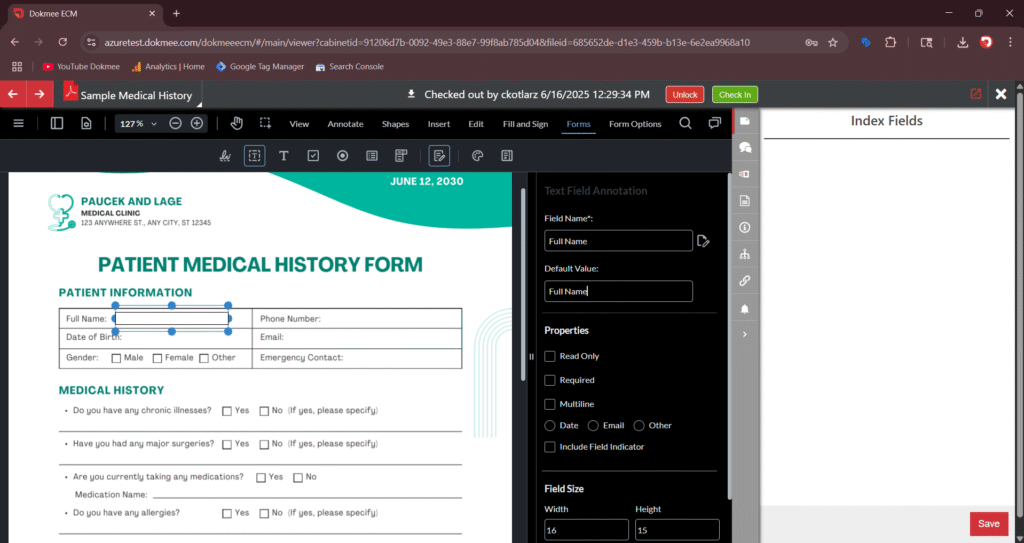
It combines OCR-powered capture, AI-assisted indexing, workflow automation, and role-based security in a single platform. It’s available on the cloud, on-premise, or as a hybrid deployment.
It’s purpose-built for the full document lifecycle, not a general collaboration suite
It’s used across government, legal, healthcare, finance, manufacturing, and other document-heavy industries
Every plan includes AI Search and unlimited cabinets.
What Is SharePoint?
SharePoint is a web-based collaboration and content management platform built into Microsoft 365.
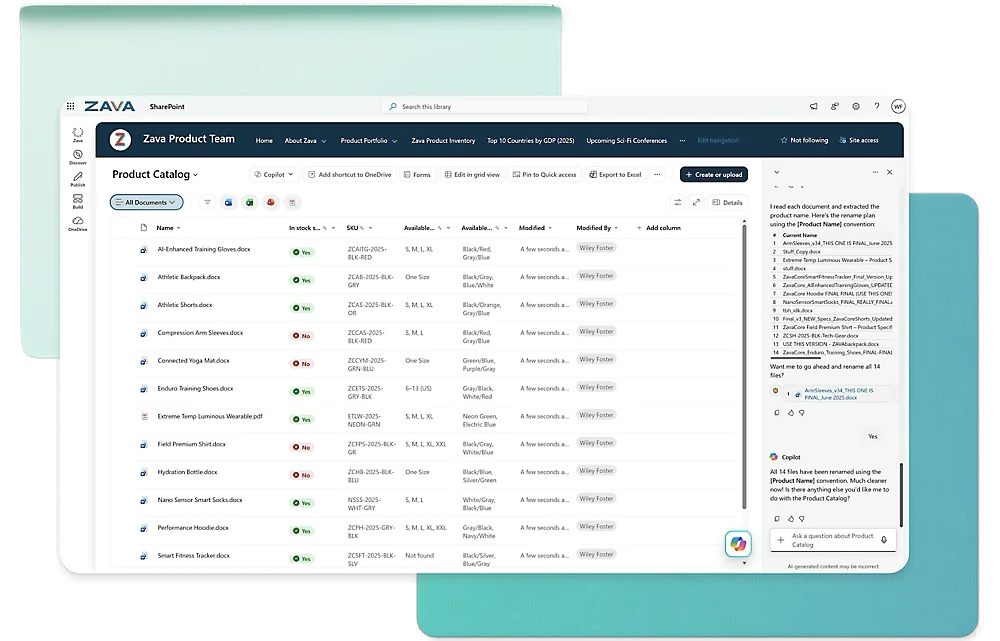
It combines document libraries, team sites, and communication sites with business process automation through Power Automate.
It’s best suited to organizations already standardized on Microsoft 365
Its primary focus is collaboration and content management. Document management is one piece of a much broader platform.
For a full breakdown, see our Microsoft SharePoint review.
How Do Dokmee and SharePoint Compare on Document Capture and Indexing?
This is where the two platforms diverge most.
Dokmee | SharePoint | |
|---|---|---|
OCR and capture | Built-in OCR, ICR, OMR, and MICR support for scanned and handwritten documents | No native OCR or document capture; requires third-party tools or Purview add-ons |
Indexing | Magic Indexing (AI-assisted) automatically tags documents by analyzing content, including logos and handwriting | Metadata tagging is manual, applied by users or basic rules |
Custom classification | AI Scripting for custom, code-based classification logic | Not available natively |
Scanning costs | Unlimited scanning included, no per-click charges | Not a capture platform |
How Do Dokmee and SharePoint Compare on Workflow Automation?
Both Dokmee and SharePoint automate approvals and routing, but through different mechanisms.
Dokmee | SharePoint |
|---|---|
Native no-code workflow designer, built directly into the document platform | Workflow automation runs through Microsoft Power Automate, a separate connected product |
Custom builds available from the Dokmee team for complex processes | Requires learning and maintaining a separate automation tool |
Automates document approvals, reviews, and notifications natively | Automates approvals, notifications, and routing via Power Automate's visual builder |
How Do Dokmee and SharePoint Compare on Security and Compliance?
Dokmee gives you tight compliance controls right out of the box. With SharePoint, you have to build and license that power through Microsoft Purview.
Dokmee | SharePoint |
|---|---|
Built-in retention policies with automated archive, relocate, or delete actions | Retention policies, legal holds, and records management via Microsoft Purview, additional licensing and configuration |
Granular permissions: full restriction, view-only, watermark-on-export, and annotate/sign tiers | Granular permissions at the site, library, folder, or document level |
Tamper-resistant audit logs covering every document interaction | Audit logs, DLP, and sensitivity labels available through Purview |
Compliance support referenced directly for HIPAA, GDPR, and SOX | Compliance depth depends on which Purview and SharePoint Premium tier is licensed |
How do Dokmee and SharePoint Compare on AI Capabilities?
SharePoint’s AI is broader in scope, spanning the entire Microsoft 365 suite. Dokmee’s is narrower but purpose-built specifically for document classification.
Dokmee: Magic Indexing, AI Scripting, AI Search, and AI Document Summary, purpose-built for document classification and retrieval.
SharePoint: Microsoft Copilot and Work IQ ground AI across SharePoint content, plus the wider Microsoft 365 suite (Word, Excel, Outlook, and Teams).
Which matters more depends on whether you need AI across your whole workflow or specifically inside your document archive.
How Do Dokmee and SharePoint Compare on Deployment?
Dokmee is available on the cloud, on-premise, or following a hybrid model, with full feature parity across all three.
SharePoint is cloud-first through SharePoint Online. On-premise SharePoint Server remains technically available, but SharePoint Server 2019’s extended support ended July 14, 2026, and Microsoft’s investment has shifted almost entirely to the cloud version.
How Do Dokmee and SharePoint Compare on Integrations?
SharePoint is Microsoft-native, meaning it integrates directly across Teams, Outlook, Word, Excel, PowerPoint, OneDrive, Power Automate, Power BI, and Power Apps.
Dokmee has great integration with Microsoft Office, SAP, QuickBooks, DocuSign, and other business applications via API.
What Does SharePoint Offer That Dokmee Doesn’t?
To be fair to SharePoint, it does some things Dokmee was never built to do.
Team sites, communication sites, and a full company intranet builder. Dokmee isn’t trying to be a collaboration or intranet platform.
Teams channels are literally backed by SharePoint document libraries, so the integration is native infrastructure, not a connector.
Access to the broader Microsoft Power Platform (Power Automate, Power Apps, and Power BI) for custom, low-code app-building beyond documents.
Copilot grounded across the entire Microsoft 365 suite, not just document content.
If your organization already pays for Microsoft 365 Business, SharePoint access comes at no additional cost.
None of that matters much if your actual bottleneck is documents specifically, not collaboration in general.
An intranet doesn’t scan a filing cabinet, Power Automate doesn’t index a handwritten form, and Copilot’s general-purpose assistance isn’t the same as AI built specifically to classify and retrieve documents at scale.
If document capture, retention, and audit-ready compliance are the real problem, Dokmee’s narrower focus is an advantage.
What Are the Pros and Cons of Dokmee and SharePoint?
Here’s a quick breakdown of how the two platforms are received by their respective users.
Dokmee Pros and Cons
Users across third-party review websites praise Dokmee for its ease of use and day-to-day reliability, though a few reviews mention setup cost as a pain point.
Pros | Cons |
|---|---|
✅ Easy to learn, with a drag-and-drop interface that gets new users productive quickly | ⚠️ Search can be inconsistent and underpowered, though other users report is as solid |
✅ Sharing and collaborating on documents across a team is straightforward and secure | ⚠️ Licensing, hardware, and ongoing maintenance costs are a consideration for smaller organizations |
✅ Centralizes large volumes of documents and varied file types in one organized, easy-to-navigate repository | ⚠️ The interface is functional but not especially polished visually |
✅ Workflow automation handles approvals, reviews, and rules-based document routing without much manual setup | ⚠️ File organization and sorting options could go deeper for larger, more complex libraries |
✅ Integrates well with other business applications, keeping document workflows connected to the rest of the tool stack | |
✅ Customer support is repeatedly called responsive and helpful, particularly during onboarding |
SharePoint Pros and Cons
Although users praise SharePoint’s collaboration and Microsoft 365 integration, many reviews express frustration with setup complexity and everyday usability.
Pros | Cons |
|---|---|
✅ Real-time co-authoring in Word, Excel, and PowerPoint lets multiple people work on the same document simultaneously without version conflicts | ⚠️ Initial setup, especially permissions and access management, is complex enough that organizations need dedicated IT involvement |
✅ Deep native integration with Microsoft 365 means files move between apps without separate uploads or exports | ⚠️ Navigating complex sites and the full feature set takes real time to get comfortable with |
✅ Granular, site- and document-level permissions make sharing internally or with specific outside partners easy to control | ⚠️ Performance can slow down noticeably when working with large files or heavily customized sites |
✅ Team sites and document libraries give departments a structured, centralized home for shared content instead of scattered personal folders | ⚠️ Finding a specific document can be difficult once a site’s structure or permissions get complicated, undercutting the platform’s own search tools |
✅ Familiar navigation for anyone already comfortable with Microsoft Office, which shortens onboarding for everyday document tasks |
How Much Do Dokmee and SharePoint Cost?
SharePoint has no standalone price; it’s only available bundled into a Microsoft 365 Business plan alongside OneDrive, Teams, and the core Office apps.
Plan | Price |
|---|---|
Dokmee Cloud | $39/mo. per user |
Dokmee Cloud+ | $59/mo. per user |
Dokmee Enterprise | Custom, quote-based |
SharePoint (Business Basic) | $7/user/mo. (with Teams) |
SharePoint (Business Standard + Copilot) | $23.50/user/mo. (with Teams) |
SharePoint (Business Premium + Copilot) | $32/user/mo. (with Teams) |
Dokmee vs. SharePoint: Which One Fits Your Business Needs?
Choosing between the two comes down to whether you need a broad collaboration workspace or a dedicated, audit-ready document engine.
If your primary need is… | Best Choice |
|---|---|
Living inside Microsoft 365 and prioritizing real-time co-authoring | SharePoint |
Solving heavy document volume, scanning backlogs, or OCR workflowss | Dokmee |
Maintaining audit-ready compliance (HIPAA, SOX, GDPR) without extra licenses | Dokmee |
Building a company-wide intranet, team sites, or general knowledge base | SharePoint |
Automating lifecycle retention and instant secure document retrieval out of the box | Dokmee |
Dokmee vs SharePoint: Why Dokmee Is the Smarter Choice for Pure Document Management
SharePoint works well as a team collaboration hub for Microsoft 365 power users. But when your business challenge is managing, securing, and retaining documents, it quickly becomes expensive and complex.
You end up stacking separate Purview licenses, third-party OCR plug-ins, and manual tagging workflows just to approximate what Dokmee delivers natively on day one.
If your core priorities are high-accuracy document capture, automated retention schedules, and turnkey compliance without the hidden overhead, Dokmee gives you a system designed to work right out of the box.
Want built-in OCR, AI-assisted indexing, and transparent pricing instead of licensing your way to basic document management? See what a platform built specifically for documents looks like.