What is Intelligent Document Processing and How it Works
16 Apr. 2026
10 min read
By Christina Miranda
Intelligent document processing transforms unstructured data into structured information to reduce costs and improve business efficiency. Find the best software for you.
Did you know there are companies who have managed to reduce processing time by 50-70% and cut costs by 30-40% with a single tool?
They used intelligent document processing, a software that uses different technologies to turn unstructured data into structured and usable data.
What Is Intelligent Document Processing (IDP)?
Intelligent document processing is a type of software that takes unstructured data and turns it into structured and usable information. To do so, this type IDP uses technologies such as OCR, AI, and machine learning.
Every business deals with mixed documents on a daily basis, including invoices, contracts, receipts, or forms. The problem is that most of this information is unstructured, meaning it isn’t organized in a way that software can easily use.
This means you need someone that looks through documents to find important data and include it where it needs to be.
IDP allows you to take documents that usually have to be handled manually, like scanned invoices or PDFs, and automatically extracts, organizes, and sends the data to the appropriate files.
IDP vs OCR
IDP tends to get confused with OCR, since they both extract data from unstructured data.
However, they are not quite the same.
On the one hand, optical character recognition is a technology that extracts data to convert images, scanned documents, or in some cases handwritten documents into readable text.
For example, it can take a scanned invoice and turn it into editable text on a screen.
However, OCR stops there, it doesn’t understand the meaning of the text. It is limited to extraction.
Now, this doesn’t mean it is not useful, what it means it is simply a technology that plays a big role in other technologies.
On the other hand, IDP builds on OCR by adding intelligence.
With OCR it extracts the data but then continues to understand what that data represents and organizes it into structured data.
For example, OCR might extract this text from an invoice:
Invoice #1234 | Total: $2,500 | Due Date: Jan 31
IDP, on the other hand, would identify and structure the information like this:
Invoice number: 1234
Total amount: $2,500
Due date: January 31
This structured data can then be automatically pushed into accounting software, spreadsheets, or databases.
Basically, OCR reads documents, while IDP understands and processes them.
How Does Intelligent Document Processing Work?
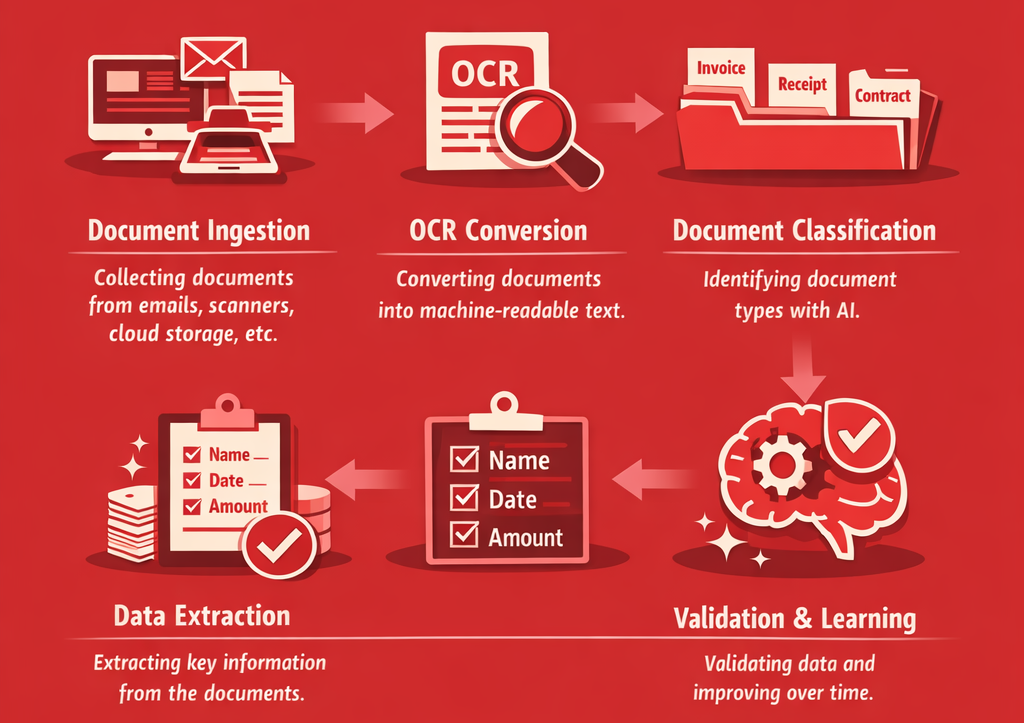
Although IDP systems can seem complex, they generally follow a straightforward process.
First, documents are collected from various sources. These could include email attachments, scanned files, cloud storage, or uploaded PDFs. This step is often called document ingestion.
Next, OCR technology converts the document into machine-readable text. This allows the system to “see” the content inside the file.
Once the text is extracted, AI models classify the document. For instance, the system determines whether it’s an invoice, a receipt, a contract, or another type of document.
After classification, the software extracts key data points. These could include names, dates, totals, addresses, or specific fields relevant to the document type. The extracted data is then structured into a format that software systems can use, such as a database entry.
Finally, many IDP systems include validation and machine learning. If a user corrects an error, the system learns from that correction and improves over time.
To put this into context, a human resources department with mostly freelance workers will receive hundreds of invoices each month.
Instead of manually entering each invoice into an accounting system, IDP automatically reads the documents, extracts the relevant fields, and uploads the data to a DMS where the finance team can access payments easily.
What used to take hours can now be completed in minutes.
What Are the Benefits of IDP?
IDP software brings document management and operational tasks one step closer to modern paperless offices and the efficiency that comes with AI.
Implementing these types of tools offer many advantages aside from simply having a more modern infrastructure.
One of the biggest advantages of IDP is cost reduction.
Manual document processing requires time, labor, and resources. When you factor in printing, storage, and administrative work, the costs quickly add up. IDP reduces or completely eliminates many of these expenses.
Efficiency is another major benefit.
Employees no longer need to spend time searching for documents, re-entering data, or managing physical files. Information becomes instantly accessible and workflows move much faster.
Accuracy also improves significantly.
Human error is common in manual data entry, especially when dealing with large volumes of messy handwritten documents. IDP systems, once properly configured, can achieve very high levels of accuracy and consistency that will only improve over time thanks to machine learning technology.
Scalability is equally important.
As your business grows, document volume increases. Hiring more staff to handle this workload can be expensive and inefficient. IDP allows companies to scale operations without increasing headcount.
There are also compliance advantages. Structured, searchable data makes it easier to track records, respond to audits, and meet regulatory requirements.
Finally, IDP supports sustainability efforts. By reducing reliance on paper and physical storage, businesses can significantly lower their environmental impact.
IDP Use Cases
IDP is used across a several industries and departments, particularly where large volumes of documents are involved.
Accounts payable and invoice processing
Finance teams process hundreds or thousands of supplier invoices monthly. IDP extracts key fields automatically and routes them into accounting systems, cutting cycle times from days to minutes.
IDP takes out the risk of having duplicate payments, late-payment penalties, and it frees AP staff from repetitive data entry so they can focus on exceptions and reconciliation.
Some common document types include purchase orders, credit notes, and remittance advice.
A typical example is extracting vendor name, line items, totals, tax, and PO numbers from PDF invoices and syncing them to your accounting software without manual keying.
Expense management and receipt capture
Employees submit receipts from travel, meals, and supplies. IDP reads scanned or photographed receipts and populates expense reports automatically, reducing submission friction and finance review time.
This matters because it speeds up reimbursement cycles, flags policy violations in real time such as over-limit meals, and produces a clean audit trail without manual spreadsheets.
For example, an employee photographs a restaurant receipt on their phone and submits it. IDP extracts the date, vendor, amount, and currency, auto-coding it to the correct cost centre in expense management tools like Expensify
The same logic applies to hotel folios, fuel receipts, and rideshare confirmations.
Legal and contract management
Legal and procurement teams manage portfolios of hundreds of contracts with varying terms, deadlines, and obligations.
IDP extracts and structures important provisions so nothing is missed and renewal deadlines are never overlooked.
Intelligent document processing prevents expensive auto-renewals, ensures compliance obligations are tracked, and lets teams surface risk clauses across an entire contract portfolio quickly.
In practice, this means ingesting NDAs, MSAs, and SaaS agreements to pull out parties, effective dates, termination clauses, liability caps, and auto-renewing subscription terms into a centralized contract database.
Lease contracts and vendor agreements are equally common applications.
Banking and financial services onboarding
In banking, there are many identity documents, income statements, and application forms involved in most tasks. IDP speeds up intake and verification in order to reduce turnaround time and operational cost per application.
Essentially, it cuts loan approval times from days to hours, reduces manual errors that cause compliance failures, and improves customer experience at a critical decision point.
For example, IDP software could extract borrower data from mortgage applications, passports, payslips, and bank statements, then automatically fill in the loan origination system.
Healthcare records
Healthcare clinics or hospitals deal with a constant flow of paper-based and digital records including intake forms, referral letters, lab results, and insurance claims. IDP digitizes and structures this data to improve care coordination and administrative efficiency.
IDP is important to speed up admission or release processes without and helps organisations meet data accessibility and interoperability standards such as HL7 and FHIR, among others.
For instance, handwritten patient intake forms can be scanned and processed to extract name, date of birth, symptoms, medications, and insurance details, automatically populating the EHR system before an appointment begins.
Logistics and supply chain documentation
Logistics operations generate dense paper trails including bills of lading, customs declarations, packing lists, and proof of delivery. IDP processes these documents at scale to ensure data reaches warehouse and freight systems without manual transcription.
Delays caused by document errors cost time and money at every handoff. IDP reduces transcription mistakes and gives operations teams real-time visibility into shipment data.
For example, IDP could extract shipper, consignee, cargo description, weight, and HS codes from bills of lading at port, feeding the data directly into a freight management system to trigger customs clearance workflows.
Best Intelligent Document Processing Software
You can find IDP software in two different formats: as standalone tools or integrated in broader productivity tool.
Feature
Standalone IDP
Integrated IDP
Definition
Dedicated tools focused purely on document processing (OCR, classification, extraction)
IDP capabilities embedded within broader platforms like ERP, CRM, or RPA
Primary Use
Extracting and structuring data from documents across multiple systems
Automating entire workflows where document processing is one step
Examples
ABBYY Vantage, Rossum
Google Document AI, Dokmee
Integration
Requires APIs or connectors to link with other systems
Already integrated into existing business systems
Best For
Companies who need specialized, high-accuracy document processing across multiple systems
Companies who are looking for simple, unified automation within one ecosystem
Some popular examples of standalone tools include ABBYY FineReader PDF, ABBYY Vantage, or Amazon Comprehend.
For example, ABBYY FineReader PDF is primarily an OCR and PDF productivity tool. It’s commonly used to convert scanned documents into editable formats like Word or Excel, search and edit PDFs, and digitize paper archives. In terms of automation, it offers basic capabilities such as batch processing, but it is largely user-driven.
Moving further into true IDP capabilities, ABBYY Vantage represents a more advanced, enterprise-grade solution. It is designed for use cases such as invoice processing, purchase orders, KYC verification, and insurance claims handling. Vantage provides a high level of automation by combining AI and machine learning to classify documents and extract key data, along with human-in-the-loop validation to improve accuracy over time.
Amazon Comprehend differs slightly in that it is not a complete IDP platform but a natural language processing (NLP) service. It is typically used to extract meaning from text, such as identifying entities, analyzing sentiment, or detecting key phrases in documents like emails or customer feedback. Automation is achieved through API-based integration, and it is often combined with OCR tools like Amazon Textract to form part of a broader document processing pipeline. Its strength lies in its deep language understanding and integration within the AWS ecosystem.
When looking at broader solutions, you have many different alternatives and stypes of software.
For example, solutions like Rossum specialize in invoice processing, while platforms such as Hyperscience focus on high-accuracy data extraction for complex documents.
Cloud-based options like Google Document AI offer scalability and flexibility for growing businesses.
The UiPath Platform is used for end-to-end processes such as invoice handling, where documents are ingested, data is extracted, and the results are automatically entered into systems like ERPs without manual intervention. UiPath offers very high automation through a combination of document understanding, robotic process automation, and workflow orchestration.
Finally, you also have document management systems where you will need strong technology and automation to extract and route data into the appropriate files and folders where they are automatically indexed and can be used for AI-powered summaries, for example.
Selecting the right IDP solution is one of the most consequential decisions in any document automation project. The market has matured significantly, with tools ranging from general-purpose platforms to highly specialised solutions built for specific industries or document types. The criteria below will help you evaluate options with confidence.
Step 1: Classify your document types
Before evaluating any software, you need a clear picture of the documents your organisation actually handles.
IDP tools are not one-size-fits-all. A platform built for structured forms may struggle with semi-structured contracts, and one optimized for invoices may perform poorly on handwritten records.
Knowing your document landscape upfront prevents you from selecting a tool that solves only part of your problem.
Start by auditing the documents flowing through the processes you want to automate.
Group them by structure:
→ Structured documents follow a fixed, predictable layout such as tax forms or application templates
→ Semi-structured documents like invoices or purchase orders share common fields but vary in layout between suppliers or clients
→ Unstructured documents such as contracts, emails, and clinical notes contain free-form text with no consistent format.
Also consider volume, frequency, and the languages or regional formats involved.
Step 2: Map your requirements and integrations
The first thing you need to ask yourself is “why do I need IDP?”
Will you need it as a standalone platform to build a paperless office, a system that integrates into your current stack, or end-to-end document automation?
Even a highly accurate IDP tool delivers limited value if it cannot connect to the systems your teams already use. Before evaluating any platform, map out your current stack: your ERP, CRM, accounting software, document management system, and any industry-specific tools.
Then verify that the IDP solution offers native connectors or a well-documented API for each.
Also consider how data flows after extraction. Does the tool simply export a CSV, or does it push structured data directly into the right fields in your target system? The tighter the integration, the less manual handling is required between extraction and action.
Step 3: Test for scalability
Your document volumes today are unlikely to reflect your needs in two or three years.
A solution that performs well at low volume may become a bottleneck as your business grows, particularly if it charges per page or per document in a way that makes scaling expensive.
Evaluate whether the platform is cloud-native and whether it can handle concurrent processing across multiple document types and business units simultaneously. If your organisation operates internationally, also check whether the solution supports multiple languages and regional document formats.
Step 4: Calculate total cost and ROI
IDP pricing models vary quite a lot, some platforms charge per page processed, others by user seat, and others offer flat monthly fees based on volume bands.
Understand the full cost of ownership, including implementation, integration work, and ongoing maintenance, not just the licence fee.
When calculating return on investment, go beyond cost reduction.
The most significant gains come from faster processing times, fewer errors reaching downstream systems, and staff being redirected to higher-value work. A solution that costs more upfront but eliminates a bottleneck in a high-stakes process can deliver a far stronger return than a cheaper tool that only partially solves the problem.
So…. when do you really need IDP?
Intelligent Document Processing has become an essential tool for efficiency.
By transforming unstructured documents into structured, actionable data, IDP speeds ups the workflows that keep organisations running. If you’re still relying on paper-based or manual processes, adopting IDP is the most sustainable way to manage information at scale.
The question is not whether IDP can add value to your organisation. In most cases, it can. The more useful question is whether your current situation makes it a pressing need.
You likely need IDP now if:
Your team spends significant time manually keying data from documents into other systems
Document processing errors are causing downstream problems such as incorrect payments, missed deadlines, or compliance gaps
You are handling high volumes of invoices, contracts, forms, or records that follow similar but not identical formats
Approval or review processes are slow because documents must be routed and checked manually
You are growing quickly and your current document handling cannot scale without adding headcount
Audits or regulatory requirements demand a reliable, traceable record of how documents were processed
Dokmee brings intelligent document processing together with powerful document management, giving your organisation a single platform to capture, extract, and act on information from any document type.
Whether you are automating invoice processing, streamlining contract management, or digitising records at scale, Dokmee is built to make it straightforward.
Intelligent Document Processing (IDP) is a technology that uses AI, machine learning, and OCR to automatically extract, classify, and structure data from documents.
Unlike basic automation, IDP can understand context, handle unstructured data, and continuously improve through learning. It transforms documents like invoices, contracts, and forms into usable data that can flow directly into business systems.
What is the difference between OCR and intelligent document processing?
OCR (Optical Character Recognition) is a foundational technology that simply converts images or scanned documents into machine-readable text. IDP builds on OCR by adding intelligence, such as document classification, data extraction, and validation. In simple terms:
OCR = “Reads” text from documents
IDP = “Understands and processes” the document
IDP doesn’t just digitize content, it interprets it and turns it into structured, actionable data.
What is the difference between IDP and ADP?
IDP (Intelligent Document Processing) focuses specifically on extracting and structuring data from documents. ADP (Automated Data Processing), on the other hand, is a broader concept that refers to automating data handling tasks across systems.
IDP = Specialized in document-based data (e.g., invoices, PDFs, forms)
ADP = General data processing automation (e.g., payroll, databases, transactions
Think of IDP as a subset of ADP, focused on one of the most challenging data sources: unstructured documents.
Is OCR obsolete?
No, OCR is not obsolete, it’s still a critical component of document processing. However, on its own, it’s no longer sufficient for modern business needs.
Today, OCR is typically used as part of a larger IDP system.
Summarize with AI Here
Résumez avec l’IA ici
Resume con IA aquí
Resuma com IA aqui


 Christina Miranda

 Christina Miranda
  Christina Miranda