AI agent workflow automation replaces rule-based logic with workflows that process data, trigger actions, and adjust outcomes based on context and feedback.
Automation used to mean rigid rules: if this happens, do that. But real work rarely behaves that neatly.
Emails arrive unstructured, invoices differ in format, customers don’t follow scripts, and decisions depend on context, not just conditions.
So traditional automation falls short. But AI agents change this dynamic.
AI agent workflow automation is a shift from rule-based processes to adaptive, goal-driven systems that can operate inside real business environments.
What Are AI Agents?
AI agents are systems designed to complete tasks autonomously within a defined environment and with minimal human involvement.
In the context of workflows, they go beyond simple automation rules. Instead of following a fixed “first task A, then task B” logic, they can interpret inputs and take certain actions toward a goal.
For example, if a manager hasn’t signed a proposal in 3 days, an alert will be triggered before sending to C-levels.
Think of a traditional workflow as a checklist: step one triggers step two, which triggers step three. An AI agent, by contrast, behaves more like an operator. It can decide which steps to take, skip unnecessary ones, or adapt when something changes.
In a finance workflow, for instance, a traditional automation might flag invoices over a certain amount. An AI agent could review the invoice, cross-check it against past transactions, identify anomalies, and decide whether to escalate or approve it.
This shift is why AI agents are increasingly tied to workflows rather than standalone tools. Their value comes from operating inside processes, not just responding to prompts.
What is AI Agent Workflow Automation?
AI agent workflow automation refers to the use of autonomous agents to manage and execute business processes with minimal human input.
These workflows are often called agentic workflows because they rely on agents that can act independently.
The difference with average automation is flexibility. Instead of rigid logic, agentic workflows adapt in real time. They can interpret unstructured data, use external tools, and refine their actions based on outcomes.
This matters because most real-world workflows are messy. Inputs vary, edge cases appear, and conditions change. Traditional automation struggles here because it requires every scenario to be predefined. AI agents fill that gap by handling ambiguity.
A practical example is customer support triage.
A rule-based system might route tickets based on keywords. An AI agent can read the full context, detect urgency, identify sentiment, and decide where the ticket should go, even if the wording doesn’t match predefined rules.
How do Agentic Workflows Work?
Agentic workflows follow a loop rather than a straight line. While implementations vary, the core pattern looks like this:
Step 1: Understand the task
The agent starts by understanding the task. This might involve parsing a request, analyzing data, or identifying a goal.
For instance, an agent might receive a request to “reconcile monthly expenses.”
Step 2: Diagnose and plan
Next comes diagnosis. The agent determines what information it needs and what steps are required.
It might check accounting records, identify missing data, or flag inconsistencies.
Step 3: Execute actions
Then it executes actions. This is where integrations come in. The agent can call APIs, query databases, or trigger other tools to complete tasks.
Step 4: Evaluate and iterate
After acting, it evaluates results. If something doesn’t match expectations, say, totals don’t align, it iterates.
It might retry with different parameters or escalate the issue.
Step 5: Finalize and learn
Finally, it completes the workflow and logs the outcome. In more advanced systems, this feeds back into future decisions, improving performance over time.
This loop (understand, act, evaluate, repeat) is what makes agentic workflows dynamic instead of static.
Types of AI Agents in Workflow Automation
Not all AI agents behave the same way. Different types are better suited for different workflow scenarios.
Simple reflex agents operate on basic rules. They are useful for straightforward tasks where conditions are predictable, such as routing emails based on keywords.
Model-based agents add context. They maintain an internal understanding of the system, which allows them to handle slightly more complex workflows, like tracking the state of an approval process.
Goal-based agents are more flexible. They focus on achieving an outcome rather than following fixed steps. For example, they might optimize a delivery schedule based on changing constraints.
Learning agents improve over time. They analyze past outcomes and adjust their behavior, making them useful in areas like fraud detection or demand forecasting.
Utility-based agents go a step further by evaluating trade-offs. They choose actions based on maximizing a defined metric, such as minimizing cost or maximizing efficiency.
Hierarchical agents break large workflows into smaller sub-tasks, assigning them to specialized agents. This is common in complex operations like supply chain management.
Multi-agent systems involve several agents working together. Each agent handles a specific part of the workflow, coordinating to achieve a larger goal.
In practice, most real-world systems combine these approaches rather than relying on a single type.
Components in Agentic Workflows
Agentic workflows are built from several core components that work together to turn AI from a passive tool into an active operator inside a process. Each piece plays a distinct role, and understanding where technologies like NLP, machine learning, and APIs fit helps clarify how these systems actually function in production.
AI agent
This is the decision-making layer that interprets inputs, chooses actions, and drives the workflow forward.
In most modern systems, this agent is powered by LLMs, which rely heavily on natural language processing. NLP allows the agent to understand unstructured inputs such as emails, chat messages, or images, and convert them into structured intent.
For example, when an agent reads “Please review this invoice and confirm if it matches last month’s order,” NLP is what enables it to extract the task, identify key entities, and understand the objective.
Machine learning
Machine learning plays a broader role beyond language. It supports pattern recognition, prediction, and classification tasks within the workflow.
For instance, a machine learning model might detect anomalies in financial data, score the likelihood of fraud, or classify support tickets by urgency. While the language model handles reasoning and interpretation, these specialized models provide signals that improve decision-making.
Integrations
Tools and integrations are what allow the agent to act. This is where APIs come in.
APIs connect the agent to external systems, including CRMs, ERPs, databases, or third-party services.
Without APIs, an agent can analyze a situation but cannot execute anything. With them, it can update records, send emails, trigger payments, or retrieve real-time data.
For example, in an accounts payable workflow, the agent might extract invoice data using NLP, validate it using a machine learning model, and then use an API to push the approved invoice into an accounting system.
Prompts
Prompting and instructions define how the agent behaves within these environments, similar to LLMs, there has to be a “teaching” process.
Even though agents are autonomous, they are still guided by constraints. Prompts specify goals, rules, and context, what the agent should prioritize, what data it can access, and how it should respond to ambiguity.
This layer is critical because it shapes how the underlying NLP and reasoning capabilities are applied in practice.
Feedback
Feedback and prompts both have the same goal: to lead you AI agents down the right path.
Feedback mechanisms allow the system to improve over time. At a basic level, this includes logging outcomes and tracking whether actions were successful.
More advanced systems incorporate machine learning feedback loops, where results are used to refine models or adjust agent behavior.
For example, if an agent repeatedly misclassifies certain documents, that feedback can be used to retrain the classification model or adjust the prompting strategy.
Monitoring systems
Monitoring and controls ensure the workflow remains reliable and auditable. Even with automation, human-defined rules still apply. This includes fallback logic when the agent is uncertain, approval checkpoints for sensitive actions, and audit trails for compliance. These controls are especially important in regulated environments like finance or healthcare, where decisions must be explainable.
Multi-agent coordination
Instead of one agent doing everything, multiple agents can specialize one specific tasks, for example one workflow might handle data extraction, another handles validation, and another manages execution. This is relevant when workflows begin to scale.
These agents communicate through shared context and APIs, effectively forming a system that mirrors how teams operate, but with automated coordination.
How to Automate Workflows with AI Agents
Adopting AI agents in workflows requires choosing the right processes and tools to suit your needs and current workflows.
One of the biggest mistakes is over-automation. Not every workflow benefits from autonomy. Processes that lack clear structure, reliable data, or defined outcomes can break when handed to an agent.
Testing and iteration are essential before scaling.
Here we will leave you with three types of platforms that can automate your workflows according to need of automation.
n8n
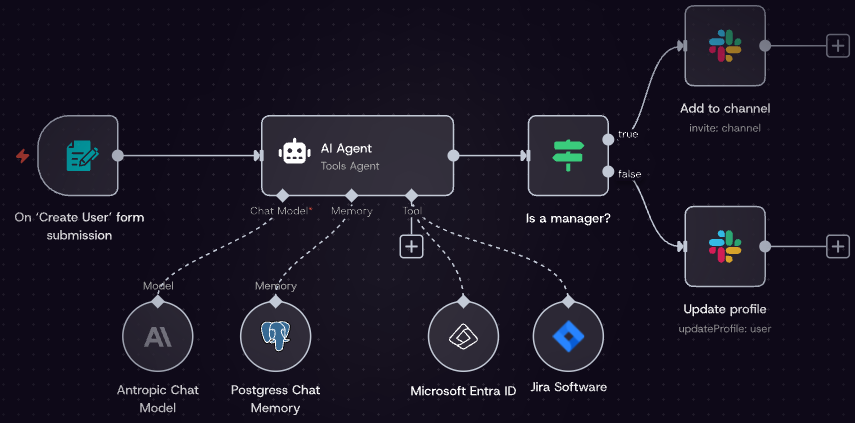
n8n is often used to build flexible, developer-friendly workflows. It sits between traditional automation and agentic systems.
With n8n, you can connect services, define triggers, and incorporate AI models into workflows. For example, you might create a pipeline where incoming emails are analyzed by an AI model, categorized, and then routed to different systems.
Where n8n stands out is control. You can design workflows visually while still customizing logic deeply. This makes it a good fit for teams that want to experiment with AI agents without giving up structure.
Best for:
Teams with technical resources that want flexibility and control over how workflows behave.
It’s especially suited to developers, startups, or operations teams that need custom logic, self-hosting options, or deeper integrations than no-code tools typically allow.
Use case:
A finance team automating invoice processing.
Incoming invoices are captured via email, passed through an AI model for data extraction (NLP), validated against internal records, and then pushed into an accounting system via API. If discrepancies are detected, the workflow branches and notifies a human reviewer.
Zapier
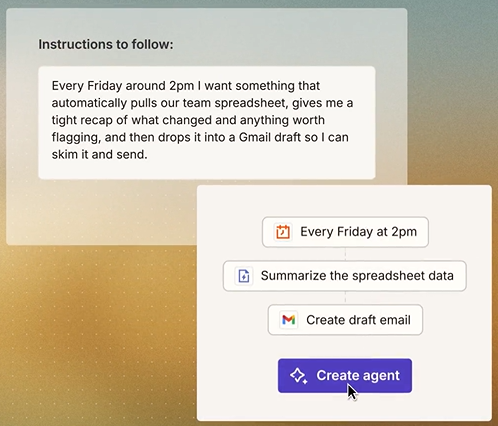
Zapier is more accessible and widely used for business automation. It focuses on ease of use rather than deep customization.
With the addition of AI features, Zapier can now handle tasks like summarizing data, generating responses, or making simple decisions within workflows.
However, it still leans toward predefined logic. While you can integrate AI, it’s not as flexible for complex, adaptive workflows. It works best to develop current automation rather than replacing them with fully agentic systems.
Best for:
Non-technical teams or business users who want fast, reliable automation.
It’s especially strong for marketing, sales, and operations teams that need to connect SaaS tools and add light AI features without managing infrastructure or complex logic.
Use case:
A marketing team automating lead nurturing. When a new lead enters via a landing page, Zapier uses NLP to analyze the lead’s message, classifies intent (e.g., “high purchase intent” vs “general inquiry”), generates a personalized follow-up email using AI, and pushes the lead into a CRM like HubSpot.
If the lead is high priority, it also triggers a Slack notification for the sales team.
Dokmee
Dokmee focuses on document management and process automation, which makes it a strong fit for AI agent-driven workflows, especially in environments where documents are central to operations.
In document-heavy processes such as invoice handling, compliance review, or contract lifecycle management, AI agents can act as an intelligent layer on top of traditional document systems. They can use NLP to extract key fields from unstructured documents, classify document types, and determine what actions should happen next in the workflow.
This is particularly useful when documents vary in format but still follow recognizable patterns, such as invoices from different vendors or contracts with different structures.
Dokmee provides two main approaches to workflow automation.
The first is a drag-and-drop workflow builder, which allows users to design structured processes visually. This is typically used for straightforward routing, approvals, and document movement between departments.
The second is a more advanced builder that allows for deeper customization using code and API integrations. This is where Dokmee starts to support more agent-like behavior, enabling connections to external systems, triggers based on document events, and integration with AI services.
In practice, AI agents in Dokmee workflows often sit between document ingestion and business systems. For example, an incoming invoice can be scanned and processed using OCR combined with NLP to extract relevant fields like vendor name, amount, and due date.
A machine learning model can then validate the data against historical records or purchase orders. If everything matches, the workflow continues automatically via API integration into an accounting system. If discrepancies are detected, the agent can flag the issue, attach contextual reasoning, and route it to a human approver.
What makes Dokmee particularly relevant in the context of agentic workflows is its balance between structure and flexibility. The workflows themselves remain governed and auditable, while AI agents handle the variability inside the process.
Best for:
Organizations that are heavily document-driven and need strong governance alongside automation. It is particularly suited to industries where compliance, auditability, and structured approval processes are critical, such as finance, legal, healthcare, and enterprise operations.
Use case:
An accounts payable workflow where invoices are automatically ingested into Dokmee, processed using OCR and NLP to extract key fields, validated against purchase orders using rule-based checks and machine learning anomaly detection, and then routed for approval.
Matched invoices are pushed into an ERP system via API, while mismatches are flagged with context and sent to a reviewer for resolution.
Where AI Agents Fit in Automation
AI agents don’t replace traditional automation, they extend it.
Rule-based systems are still more reliable for predictable tasks. AI agents are most useful where workflows involve uncertainty, unstructured data, or frequent changes.
They fill the gap between manual work and rigid automation. Instead of forcing processes into strict rules, they adapt to how work actually happens.
The key is balance. Keep deterministic systems where precision matters, and introduce agents where flexibility is needed. Done right, this creates workflows that are both efficient and resilient.


 Christina Miranda

 Christina Miranda
  Christina Miranda