
What Are The Best Laserfiche Alternatives?
 7 min read
 Christina Miranda

Choosing the perfect tool is essential for your document management, check out these 5 Laserfiche alternatives to see if there is a better ECM or DMS for you.
Laserfiche is a good option if you’re looking for an ECM that focuses primarily on process automation.
However, if you need more advanced document management features, you might want to consider these 5 Laserfiche alternatives.
What is Laserfiche?
Laserfiche is an ECM and business process automation that helps you manage your business’ documents and tasks. The tool provides both cloud-based and on-premise deployment.
Like most DMS and ECM solutions, Laserfiche centralizes all your documents in digital file cabinets and uses workflow automation to increase collaboration between different departments.
For these workflows (or other processes) you can access de Laserfiche Marketplace and purchase templates for solutions that other users have successfully used. This can include integrations with Salesforce or DocuSign, templates for accounts payable, contract management systems, etc.
There are 4 features to highlight in this software.
Document and records management
Laserfiche’s document and records management system is the basic of any DMS, this include, storing, organizing, and retaining your files.
It combines AI-powered document processing, storage, and governance. Additionally, it transforms unstructured data, such as scanned files, audio, PDFs, and meeting notes, into organized, searchable, and actionable content.
Laserfiche automatically identifies document types, extracts information, and classifies files into the appropriate categories. The system can generate summaries of lengthy documents to help you save time.
Documents are stored using granular access permissions, version control, and complete audit trails to help you keep transparency and meet regulatory requirements across departments.
Additionally, the system enables records lifecycle management, automatically retaining, archiving, or disposing of files according to compliance policies.
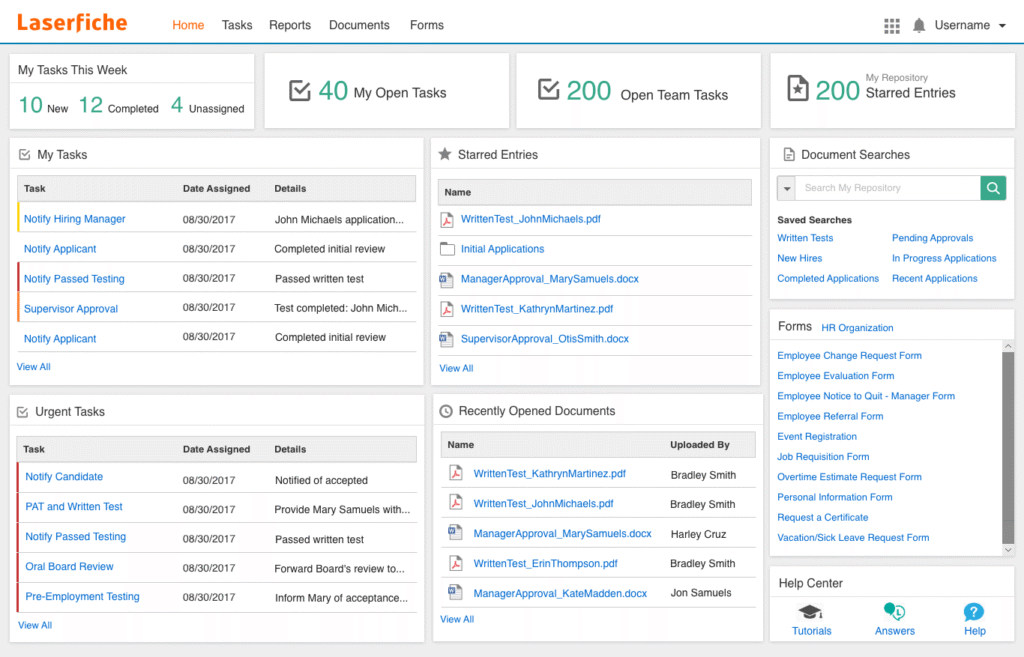
Intelligent data capture
Laserfiche’s intelligent data capture helps you transform unstructured information into usable, structured data.
The system extracts and processes data from multiple sources,such as scanned documents, forms, CRMs, and ERPs. Laserfiche combines AI and no-code to build your workflows.
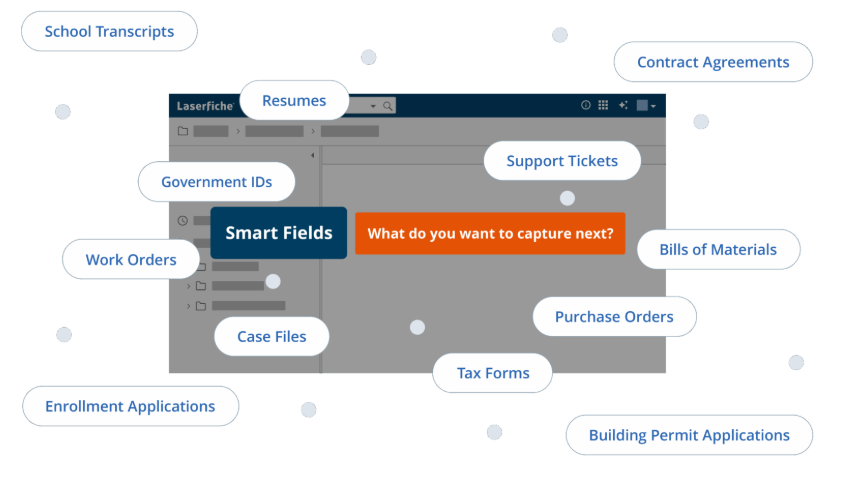
Laserfiche uses AI-powered Smart Fields to automate data recognition and extraction. You can define in natural language what type of information each field should contain, and the system identifies and captures that data from diverse formats, layouts, or file types.
Once information is captured, it is automatically routed into pre-defined workflows for processing, approval, and archiving.
Laserfiche can extract and analyze contract terms for risk identification, collect HR data during onboarding, or match invoices with purchase orders to eliminate payment errors.

Process automation
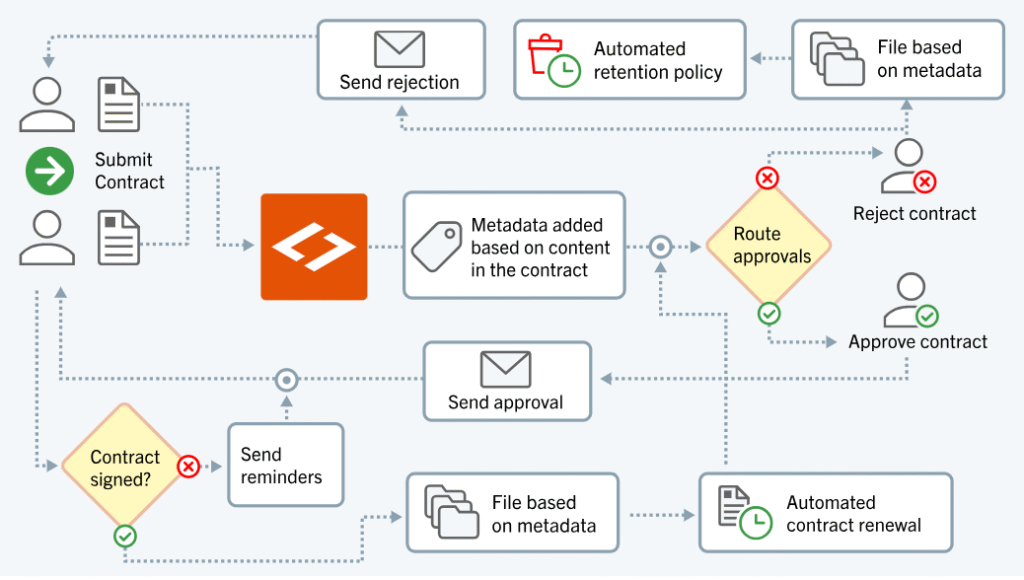
Laserfiche’s process automation automates repetitive processes from start to finish, helping your teams operate more efficiently.
This tool uses a drag-and-drop workflow designer to build automated processes without coding. This low-code environment means your non-technical staff can configure task routing, approval chains, and notifications independently.
Once deployed, workflows ensure consistency by enforcing standardized procedures and compliance rules.
Laserfiche’s process automation also provides real-time visibility and analytics. Managers can track workflow progress, identify bottlenecks, and gather performance metrics to inform operational improvements.
You can use process automation for several use cases, including accounts payable processing, supply chain management, contract review, and employee performance evaluation.
Each solution automates document routing, approvals, and archiving.
Laserfiche connects to existing enterprise systems through pre-built connectors, APIs, and iPaaS platforms, so you can implement data from CRMs, ERPs, and HR tools.
Laserfiche 12
Laserfiche 12 introduces new AI-powered features and automation tools that enhance document capture, process, and information management.
This release focuses on making document management smarter and more intuitive through technologies like intelligent data capture, customizable workflows, and advanced metadata management.
With both cloud and self-hosted options, Laserfiche 12 continues to support flexibility and scalability for organizations across industries such as government, education, finance, and healthcare.
This release uses Smart Fields, an AI-driven intelligent document capture tool that represents one of Laserfiche’s most powerful innovations to date.
Smart Fields allow users to extract information from virtually any document type, including handwritten forms, line-item tables, and multilingual text, using simple natural language prompts.
You can describe the type of data you want to capture, and the system automatically configures the fields and templates needed. Once set up, Smart Fields can extract metadata in a single click or run as part of a fully automated workflow, eliminating manual data entry and significantly reducing processing time.
Laserfiche 12 also uses customizable AI integration within its Workflow engine so you can connect your own large language models (LLMs) to automate complex or undefined business processes.
There is also an out-of-office task reassignment feature for its Forms module.
When your team members mark themselves unavailable, workflow tasks are automatically reassigned to other members, preventing delays and ensuring processes continue without disruption.
The release further enhances metadata management with new Repository Field Formulas, which allow you to perform calculations, apply logical conditions, or manipulate text directly within metadata fields.
When Is Laserfiche a Good Option?
Laserfiche is a great option if your organization requires high-level document control, workflow automation, and compliance management.
It’s particularly effective for:
- Public institutions and governments who need to manage large volumes of records under strict retention laws.
- Educational institutions that need secure student information management.
- Financial and healthcare organizations that must adhere to regulatory standards while improving document accessibility.
However, Laserfiche can be complex and costly for smaller teams or businesses that only need basic document storage and workflow tools.
Its enterprise-level capabilities may exceed the needs (and budgets) of organizations who are looking for a lightweight, user-friendly DMS.
5 Best Alternatives to Laserfiche
We have gathered 5 of our favorite DMS and ECM solutions for you.
| Software | Best For | Best Features | Strengths | Limitations |
|---|---|---|---|---|
| Dokmee | SMBs and enterprises | OCR, e-forms, customizable workflows, metadata indexing | Affordable, flexible, scalable | Fewer built-in analytics |
| OpenText | Large enterprises, regulated sectors | Content lifecycle, AI analytics, SAP/Oracle integration | Enterprise compliance & scalability | Complex, high cost |
| FileHold | Mid-sized organizations | Versioning, search, workflow automation, e-signatures | Intuitive, modular, affordable | Limited AI capabilities |
| DocStar | SMBs to mid-sized firms | OCR, ERP integrations, e-forms, workflow builder | User-friendly, strong automation | Moderate compliance tools |
| NetDocuments | Legal & financial industries | Secure cloud, encryption, collaboration tools | Superior governance, version control | Rigid UI, less customization |
1. Dokmee
⭐⭐⭐⭐⭐ Ratings
G2 4.5/5 | Capterra 4.7/5
Overview
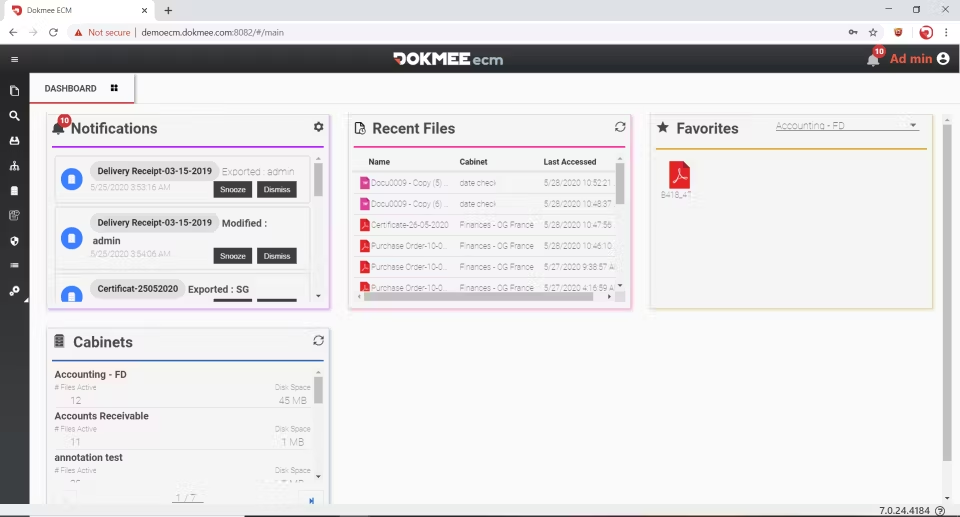
Dokmee is a DMS and ECM that offers powerful document management, automated file retention, workflow automation and document capture for businesses of all sizes.
The greatest advantage of Dokmee over Laserfiche is that it is fully customizable.
This customization applies to workflows (both coded and no-code), security roles and permissions, metadata tagging, deployment… Plus, you can add features such as capture or E-Forms as need be.
Your documents can also be edited or signed directly from the software and its version control guarantees that the most recent version will always be available, while you can check all edits in the audit trails.
When should you choose Dokmee?
Choose Dokmee if you need a highly customizable, budget-friendly DMS with enterprise-grade features but simpler deployment.
It’s ideal for growing organizations who are looking for strong OCR, role-based access, and full control over workflow automation, without the enterprise cost of Laserfiche.
2. OpenText Content Management
⭐⭐⭐⭐ Ratings
G2 4.4/5 | Capterra 3.8/5
Overview
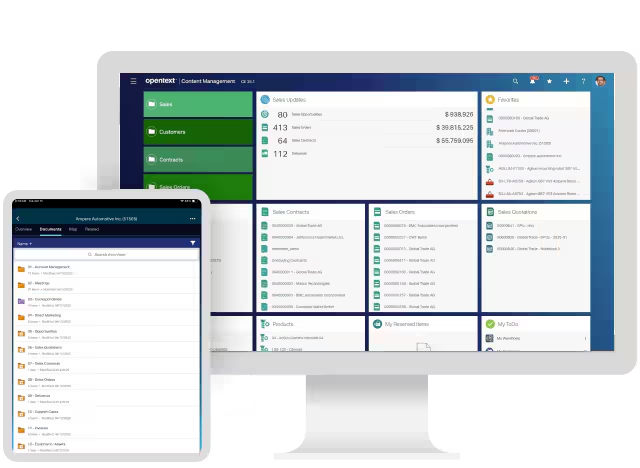
OpenText Content Management (Extended ECM) stores, manages and accesses your documents with strict governance and compliance standards.
OpenText integrates with major enterprise systems such as SAP, Salesforce, Microsoft 365, and Guidewire, so you can collaborate in real time and access the information you need directly from your toolset.
It offers deeper system integrations and AI-powered search than Laserfiche. It offers a built-in content assistant to locate, summarize, and recommend documents.
This alternative offers a complete content lifecycle solution that supports digital transformation at scale. It ensures that information remains secure, compliant, and easily accessible.
OpenText stands out as a powerful alternative to Laserfiche for enterprises who need deeper system integration, enterprise-grade scalability, and AI-enhanced document intelligence.
When should you choose OpenText?
Choose OpenText if your organization requires enterprise-level scalability, data governance, and integration with existing ERP systems.
It’s a good choice for corporations in regulated industries such as finance, energy, and government that need tight control over information and strict compliance adherence.
3. FileHold
⭐⭐⭐⭐⭐ Ratings
G2 4.6/5 | Capterra 4.7/5
Overview
FileHold is more of a lightweight DMS that is still easy to use and scalable.
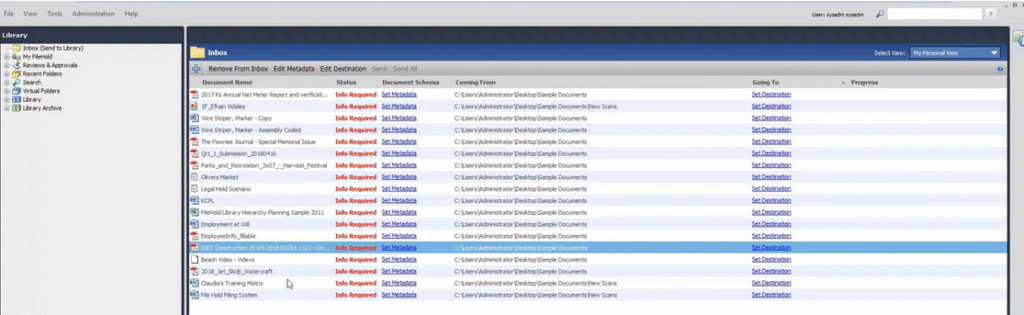
It includes document capture, version control, workflow automation, and advanced search using metadata tagging and indexing.
Like Dokmee, it offers a modular architecture where you can add records management, e-signatures, or portal access for external users.
FileHold is a cost-effective and highly reliable alternative to Laserfiche is you don’t need advances process automation, although it does combine document control with intuitive workflow automation.
This tool is flexible and accessible thanks to FileHold Cloud, where you can implement and manafe a fully supported document management system.
It provides regular backups, updates, and maintenance, allowing even small to mid-sized organizations to enjoy enterprise-level functionality without having to upkeep expensive infrastructure.
FileHold also offers document workflow automation and electronic form management. Through its Customer Forms Portal, you can create, fill, and distribute forms digitally with features such as auto-filling, categorization, reminders, and automated routing for signatures, approvals, and reviews.
This makes FileHold particularly effective for HR, procurement, and administrative teams that rely on structured document workflows.
When should you choose FileHold?
Choose FileHold if you’re a mid-sized business looking for a user-friendly and affordable DMS that still delivers enterprise-grade control.
It’s a good option for organizations who want to automate document routing and collaboration while maintaining a simple, scalable structure.
4. DocStar
⭐⭐⭐⭐ Ratings
G2 3.8/5 | Capterra 4/5
Overview
DocStar is an ECM designed for most business sizes and integrates well with accounting systems such as Sage and QuickBooks. It is considered to be a stronger and more accessible alternative to Laserfiche.
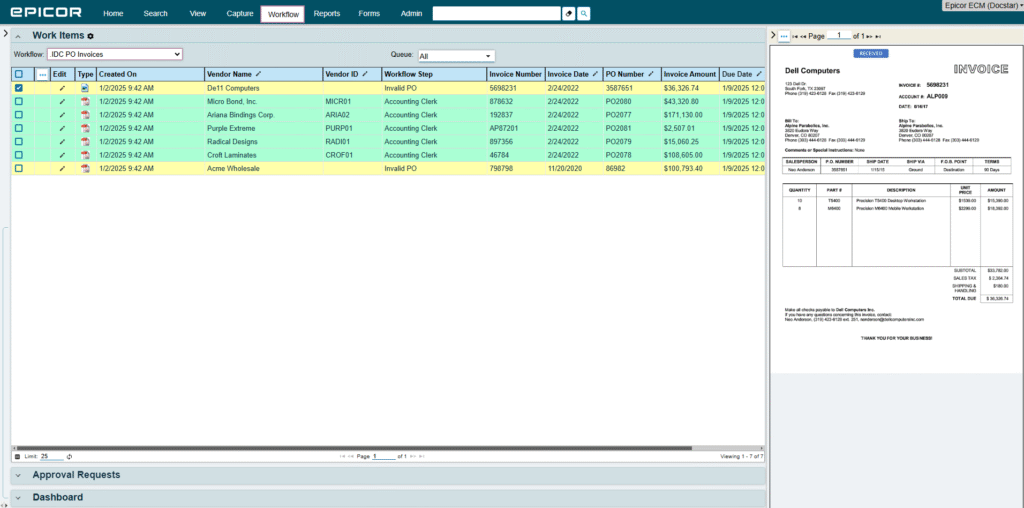
The platform combines document management, data capture, and workflow automation to manage the entire content lifecycle, from document creation to archival.
DocStar’s advanced data capture and extraction engine, automates the collection and processing of information from multiple document types, reducing manual entry to ensure higher data accuracy.
This tool is particularly useful for departments such as accounts payable, HR, and contract management.
Unlike Laserfiche, which targets larger enterprises with complex ECM infrastructures, DocStar’s strength lies in its flexibility and integration options. It connects with leading ERP systems, including Epicor, Microsoft Dynamics, and Sage.
DocStar combines the functionality of Laserfiche with greater usability and deployment flexibility, making it an decent choice for organizations who are looking for scalable, data-driven, and automation-focused document management without the high complexity and cost of a full enterprise ECM suite.
When should you choose DocStar?
Choose DocStar if you want a comprehensive yet accessible DMS.
It’s best for organizations who want strong workflow automation and OCR capabilities without the enterprise-level cost and complexity of Laserfiche.
Particularly suited to finance, logistics, and HR departments that need faster approval cycles and document transparency.
5. NetDocuments
⭐⭐⭐⭐ Ratings
G2 3.7/5 | Capterra 4.2/5
Overview
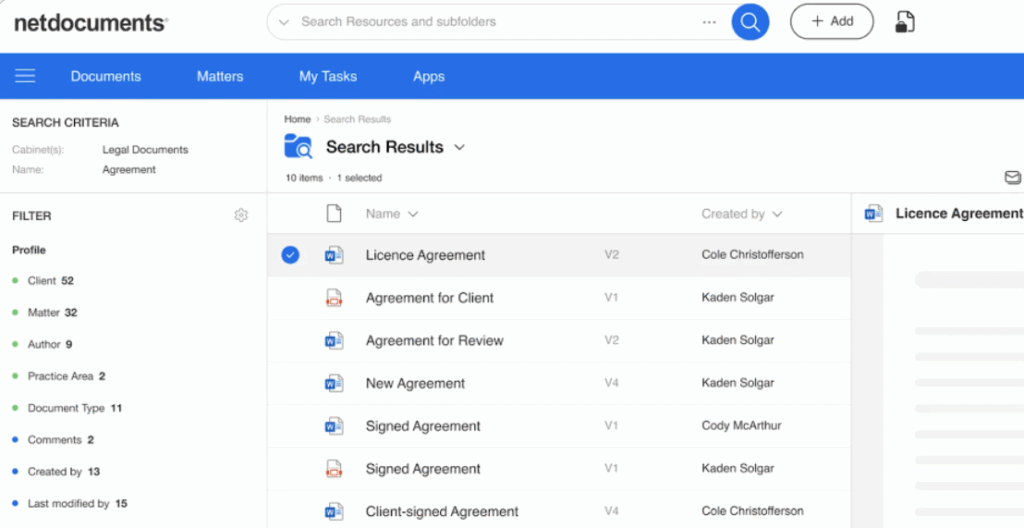
NetDocuments is a cloud-native document and email management platform built around security, compliance, and collaboration.
Commonly used in legal, accounting, and professional services, it provides SOC 2 Type II certification, encrypted storage, granular access controls, and built-in workflow and version management.
Where Laserfiche provides a broad ECM suited for multiple industries, NetDocuments focuses deeply on legal and compliance-driven workflows.
Its intelligent DMS automates your daily operations such as document versioning, bundling, and email management, while AI tools help you extract insights, generate summaries, and automate drafting and review tasks.
NetDocuments offers deep collaboration and mobility features.
You can securely co-author, edit, and share documents in real time using tools like Microsoft Teams integration.
Built-in security layers, such as data loss prevention, ethical walls, encryption, and detailed audit trails, help legal firms comply with stringent confidentiality and client data standards.
Compared to Laserfiche, it offers a more specialized environment tailored to professional services and legal workflows, emphasizing user experience, system reliability, and seamless collaboration.
When should you choose NetDocuments?
Choose NetDocuments if you work in heavily regulated or client-sensitive industries that prioritize data protection and governance, such as legal firms.
It’s a great alternative to Laserfiche if you seek compliance and security above customization, especially in distributed work environments.
How can I choose the perfect ECM?
The perfect tool will depend greatly on your needs.
If you’re looking for full customization, advanced OCR, and flexible workflows choose Dokmee.
If you need deep system integration and enterprise-level scalability, choose OpenText
If you prefer a simple, affordable, and user-friendly DMS, choose FileHold.
If your focus is on flexible automation and accounting or HR integrations, choose DocStar.
If you work in legal, financial, or highly regulated industries, choose NetDocuments.
Laserfiche is a good option for organizations who prioritize process automation and compliance.
However, if you need more specialized, flexible, or cost-effective document management, these five alternatives provide powerful solutions.
If you’re ready to make a change, contact Dokmee today.
Get in Touch with Our
Enterprise ECM Experts
Schedule Your Free Demo—Anytime, Anywhere
Experience enterprise-grade ECM with zero hidden fees and instant ROI:
- Instant 24-hour callback—you choose the time.
- Tailored to your workflows—no cookie-cutter pitches.
- ROI in 60 days—most enterprises recoup costs fast.
“Dokmee cut our retrieval time by 70%—we saw ROI in 45 days.”
Chad P., CTO