Full 2026 Laserfiche Review
Written by Christina Miranda · Reviewed by  Dokmee
In this Laserfiche review, we cover features, pros, and cons to help you decide if its powerful but complex system is right for you, or if a modern alternative is better.
Laserfiche is one of the most established ECM platforms in the market.
Since its launch in 1987, the platform has evolved from a document repository into a full ECM platform.
Laserfiche has expanded its cloud capabilities and introduced AI-powered features to improve document capture, search, and process automation.
But does that make it the right choice for you?
In this Laserfiche review, we'll examine its features, strengths, limitations, and the types of organizations that benefit most from the platform.
What is Laserfiche?
Laserfiche is an ECM platform that carries out the main enterprise content management tasks, such as capture, secure storage, and workflow automation.
Beyond document storage, the platform combines:
Document management
Workflow automation
Electronic forms
Intelligent document capture
Records management
Process orchestration
Information governance
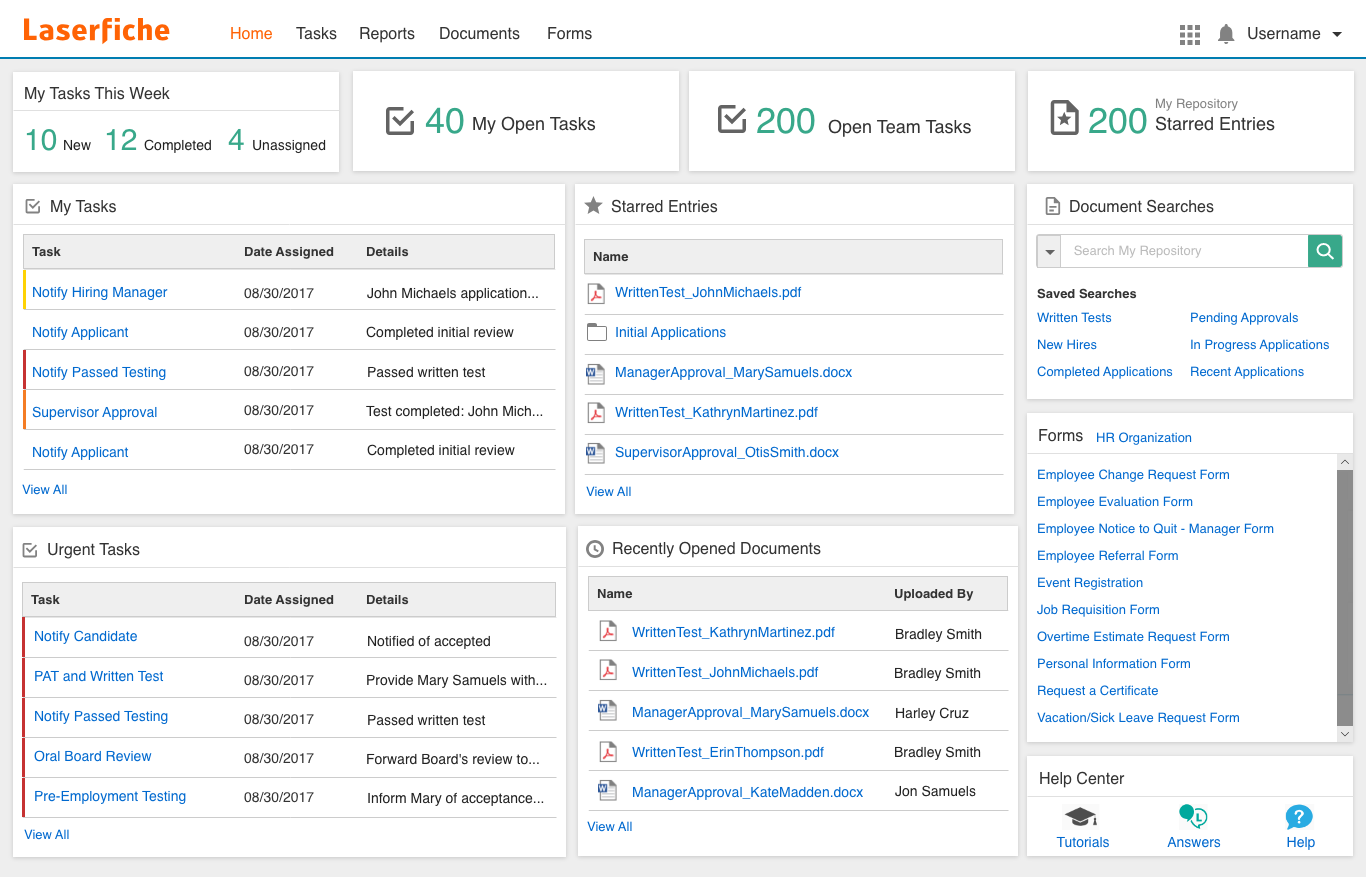
Laserfiche has traditionally been strongest in highly regulated industries including government, higher education, financial services, healthcare, manufacturing, and public sector organizations where compliance, retention policies, and auditability are critical.
The platform is available as both Laserfiche Cloud and self-managed deployments, so you can choose freely between cloud or on-premises infrastructure depending on your requirements.
Laserfiche automates document-centric business processes with low-code tools. This automation allows you to build workflows for invoice approvals, employee onboarding, contract routing, permit applications, HR requests, records requests, and other operational processes.
More recently, Laserfiche has been investing heavily in AI capabilities that reduce manual document processing and improve information retrieval.
Who is Laserfiche for?
Laserfiche is designed primarily for medium to large organizations that manage large document volumes, complex workflows, and strict compliance requirements.
Typical users include:
Government and public sector
Government agencies use Laserfiche to manage public records, permits, citizen requests, policy documents, and records retention while maintaining detailed audit trails.
Higher education
Universities use Laserfiche to automate admissions, financial aid, HR, procurement, student records, and faculty workflows across multiple departments.
Financial services
Financial institutions benefit from approval workflows, document retention, compliance controls, and secure document management for audits and regulatory requirements.
Healthcare
Healthcare providers use Laserfiche to manage administrative documentation, HR records, contracts, and operational workflows while supporting governance requirements.
Large enterprises
Organizations with multi-step approval processes across finance, procurement, legal, and operations often choose Laserfiche for its mature workflow automation capabilities.
Smaller businesses with straightforward document storage needs may find that the platform has unnecessary features for their document-load. Particularly if they do not require advanced workflow automation or enterprise governance features.
Laserfiche Features
Laserfiche offers a broad feature set that extends well beyond traditional document management. Its strongest capabilities lie in workflow automation, governance, and enterprise process management.
Document Management
Laserfiche offers mature document management functionality with strong support for enterprise repositories.
Some basic features you can find include:
Version control
Metadata management
Folder structures
Advanced permissions
Document check-in/check-out
Full-text search
Audit history
The platform handles large repositories efficiently and provides flexible ways to organise information.
Compared with newer cloud-first document management systems, however, the interface can feel more administrative and structured, particularly for casual business users who primarily want fast document retrieval and collaboration.
Process Automation
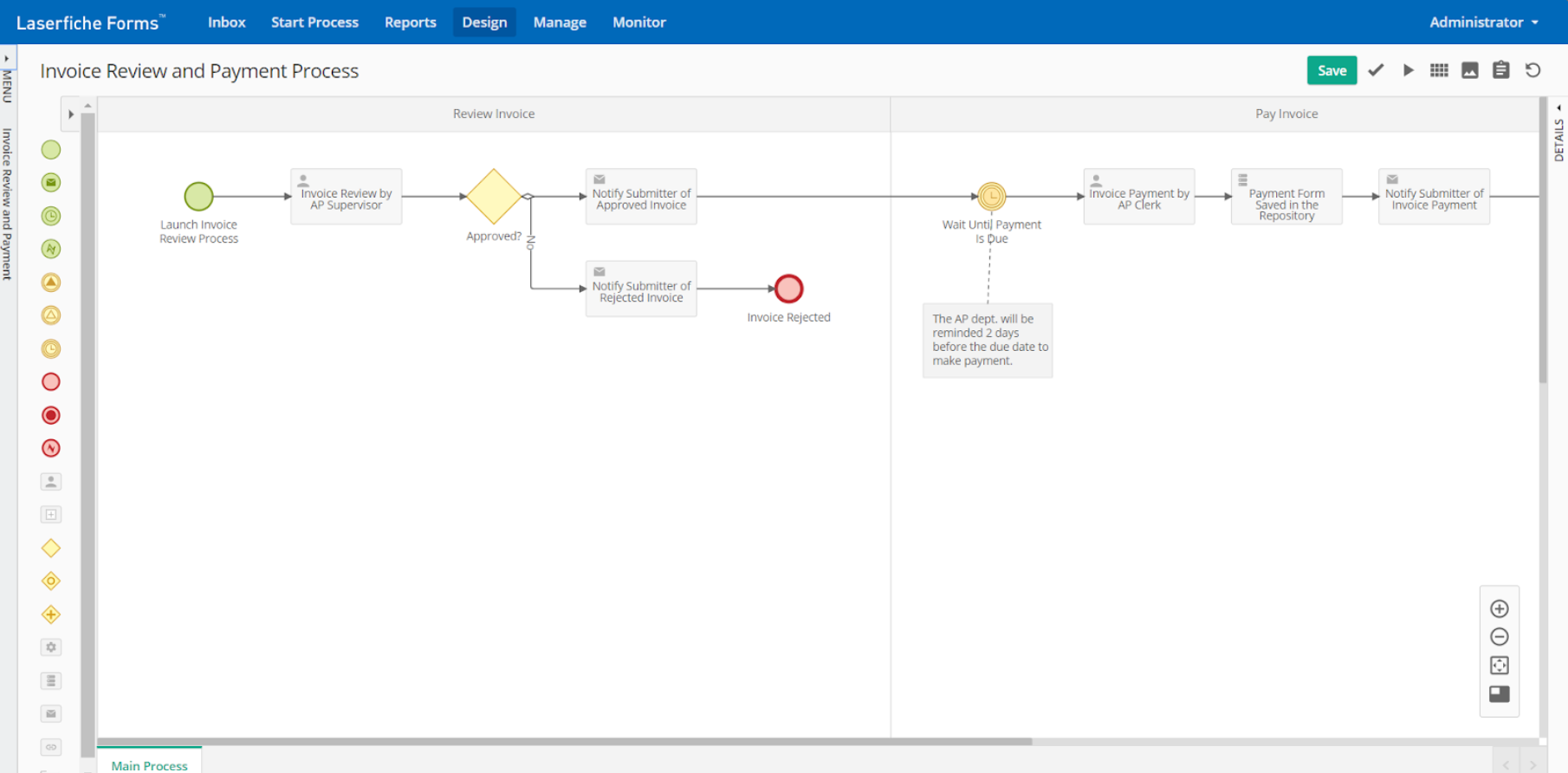
Process automation works with a low-code workflow designer where you can automate document routing, approvals, notifications, data validation, and business rules across departments.
Workflows can integrate with forms, repositories, metadata, and external business systems to create end-to-end automated processes.
Recent platform updates have also expanded automation through AI-powered document classification and metadata extraction, reducing manual work during document intake.
While powerful, building sophisticated workflows still requires planning and administrator expertise. Organizations with dedicated IT or business analysts typically get the most value from the platform.
Intelligent Data Capture
Laserfiche supports:
OCR for searchable documents
Barcode recognition
Metadata extraction
Automated document classification
Smart Fields for AI-assisted metadata capture
Batch document processing
The newer AI-assisted capture features reduce manual indexing by identifying document types and extracting relevant business information automatically.
Accuracy is generally high for structured documents, although organizations often need to configure templates and validation rules to achieve optimal performance for more complex document types.
AI Agents
One of Laserfiche's most significant recent additions is its expanding AI Agents.
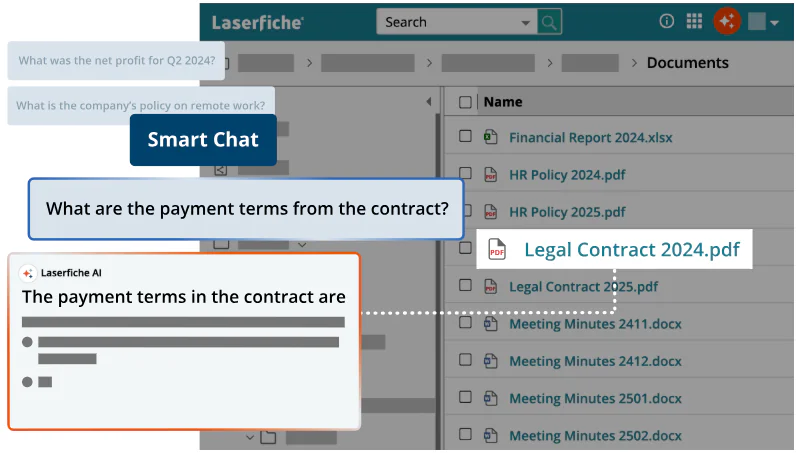
The platform now includes AI-powered search capabilities that allow users to locate information using natural language rather than relying solely on folder structures or metadata.
Laserfiche has also introduced AI assistants that can summarize documents, answer questions about repository content, and help users locate relevant information more efficiently.
These features improve productivity, particularly for organisations managing large document repositories, although effectiveness depends on repository quality, metadata, and permissions.
Smart Fields automatically extract key information from incoming documents and convert it into structured metadata.
Laserfiche’s AI can classify documents, apply metadata, assign repository templates, and identify sensitive content for appropriate security controls.
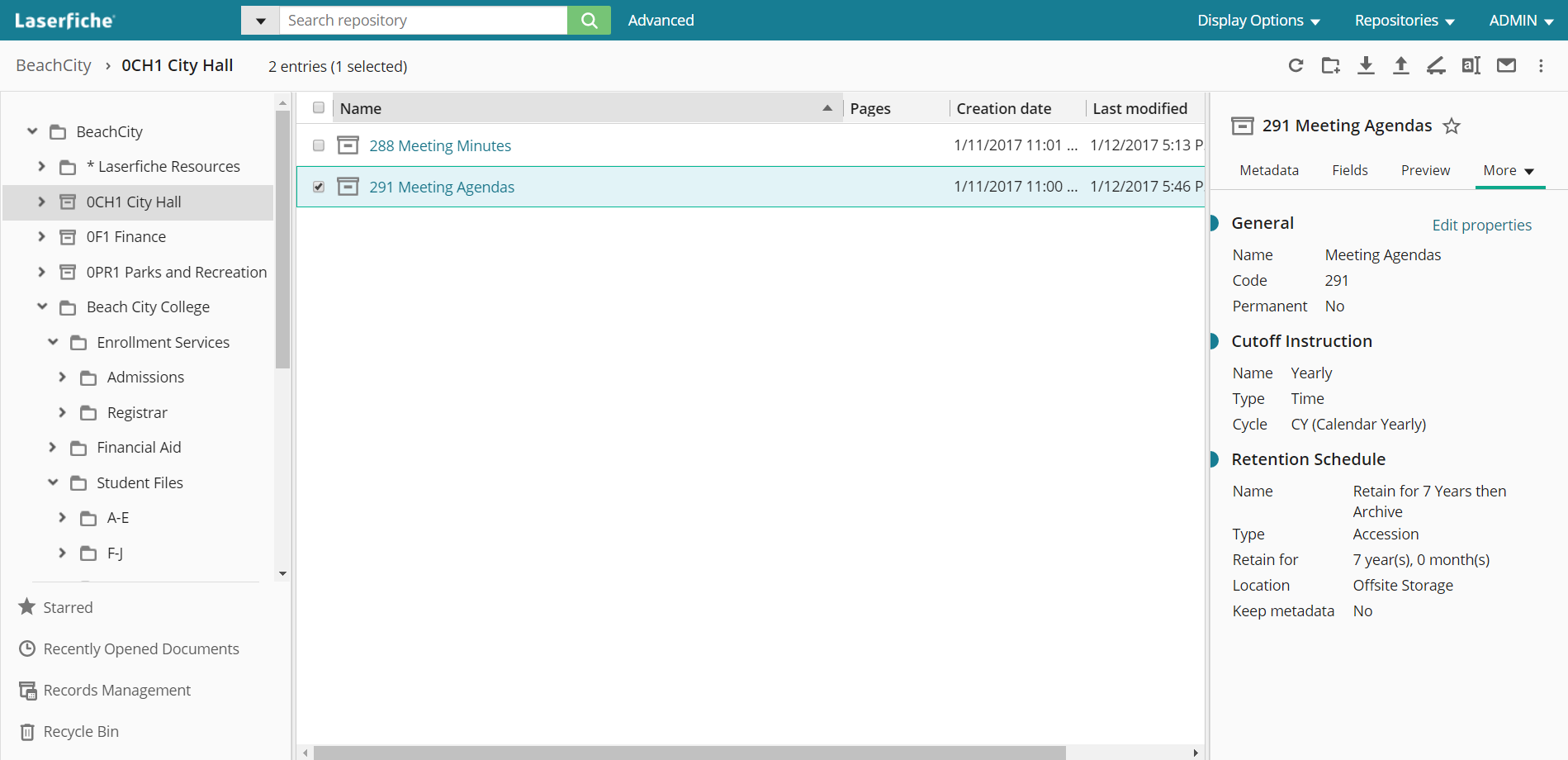
Records Management and Governance
Laserfiche provides comprehensive governance features including:
Retention schedules
Legal holds
Records disposition
Audit trails
Version history
Security permissions
Compliance reporting
These capabilities make the platform particularly attractive to highly regulated industries where information lifecycle management is a business requirement rather than a convenience.
The trade-off is complexity. Administrators have to invest time configuring policies, security models, and retention schedules to fully leverage these capabilities.
Pricing
Laserfiche offers several cloud subscription tiers designed for organizations of different sizes, with pricing based on the number of users and the level of functionality required.
The platform also continues to offer self-managed (on-premises) deployments, although pricing for those editions is available through quotation only.
Plan | Starting price | Number of users |
|---|---|---|
Professional | $73/user/month (billed annually) | Starts at 5 users. |
Business | $93/user/month (billed annually) | Starts at 25 users. |
Business+ | $42/user/month (billed annually) | Starts at 500 users. |
Each subscription includes document management, workflow automation, electronic forms, Microsoft 365 integration, and Laserfiche AI capabilities such as AI Agents and Smart Fields.
Higher-tier plans increase storage, AI usage allowances, API limits, and add governance and security features such as records lifecycle management, advanced audit trails, SCIM provisioning, and disaster recovery.
Some features like Vault (WORM storage), Participant Users, and certain integrationa, are available as optional add-ons rather than being included in every plan.
Implementation services and professional consulting are not included in the subscription prices and may represent an additional cost depending on the complexity of the deployment.
Laserfiche User Reviews
⭐⭐⭐⭐⭐
G2 4.7/5 | Capterra 4.5/5 | Gartner 4.7/5
Laserfiche is consistently well rated across major review platforms, particularly by enterprise organisations with complex document management and compliance requirements.
Most positive reviews focus on its automation and governance capabilities, while criticisms tend to centre on complexity, implementation, and cost.
Pros
Highly configurable workflows, forms, metadata, and business rules to support complex organisational requirements
Strong records management, audit trails, retention schedules, and compliance features
Version control, OCR, metadata, and advanced search capabilities
Reliable and scalable platform suitable for managing large document repositories
Responsive customer support with a comprehensive knowledge base
Cons
Steep learning curve for configuration of workflows, security permissions, and repositories
Implementation often requires dedicated IT resources or experienced Laserfiche administrators
Laserfiche Cloud may not yet offer full feature parity with self-managed deployments for some advanced use cases
Premium pricing can become expensive as organisations add users, automation capabilities, and additional modules
Licensing structure can be difficult to understand, making total cost of ownership less predictable
Best alternative to Laserfiche
The best alternative to Laserfiche would be Dokmee.
Both Laserfiche and Dokmee offer comprehensive document management capabilities, including document capture, workflow automation, security controls, and compliance features.
However, they target different types of organizations and deployment needs.
Laserfiche is primarily designed for medium to large enterprises with complex business processes, extensive governance requirements, and dedicated IT resources.
Dokmee offers many of the same core document management capabilities in a platform that is generally easier to deploy, administer, and adopt, making it well suited to organizations looking for enterprise functionality without the overhead of a large ECM implementation.
Feature | Laserfiche | Dokmee |
|---|---|---|
Document Management | Version control, metadata, search, repositories | Version control, metadata, OCR, AI search |
Document Capture | OCR, Smart Fields, AI-assisted classification | OCR, AI-assisted indexing and document capture |
Workflow Automation | Low-code workflow designer for complex business processes | Visual workflow designer with configurable automation |
Electronic Forms | Integrated forms with workflow automation | Built-in eForms and workflow integration |
AI Features | AI Agents, Smart Fields, Smart Chat, document summarization | AI Search, AI Document Summary, AI-assisted indexing |
Security & Compliance | Granular permissions, records management, audit trails | Role-based permissions, audit trails, retention policies |
Integrations | Microsoft 365, Salesforce, Dynamics, APIs, Boomi | Microsoft 365, Outlook, QuickBooks, APIs |
Deployment | Cloud and self-managed | Cloud, on-premises, and hybrid |
Implementation | Often requires planning and dedicated administration | Generally faster to deploy and easier to administer |
Pricing | Starts at $73 per user | Starts at $39 per user |
Best For | Large enterprises | Small to mid-sized organizations and enterprises |
Laserfiche is a strong choice for organizations with complex governance requirements, large-scale workflow automation, and dedicated administrators.
Dokmee is better suited to organizations that need robust document management, automation, and compliance features in a platform that is typically quicker to implement and easier for business users to manage.
Check out more Laserfiche alternatives
Choose the best DMS for your business
Laserfiche remains one of the most capable ECM platforms on the market.
Its strengths lie in workflow automation, records management, compliance, and information governance, making it a strong option for government agencies, higher education, healthcare, financial services, etc.
That level of functionality, however, comes with greater implementation effort, ongoing administration, and higher licensing costs.
If you don't require enterprise-scale governance or highly customized workflows, the platform may offer more complexity than necessary.
If your priority is secure document management, intelligent document capture, workflow automation, and AI-powered productivity in a platform that's easier to deploy and manage, Dokmee is a compelling alternative.
It delivers the core capabilities most organizations need while providing flexible deployment options, transparent pricing, and an intuitive user experience that helps teams become productive faster.
Ready to compare your options?
Book a free demo now.