Full Box DMS Review for 2026: Features, AI, Pros, and Cons
20 Jan. 2026
6 min read
By Christina Miranda
With this Box DMS review, we help you decide if it is right for your business. Explore Box AI, workflows, e-signatures, user feedback, and top alternatives.
DMS platforms have evolved into much more than storing files.
You need automation, workflows, security, and collaboration tools to name a few.
In this Box DMS review we will analyze the features and AI capabilities this platform offers for large organizations and enterprise.
We have tracked down the pros, the cons, and the best alternative so you don’t have to.
What is Box DMS?
Box DMS is a cloud-based document management system and intelligent content platform that incportates its own AI, Box AI.
The DMS can store, manage, share, and govern your digital content, but also combines collaboration, automation, security, and compliance capabilities, making it a good choice if you handle sensitive information.
Box centralizes documents such as contracts, financial records, HR files, marketing assets, project documentation, and compliance materials into a single, cloud-accessible platform.
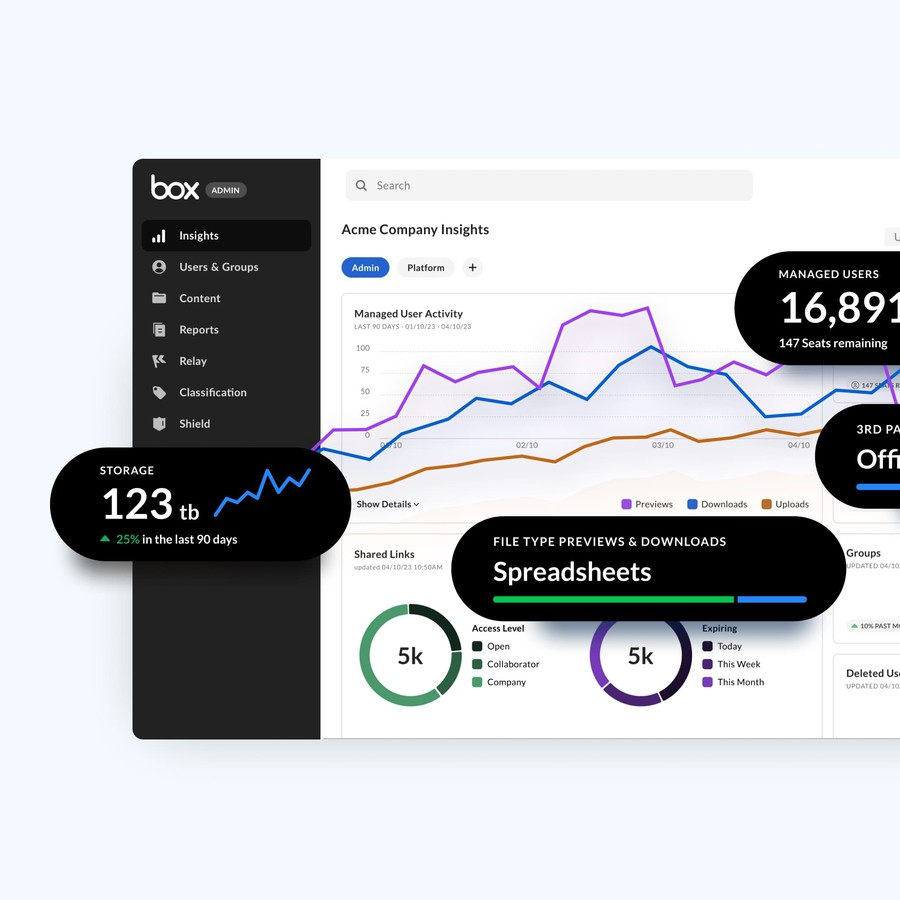
Intelligent content management features, powered by metadata, automation, and AI-assisted tools, allow you to classify content, extract information, apply governance rules, and automate workflows.
Box is commonly used for secure file sharing and collaboration across distributed teams.
Employees can access documents from anywhere, collaborate in real time, manage versions, and track changes without relying on email attachments or disconnected file servers. This makes it a useful ocument management system for hybrid and remote work environments.
The platform is also widely adopted for content governance and compliance.
Box provides tools for access control, encryption, audit logs, retention policies, and legal holds, supporting regulatory requirements in industries such as finance, healthcare, legal services, and technology.
Box integrates with business applications and offers automation features that support document approvals, contract routing, onboarding processes, and records management.
By embedding workflows directly into content operations, it helps you speed up business processes.
Who Is Box DMS For?
Box DMS is best suited for mid-sized to large enterprises that require scalable, cloud-native content management with strong collaboration and security capabilities.
It offers a subscription-based model, with integrations, and governance features so it’s a good choice if you have complex content needs and distributed workforces.
From a departmental perspective, Box is commonly used by IT teams for centralized content governance and security, legal departments for contract and document control, HR teams for employee records and onboarding documentation, finance teams for secure handling of financial documents, and sales and marketing teams to manage proposals, presentations, and digital assets.
Best Features in Box DMS
Below you can find a selection of what we consider are the best Box features. Although the platform offers many more.
Native E-Signature
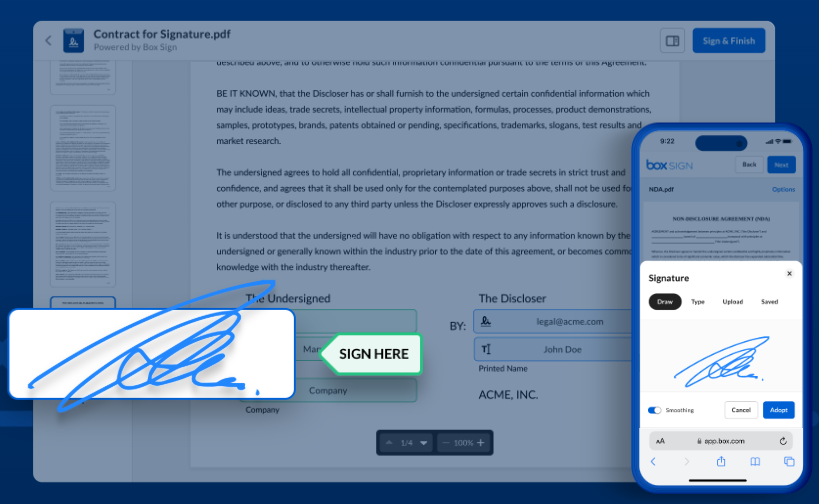
Box Sign is Box’s native electronic signature feature, built directly into the Box Intelligent Content Management platform.
It allows you to request and collect legally binding electronic signatures without leaving the app. You can send unlimited signature requests at no additional cost.
Documents can be prepared, sent for signature, signed, and stored within the same secure content repository. This approach reduces versioning issues, minimizes manual handoffs, and allows signed agreements to remain governed by the same retention policies as other business content.
Box Sign also supports workflow integration with third-party business applications, so you can initiate signature requests from commonly used platforms such as CRM, ERP, automation, and collaboration tools. Integrations with systems like Salesforce, NetSuite, HubSpot, Appian, UiPath, and Slack Workflow Builder allow e-signatures to be embedded into existing business processes.
Box Sign is further enhanced by Box AI, which helps automate and simplify e-signature workflows.
AI-driven metadata extraction and document analysis can be used to route documents for review, trigger signature requests, summarize signed agreements, and surface insights from complex contracts.
Sales teams use Box Sign to speed up deal closures, HR departments streamline hiring and onboarding, legal teams standardize contracts and reduce risk, marketing teams manage agency agreements, and finance teams handle approvals and audits with greater visibility.
Automated workflows
Box Intelligent Workflows are designed to automate and optimize content-centric business processes at scale.
Box embeds automation directly into the content layer, so you can connect documents, data, people, and systems within a single environment.
You can automate repeatable tasks such as content reviews, approvals, onboarding, and contract routing using Box Relay, a no-code workflow engine that provides triggers, conditions, and outcomes.
Prebuilt templates allow you to get started quickly, while configurable logic supports more complex, multi-step processes. By reducing manual handoffs and standardizing execution, Box helps reduce errors, shorten cycle times, and improve operational efficiency.
Box extends traditional workflow automation through agentic and AI-driven capabilities, delivered via Box Automate.
This functionality combines drag-and-drop workflow design with intelligent services such as data extraction, document analysis, file-based Q&A, and content generation.
You can also create and deploy custom Box AI agents that assist with decision-making and task execution. These capabilities are designed to help teams work more efficiently with large volumes of unstructured content while enabling faster, more informed actions.
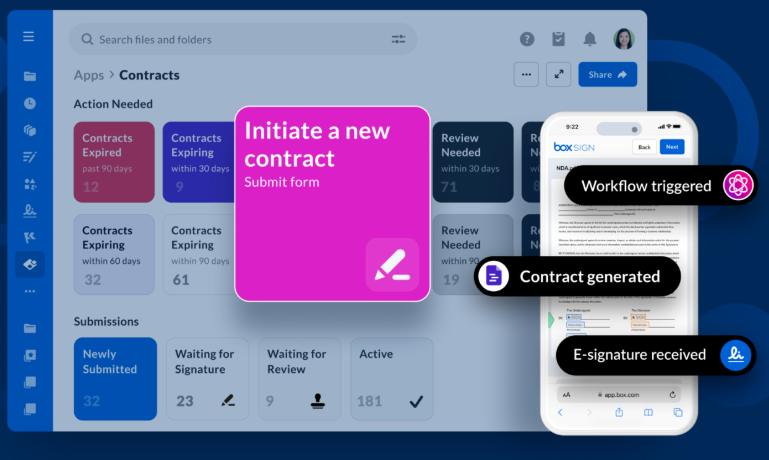
Additionally, with Box Apps you can tailor content experiences through customizable dashboards, metadata views, and role-specific interfaces.
It can be used by sales teams to speed up deal cycles through form-initiated agreements and automated contract generation.
Operations teams benefit from AI-enriched metadata and actionable workflows that improve process visibility. HR departments streamline recruiting, offer management, and onboarding, while legal teams manage contracts at scale with automated intake, classification, and review processes.
Content Platform
Box Content Platform is the foundational layer of the Box ecosystem. Basically, it provides an infrastructure built with integrations that supports both structured and unstructured data at scale, enabling organizations to build, customize, and connect content-driven experiences across their technology stack.
At the infrastructure level, the Box Content Platform is engineered to handle large-scale enterprise workloads, supporting terabytes of data across virtually any file type.
Content is protected through end-to-end encryption, multi-region redundancy, and enterprise-grade security controls designed to meet stringent regulatory and compliance requirements.
Box allows you to embed AI directly into content workflows and other apps. Through Box AI and agent-based services, developers can access advanced AI capabilities via APIs without needing to manage underlying complexities such as retrieval-augmented generation (RAG), vector embeddings, or model orchestration.
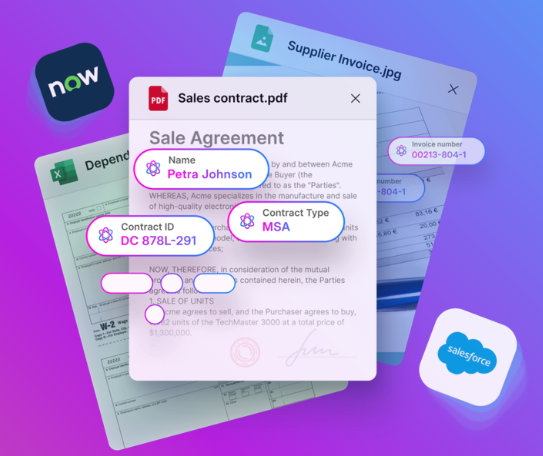
Box AI also enables context extraction from unstructured content, transforming documents into structured, actionable data.
Intelligent extraction agents analyze files to identify key entities, themes, and insights, storing this information as metadata that can be reused across workflows and applications.
The Box Content Platform serves as a unique intelligent content management foundation that combines scalability, extensibility, AI enablement, and enterprise-grade security.
Box AI Agents
Box AI Agents are built into the Box AI content intelligent platform and their aim is to extract value from unstructured data.
These agents use reasoning, context, and access controls to analyze content stored in Box to incorporate them into business workflows while governance policies.
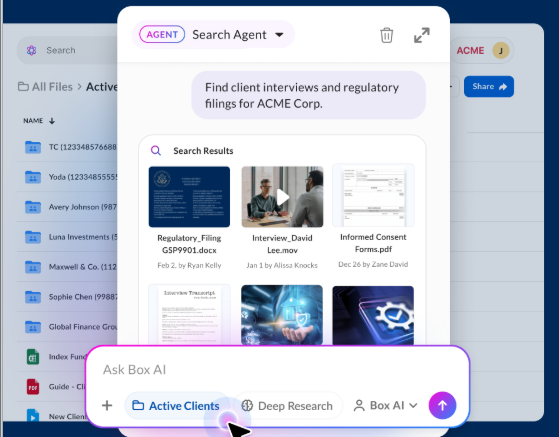
Box AI Agents is an agentic reasoning framework that allows them to perform complex tasks in a structured and controlled manner. Each agent follows a dynamic process that includes understanding the user’s goal, securely discovering relevant content within Box, reasoning over that information, and producing an output or triggering an action.
Box AI Agents support a growing range of capabilities, including intelligent search, contextual question-and-answer, content composition, and extraction of key information from documents.
Extract Agents can identify important facts, dates, and themes within unstructured files and convert them into structured metadata, which can then be used to drive workflows and decision-making.
Box AI Agents can integrate with enterprise tools such as Microsoft 365 Copilot, allowing users to analyze and summarize Box content directly within applications like Teams, Word, PowerPoint, and Copilot Chat.
User’s Reviews
⭐⭐⭐⭐⭐ Ratings
G2 4.2/5 | Capterra 4.4/5 | Gartner 4.4/5
We have the basics, however, users have the last word in any review.
User reviews of Box DMS show both the positives and the negatives.
On the one hand, the first thing that users praise, is Box’s strong security capabilities. It ensures sensitive documents are protected and include encryption and audit trails. which make this software suitable for highly regulated industries.
Additionally, many users have claimed the platform integrates seamlessly with popular tools such as Microsoft Office or Salesforce so that all content is embedded in workflows and not siloed in separate systems.
However, some reviews point to limitations that prospective users should consider.
A common criticism is that administrative and configuration tasks can be complex, especially for smaller IT teams or organizations without dedicated Box administrators.
While Box’s feature set is extensive, this sometimes leads to a steeper learning curve for users who are accustomed to simpler file-sharing solutions.
Performance issues are occasionally mentioned, particularly with large file uploads or complex folder structures, though experiences vary depending on network conditions and implementation choices.
✔️ Pros
Strong collaboration features
Security protocols to prevent data leaks
Includes electronic signature
Integrates with ERP platforms
Simple interface
✖️ Cons
Expensive, unsuitable for small organizations
Limited offline access
Finding files can be a challenge
Admin onboarding is time-consuming and ineffective
Takes a long time to sync large files
Dokmee, The Best Alternative To Box
Box is a strong choice for organizations that prioritize cloud-based collaboration, secure file sharing, and broad third-party integrations.
It is particularly effective for distributed teams, enterprises with established SaaS ecosystems, and businesses that need scalable storage combined with governance and compliance controls. Its AI-native direction and developer-friendly APIs also make it appealing for organizations looking to embed content services into custom applications.
However, Box may present limitations depending on organizational needs and use cases.
Some users find that its document capture capabilities are limited compared to platforms designed specifically for high-volume document ingestion, such as scanning, OCR-intensive workflows, or structured data extraction from paper-based processes. Advanced automation, records management, and AI-driven features are often tied to higher-tier plans, which can increase total cost of ownership.
Dokmee stands out as one of the best alternatives to Box, particularly for organizations that require actual DMS and ECM features that don’t get too lost in AI capabilities.
Dokmee is purpose-built to manage document-heavy, compliance-driven environments and provides stronger native capabilities for document capture, indexing, and lifecycle control.
Its advanced capture tools, including OCR and metadata-driven classification, make it well suited for organizations transitioning from paper-based or hybrid workflows.
Dokmee also offers robust ECM functionality, allowing organizations to manage documents from creation and ingestion through approval, retention, and archival within a single platform.
Combined with strong security controls, audit trails, and scalable deployment options, Dokmee offers a balanced alternative for organizations seeking deeper document control, stronger capture capabilities, and enterprise-grade ECM features beyond what Box typically delivers.


 Christina Miranda

 Christina Miranda
  Christina Miranda