FolderIt Review (2026)
Written by Christina Miranda · Reviewed by  Dokmee
FolderIt offers straightforward approval workflows, strong access controls, and transparent pricing, but its simple search and basic automation may bottleneck high-volume teams. Here is our full breakdown.
Folderit has built its reputation around keeping document management straightforward and simple, offering the basic features you need for centralized document storage and collaboration.
As your requirements become more advanced, however, the depth of Folderit’s automation, search, integrations, and AI capabilities becomes an important consideration.
This Folderit review examines its key features, pricing, strengths, limitations, and user feedback to help you determine whether it is the right document management system for your team.
It FolderIt worth it? That depends on how much your document volume will grow. If you’ve only got a minute, here’s what to keep in mind:
FolderIt is a cloud-based document management system (DMS) built around a clean, file-cabinet-style structure with strong security and compliance.
Rated 4.3 out of 5 on G2 (45+ reviews) and 4.8 out of 5 on Capterra (15+ reviews).
Best suited to small and mid-sized teams in finance, healthcare, legal, manufacturing, and education.
Strong on security, access control, and audit trails, with GDPR, HIPAA, and ISO 27001 alignment.
Weaker on advanced search filtering, large-file performance, and integration depth beyond its native connectors.
Doesn't currently offer AI-driven document classification or summarization.
What is Folderit?
Folderit is a cloud-based document management system that stores, organizes, and secures business documents inside a structured, file-cabinet-style layout.
It's built around four promises:
A central source of truth for documents
Reliable automation
Controlled access
Fast retrieval
It is built with security and compliance in mind, faithfully following GDPR, HIPAA, and ISO 27001 standards.
Folderit runs on AWS by default, though an on-premises version is available with the same feature set for organizations that need to keep data in-house.
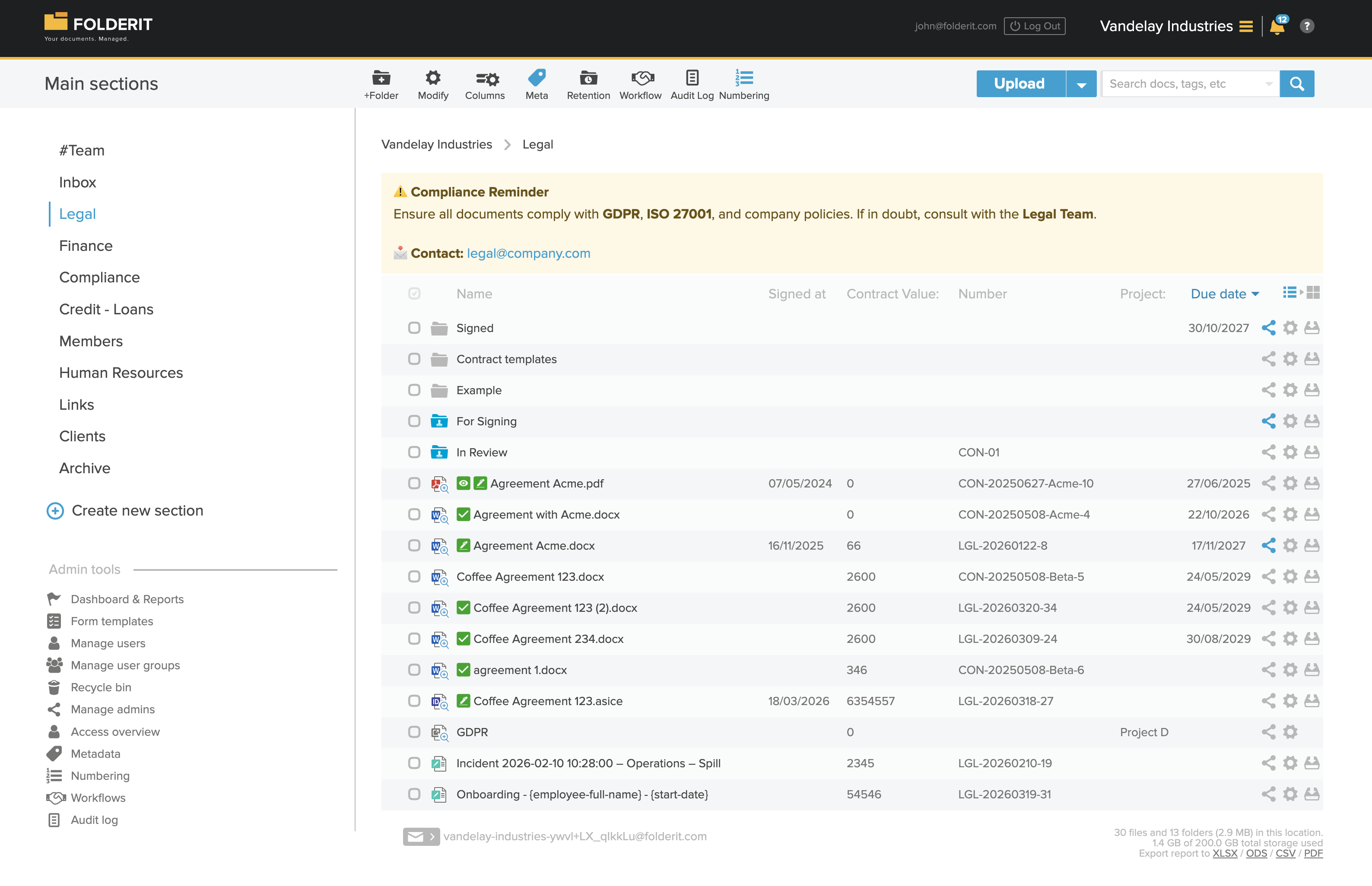
Who is Folderit for?
Folderit is commonly used by small to mid-sized organizations as it offers a straightforward, cloud-based solution to manage documents without complex infrastructure.
Industries that benefits from Folderit include those with high compliance requirements such as finance, healthcare, legal, manufacturing, or education.
It can also be used, for example, by marketing teams to run targeted campaigns where the proposal can be centralized and edited in real time by other teams, like sales or the product teams.
Additionally, thanks to its contract management, it is a useful tool for HR departments.
Who Shouldn’t Use FolderIt?
The same simplicity that makes FolderIt approachable is also where growing or high-volume teams tend to hit a ceiling.
Poor Fit | Why |
|---|---|
Teams handling very large files or heavy upload volume | Reviewers report noticeable lag with high-resolution media and large technical logs during heavy uploads |
Teams that search constantly across large libraries | Search lacks advanced filtering and doesn't support saved or folder-scoped searches |
Teams wanting AI-driven classification or summarization | FolderIt's own feature list doesn't currently advertise AI-based tagging or document intelligence |
Teams with complex, branching approval logic | Workflows are intentionally simple and may not support conditional, multi-step routing |
Teams relying on deep CRM or ERP integrations | Native integrations are limited; most CRM and ERP connections require custom API work |
Best Folderit features
Most of Folderit’s features are built around the premise of keeping your documents safe, which is why, like Dokmee, all features are subject to granular roles and permissions to reduce security breeches.
Aside from typical DMS features, such as document storage, these are some of Folderit’s best features.
Approval Workflows
Folderit’s workflow feature can automate common document-handling processes within its document management system.
The platform supports three main workflow types: approval, review, and acknowledgement.
Approval workflows are used when a document requires formal sign-off, review workflows collect feedback before finalization, and acknowledgement workflows track whether users have read or confirmed a document.
Workflows can be started either manually on a specific document or automatically when a document is added to a predefined folder.
For example, a document can be uploaded to a specific folder and automatically trigger an approval or review sequence.
Folderit provides visibility into workflow progress through status indicators and workflow views.
Once a workflow is completed, Folderit records the outcome and can generate a summary of decisions and comments associated with the document.
However, Folderit’s workflows are designed to remain simple. If you have complex workflows that require accurate triggers, this might fall short very quickly.
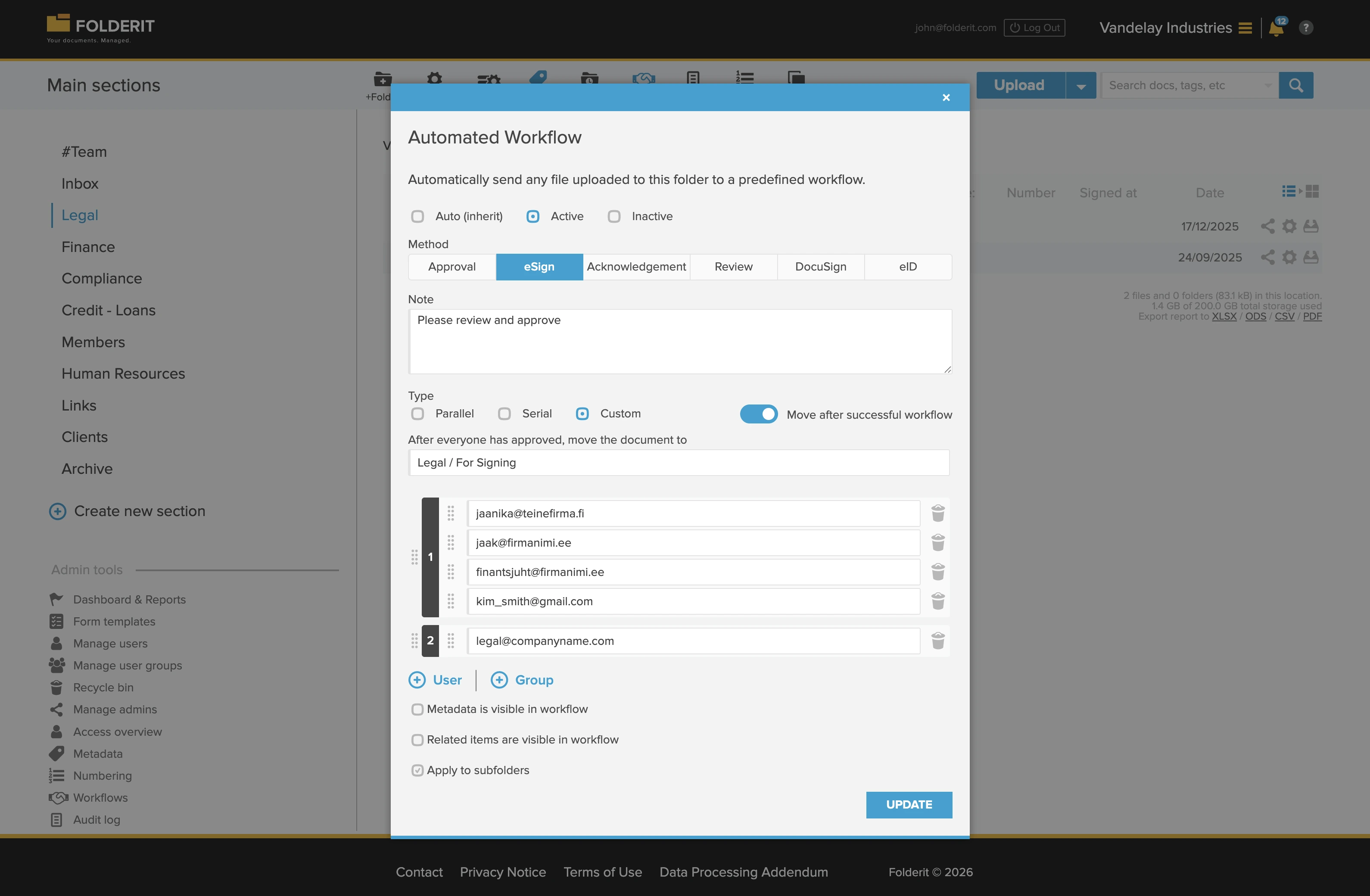
Electronic signatures
Folderit eSign integrates DocuSign directly into document workflows, so signatures can be requested and collected without leaving the platform.
With eSign:
Signers don’t need a FolderIt account; external participants are invited by email
Signing can be sequential (one after another) or parallel (all at once), depending on the workflow
Visual status indicators show whether a signature request is pending, completed, or rejected
E-signature workflows can trigger automatically when a document lands in a preconfigured folder
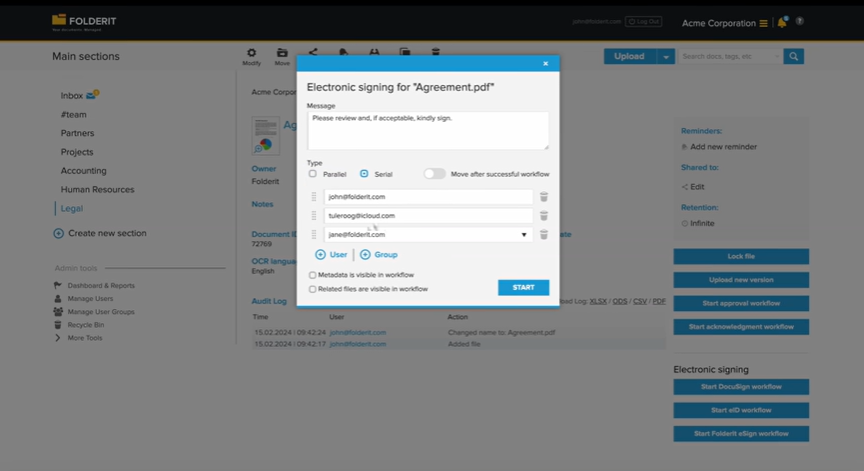
Document retention and file archiving software
Retention rules in Folderit are set at the folder or file level, and they run automatically once configured, the same way any structured document retention policy should.
By default, files in Folderit are stored indefinitely, but administrators can configure a retention period.
Retention periods can be based on creation date, last modification, approval date, or a custom metadata field.
Once a file’s retention period expires, Folderit can archive it, move it to the recycle bin, or permanently delete it.
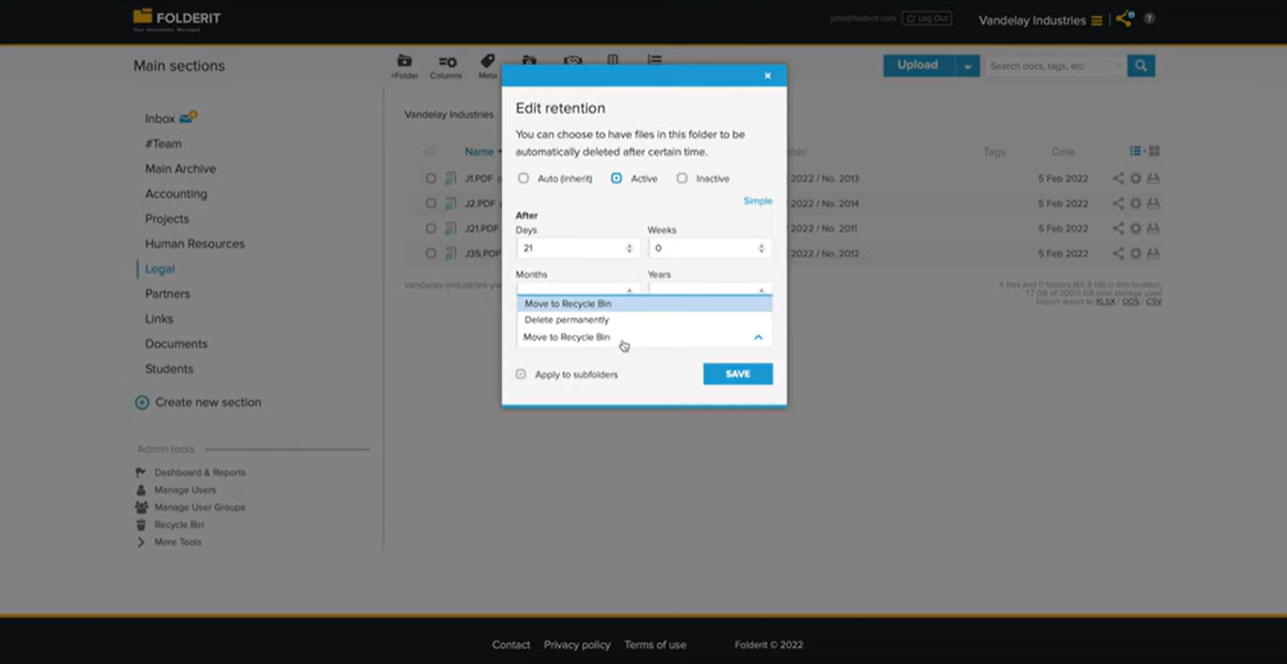
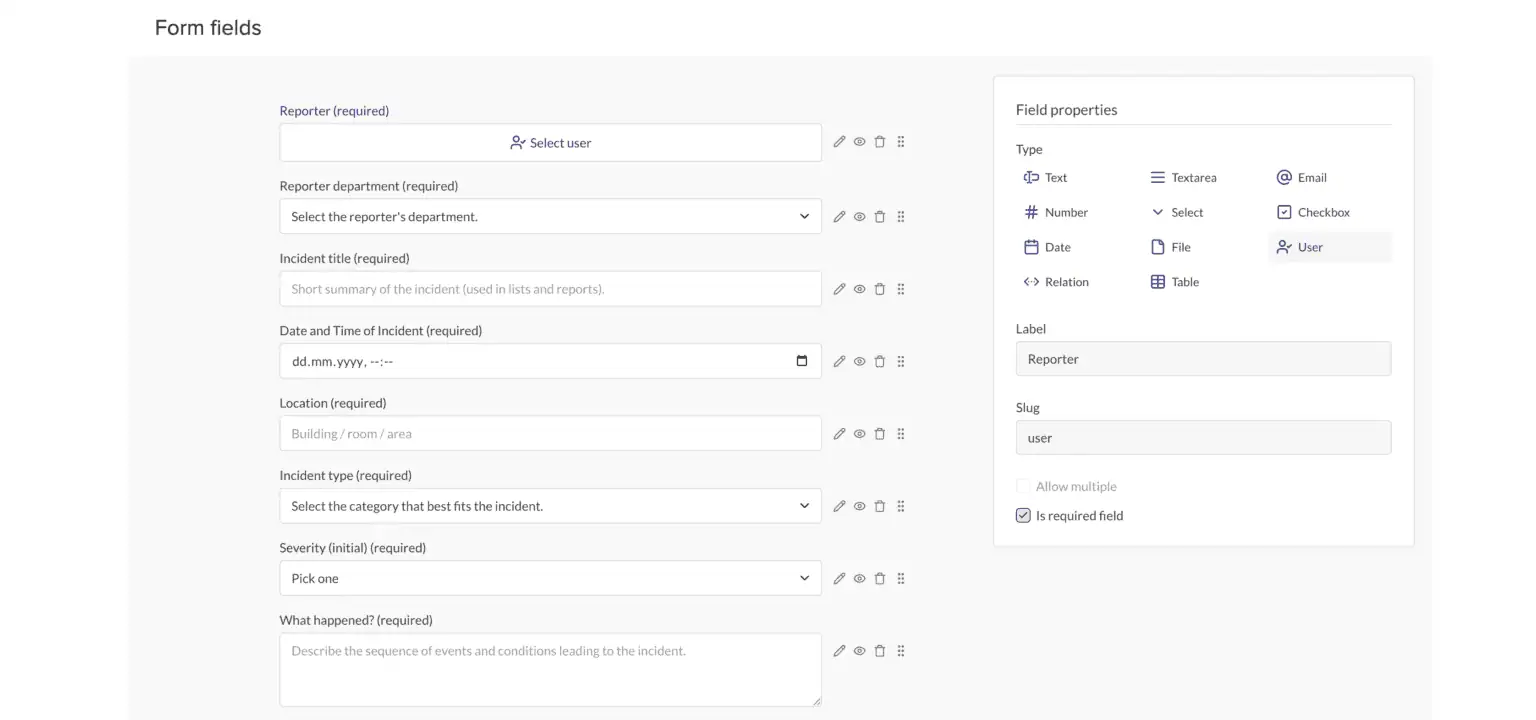
Records management with eForms
Records can be created through document uploads, scanned files, email, and electronic forms, with OCR and metadata supporting search and retrieval.
Its eForms can automatically create records, apply naming conventions, and store submitted information as searchable metadata, while attachments remain linked to the corresponding record.
Folderit covers the basic requirements to manage digital records, but the information provided does not indicate more advanced records management capabilities such as automated records classification, legal holds, or more sophisticated disposition management.
OCR content indexing
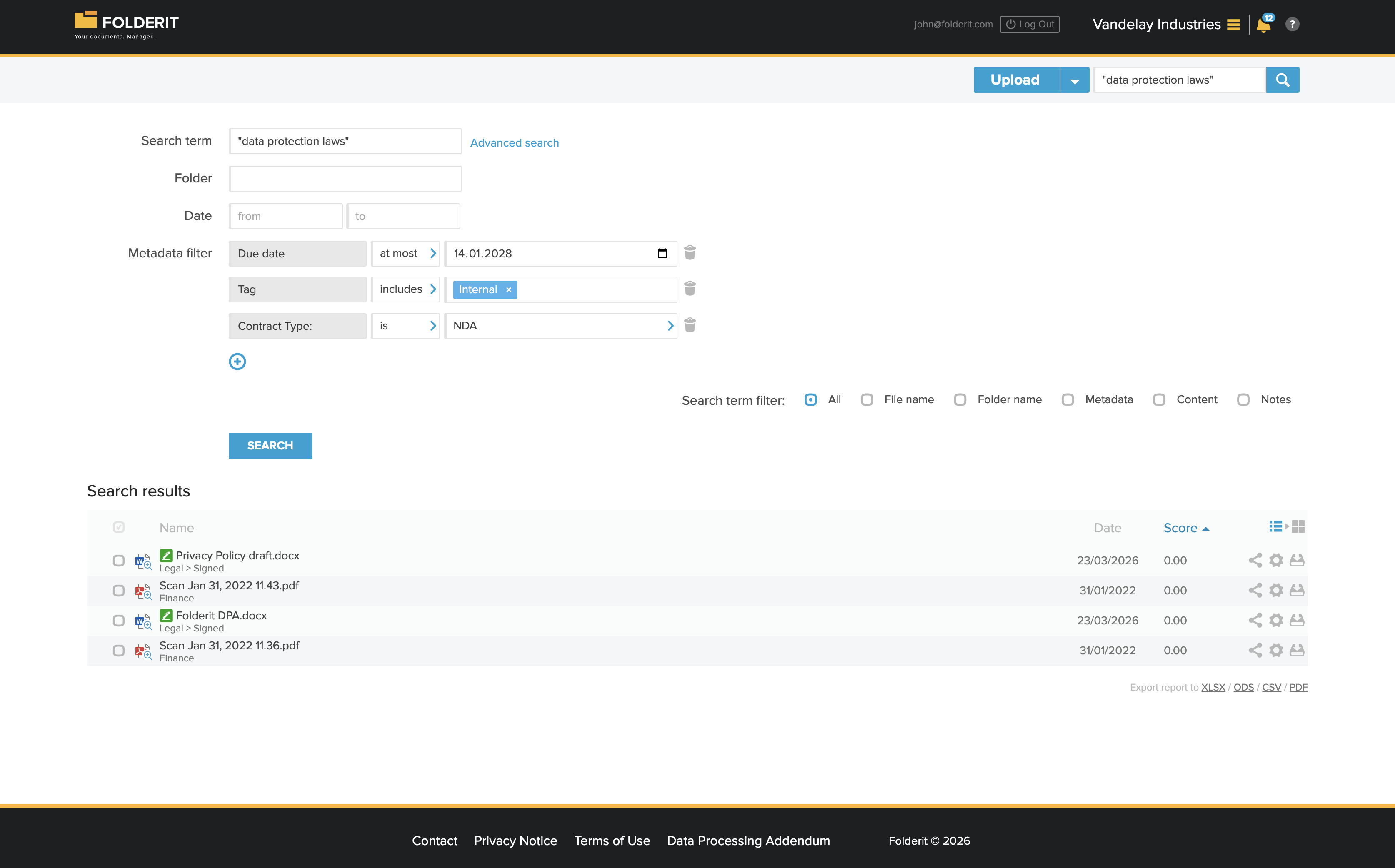
Folderit includes OCR content indexing to make the full text of scanned documents and images searchable, rather than just indexing filenames and metadata.
When files such as scanned PDFs, JPEGs, PNGs, or other image‑based documents are uploaded to Folderit, the system uses multilingual OCR technology to recognize the text within those files and convert it into machine‑readable content that the search engine can index.
This means users can perform deep searches across the contents of documents for specific words or phrases, even if that text only appears in a scan or image rather than in the filename or metadata fields.
Additionally, Folderit’s OCR indexing includes image‑based files that contain text, such as photos or scans of paper documents.
Once the OCR process runs, the recognized text is indexed alongside metadata, allowing more accurate retrieval of information during searches.
The system also allows administrators to disable OCR indexing for an account if desired.
However, users have reported that the search lacks advanced filtering by file type, date range, or last-modified-by and doesn’t support saved searches or folder-scoped searches. If your team searches constantly across a large library, test this specifically before committing.
Document generator
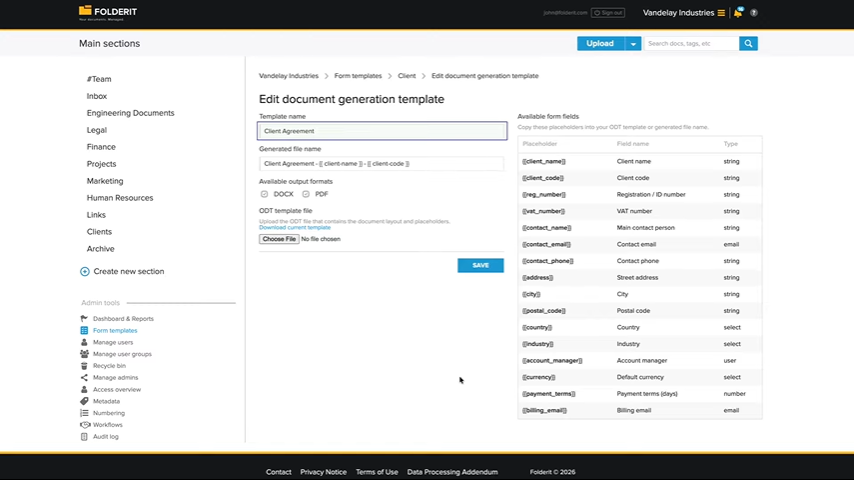
Folderit’s Document Generator creates PDF and DOCX documents from structured data collected through its eForms.
Users create an ODT template with placeholders for form values, connect it to an eForm, and generate a completed document from each submitted record. Templates can include standard text and formatting, repeating rows, conditional sections, and formatted dates, numbers, and currency values.
The main limitation is that the generator is closely tied to Folderit’s eForms and ODT-based templates, so it does not support broader template authoring, complex data integrations, or AI-assisted document creation.
What is Folderit missing?
While Folderit does in fact offer the same capabilities that a strong DMS platform should provide in the areas of security, workflows, OCR search, indexing, and compliance, there are some areas where it may fall short for many users.
If your organization handles a large amount of documents, you should be aware that this DMS may show performance delays when uploading or working with very large files.
Concerning the mobile app’s UI, it doesn’t always match the polish or full functionality of the desktop experience. Users sometimes describe the interface as less refined than competitors, which may impact productivity for frequent mobile or power users.
Additionally, Folderit isn’t as intuitive as other DMS platforms, and will therefore strain migration and initial implementation for small teams that don’t have dedicated IT support.
Some reviews also highlight limitations in customization and automation flexibility outside the basic feature set.
While Folderit offers very decent metadata, filtering, and retention rules, it doesn’t always provide the same level of workflow extensibility, integrations, or AI‑driven capabilities (like automated tagging, smart content categorization, or AI document summarization) that are increasingly expected in newer DMS platforms.
Some users mention limitations with payment processing systems or customer support channels which can be frustrating if urgent issues arise. And in a few reviews, problems with external billing partners have impacted account access.
Basically, Folderit falls short in areas such as interface performance, advanced customization, automation, mobile functionality, and the overall ease of onboarding for complex use cases.
User reviews
⭐⭐⭐⭐⭐ Ratings
G2 4.3/5 | Capterra 4.8/5
Folderit's reputation holds up reasonably well across the two platforms with verified review data, though the sample sizes are worth keeping in mind.
Folderit is praised for ease of use, security, and OCR search; the recurring complaints are performance lag with large files and light native integrations.
Overwhelmingly positive feedback on security, organization, and setup speed; the one detailed complaint centers on a billing dispute with Folderit’s payment processor.
The star ratings are close, but the written reviews reveal more about where Folderit’s simplicity becomes a limitation rather than a strength.
✅ Pros | ❌ Cons |
|---|---|
Centralized, easy-to-navigate document storage that's live within minutes of signing up | Bulk actions like moving, renaming, or applying permissions to many files at once can feel slow |
OCR full-text search that reliably finds content inside scans and PDFs | Search lacks advanced filters and saved searches, making repeat lookups more manual than expected |
Audit trails and permission controls described as thorough but still simple to configure | Performance can lag with high-resolution media or very large files during heavy uploads |
Clean folder structure and reliable version control for sensitive documents | Native integrations are light outside Microsoft 365, DocuSign, and Okta |
Fast, straightforward initial setup; several reviewers were live within minutes | One detailed, credible account describes a billing dispute with FolderIt's payment processor that briefly cut off account access |
Folderit pricing
Folderit publishes its pricing directly. Plans are billed monthly plus VAT, with three published tiers:
Plan | Pricing per month + VAT | Users + Storage |
|---|---|---|
Mini | $45 | 5 users + 150 GB |
Medium | $85 | 10 users + 500 GB |
Tailor | $113 | 20 users +0.5 TB (personalizable) |
In the Mini plan you receive the basics of document management , including Microsoft 365 integration, storage, audit trails, basic reminders, and content search (among others).
Automated retention, workflows, and custom metadata are available in the Medium plan. However, other features including workflow designer, API access, and granular permissions are only available on Tailor, the top tier plan.
If you need a more customized deployment, you can select the enterprise plan with custom quotes in order to build the system that works best for you.
Folderit vs Dokmee
Folderit and Dokmee both provide document management features for securing, organising, searching, and controlling business documents, but they differ in the depth and approach of their functionality.
Feature | Folderit | Dokmee |
|---|---|---|
Deployment | Cloud (AWS) or on-premises | Cloud, on-premises, or hybrid |
Indexing and search | Multilingual OCR and full-text search | AI-assisted Magic Indexing, AI Search, and AI Scripting for custom classification and indexing logic |
Workflow | Approval, review, and acknowledgement workflows with a simpler setup | No-code drag-and-drop workflow builder, with custom workflows also available through the Dokmee team |
eSignatures and forms | Folderit eSign and DocuSign integration; eForms | Dokmee Forms with no-code form building and e-signature capabilities |
Scanning | OCR for uploaded and scanned documents | Scanning is a core capability, with unlimited scanning and no per-click charges |
Starting price | $45month for 5 users | $39/month per user |
The better fit depends on what you need from your document management system.
Folderit offers a lower-cost option with core document management, OCR, forms, workflows, and electronic signing, while Dokmee provides a broader set of capabilities for organisations that need more advanced indexing, scanning, workflow configuration, and deployment flexibility.
If AI-assisted indexing, custom classification, or high-volume scanning are priorities, Dokmee offers capabilities that go beyond Folderit's more straightforward approach. If you're primarily looking for affordable document management with forms and essential workflow features, Folderit may provide sufficient functionality at a lower starting price.
Is Folderit the right choice for your team?
FolderIt is fast to set up, easy to use, and covers essential security and compliance needs like encryption, SSO, granular permissions, and solid audit trails.
Where it’s limited, however, is scale and intelligence. As document libraries expand, bulk actions can lag, search remains strictly keyword-and-filter based, and there’s no native path to AI-assisted classification.
If you’re a small team leaving paper behind, it gets the job done. But if you expect your document volume to scale, you may quickly outgrow its simplicity.
Want AI-powered classification, instant search, and unlimited scanning instead of keyword filters and scaling bottlenecks? Avoid migrating twice by choosing a platform built to grow with you.