
What is Document Retrieval and How Can it Impact Your Business?
 5 min read
 Christina Miranda

Document retrieval doesn’t have to slow your business down. A DMS allows fast, accurate, and secure access to active and archived documents.
Did you know 25% of a working day can be spent looking for information?
The worst part is that some employees end up having to recreate the document they’re looking for out of frustration.
Result? Lost time, duplicate document, risk of incorrect data, loss of trust with clients… Shall we go on?
A DMS or ECM can help you pull up any (original) document at a moment’s notice thanks to its many features for document retrieval.
What Is Document Retrieval?
Document retrieval is the process of locating and accessing the document you want at the exact time you need it.
Sounds simple, but employees spend around 9.3 hours per week locating documents.
In business context, retrieving a document has to be done at the right time and most accurate version, without disrupting workflows or hindering meetings (especially with clients).
Manual document retrieval meant employees had to comb through endless filing cabinets, folders, and papers to track down the document they needed. With a DMS the process is much simpler. And quicker.
Document retrieval in a DMS uses metadata, full-text search, OCR, and advanced filtering to help you locate your document in seconds by simply typing in a couple of keywords or using filters.
That simple.
After documents are created and stored, they must remain accessible throughout their active use, archived when no longer needed daily, and eventually disposed of according to retention policies. Retrieval connects every stage of this lifecycle by ensuring documents remain usable at all times.
Common examples of documents that require fast and reliable retrieval include contracts, invoices, HR records, company policies, compliance documentation, engineering drawings, and customer files.
When these documents cannot be found quickly, operations slow down and risk increases.
Why Document Retrieval Is Necessary
Document retrieval is essential in almost every daily task, the point here is actually why effective document retrieval is necessary.
Pulling your documents up quickly directly impacts your productivity. Delays during meetings or time-sensitive tasks negatively affect workflows and increase frustration in both team members and clients.
Inaccurate or incomplete retrieval also affects decision-making. Your teams rely on documents to validate information, approve actions, and assess risks. If the wrong version is retrieved, or if critical documents are missing, decisions might be based on incorrect data.
Document retrieval is also closely tied to compliance. Many industries require quick document retrieval during audits or legal inquiries. If documents cannot be retrieved accurately and on demand, your organization could face penalties, reputational damage, and operational disruption.
Finally, as your business grows, retrieval challenges scale rapidly. What works for a small team with a limited number of documents becomes unmanageable when document volumes increase across departments, locations, and systems. Without a structured retrieval strategy, growth introduces document chaos rather than efficiency.
DMS Features to Improve document Retrieval
As we have mentioned, the ability to locate and retrieve your documents as quickly as possible is the core of any DMS, so there are many features implemented for exactly this reason.
Centralized Document Repository
A centralized document repository (or file cabinets) is the foundation of efficient document retrieval. By storing all documents in a single, controlled environment, a DMS eliminates information silos and fragmented storage locations. Employees no longer need to search across email inboxes, local drives, and shared folders to find what they need.
This centralization creates a single source of truth, ensuring that everyone accesses the same documents regardless of department or location. Retrieval becomes faster and more reliable because users know exactly where documents live and can trust the system to surface the correct file.
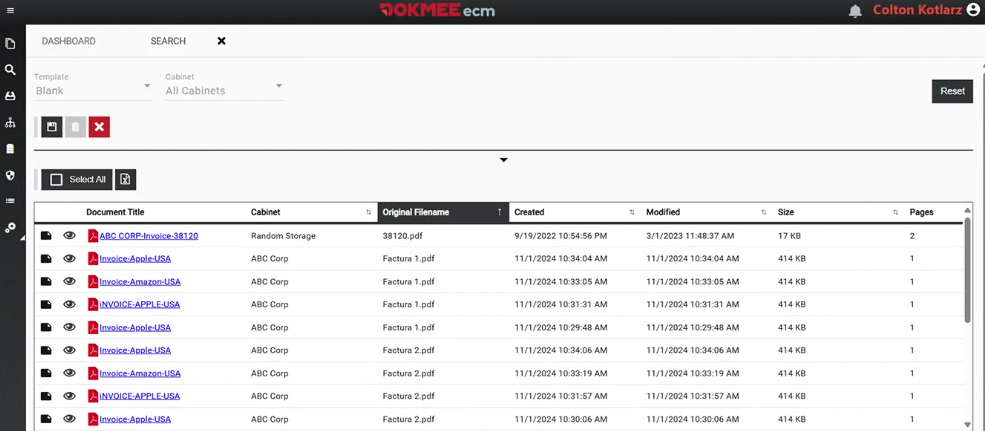
Advanced Search Filters
Advanced search filters allow you to narrow results based on multiple criteria, such as date ranges, document type, department, or workflow status. By combining filters, you can quickly locate highly specific documents without sorting through irrelevant results.
This precision reduces time spent searching and improves confidence in retrieval outcomes.
Instead of scrolling through long lists of files, you arrive directly at the document you need.
Metadata and Indexing
Advanced indexing automatically analyzes document content and metadata to make every file fully searchable.
A DMS can index text within files, apply rules or classifications, and continuously update search indexes as documents change.
Metadata adds structured information to documents beyond their file name.
Instead of relying on folder navigation, users can search based on meaningful attributes such as document type, date, client name, vendor, case number, or status.
This approach transforms how documents are found.
Searching by metadata allows users to retrieve documents even when they don’t remember specific details, while browsing folders often requires prior knowledge of where a document was stored.
Full-Text Search and OCR
Full-text search allows you to retrieve documents based on the actual content inside them, not just titles or metadata.
OCR plays a critical role by converting scanned documents and images into searchable text, ensuring that paper-based or image-only files are just as retrievable as digital ones.
This means invoices can be retrieved using invoice numbers or vendor names embedded in scanned documents. Contracts can be found by searching for clauses or terms. Records that once required manual review become instantly accessible, regardless of format.
Retrieving Archived Documents Efficiently
Archived documents are no longer active documents, nor are they relevant to daily operations, however, even though they are stored separately, they still may need to be accessed.
A common misconception is that archived documents are difficult or slow to retrieve, simply because they are not in the same file cabinets. In reality, a well-designed DMS keeps archived documents searchable without cluttering everyday workflows.
A DMS separates active and archived content logically, not functionally.
Archived documents remain indexed, searchable, and retrievable using the same tools as active files. This ensures that documents can be accessed quickly during audits, legal discovery, or internal reviews.
Retention policies ensure documents remain accessible throughout their required lifecycle.
Archived documents are protected from modification while remaining available to authorized users. Controlled access ensures only approved personnel can retrieve historical records, and audit trails track every retrieval action for accountability.
Security Considerations in Document Retrieval
Security is a critical component of document retrieval. Fast access should never come at the expense of control.
Role-based access ensures users can retrieve only the documents relevant to their responsibilities, reducing the risk of unauthorized exposure.
Watermarks and access logs further protect sensitive information by discouraging misuse and providing visibility into document activity.
Audit trails record who retrieved a document, when it was accessed, and what actions were taken, supporting both internal governance and external compliance requirements.
A secure retrieval system balances accessibility with protection, enabling users to work efficiently while safeguarding critical data.
How Dokmee Simplifies Document Retrieval
Dokmee simplifies document retrieval by combining centralized storage with structured indexing and intelligent search.
Documents are stored in unified file cabinets, enriched with metadata, and made searchable through OCR and full-text search.
Both active and archived documents remain accessible through the same retrieval interface, ensuring continuity across the document lifecycle. Role-based permissions and audit logging provide secure access while maintaining compliance visibility.
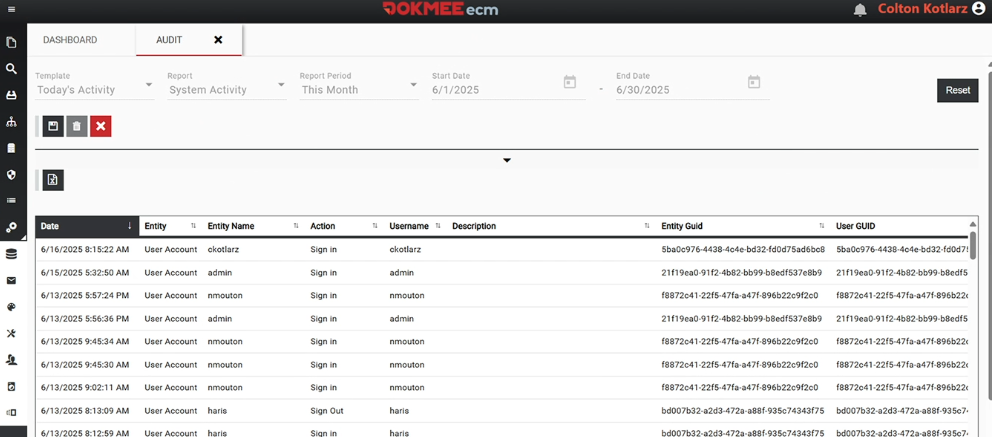
Dokmee’s scalable architecture supports growing document volumes without compromising retrieval speed or accuracy, making it suitable for organizations at any stage of growth.
You can try out this free document search time calculator to see exactly how Dokmee can help you out.
Document Search Time Calculator
Calculate the hidden cost of inefficient document search
Industry avg: 2.5 hrs/week
Estimated reduction: 80%
Your Document Search Costs
See how Dokmee can help you recover this time
Book a Free Demo →Document Retrieval as a Competitive Advantage
Fast, accurate document retrieval is a strategic advantage.
Retrieving documents instantly makes your business more efficient by helping you respond to issues faster and make decisions with greater confidence.
Reliable retrieval also strengthens compliance, reduces operational risk, and builds trust in documentation across teams. When your employees know they can always find the right document, workflows become smoother and accountability improves.
A DMS provides the foundation for consistent, secure, and scalable document retrieval.
Platforms like Dokmee demonstrate how modern retrieval capabilities support efficiency, compliance, and long-term organizational growth.
Book a free demo now and see for yourself how you can improve efficiency.
Get in Touch with Our
Enterprise ECM Experts
Schedule Your Free Demo—Anytime, Anywhere
Experience enterprise-grade ECM with zero hidden fees and instant ROI:
- Instant 24-hour callback—you choose the time.
- Tailored to your workflows—no cookie-cutter pitches.
- ROI in 60 days—most enterprises recoup costs fast.
“Dokmee cut our retrieval time by 70%—we saw ROI in 45 days.”
Chad P., CTO