Complete Zoho WorkDrive Review: Features, Pricing, Pros, and Cons
25 Feb. 2026
6 min read
By Christina Miranda
In this Zoho WorkDrive review we explore features, pricing, pros and cons, and the best ECM alternative for structured document management.
If you’re already using more than one product from the Zoho ecosystem, Zoho WorkDrive is definitely the easiest choice.
But if you’re not using Zoho products, how can you know if this is the right ECM for you?
In this Zoho WorkDrive review we explore its best features, limitations, and the best alternative.
What is Zoho Workdrive?
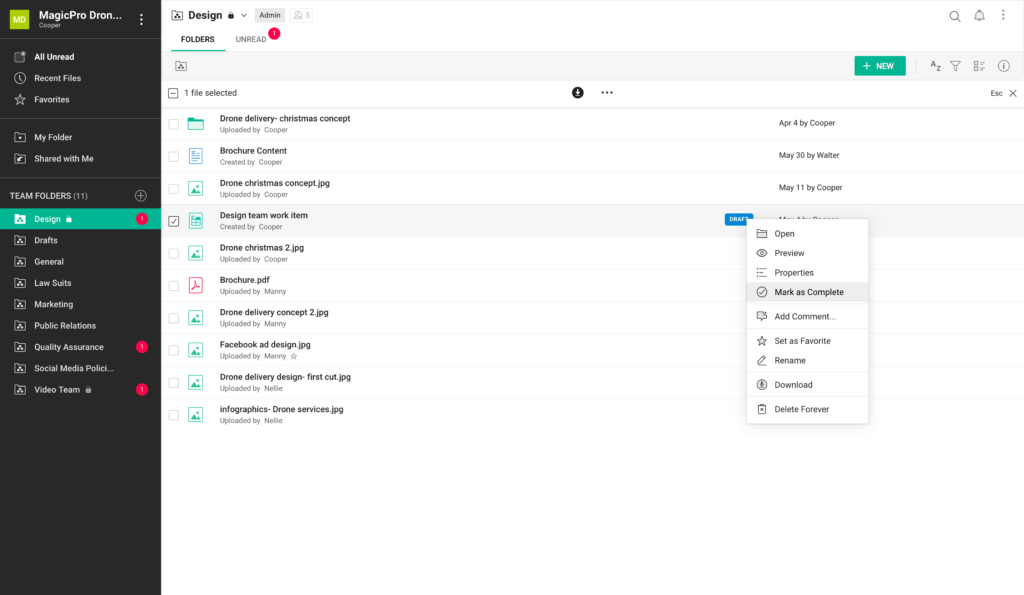
Zoho WorkDrive is a cloud-based content management platform that focuses on file storage and team collaboration.
As such, WorkDrive allows different departments to access, edit, and share documents from the interface.
WorkDrive focuses heavily on team collaboration through features like Team Folders or Annotations, role-based access controls, activity timelines, shared editing, and advanced search capabilities.
Who Is Zoho WorkDrive For?
WorkDrive is a good fit for teams and businesses of all sizes that need more than just basic file storage.
It serves:
Small and medium-sized businesses that need affordable cloud storage
Departments within larger companies that want centralized content control with granular permissions
Remote or distributed teams that need consistent access to documents across locations
Industries with compliance requirements or sensitive information workflows
What Makes Zoho WorkDrive Different?
Most ECM platforms share the same structure and goal: bring all your content to the platform where it can be properly organized with more efficient and automated workflows.
However, most ECM platform also have a unique touch to their approach. In Zoho WorkDrive’s case, this is team collaboration, which is why they offer:
Team-first architecture
WorkDrive is built from the ground up for organizations.
Its Team Folders are shared workspaces where files belong to the whole team rather than to individual members, making collaboration more transparent and reducing single-user bottlenecks.
Flexible sharing and governance
With WorkDrive you can configure granular access controls at both the team and folder levels and to monitor activity across accounts.
Files can be shared externally with configurable permissions, link expiration, and tracking.
Integration with all Zoho products
For businesses already using Zoho applications, like CRM, Projects, or Analytics, WorkDrive integrates tightly within that ecosystem to access relevant files without bouncing between multiple apps.
Best Features
Zoho WorkDrive has all the typical features you find in any ECM including storage, retention, and security measures to guarantee compliance and document protection.
Here we have selected four specific features in Zoho WorkDrive that can set the platform apart.
File annotations
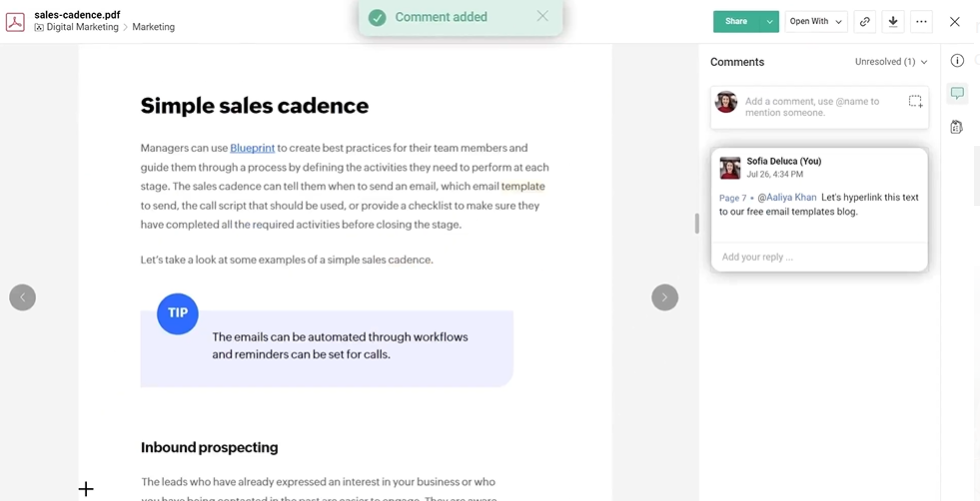
Zoho WorkDrive’s file annotation feature allows you to leave comments in your files in a more informal way.
These annotations have a “chat” format, and you can open discussions directly in the point of a document that you need to discuss so your feedback is clear and leaves no room for misunderstandings.
You can mark up areas in images, or pinpoint exact moments in a video and attach comments right there in the file preview and comments are timestamped so there is no confusion in review dates.
When leaving annotations, you can use @mentions to draw specific team members into the conversation and they will immediately receive a notification.
WorkDrive Snap
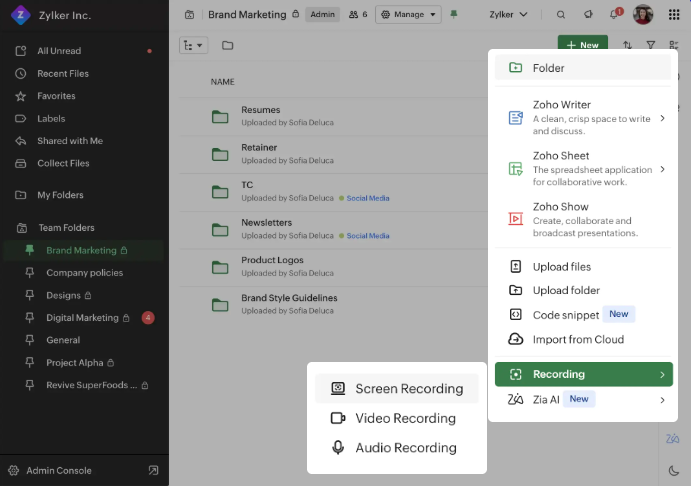
Zoho WorkDrive’s Snap allows you to record and share videos, screen captures, and audio messages from the platform to add more feedback or explanations.
It works very similarly to Loom, but you wouldn’t have to leave the app or send your feedback in separate chats or platforms.
With WorkDrive Snap, you can choose between screen recordings, webcam-only video, or a combination of the two. Basically it is like an in-app version of Loom recordings.
Recordings include features like picture-in-picture video and voice narration, making it simple to guide viewers step by step through a task or walkthrough.
Snap recordings are stored alongside other work files in Zoho WorkDrive, meaning your teams can organize, share, and reference them just like any other document or asset.
Workflows
Zoho WorkDrive’s latest addition was automated workflows to turn the platform into a full ECM.
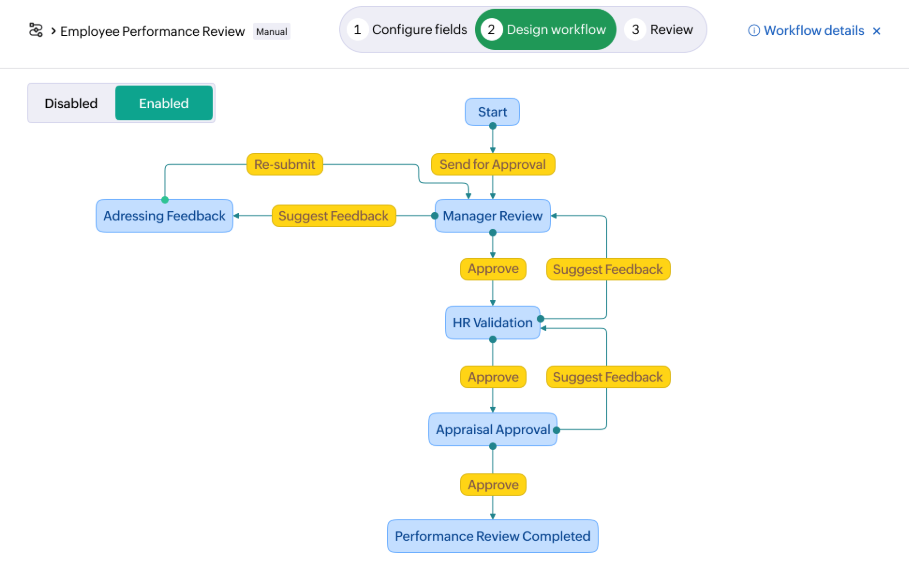
You can build your workflow with custom fields and trigger. For example a file being uploaded, moved, or marked ready, and guides that document through defined states like review, approval, or archiving.
WorkDrive’s workflow system supports both automatic and manual workflows.
Automatic workflows kick in when specific conditions are met, allowing processes to run without human intervention once they’re configured.
Manual workflows, on the other hand, are launched by users when needed, for example when a draft is ready for review or a folder needs to enter an approval cycle.
Zia AI
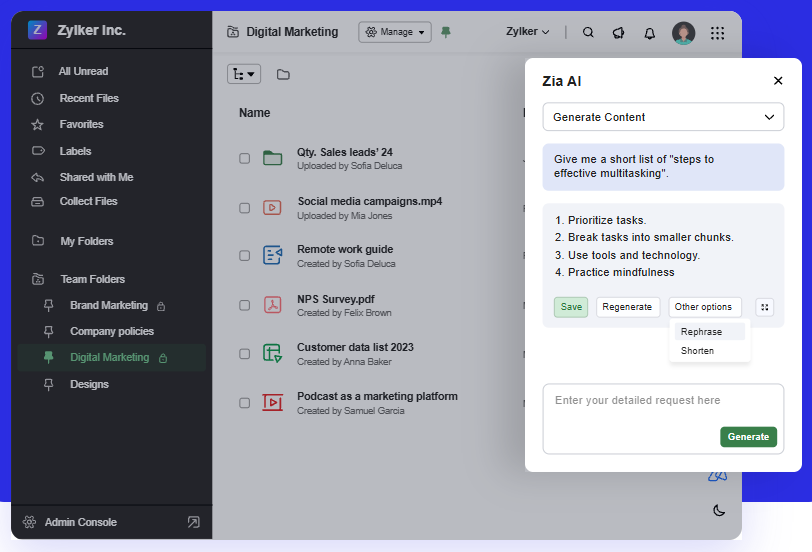
Zia AI is an integrated artificial intelligence assistant that brings advanced machine intelligence directly into your file management and collaboration workflow.
Zia uses AI to help with tasks like summarizing documents, generating content, polishing grammar, and making files easier to locate.
Zia offers AI-assisted search and retrieval. This features allows you to look for files using filenames or content inside documents, including text and even objects within images. Zia can also suggest relevant files based on your activity, helping you get to what you need without endless browsing through folders.
Pricing
Zoho WorkDrive allows you to choose from 4 different affordable plans.
Starter, Team and Business ranges from 2,50€ to 9€ per user and month for a minimum of three users, or you can get a custom quote for the Enterprise plan, that has a minimum of 200 users.
Although pricing is very affordable, you should also take add-ons into consideration.
For example, for each client you bring into the ECM, you will be looking at 12€ per client.
Regular pricing plans include up tp 5 TB of storage (Business plan). However, additional storage has extra cost:
10 GB 60€ per year
100 GB 144€ per year
1 TB 348€ per year
Their website has a storage calculator that can help you decide if the pricing is right for you.
Strong native integration with Zoho products (particularly useful with Zoho CRM)
High flexibility
Great team collaboration features
Clean UI
Simple team onboarding
✖️ Cons
Slow interface
Limited third party integrations outside Zoho ecosystem
Syncing takes a long time
Client links expire too soon
Finding files requires several clicks
Zoho WorkDrive vs Dokmee
Your ROI will depend on how efficient your ECM actually is. You’ll need to check that features perfectly align with your expectations in order to make your system productive.
Both Zoho WorkDrive and Dokmee are solid ECM choices. Both platforms will help your business organize, secure, and automate your document processes and focus heavily on collaboration.
However, there are some differences. Particularly in focus, customization, and integration.
Zoho WorkDrive is a cloud-native content collaboration platform built around team-centric file storage, real-time collaboration, and integrated productivity features across the Zoho ecosystem.
In contrast, Dokmee is a more traditional enterprise content management system with a heavier emphasis on structured document governance, rules-based workflow automation, and comprehensive content lifecycle management.
Dokmee’s platform centralizes storage, OCR-based indexing (supporting 130 + languages), retention policies, and full-featured annotation tools that let users add notes, stamps, and marks directly on documents.
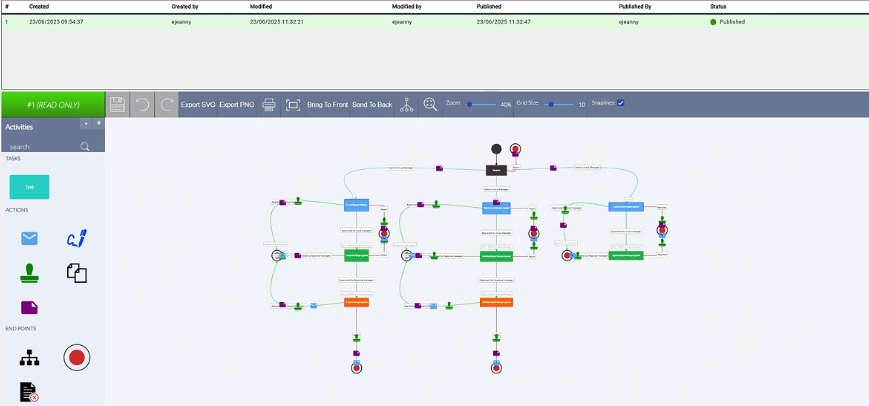
Its interface includes a graphical workflow builder that allows administrators to visually design, automate, and track multi-step approval and document routing processes without coding.
Workflows and Automation
Both platforms offer workflow capabilities, but they serve different organizational needs.
Zoho WorkDrive Workflows help automate content-related processes across teams with triggers, transitions, and actions defined through its built-in workflow builder.
This is a good option for cross-team cooperation and automating repetitive tasks like approvals and content reviews.
Dokmee Workflow Engine provides a dual-interface approach: a drag-and-drop designer for non-technical users and deeper configuration options for complex business processes.
You can automate approvals, multi-stage review cycles, notifications, and other rules-based tasks, while tracking progress through color-coded visual mappings.
This is tailored for formal enterprise content lifecycles, compliance workflows, and structured business processes.
Annotation and Document Editing
Dokmee’s annotation capabilities allow you to mark up documents, highlighting text, adding graphic stamps, signatures, and inline comments, as part of collaborative review workflows.
You can leave notes directly within the ECM and combine this with version tracking, approval stamps, and audit trails. Additionally, with Docusign integration, you can also sign documents instantly without leaving the app.
With a seamless integration with the Office package, you can edit presentations, documents, or excel spreadsheets directly from the platform.
WorkDrive also supports collaboration and annotation through its integrated tools (such as comments and activity tracking), and its broader platform includes AI-assisted insights and content generation.
Customization, Free Tools and Deployment
Dokmee shines in customization and control:
It supports full language localization
It offers flexible deployment options, cloud, on-premise, or hybrid
Comprehensive workflow customization, metadata tagging, retention policies, and OCR configuration
Dokmee includes free ECM tools and basic annotation capabilities that smaller teams can use without extra cost or complex setup
Zoho WorkDrive, by contrast, embeds customization in its broader ecosystem:
Integrations with 1 000+ third-party apps and robust APIs allow organizations
WorkDrive’s workflow builder and AI features are designed for cross-functional collaboration rather than deep document governance
Language support continues to expand (including all official Indian languages)
Ultimately, WorkDrive excels in team collaboration, integrated productivity, AI enhancements, and third-party integrations tailored for modern, distributed work environments.
While Dokmee offers deeper ECM-centric capabilities, including customizable workflows, advanced annotation, broad language support, free tools for core document management, and flexible deployment models that appeal to regulated industries and enterprise-level governance needs.
Is Zoho WorkDrive the Right Fit for You?
It depends on your organization’s priorities, internal processes, and long-term content strategy.
Zoho WorkDrive is designed primarily as a collaborative cloud content platform, while Dokmee positions itself as a full ECM solution with deeper governance and workflow control.
The right choice comes down to whether your focus is streamlined team collaboration or structured, enterprise-grade document lifecycle management.
If you’re looking for:
A cloud-native platform built for team collaboration
Easy file sharing and real-time document editing
Built-in AI assistance and smart search
Strong integration within the Zoho ecosystem
…then Zoho WorkDrive is likely a strong fit.
It works particularly well for distributed teams, marketing departments, project-based collaboration, and organizations that prioritize usability and fast adoption.
However, if you need a more powerful ECM solution with advanced governance, customizable metadata structures, dual-interface workflow builders, detailed audit trails, Microsoft Office integration for editing Word, Excel, and PowerPoint directly within the system, flexible cloud or on-premise deployment, multilingual OCR support, and free tools like ROI calculators and retention policy generators, then Dokmee may be the better choice.
If you’re ready to compare, book your free demo today.
Summarize with AI Here
Résumez avec l’IA ici
Resume con IA aquí
Resuma com IA aqui


 Christina Miranda
 Christina Miranda
  Christina Miranda