Complete Zoho WorkDrive Review: Features, Pricing, Pros, and Cons
Written by Christina Miranda · Reviewed by  Dokmee
In this Zoho WorkDrive review we explore features, pricing, pros and cons, and the best ECM alternative for structured document management.
In this Zoho WorkDrive review we explore features, pricing, pros and cons, and the best ECM alternative for structured document management.
If you’re already using more than one product from the Zoho ecosystem, Zoho WorkDrive is definitely the easiest choice.
But if you’re not using Zoho products, how can you know if this is the right ECM for you?
In this Zoho WorkDrive review we explore its best features, limitations, and the best alternative.
What is Zoho Workdrive?
Zoho WorkDrive is a cloud-based content management platform that focuses on file storage and team collaboration.
WorkDrive delivers structured teamwork where different departments can be accessed, edited, and shared from a unique platform.
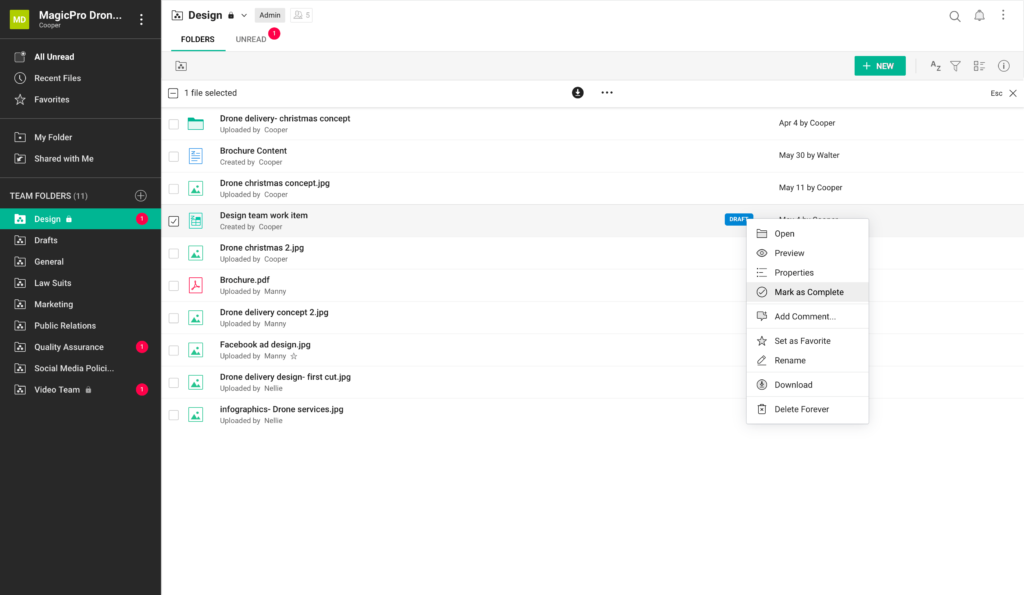
Unlike personal cloud drives, which are primarily meant for single users, WorkDrive focuses heavily on team collaboration through features like Team Folders or Annotations, role-based access controls, activity timelines, shared editing, and advanced search capabilities.
Who Is Zoho WorkDrive For?
WorkDrive is a good fit for teams and businesses of all sizes that need more than just basic file storage.
It serves:
Small and medium-sized businesses that need affordable cloud storage
Departments within larger companies that want centralized content control with granular permissions
Remote or distributed teams that need consistent access to documents across locations
Industries with compliance requirements or sensitive information workflows
What Makes Zoho WorkDrive Different from Other Platforms?
Most ECM platforms essentially do the same. So, why is Zoho WorkDrive worth considering against other platforms?
Team-first architecture
Unlike consumer-oriented cloud storage tools, WorkDrive is built from the ground up for organizations.
Its Team Folders are shared workspaces where files belong to the whole team rather than to individual members, making collaboration more transparent and reducing single-user bottlenecks.
Flexible sharing and governance
With WorkDrive you can configure granular access controls at both the team and folder levels and to monitor activity across accounts.
Files can be shared externally with configurable permissions, link expiration, and tracking.
Integration with all Zoho products
For businesses already using Zoho applications, like CRM, Projects, or Analytics, WorkDrive integrates tightly within that ecosystem to access relevant files without bouncing between multiple apps.
Best Features
Zoho WorkDrive has all the typical features you find in any ECM including storage, retention, andsecuity measures to guarantee compliance and document protecion.
Here we have selected four specific features in Zoho WorkDrive that can set the platform apart.
File annotations
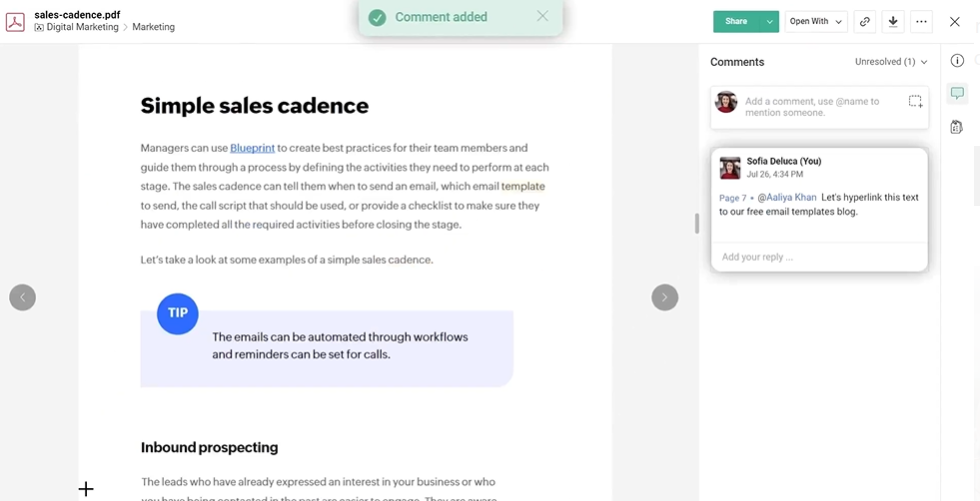
Zoho WorkDrive’s file annotation feature allows you to leave precise, contextual feedback directly on files without leaving the platform or having to open “chats” per discussion.
Instead of sending comments through lengthy email threads or separate chat tools, you can highlight specific text in a PDF, mark up areas in images, or pinpoint exact moments in a video and attach comments right there in the file preview.
This makes reviewing documents, designs, and multimedia much more efficient and intuitive for collaborators, specifically during project creations or drafting proposals.
For PDF files, WorkDrive allows reviewers to select a section of text or a visual element and add a comment tied to that specific part.
Collaborators can also use @mentions to draw specific team members into the conversation and ensure everyone stays aligned.
With image annotations, you can click and draw attention to exact areas of a design or visual asset where changes are needed. The ability to leave comments without exporting images to third-party tools simplifies workflows and keeps all review activity centralized within WorkDrive.
WorkDrive even supports timestamped video annotations, allowing collaborators to jump to any frame of a video, add a comment tied to that moment, and discuss edits or changes with precision.
Across all file types, annotations help your teams manage feedback efficiently by keeping discussions contained within the file environment. You can reply to, resolve, or reopen comments as needed, making it easier to track progress and keep review cycles organized.
WorkDrive Snap
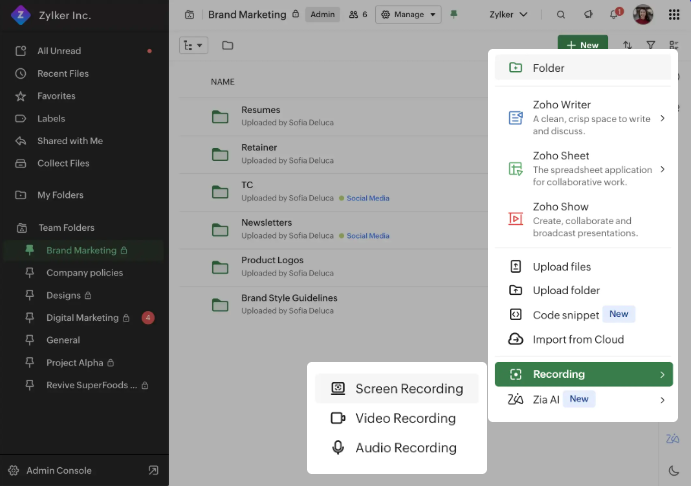
Zoho WorkDrive’s Snap is a communication tool that allows you to record and share videos, screen captures, and audio messages from the platform to improve comments by making them more visual.
Instead of relying on live meetings or back-and-forth emails to explain ideas or convey feedback, Snap allows you to quickly capture what’s on your screen, give your thoughts, and share the recording with teammates. This creates a more visual and contextual way to communicate that saves time and reduces misunderstanding.
With WorkDrive Snap, you can choose between screen recordings, webcam-only video, or a combination of the two. Basically it is like an in-app version of Loom recordings.
This flexibility allows you to demonstrate a process, highlight interface elements, or simply record a personal message.
Recordings include features like picture-in-picture video and voice narration, making it simple to guide viewers step by step through a task or walkthrough.
Snap has an asynchronous design. Team members don’t need to be online at the same time to receive or respond to information.
Instead of scheduling a meeting, you can record your message when ready and let others view it at their convenience. This is especially valuable for distributed teams working across time zones.
Snap recordings are stored alongside other work files in Zoho WorkDrive, meaning your teams can organize, share, and reference them just like any other document or asset. You can also control who has access to Snap recordings using WorkDrive’s permission settings, ensuring sensitive recordings remain private to the intended audience.
Workflows
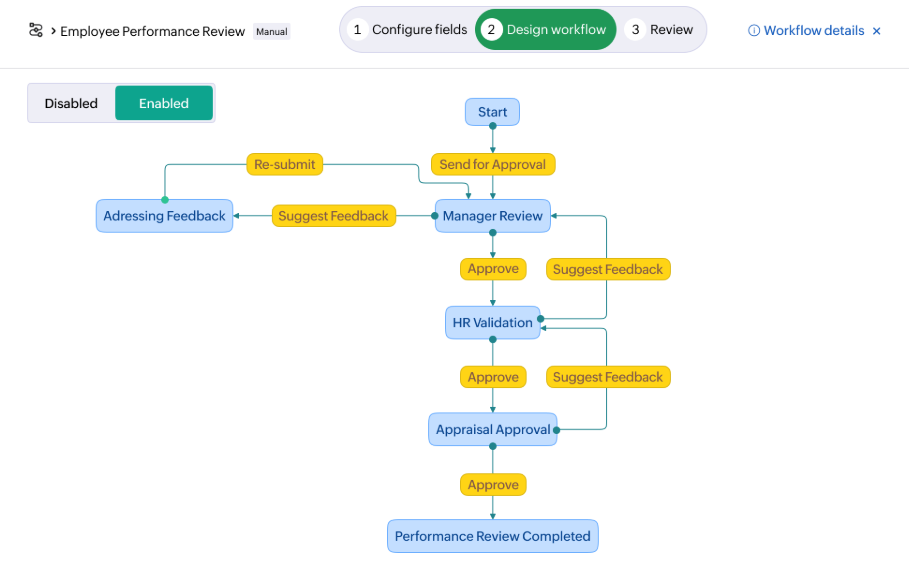
Workflows in Zoho WorkDrive are automation tools that help you automatically structure repetitive content-related tasks or processes.
Instead of manually moving files, checking statuses, or chasing approvals, workflows let you define a series of actions and transitions that run automatically or with minimal input.
A workflow starts with a trigger, for example a file being uploaded, moved, or marked ready, and guides that document through defined states like review, approval, or archiving.
WorkDrive’s workflow system supports both automatic and manual workflows.
Automatic workflows kick in as soon as specific conditions are met, allowing processes to run without human intervention once they’re configured.
Manual workflows, on the other hand, are launched by users when needed, for example when a draft is ready for review or a folder needs to enter an approval cycle.
By automating tasks such as assigning reviewers, routing files based on decisions, and updating folders when stages are complete, workflows help your teams hold momentum and transparency. Predefined default workflows (such as Review, Approval, and Review & Approval) allow teams to get started quickly, while custom workflows let organizations tailor automation to their specific processes.
From an administrative perspective, managing workflows is centralized and intuitive. WorkDrive provides a dedicated Workflows tab where you can view tasks waiting for their action, track current workflows, edit existing automation, or deactivate outdated processes. Admins can also clone workflows to reuse successful configurations and adjust workflow behavior based on evolving business needs.
Zia AI
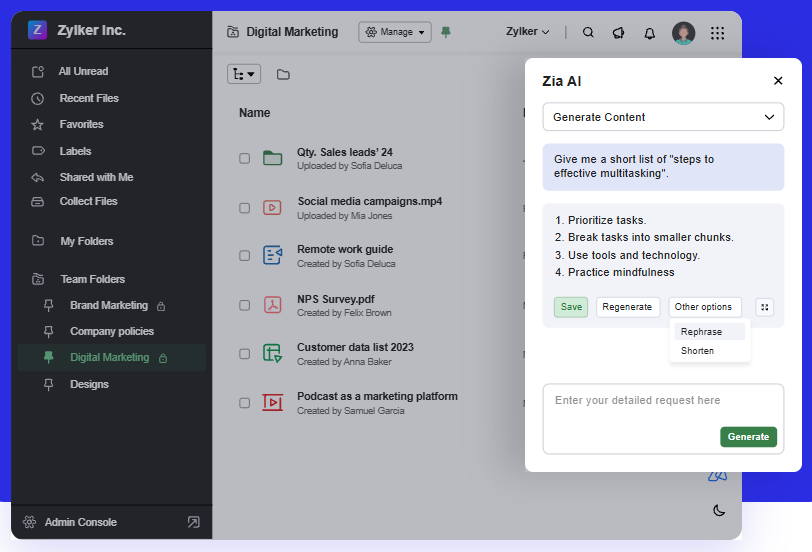
Zia AI in Zoho WorkDrive is an integrated artificial intelligence assistant that brings advanced machine intelligence directly into your file management and collaboration workflow.
Zia uses AI to help with tasks like summarizing documents, generating content, enhancing comments, and making files easier to locate.
Zia offers AI-assisted search and retrieval. This features allows you to look for files using filenames or content inside documents, including text and even objects within images. Zia can also suggest relevant files based on your activity, helping you get to what you need without endless browsing through folders.
Zia can also generate summaries and extract insights from files.
This means that instead of reading a long document or media file in full, you can get a concise overview of the most important points instantly. This feature helps teams save time and focus on the core information they need to move forward.
Zia also improves communication within the platform. It can refine, rephrase, and translate comments to provide clarity and professionalism, and it can help break down language barriers when working with global teams.
By polishing grammar, adjusting tone, or converting comments into your preferred language, Zia supports clearer collaboration among diverse users.
Another advantage is that Zia brings creative generation capabilities into WorkDrive.
You can prompt Zia to create new text content (like drafts or brainstorms for example) directly within the interface, and with certain integrations (e.g., OpenAI), it can generate visuals or cover images for audio and video files based on descriptive input.
Pricing
Zoho WorkDrive allows you to choose from 4 different affordable plans.
Starter, Team and Business ranges from 2,50€ to 9€ per user and month for a minimum of three users, or you can get a custom quote for the Enterprise plan, that has a minimum of 200 users.
Although pricing is very affordable, you should also take add-ons into consideration.
For example, for each client you bring into the ECM, you will be looking at 12€ per client.
Regular pricing plans include up tp 5 TB of storage (Business plan). However, additional storage has extra cost:
10 GB 60€ per year
100 GB 144€ per year
1 TB 348€ per year
Their website has a storage calculator that can help you decide if the pricing is right for you.
User Reviews
Ratings ⭐⭐⭐⭐⭐
G2 4.4/5 | Capterra 4.6/5 | Software Advice 4.6/5 | TechRadar 4./5
✔️ Pros
Strong native integration with Zoho products (particularly useful with Zoho CRM)
High flexibility
Great team collaboration features
Clean UI
Simple team onboarding
✖️ Cons
Slow interface
Limited third party integrations outside Zoho ecosystem
Syncing takes a long time
Client links expire too soon
Finding files requires several clicks
Zoho WorkDrive vs Dokmee
Your ROI will depend on how efficient your ECM actually is. You’ll need to check that features perfectly align with your expectations in order to make your system productive.
Both Zoho WorkDrive and Dokmee are solid ECM choices. Both platforms will help your business organize, secure, and automate your document processes and focus heavily on collaboration.
However, there are some differences. Particularly in focus, customization, and integration.
Zoho WorkDrive is a cloud-native content collaboration platform built around team-centric file storage, real-time collaboration, and integrated productivity features across the Zoho ecosystem.
In contrast, Dokmee is a more traditional enterprise content management system with a heavier emphasis on structured document governance, rules-based workflow automation, and comprehensive content lifecycle management.
Dokmee’s platform centralizes storage, OCR-based indexing (supporting 130 + languages), retention policies, and full-featured annotation tools that let users add notes, stamps, and marks directly on documents.
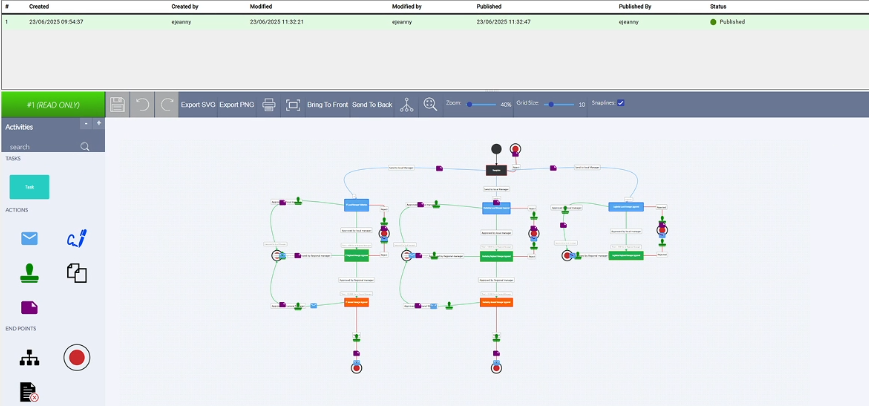
Its interface includes a graphical workflow builder that allows administrators to visually design, automate, and track multi-step approval and document routing processes without coding.
Workflows and Automation
Both platforms offer workflow capabilities, but they serve different organizational needs.
Zoho WorkDrive Workflows help automate content-related processes across teams with triggers, transitions, and actions defined through its built-in workflow builder.
This is a good option for cross-team cooperation and automating repetitive tasks like approvals and content reviews.
Dokmee Workflow Engine provides a dual-interface approach: a drag-and-drop designer for non-technical users and deeper configuration options for complex business processes.
You can automate approvals, multi-stage review cycles, notifications, and other rules-based tasks, while tracking progress through color-coded visual mappings.
This is tailored for formal enterprise content lifecycles, compliance workflows, and structured business processes.
Annotation and Document Editing
Dokmee’s annotation capabilities allow you to mark up documents, highlighting text, adding graphic stamps, signatures, and inline comments, as part of collaborative review workflows.
You can leave notes directly within the ECM and combine this with version tracking, approval stamps, and audit trails. Additionally, with Docusign integration, you can also sign documents instantly without leaving the app.
With a smooth integration with the Office package, you can edit presentations, documents, or excel spreadsheets directly from the platform.
WorkDrive also supports collaboration and annotation through its integrated tools (such as comments and activity tracking), and its broader platform includes AI-assisted insights and content generation.
Customization, Free Tools and Deployment
Dokmee shines in customization and control:
It supports full language localization
It offers flexible deployment options, cloud, on-premise, or hybrid
Comprehensive workflow customization, metadata tagging, retention policies, and OCR configuration
Dokmee includes free ECM tools and basic annotation capabilities that smaller teams can use without extra cost or complex setup
Zoho WorkDrive, by contrast, embeds customization in its broader ecosystem:
Integrations with 1 000+ third-party apps and powerful APIs allow organizations
WorkDrive’s workflow builder and AI features are designed for cross-functional collaboration rather than deep document governance
Language support continues to expand (including all official Indian languages)
Ultimately, WorkDrive excels in team collaboration, integrated productivity, AI enhancements, and third-party integrations tailored for modern, distributed work environments.
While Dokmee offers deeper ECM-centric capabilities, including customizable workflows, advanced annotation, broad language support, free tools for core document management, and flexible deployment models that appeal to regulated industries and enterprise-level governance needs.
Is Zoho WorkDrive the Right Fit for You?
It depends on your organization’s priorities, internal processes, and long-term content strategy.
Zoho WorkDrive is designed primarily as a collaborative cloud content platform, while Dokmee positions itself as a full ECM solution with deeper governance and workflow control.
The right choice comes down to whether your focus is efficient team collaboration or structured, enterprise-grade document lifecycle management.
If you’re looking for:
A cloud-native platform built for team collaboration
Easy file sharing and real-time document editing
Built-in AI assistance and smart search
Strong integration within the Zoho ecosystem
…then Zoho WorkDrive is likely a strong fit.
It works particularly well for distributed teams, marketing departments, project-based collaboration, and organizations that prioritize usability and fast adoption.
However, if you need a more powerful ECM solution with advanced governance, customizable metadata structures, dual-interface workflow builders, detailed audit trails, Microsoft Office integration for editing Word, Excel, and PowerPoint directly within the system, flexible cloud or on-premise deployment, multilingual OCR support, and free tools like ROI calculators and retention policy generators, then Dokmee may be the better choice.
If you’re ready to compare, book your free demo today.
What is Zoho Workdrive?
Best Features
Pricing
User Reviews
Zoho WorkDrive vs Dokmee
Is Zoho WorkDrive the Right Fit for You?