Secure Your Documents With Advanced AI Data Protection With DMS Platforms
Written by Christina Miranda
AI tools can easily summarize restricted document contents without a user ever opening the original file. Implementing strong AI data protection within your DMS ensures search tools respect existing user permissions and prevent accidental leaks.
Traditional file permissions fail when AI assistants search, summarize, and combine information from multiple restricted documents at once.
Modern AI data protection secures the entire information flow by controlling what the system accesses, what users prompt, and where outputs reside.
What is AI data protection?
AI data protection is the combination of security, privacy, access controls, governance, and recovery measures used to protect that moves through AI systems.
AI can interact with data in more ways than traditional software.
An AI system may search your storage, extract information from files, summarize records, answer questions about documents, or combine information from multiple sources. Each of these activities creates another point at which sensitive information needs to be controlled.
AI data protection is therefore not limited to securing the AI model itself. You also need to consider the data the system can access, the information users provide to it, the results it produces, and the systems where that information is stored.
Several terms are used when discussing AI and data security, but they describe different areas of concern.
Term | What it focuses on |
|---|---|
AI data protection | Protecting data used by and generated through AI systems |
Data protection | Protecting business and personal data more broadly |
AI security | Protecting the wider AI application, model, infrastructure, and behavior |
Data privacy | Ensuring personal data is handled lawfully and appropriately |
AI-powered data protection | Using AI to improve security, monitoring, or recovery |
AI data protection is about protecting the data involved in AI processes, while AI security takes a broader view of the technology itself.
Data privacy is concerned primarily with how personal information is collected, used, stored, and shared, including whether that processing complies with applicable laws and regulations.
AI-powered data protection means something different again: it uses AI as part of the protection process, such as identifying unusual activity or helping detect threats.
Why does AI change the way you need to protect data?
Traditional document security largely starts with a straightforward question:
Who can access this document?
That question still matters when you introduce AI, but it is no longer enough. AI can make information available in ways that do not require a user to open the original document. A user might search a large document collection using natural language, ask for a summary, or ask a question that requires information from several files.
You therefore need to ask additional questions:
Can an AI search retrieve this document?
Can an AI summary include information from it?
Can a user ask questions about its contents?
Can the AI combine information from multiple restricted documents?
Where is the user's prompt processed?
Where is the AI-generated response stored?
Who can access that response?
Are prompts, outputs, or interaction logs retained?
Is information being sent to a third-party AI service?
Do connected systems introduce additional access points?
These questions become particularly important when your documents contain confidential or regulated information. A legal office may hold privileged client documents. An insurance organization may store claims and financial records. A government agency may manage documents containing personal information. In each case, giving an AI system access to documents does not remove the need to control who can access the underlying information.
AI DMS features need to respect established roles and permissions
This is one of the most important principles for AI-powered document management platforms.
If a user does not have permission to open a document, an AI search should not effectively give that user access to its contents by returning the information in a summary or answer.
For example, imagine that an employee can access 50 documents in a repository that contains 10,000 files. If they ask an AI assistant to "summarize all documents relating to this customer," the system should not treat the question as permission to search all 10,000 documents.
The AI should work within the user's existing access rights, therefore protecting the contents inside restricted files.
The same principle applies when AI combines information from multiple documents. A response can potentially reveal information from several sources at once, so permissions need to apply to the information retrieved by the AI, not only to the original files.
When AI search, summaries, and analysis are properly integrated within a DMS, you can use those capabilities without creating a separate route around your existing permissions and let AI protect your data with minimal risk.
AI data protection and GDPR
GDPR protects personal data and governs how that data is processed.
AI data protection is a broader technical and organizational concept that includes protecting data used by and generated through AI systems.
If you are based in the European Union or process personal data of those covered by the GDPR, AI does not remove your existing data protection responsibilities. Using an AI system to search, summarize, classify, or analyze a document is still a form of data processing when personal data is involved.
AI-powered document management can involve many types of personal or sensitive information, including:
Names and addresses
Financial information
Health information
Employment records
Legal and case information
Customer records
Identification documents
The relevant requirements depend on what data you are processing, why you are processing it, what legal basis applies, which systems and providers are involved, and the specific circumstances of the processing.
For that reason, GDPR compliance should not be reduced to a single AI setting or security feature. You need to consider the entire data flow, from the original document and the user's access rights through to the AI processing, generated response, storage, retention, and deletion of information.
The GDPR includes several principles that are particularly relevant when you use AI with documents.
Data minimization
You should only process the personal data that is necessary for the stated purpose.
If an AI tool only needs information from a particular set of documents to perform a task, giving it access to an entire repository can create unnecessary exposure.
Purpose limitation
Personal data should be collected for specified, explicit purposes and not used in ways that are incompatible with those purposes.
If you collect documents for one business process, introducing AI into that process does not automatically mean the information can be reused for unrelated purposes.
Accountability
You need to be able to demonstrate that you are taking appropriate steps to protect personal data and comply with your obligations.
That makes governance, access controls, policies, and appropriate records important when introducing AI into document workflows.
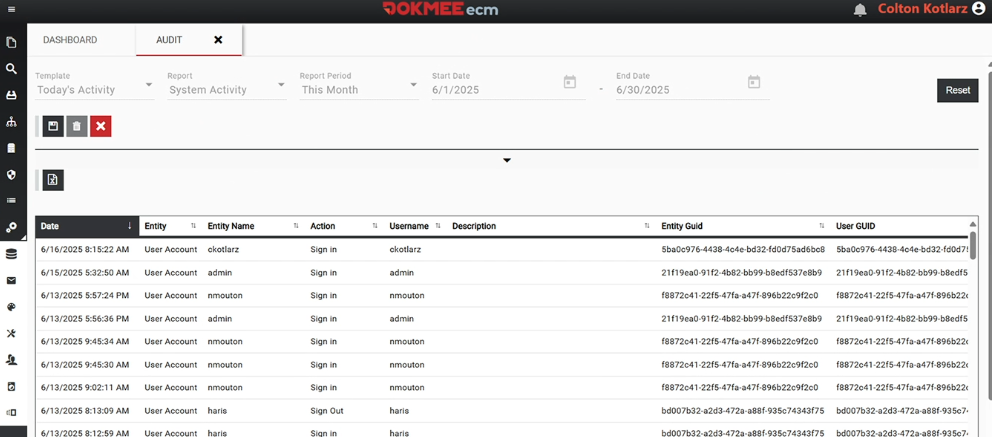
A DMS will provide detailed audit trails where you can view exactly who accessed a document and when, or what information has been viewed.
Transparency
People may have rights regarding how their personal data is processed.
Organizations therefore need to understand what AI is doing with personal information and provide appropriate information about processing where required.
Access rights
GDPR provides individuals with rights concerning their personal data, including rights relating to access and, in certain circumstances, correction, deletion, and restriction of processing.
Your AI and document-management processes need to account for these rights where they apply.
What data needs protection when using AI?
When you use AI with documents, protecting the original files is only part of the job. Information can move through several stages as an AI system searches, processes, and responds to a request. Each stage creates a potential point of exposure.
For example, a legal document may be stored securely in your DMS, but a user could still expose information from that document by including confidential details in an AI prompt.
You therefore need to consider the entire flow of information, including the documents AI can access, the prompts users submit, the results it generates, and any systems that store or process that information.
Data | Example | Risk |
|---|---|---|
Documents | Contracts, case files, claims, employee records | Unauthorized users gaining access to confidential information |
Prompts | Questions containing client, employee, customer, or case information | Sensitive information being sent to an AI service or retained in interaction history |
AI outputs | Summaries, answers, extracted information, or generated text | Confidential information being reproduced, misinterpreted, or shared with someone who should not receive it |
Search results | Documents or passages retrieved in response to an AI query | Information being returned from documents outside the user's permissions |
Logs | Search history, prompts, AI interactions, and system activity | Sensitive information being retained in logs that have their own access and retention requirements |
Embeddings and vector data | Representations of documents used to retrieve relevant information for an AI system | Sensitive information being exposed through connected AI infrastructure or poorly controlled access to the underlying data |
Connected data sources | DMS repositories, databases, SaaS applications, and knowledge bases | More systems, integrations, and permissions that need to be secured and governed |
Backups | Copies of documents, repositories, configurations, and other AI-related data | Sensitive information remaining exposed after a compromise, corruption, ransomware attack, or other operational failure |
The key point is that AI data protection is not a single security feature. You need to consider what happens to information before, during, and after an AI interaction.
A useful way to assess your environment is to ask:
What data can the AI access?
Who is allowed to access that data?
What information can users submit in prompts?
Where is that information processed and stored?
What does the AI return to the user?
Are prompts, outputs, and activity logged?
What other systems or data sources are connected?
How are the underlying documents and related data backed up and recovered?
When you can answer these questions, you have a clearer picture of where sensitive information could be exposed and which controls need to be in place.
For document-heavy organizations, this is where your DMS becomes particularly important.
The platform will guarantee that documents, permissions, search, and AI functionality are governed together.
The real risks of AI and private data
AI does not automatically make private data unsafe.
The risks come from how you use AI, what information you give it, how the system handles that information, and which other systems it can access.
If your organization handles confidential or regulated documents, three risks deserve particular attention.
Employees can enter confidential information into public AI tools
One of the simplest ways to lose control of sensitive information is for an employee to copy it into a public AI chatbot.
An employee might paste:
a contract to summarize
a customer complaint to help draft a response
source code to debug
an insurance claim to analyze
a legal document to identify relevant clauses
The task itself may be legitimate. The problem is that the employee has moved the information outside the organization's existing document security controls.
For example, in 2023, Samsung reported that employees had entered sensitive information into ChatGPT, including source code and internal meeting information. The company subsequently restricted the use of generative AI tools while it developed measures to prevent sensitive information from being exposed through AI services.
Before using an external AI service for confidential information, you need to know where the data is processed, whether it is retained, how it is protected, whether it can be used for other purposes, and who can access it.
It is important to offer your team a secure way to use AI with the information they are already authorized to work with.
AI systems can expose information through vulnerabilities
Not every AI data exposure results from someone deliberately submitting sensitive information. AI services, like other software systems, can also contain vulnerabilities or experience security incidents.
This creates a separate risk: even when users follow normal workflows, the systems processing their information still need to be secure.
Take for instance what occurred to OpenAI in 2023.
A bug in an open-source Redis library allowed some ChatGPT users to access other users’ information, including chat titles and conversation history. The incident also exposed some payment-related information belonging to a limited number of users.
You need to consider the security of the AI service itself and the infrastructure processing the data.
For sensitive information, that means assessing the security practices of any third-party AI provider you use, rather than assuming that a reputable service eliminates the risk of exposure.
Connected AI systems create additional attack surfaces
AI becomes significantly more useful when you connect it to your existing information systems.
Instead of answering questions from a standalone model, an AI assistant might retrieve information from your document repository, cloud storage, CRM, email, databases, knowledge bases, or internal applications.
That also increases the number of systems and connections that need to be secured.
For every integration, you need to know:
What information can the AI access?
Which users can access that information?
Do the existing permissions carry over to the AI?
Where is retrieved information processed?
What information is returned to the user?
Is the interaction stored or logged?
What happens if the connected system or integration is compromised?
The main concern is whether access controls remain consistent across those systems or not.
For example, connecting an AI assistant to a document repository should not give every user access to every document simply because the AI can technically search the repository. A user who cannot open a confidential document should not be able to obtain its contents by asking the AI a question about it.
This is where an AI-enabled DMS can provide an important advantage over copying documents into an external chatbot.
When AI search, summaries, and analysis operate within the document management environment, you can design those functions around the permissions already protecting your documents.
How a modern DMS protects your sensitive data
A secure DMS gives AI access to documents without giving AI unrestricted access to everything.
The distinction matters. AI can make large document repositories much easier to search and analyse, but those capabilities should operate within the same security framework as the documents themselves. Your access controls, permissions, and governance should not disappear when you use an AI feature.
Role-based access controls
Role-based access controls determine which documents and information each user can access based on their role, department, responsibilities, or other permissions.
For example, a solicitor might have access to the case files they work on, while an HR employee can access employee records without having access to unrelated legal files. An insurance broker might access claims assigned to their team, while a government employee can access documents associated with their department.
Those permissions should continue to apply when users search, summarize, or analyze documents with AI.
Permission-aware AI search
AI-powered search can answer questions that go beyond finding a specific word or phrase.
A traditional search asks:
“Find ‘termination clause’.”
An AI search asks:
“Which of our supplier contracts can be terminated within 90 days?”
Answering the second question may require the system to find relevant documents, interpret their contents, compare terms, and produce a response.
That makes access controls even more important. The AI should only retrieve and use information that the person making the request is authorized to access. Otherwise, a feature designed to make information easier to find could unintentionally create a new route to restricted data.
Permission-aware summaries
The same principle applies when AI summarizes documents.
Imagine a legal team has 500 documents relating to a client, but a particular employee has permission to access only 40 of them. If that employee asks:
“Summarize all documents assigned to this client.”
The AI should work from the 40 documents available to that employee, not silently search the entire repository.
AI analysis without moving documents into public chatbots
One reason to use AI within a controlled document environment is to reduce the need to manually move sensitive information between systems.
Without an integrated approach, the process might look like:
DMS → download document → upload to external chatbot → analyse → copy the result back
Each step can introduce another question about where the document goes, who can access it, how long it is retained, and whether the handling meets your organization's policies.
A DMS with integrated AI capabilities can instead provide a workflow such as:
DMS → controlled AI search, summary, or analysis → permissions remain connected to the document environment
Not every AI-enabled DMS processes data in the same way, so you should verify where data is processed, whether it leaves the environment, what providers are involved, and how prompts, outputs, and other AI-related data are handled before making a security or compliance decision.
Which security features should an AI-ready DMS include?
AI data protection does not depend on one feature alone.
Your DMS should provide a combination of access controls, monitoring, data protection, and recovery capabilities that continue to apply as you use AI with your documents.
Some essential features to protect your data include:
Encryption
Encryption helps protect documents and other data from unauthorized access while they are being transmitted or stored.
Look for encryption in transit when data moves between users, applications, and services, and encryption at rest for information stored within the DMS. Where backups contain sensitive documents, you should also understand how those backups are protected.
Encryption does not replace access controls, but it adds another layer of protection if data is intercepted or storage is compromised.
Authentication and identity controls
Access controls depend on knowing who is accessing the system.
Strong authentication and identity management help ensure that users receive access based on their actual accounts and permissions rather than simply having access to a shared repository.
If you handle sensitive information, consider the authentication options available, how user accounts are managed when employees join or leave, and whether stronger authentication methods such as multi-factor authentication are supported.
These controls give you a foundation to use AI with sensitive documents without treating AI security as something separate from document security.
Clear identity controls will help reinforce governance and role-based permissions.
Role-based permissions
Your DMS should let you control access according to your organization's structure and the sensitivity of the information.
Depending on the system, this may include permissions based on users, departments, workflows, cabinets, or files.
For an AI-ready DMS, these controls should also govern what information AI features can retrieve and use. Otherwise, strong document permissions can be undermined by an AI search or summary function.
Your permissions should be able to state who can view, edit, print, or share documents. Plus, these roles should be also embedded into other AI features, such as summaries or searches.
Audit trails
Audit trails give you a record of activity within the document environment.
Depending on the system and configuration, you may need to know:
who accessed a document
who modified it
who searched for it
what actions were performed
when those actions occurred
how AI functionality was used
This provides visibility into how sensitive information is being handled and can help you investigate unexpected access or activity.
Secure document sharing
Sensitive documents should not become less secure simply because you need to share them.
Look for controls that let you manage who can access shared documents and how that access works, rather than relying on uncontrolled downloads or forwarding. Depending on your requirements, this may include access restrictions, authentication, expiration controls, or other safeguards.
The right approach depends on the sensitivity of the documents and the people or organizations receiving them.
It is also important to choose a DMS that allows you to share document directly from your app. The less tools your documents have to move around through, the more protected they will be
Retention and deletion controls
Keeping sensitive information indefinitely creates another data protection consideration.
Retention and deletion controls can help you apply appropriate rules to documents when they are no longer needed, while supporting legal, regulatory, or organizational retention requirements.
This is particularly relevant when you handle personal information covered by GDPR or operate in a regulated industry.
Your DMS should support the retention policies you actually need rather than assuming every document should be kept permanently. Your DMS’ AI should be able to enforce automated retention policies to make sure you don’t miss any timelines.
AI data protection for regulated industries
The consequences of poor AI data protection become more significant when your organization handles information that is confidential, legally protected, or subject to strict access requirements.
The underlying principles remain the same, but the documents you protect, the people who can access them, and the consequences of inappropriate disclosure differ by industry.
Organization | Document examples | Security consideration |
|---|---|---|
Law firms | Contracts, case files, correspondence, evidence | Client confidentiality and strict matter-level permissions |
Insurance brokers | Claims, policies, customer information | Personal and financial data access |
Government | Citizen records, internal reports, applications | Departmental access and sensitive public-sector information |
Healthcare organisations | Patient and administrative records | Highly sensitive personal information |
HR departments | Employee records, performance documents | Restricted access to personnel information |
Let’s break it down.
For a law firm, the DMS will usually store contracts, case files, correspondence, evidence, and other documents relating to individual clients and matters.
A solicitor can use AI to find relevant clauses across a set of case documents or summarize correspondence before reviewing a file. The system still needs to enforce matter-level permissions so that the AI does not retrieve information from cases the solicitor is not authorized to access.
An insurance broker works with claims, policies, customer records, financial information, and supporting documentation.
With a DMS, you can use AI to identify relevant information across a claim file or summarize a customer's policy history. Here, controlling which employees can access particular customer and claims information is particularly important because a useful AI answer may bring together information from multiple documents.
For government organizations, file cabinets contain citizen records, applications, internal reports, and other sensitive public-sector information.
AI can be used to summarize applications or locate information across departmental records. The system should reflect departmental access boundaries so that a user working with one category of records cannot retrieve restricted information simply by phrasing the request differently.
Healthcare organizations handle patient records alongside administrative and operational documents.
An AI search or summary could help an authorized doctor, nurse, or receptionist locate information within a patient's records, but the sensitivity of that information makes appropriate access controls especially important.
HR departments need to securely store employee records, performance documentation, compensation information, and other personnel files.
An HR manager can use AI to summarize documents relating to an employee case or locate information across a set of personnel records. Those capabilities need to operate within the organization's existing restrictions on who can access employee information.
These examples illustrate why AI data protection cannot be reduced to a single security setting. A
law firm needs to think about confidentiality at the matter level, an insurer about access to customer and claims information, a government organization about departmental boundaries, and healthcare and HR teams about particularly sensitive personal records.
The right DMS should let you apply appropriate controls to the information you hold while ensuring that AI features operate within those same boundaries.
AI data protection with Dokmee
Dokmee approaches AI data protection by combining document security with AI capabilities directly embeded into the platform, so there is no swithching back and forth through different systems.
Dokmee Cloud uses AES-256 encryption for data at rest and in transit, along with role-based access controls, multi-factor authentication, and regular security audits.
These controls provide the foundation to protect documents before you introduce AI-powered search, summaries, or analysis.
Document-level security and role-based access controls help determine who can access particular information, while audit trails provide visibility into activity within the document environment.
If you handle confidential case files, employee records, claims, or government documents, these controls help maintain clear boundaries around sensitive information.
Dokmee's AI Search adds a natural-language way to find information across documents. Instead of manually searching for individual terms, an authorized user can ask a question about the information they have access to and use the results to locate relevant documents.
The data-protection value comes from applying the same permissions to AI interactions as to the underlying documents: making information easier to retrieve should not make restricted information available to someone who could not access it directly.
The same principle applies to AI Summary and Q&A.
These features can help you interpret information within documents without requiring them to manually work through every page. Dokmee’s AI assists the person who is authorized to work with the information without creating an alternative route to restricted content.
Dokmee also provides secure document repositories and document-level controls, allowing you to manage sensitive information within the same environment where you can search and work with your files.
That deployment model is also important for organizations with different infrastructure requirements.
Dokmee supports cloud, on-premises, and hybrid deployments, allowing you to choose an environment that fits your document-management and security requirements. Rather than assuming that every organization should handle sensitive information in the same way, you can consider where your documents are stored, who needs access to them, and how AI functionality fits into your existing controls.
The result is a more integrated approach to AI data protection: secure the documents, control who can access them, and make sure AI features follow those same boundaries.
AI then becomes another way for authorized users to work with information already managed within the DMS, rather than an unrestricted gateway to the repository.
Protect the data before you put AI to work
In order to have a truly efficient document management system, you need to know it is being protected as more AI capabilities are introduced in daily work processes.
AI can make large document repositories easier to search, summarize, and analyze. But those capabilities should work within the security controls you already rely on, not create a new route around them.
A modern DMS, like Dokmee, allows you to use AI securely as it automatically keeps appropriate permissions, access controls, audit trails, and data-management policies. The goal is to make sure that using AI does not change who can access your information or where sensitive data can go without your knowledge.
The right AI tools make authorized information both easier to work with and easier to protect.
To start protecting your data with AI, book a free Dokmee demo now.