Why Is Document Collaboration Essential in Document Management?
Document collaboration in a DMS, like Dokmee, offers real-time editing, approvals, annotations, and version control throughout the document lifecycle.
Document collaboration is a major issue in document management.
Documents get lost in email chains every day. Team members become frustrated when they unknowingly work from outdated versions, reviews are delayed well beyond their deadlines, and valuable time is wasted comparing multiple copies of the same document to identify minor changes.
Document collaboration solves these challenges by giving your team a structured way to work together on documents without having to use several tools.
What Is Document Collaboration?
Document collaboration is the process of multiple people working together on a document by viewing, editing, reviewing, commenting on, and approving content throughout its lifecycle.
Instead of passing files back and forth through email, document collaboration allows contributors to access the same document from a unique document management system.
This means you and other colleagues can co-author, review changes, provide feedback, make revisions, and track updates without creating unnecessary copies or losing visibility into who changed what.
For example, a contract may require input from legal, finance, procurement, and executive leadership before it can be finalized. With document collaboration tools, each stakeholder can participate in the review process while maintaining a clear record of comments, edits, approvals, and document versions.
Document Collaboration vs. Simple File Sharing
Many organizations mistake file sharing for collaboration, but the two serve very different purposes.
File Sharing | Document Collaboration |
|---|---|
Sends documents to others | Users work together on documents |
Creates multiple copies | Keeps a unique source of truth |
Limited visibility into changes | Tracks edits, comments, and revisions |
Manual approval process | Structured review and approval workflows |
Risk of version confusion | Controlled version management |
Sharing a document simply provides access. Collaboration allows people to actively contribute while maintaining accountability, transparency, and document control.
Why Is Document Collaboration Essential in Document Management?
Document management is about much more than storing files.
It involves controlling how documents are created, reviewed, approved, updated, and retained throughout their lifecycle. Without effective collaboration capabilities, even the best document management strategy can become difficult to maintain.
Centralized access to business documents
One of the biggest challenges organizations face is ensuring everyone works from the same information.
When documents are scattered across desktops, shared drives, inboxes, and cloud folders, employees often waste time searching for files or verifying whether they have the latest version.
Document collaboration within a document management system creates a centralized repository where users can access current documents whenever they need them. This reduces confusion and helps ensure that decisions are based on accurate, up-to-date information.
Better review and approval processes
Many business documents require input from multiple members or departments before they can be finalized.
For example, sales pitches and marketing campaigns need to be aligned for optimal results.
Without a structured process, reviews often happen through lengthy email chains that make it difficult to track feedback, identify approved changes, or determine who still needs to respond.
Document collaboration simplifies the review process by including annotations where others can comment directly within documents, suggest revisions, and approve content through defined workflows.
This creates a clear path from draft to final approval.
Stronger version control
Version confusion is one of the most common document management challenges.
You may have encountered situations where multiple versions of a document exist, making it difficult to determine which file is current. This problem becomes even more significant when several people are making edits simultaneously.
Document collaboration tools help solve this issue through version control. Every change is recorded, previous versions remain accessible, and users can clearly see the document's revision history. This ensures that teams always know which version is authoritative.
Improved compliance and audit readiness
Regulated industries often require you to demonstrate how, when, and by whom documents were modified.
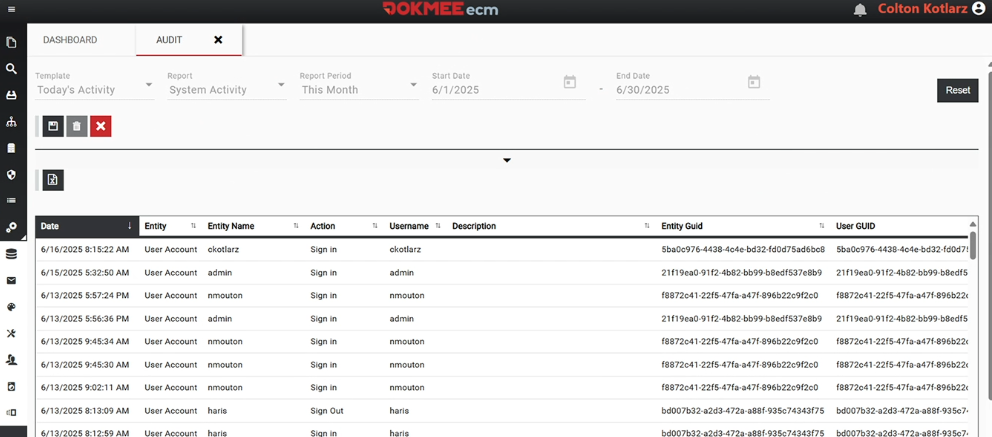
Document collaboration creates a detailed record of document activity, including edits, comments, approvals, and version history.
These records support compliance initiatives and simplify audit preparation by providing visibility into the entire document lifecycle.
Faster decision-making
When feedback is centralized and easily accessible, documents move through review cycles more efficiently.
Rather than collecting comments from multiple sources and manually consolidating feedback, you can review documents within a shared environment. This allows you to easily identify issues, make revisions, and finalize documents more quickly.
Features of Effective Document Collaboration
Not all document collaboration solutions offer the same capabilities. To support modern business processes, collaboration tools should provide several essential features.
Co-authoring
Co-authoring allows multiple users to contribute to the same document while maintaining visibility into ongoing changes.
This capability is particularly valuable when several departments need to work together to create campaigns, presentations, contracts, etc.
For example, a proposal may require contributions from sales, finance, legal, and operations teams. Co-authoring allows everyone to participate without creating separate document versions.
Real-time collaboration
Real-time collaboration allows users to see updates as they happen.
Rather than waiting for revised documents to be sent back and forth, contributors can immediately view changes, reducing delays and minimizing duplicate work.
This is especially beneficial for distributed teams working across multiple locations.
Version control
Version control is one of the most important components of document collaboration.
Every revision is tracked and recorded, allowing you to compare versions, review historical changes, and restore previous versions when necessary. This creates accountability and reduces the risk of accidental data loss.
Document sharing
Collaboration begins with secure access and simple sharing.
Effective document collaboration tools allow you to share documents with internal teams, departments, clients, vendors, or even clients without having to lose any control over who can access specific files.
Access permissions
Not everyone should have the same level of access to every document.
Permission controls allow you to determine who can view, edit, comment on, or approve documents. This helps protect sensitive information while ensuring that whoever needs to can access the content without risking productivity at all.
Comments and annotations
Not every review requires direct editing.
Comments and annotations allow reviewers to provide feedback, ask questions, highlight concerns, and suggest improvements without altering the original content.
This helps preserve document integrity while ensuring that valuable input is captured.
Approval workflows
Many documents require formal approval before they can be published, distributed, or executed.
Approval workflows automate this process by routing documents to the appropriate reviewers in the correct sequence. This helps eliminate bottlenecks and ensures that required approvals are properly documented.
Business Use Cases for Document Collaboration
Document collaboration supports a wide range of business processes across industries and departments. From reviewing contracts to updating compliance documents, collaboration ensures that the right people can contribute, provide feedback, and approve content without losing control of the document.
Contract review and approval
Contracts often require input from legal, procurement, finance, and executive stakeholders before they can be signed.
For example, imagine your company is negotiating a new software vendor agreement.
Procurement reviews pricing and service terms, finance verifies the budget impact, legal edits liability clauses, and executive leadership provides final approval.
Instead of emailing multiple versions back and forth, each stakeholder can review the same document, leave comments, suggest revisions, and approve changes within a controlled workflow.
Policy and procedure management
Policies and procedures require regular updates to remain accurate, compliant, and aligned with business operations.
For example, if your organization updates its remote work policy, HR may draft the initial revisions, legal reviews employment implications, IT adds cybersecurity requirements, and department managers provide operational feedback.
Document collaboration allows all contributors to work from a single document while maintaining version history and approval records for future reference.
Project documentation
Successful projects rely on accurate and up-to-date documentation throughout every phase of execution.
For example, during a company-wide ERP implementation, project managers may update timelines, IT teams document technical requirements, department leaders provide business process information, and executives review progress reports.
Collaboration tools ensure everyone works from the latest version of project plans, meeting notes, and status reports, reducing confusion and keeping teams aligned.
Proposal and RFP development
Creating proposals and responding to requests for proposals often requires expertise from multiple departments.
For example, when responding to a large government RFP, the sales team may write the executive summary, engineering provides technical specifications, finance develops pricing models, and legal reviews contractual language.
Document collaboration allows all contributors to work within the same proposal document, making it easier to collect input, track revisions, and submit a consistent final response before the deadline.
Quality management documentation
Organizations that maintain quality management systems frequently need to update standard operating procedures (SOPs), corrective actions, audit documentation, and compliance records.
For example, after an internal quality audit identifies a manufacturing issue, the quality team may update an SOP, production managers review operational changes, compliance personnel verify regulatory requirements, and department leadership approves the final revision.
Collaboration tools help guarantee all changes are documented, reviewed, and approved and everything is saved in an audit trail for compliance purposes.
How Does Dokmee Support Document Collaboration?
Dokmee’s DMS and ECM platforms is built with seamless collaboration features that will help you preserve governance and increase productivity,
Documents are stored in a secure, centralized cabinets, giving you access to the information you need without searching through email attachments, network drives, or disconnected systems.
As documents move through the review process, authorized users can securely access files, provide comments and annotations, and contribute feedback directly within the document. Keeping discussions and revisions connected to the document itself helps eliminate confusion and ensures everyone is working from the same source of information.
Whether your employees work in the same office, across multiple departments, or remotely, Dokmee supports collaboration while maintaining document security and access controls.
If you use Microsoft applications such as Microsoft Word, Excel, or PowerPoint you can also integrate those tools into your document processes, combining familiar collaboration experiences with Dokmee's workflow automation, document management, security, and records management capabilities.
This means you can edit the document in real-time without having to switch platforms at any time and risk saving or uploading irrelevant versions.
Dokmee also maintains a complete history of document revisions through version control and revision tracking.
Every change is recorded, allowing you to review document history, identify updates, and ensure users always have access to the latest approved version.
If you require structured review processes, Dokmee's workflow automation capabilities help route documents through predefined approval paths. Instead of manually tracking feedback and approvals through email, documents can move automatically between reviewers, helping improve accountability, consistency, and compliance.
By bringing document storage, sharing, annotations, version control, approvals, and advanced integrations into a single platform, Dokmee helps you create a more organized and controlled approach to document collaboration.
Work Closely With Your Team Thanks To Dokmee
Document collaboration is far more than simply sharing files. It is the structured process of creating, reviewing, editing, annotating, approving, and managing documents across teams and stakeholders.
As you create larger volumes of important content, collaboration becomes essential for maintaining document accuracy, accountability, and control.
Features such as co-authoring, annotations, approval workflows, version control, and secure document sharing help ensure that documents move efficiently through every stage of their lifecycle.
By combining these collaboration capabilities with centralized document management, Dokmee helps you create a more organized, secure, and controlled environment for managing business documents while supporting the way modern teams work.
Contact us today to learn more.