
Dokmee vs DocuWare: Best Document Management System Comparison
 5 min read
 Christina Miranda

Choosing the tool that will manage and administer the foundation of your organization (your documents) is an important choice. When choosing your DMS, an inevitable question arises: Dokmee or DocuWare? We are going to help you analyze the most important features and choose the best document management system. What is Dokmee? […]
Choosing the tool that will manage and administer the foundation of your organization (your documents) is an important choice.
When choosing your DMS, an inevitable question arises: Dokmee or DocuWare?
We are going to help you analyze the most important features and choose the best document management system.
What is Dokmee?
Dokmee offers robust DMS and ECM solutions.
The Dokmee DMS is a secure document management system that allows you to store, manage, and access all your digital documents.
It is the ideal system for companies looking to move away from a paper-based system but don’t want to invest in or don’t need many advanced features.
Dokmee’s modular pricing ensures you only pay for what you need.
Dokmee helps you improve your productivity while protecting your documents with advanced audit trails and enhanced security controls.
If you are looking for a more comprehensive or advanced system, you can try Dokmee ECM, which will also store your documents but goes far beyond traditional document management.
With Dokmee ECM, you benefit from advanced automated workflows (precisely customizable to your needs) and use metadata indexing to stay in control of all your documents.
It is ideal for large companies managing very large volumes of documents. It is a scalable solution, rich in powerful integrations.
In both cases, Dokmee provides centralized cabinets to store your documents, easily accessible and searchable according to access rights, making it an essential tool for companies handling large volumes of documentation.
Dokmee is offered as both an on-premise solution and a cloud service, providing companies with great deployment flexibility based on their specific needs.
Dokmee is designed for organizations of all sizes, particularly in legal, healthcare, finance, education, industry, and public administration.
It is particularly advantageous for companies subject to strict document control requirements, such as those needing to comply with HIPAA, GDPR, SOX, or other regulatory obligations.
What is DocuWare?
DocuWare is one of the most popular document management and workflow automation platforms.
DocuWare offers capturing, indexing, archiving, and retrieval of your documents, while facilitating team collaboration.
This system offers features like intelligent indexing, role-based access management, versioning, audit trails, and integration with professional tools such as Microsoft Office and ERP systems.
Additionally, it offers workflow automation for tasks such as approvals, invoice processing, and document routing.
Since it does not offer the advanced features of an ECM, it is better suited for small and medium-sized enterprises.
Like Dokmee, you can choose the deployment method: cloud, on-premise, or hybrid, to better meet your requirements and security controls.
DocuWare is designed for finance, human resources, and quality teams.
DocuWare use cases are varied and cover many business functions.
Dokmee vs DocuWare
Both Dokmee and DocuWare offer essential features in any document management system, making the choice between the two platforms complex, to say the least.
Let’s start with a quick comparison of the two best document management systems:
| Feature | Dokmee | DocuWare |
|---|---|---|
| Solution Type | DMS, ECM, workflow automation, and automated capture | DMS and workflow automation |
| Workflow Automation | Integrated visual workflow designer with audit trails | Powerful automation with predefined templates |
| Document Capture | Advanced OCR, barcode recognition, mass scanning | Intelligent indexing, automatic classification |
| Deployment | On-premise and in the cloud | Primarily in the cloud, with on-premise option |
| Deployment Speed | Fast deployment for both cloud and local | Fast installation on the cloud, longer on-site |
| User Interface | Intuitive, customizable, multilingual | Modern interface, automation-focused |
| Integration | Microsoft 365, SAP, QuickBooks, Dropbox, and custom API | Microsoft 365, SAP, Salesforce, QuickBooks, and more |
| Customization & Branding | White labeling options, custom modules, interface customization | Limited interface customization |
| Pricing Model | Flexible licensing (per user or per feature) | Subscription-based, often per user |
| Mobile Accessibility | iOS & Android apps with offline access | Native mobile apps with workflow integration |
When comparing Dokmee and DocuWare, both platforms offer powerful document management and workflow automation features, but they cater to slightly different needs and priorities.
The main difference between DocuWare and Dokmee is that Dokmee offers an ECM solution, while DocuWare relies on workflows and DMS.
Furthermore, Dokmee’s deployment is much more customized, which is advantageous for structures wanting a hybrid or cloud solution, while DocuWare tends to favor on-premise deployment.
Other features worth comparing include:
UI and UX
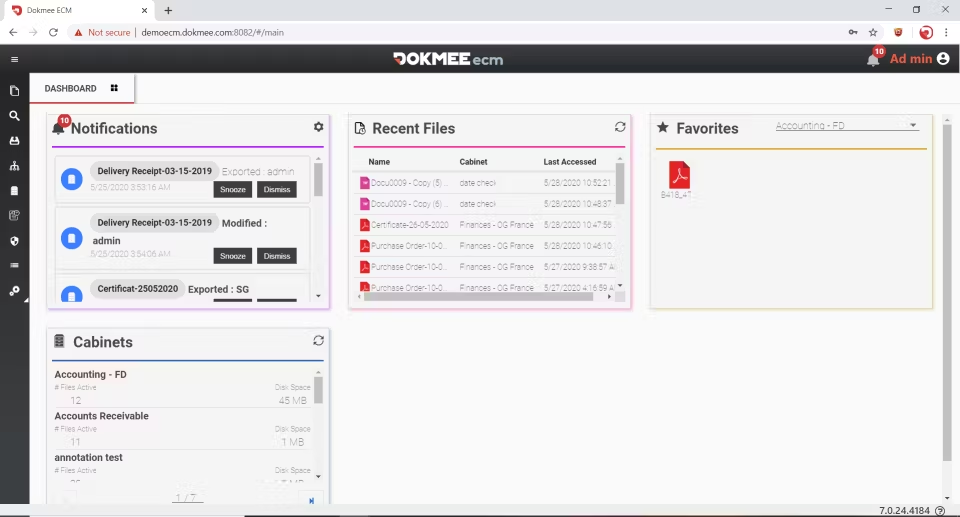
Dokmee offers a clean and intuitive interface focused on user experience, allowing for extensive customization to fit the image and processes of each organization.
Its white labeling capabilities and multilingual support are an advantage for companies requiring a customized and internationally accessible environment.
DocuWare also provides a modern and simplicity-focused interface, although it is generally more rigid and offers less customization than Dokmee.
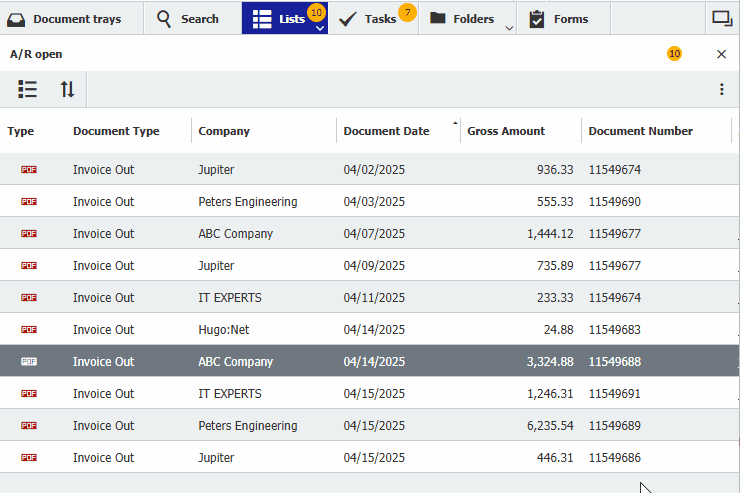
Source: DocuWare
Indexing
Dokmee offers powerful metadata-based indexing tools, allowing users to tag, classify, and find documents accurately.
Its governance features ensure compliance by applying naming conventions, retention policies, and role-based access.
DocuWare also uses intelligent indexing and metadata fields but relies more on automated templates than on free and customizable structures.
Thanks to advanced customization, Dokmee is a more versatile solution for organizations with real data governance requirements.
Capture
Document capture is an essential step in any document management, particularly when moving from paper to digital.
Dokmee offers Dokmee Capture as a dedicated mass scanning and processing solution.
This dedicated product offers advanced OCR, barcode recognition, zonal capture, and batch processing, making it perfectly suited for document-intensive departments like finance or HR.
Dokmee Capture offers:
- Automated data capture
- Automatic indexing
- Scripting
- Reporting tools
DocuWare includes capture features within its platform but does not offer a dedicated engine, which may limit scalability for high volumes.
Additionally, DocuWare’s automatic document import does not include advanced technologies like OCR, unlike Dokmee.
Integrations
Both platforms integrate with professional tools such as Microsoft 365, SAP, and QuickBooks.
However, Dokmee offers more flexibility via its API to create custom integrations, thus easily connecting to specific business systems.
DocuWare also offers major integrations but relies more on standardized plug-ins. Dokmee will therefore be preferred for companies requiring custom interoperability.
Workflow Designer
Document management workflows allow teams to collaborate while ensuring traceability, accountability, and notifications at every stage. These workflows prevent any document oversight throughout the process.
Dokmee offers a drag-and-drop workflow designer to create complex processes without any programming.
Companies can also call on the Dokmee team to design and configure their workflows according to their precise needs, ensuring an optimal solution from the start, without guesswork.
To learn more about Dokmee’s automated workflows, watch this video.
DocuWare is designed for workflow automation. These are easy to create and use, but customization remains limited as you must start from existing templates.
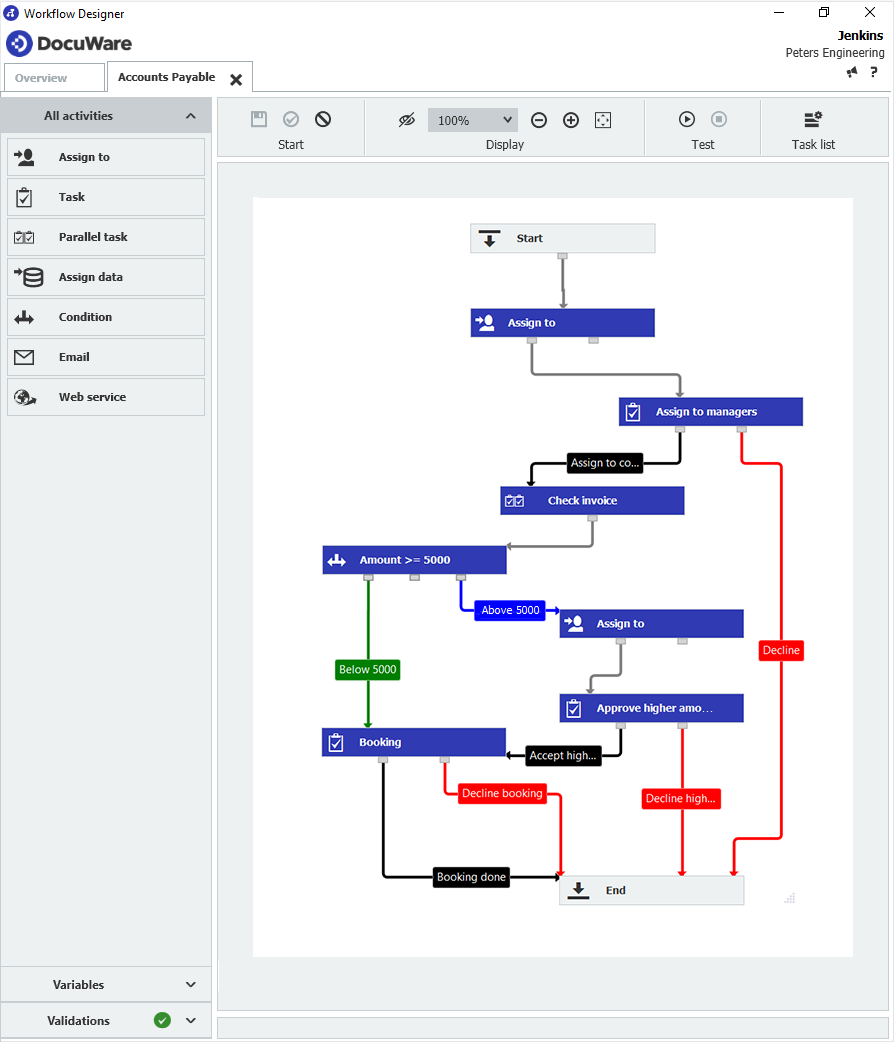
Source: DocuWare
Security Features
Regarding document security, both Dokmee and DocuWare will protect your sensitive documents, but Dokmee provides more customizable roles and permissions.
Dokmee allows for very precise user roles: full admin access, read-only access, permissions for email, printing, etc.
The system also supports document security at the file level, folder access management, as well as restricting download, edit, or delete rights according to user profiles. Additionally, Dokmee offers the optional addition of watermarks on sensitive documents, ensuring their confidentiality during consultation or sharing.
DocuWare also offers role-based access management, but its permission model is more standardized, offering fewer fine-tuning options by default. Additional configuration or licensing is often required to achieve the granularity offered by Dokmee.
Both platforms have full audit trails, recording every action (viewing, editing, deleting, or approving), ensuring regulatory compliance and total transparency.
Dokmee’s audit reporting includes real-time logs, exportable activity reports, and internal tools for administrative compliance monitoring.
DocuWare also maintains robust audit logs, but Dokmee offers more flexibility in viewing, exporting, and filtering these histories for increased control by security teams.
How to Choose Between Dokmee and DocuWare?
Ultimately, it will all depend on your business needs.
You must first evaluate the nature of your documents and your company’s requirements in order to select the solution that fits best.
However, if you prioritize a scalable, highly customizable solution with add-on modules and advanced ECM features, Dokmee stands out as the reference.
If you are just at the beginning of your research phase, we have listed 10 of the best DMS to help you make the right choice.
If you are ready to test a demo, get your free Dokmee demo now!
Get in Touch with Our
Enterprise ECM Experts
Schedule Your Free Demo—Anytime, Anywhere
Experience enterprise-grade ECM with zero hidden fees and instant ROI:
- Instant 24-hour callback—you choose the time.
- Tailored to your workflows—no cookie-cutter pitches.
- ROI in 60 days—most enterprises recoup costs fast.
“Dokmee cut our retrieval time by 70%—we saw ROI in 45 days.”
Chad P., CTO