How to Ensure Document Management Security With a DMS in 2026
Written by Christina Miranda
Human error and cloud misconfigurations cause most data breaches. To enhance document management security you need a DMS to keep documents safe, compliant, and fully traceable.
Human error and cloud misconfigurations cause most data breaches. To enhance document management security you need a DMS to keep documents safe, compliant, and fully traceable.
The two main reasons for data breaches include human error and incorrect cloud storage they can result in $4 million losses to your business.
But what if we told you, there is a way to protect your documents with a single tool.
Document management security boils down to having the best defense: A document management system.
What is Document Management Security?
Document management security embodies all the policies, technologies, and controls you can use to protect your documents in your storage system. Whether you’re using cloud or on-premise document storage.
Its primary goal is to ensure that sensitive information remains confidential, accurate, and accessible only to authorized users, while also maintaining visibility and traceability over every action performed on a document.
In organizations that have moved away from a paper-based system or basic cloud storage tools, document management security is enforced through a DMS.
A secure DMS centralizes files in a controlled environment and applies safeguards such as authentication, encryption, access controls, audit trails, and retention policies. This approach reduces the risks associated with unsecured file servers, email attachments, and disconnected storage platforms.
Why is Protecting Your Documents Important?
It sounds pretty obvious, but over 65% of people still use average cloud storage to save their data. Including sensitive information.
However, although it is quite practical for personal storage, it lacks advanced security that can protect your entire business.
Protecting documents is critical because they often contain sensitive, confidential, or regulated information such as financial records, contracts, employee data, customer information, and intellectual property.
A single breach, accidental deletion, or unauthorized disclosure can result in financial losses, reputational damage, legal penalties, and loss of customer trust.
Without proper document security, you will be facing increased risks of data leaks and compliance violations. Regulations such as GDPR, HIPAA, SOX, and ISO standards impose strict requirements on how information is stored, accessed, and retained.
Failing to protect documents can lead to fines, lawsuits, audit failures, and operational disruptions. Beyond compliance, strong document security also improves internal efficiency by ensuring employees always work with accurate, up-to-date, and authorized information.
How to Secure Your Documents With a DMS
A modern DMS platform provides multiple layers of security designed to protect documents at rest, in transit, and throughout their entire lifecycle, from creation and collaboration to retention and disposal.
Some security features in a DMS include:
Multi-Factor Authentication
Multi-factor authentication is one of the most effective defenses against unauthorized access.
It requires users to verify their identity using more than one authentication factor, such as a password combined with a one-time code, mobile app prompt, or biometric verification.
Even if login credentials are compromised, 2FA greatly reduces the likelihood that an attacker can access sensitive documents. If you handle financial, legal, or regulated data, 2FA o multi-factor authentication is a critical baseline security control.
Encryption (At Rest and In Transit)
Encryption is a foundational component of document security.
A secure DMS encrypts documents both at rest (while stored in the system) and in transit (while being uploaded, downloaded, or shared).
This guarantees that even if data is intercepted or accessed without authorization, it remains unreadable and unusable. Strong encryption protects sensitive business information, client data, and intellectual property while supporting compliance with data protection standards and privacy regulations.
Roles, Permissions, and Access Control
Roles and permissions form the backbone of access control within a DMS.
With a DMS, such as Dokmee, administrators can define exactly who is allowed to view, edit, comment on, approve, share, or delete documents based on job role, department, or responsibility.
This principle of least privilege reduces the risk of accidental exposure and limits the potential damage from insider threats.
Granular permissions also help enforce segregation of duties, which is especially important in regulated industries such as finance, healthcare, and legal services.
Document Watermarks
Watermarks add an additional layer of protection for documents shared internally or externally.
By embedding visible watermarks, you can effectively discourage unauthorized distribution. These watermarks can appear in the form of user’s name, email address, date, or document status.
If a document is leaked, watermarks make it easier to trace the source of the exposure, increasing accountability and reinforcing secure handling practices.
In-App Annotations and Electronic Signatures
Choosing a DMS with built-in annotations, e-signature, and editing helps you keep secure and auditable collaboration.
When you can review, comment, approve, and sign documents directly within the platform, every action is automatically logged in the system’s audit trail.
This avoids the need for insecure email-based workflows, reduces version confusion, and ensures that approvals and signatures are legally defensible. Centralized, in-app collaboration also minimizes unnecessary back-and-forth and prevents documents from being downloaded, altered, or stored outside controlled environments.
Automated File Retention and Disposal Policies
Automated file retention policies add another critical layer of security and compliance.
A modern DMS allows organizations to define how long documents must be retained based on document type, regulatory requirements, or internal policies.
Files can be automatically archived, locked, or securely deleted once retention periods expire. This reduces the risk of over-retaining sensitive data, limits legal exposure, and ensures consistent enforcement of compliance requirements without relying on manual processes.
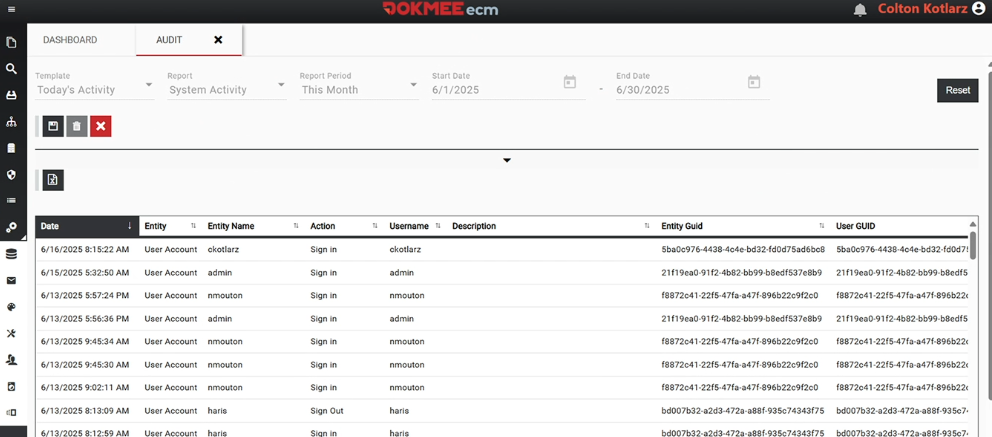
Audit Trails and Activity Logging
Audit trails are essential for document security, transparency, and compliance.
A DMS automatically records every action taken on a document, including uploads, views, edits, comments, approvals, shares, signatures, and deletions.
Each event is logged with user identity, date, time, and action performed. These immutable records create a clear chain of custody, making it easy to demonstrate compliance during audits, investigate incidents, and ensure accountability across teams.
5 Best Practices in Document Management Security
Although a DMS has many incorporated security features, there are still some things you need to take care of to ensure your DMS is both secure and efficient.
1. Define governance strategy
Every strong document security strategy starts with governance.
You should establish clear document management policies that define how documents are created, classified, shared, retained, and disposed of.
Governance provides a framework for consistent decision-making and ensures security measures align with business and regulatory requirements.
2. Set clear roles and responsibilities
By mapping user roles in advance, you can implement access controls more effectively and avoid over-permissioning users. This proactive approach reduces security gaps during system rollout and user onboarding.
3. Regularly review audit trails
Audit logs provide visibility into who accessed documents, what actions were taken, and when those actions occurred. Periodic reviews help detect unusual behavior, identify compliance issues early, and support internal or external audits.
Additionally, if there is a leak at any point, you will know when it was originate and won’t have to sift through endless trails to track down the issue.
4. Standardize collaboration practices
This will help you ensure that documents are shared through controlled DMS links rather than email attachments or unsecured downloads.
Training employees on secure document handling and reinforcing best practices helps reduce human error, which remains one of the leading causes of data breaches.
5. Continuously assess and update security measures
As threats evolve and business needs change, document security policies, permissions, and system configurations should be reviewed to maintain an effective security posture.
Secure Your Documents With Dokmee
Dokmee is designed with document management security at its core, offering the necessary features to protect sensitive information while supporting efficient collaboration.
The platform provides strong user authentication options, including role-based access controls that ensure users only see and interact with documents relevant to their responsibilities.
Documents stored in Dokmee are protected through encryption, secure storage, and controlled access, reducing the risk of unauthorized exposure. Detailed audit trails track every document action, from viewing and editing to approval and deletion, providing full transparency and compliance support.
Dokmee also enhances security through advanced document capture and indexing, ensuring that information is accurately classified from the moment it enters the system.
Built-in version control prevents data loss and ensures teams always work with the correct document version. In-app annotations, approvals, and electronic signatures keep collaboration secure and fully traceable, eliminating uncontrolled document exchanges.
Additional features such as retention policies, file lifecycle management, watermarking, and permission-based sharing help organizations maintain long-term control over their documents while meeting regulatory requirements.
Plus, it is completely customizable so you can guarantee it perfectly fits your needs and hierarchy.
So if you need to upgrade your document management security, book your free demo today.