Full DocuWare Review for 2026: Features
Written by Christina Miranda · Reviewed by  Dokmee
DocuWare is a popular DMS and workflow automation tool. However, fame doesn’t always translate to better results. Check out this DocuWare review to find out if it would be a good fit for you.
DocuWare is a popular DMS and workflow automation tool. However, fame doesn’t always translate to better results. Check out this DocuWare review to find out if it would be a good fit for you.
Did you know that over 40% of business activities depend on the accuracy of your documents?
If you don’t have the perfect document management system, chances are you’re still losing documents, forgetting important tasks, and wasting time tracking files down.
If you’re considering switching to DocuWare to handle your organization’s documents, check out this DocuWare review to understand if it can help you or if you’re just wasting time and money.
What is DocuWare?
DocuWare is currently one of the most popular document management systems and workflow automation software.
It became particularly popular last year, in 2024, due to its features to increase efficiency in organizations.
It offers centralized document storage, cloud-based DMS, and templates for automated workflows, among other useful features that we will be getting into further along.
DocuWare is a useful DMS for businesses of all sizes, however, some smaller businesses may find add-ons to be limiting, as pricing can scale to $100 per month.
Although it has many features, users tend to choose DocuWare for its workflow capabilities that can handle invoice approvals, employee onboarding, contract management, and compliance tracking.
DocuWare also focuses on keeping security measures to protect your documents such as role-based access control, audit trails, document versioning, and secure digital signatures.
Overall, DocuWare offers many features to help you manage your document management much more efficiently.
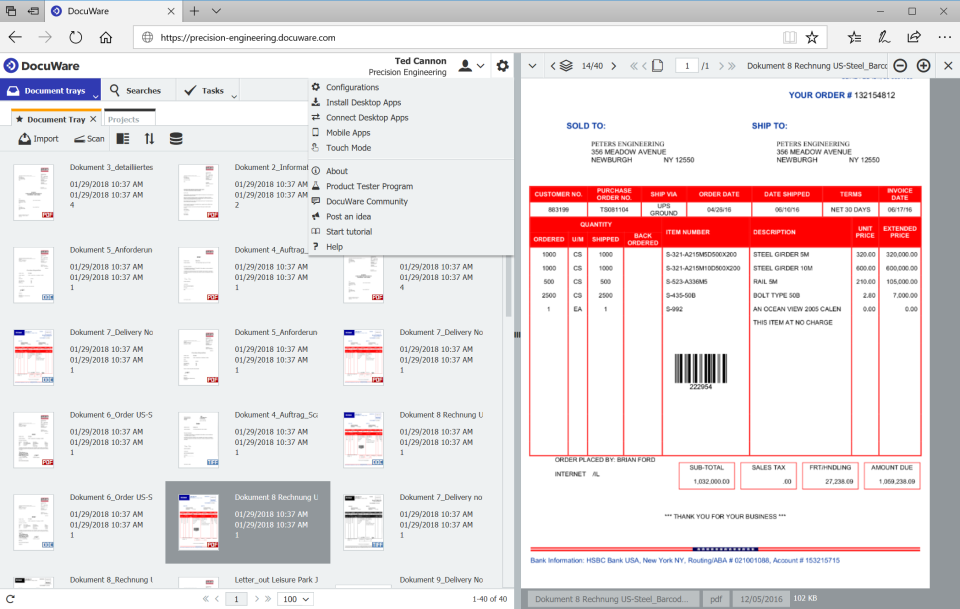
However, even though it may be the most popular DMS it is certainly not the only one and, perhaps, there might be another tool better suited for your needs.
In this article, we will be looking at DocuWare’s features objectively, but also analyzing what actual users have to say.
Where can you Implement DocuWare?
DocuWare offers flexible implementation, meaning you can decide where and how you want to deploy your documents.
DocuWare has a dedicated cloud-based DMS named DocuWare Cloud. This software is fully deployed online and you can access documents and workflows anytime, anywhere.
This product offers document management, electronic forms, intelligent indexing, and the workflow manager.
DocuWare Cloud has 4 tiers that vary depending on the number of users and document volume you wish to include in your plan. Although pricing is currently not disclosed.

If you manage more sensitive documents or belong to highly regulated industries such as healthcare, finance, or legal, you can also choose the on-premise or hybrid deployment.
Although with this model you would need to purchase additional licenses for electronic forms, intelligent indexing, barcode reading, data synchronization, mobile app, advanced integrations, and task and workflow management.
So, if you’re on a tight budget, the on-premise deployment may be quite a strain on your organization’s finances.
DocuWare Workflow Manager
DocuWare’s main capability is it Workflow Manager.
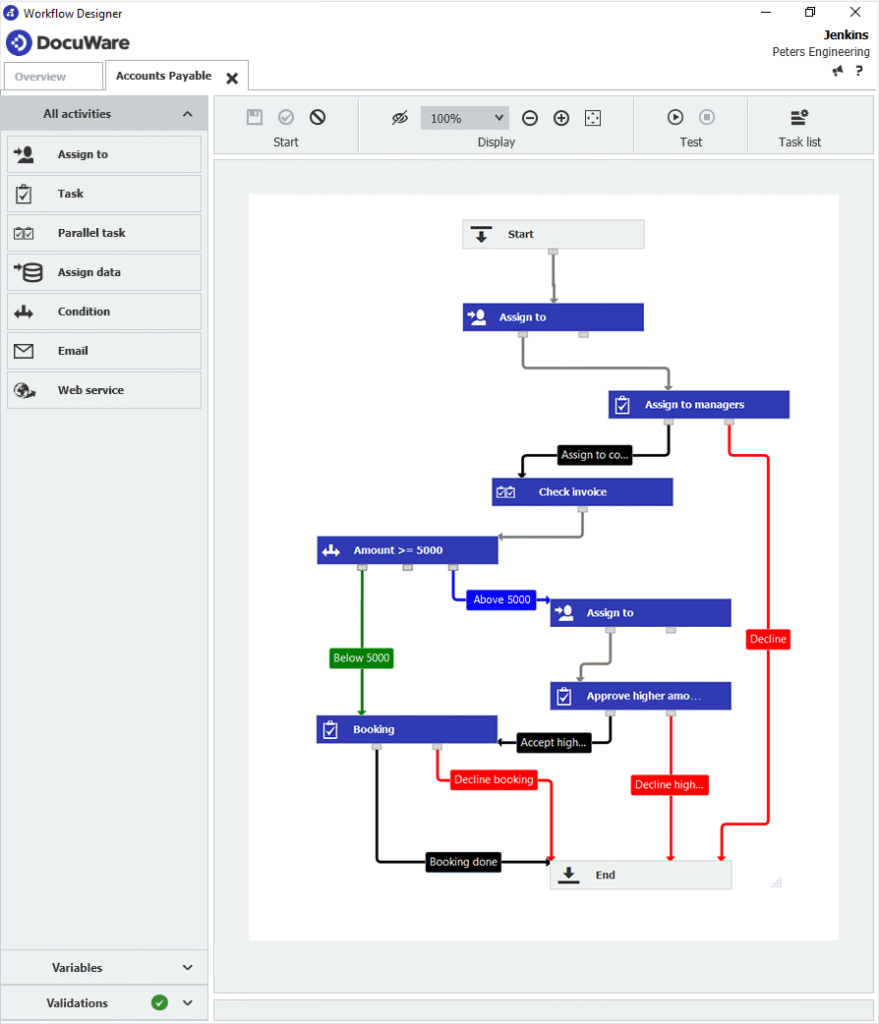
You can build workflows using the drag-and-drop editor to map out each step of your document’s process. You can connections and define whether those actions are automted or if they require manual action from a team member.
With the Workflow Manager you can use metadata and document fields to route files.
Additionally you can assign deadlines for each task to make sure that every step of the process is completed at the right time.
You can customize workflows for tasks such as invoice approvals, contact routing, employee onboarding, or purchase order processing, for example.
Task Manager
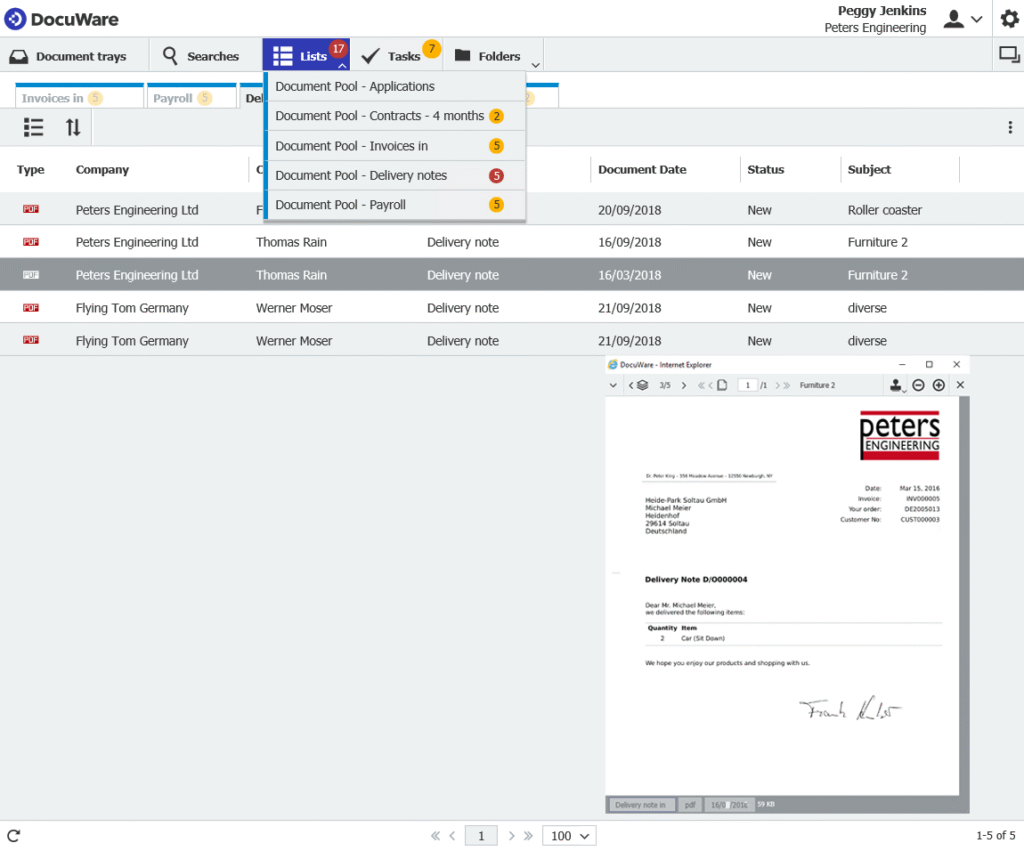
The DocuWare Task Manager keep all assignments organized and visible. It combines automates lists with customized email notifications.
Essentially, it is a centralized dashboard for pending tasks.
This DocuWare capability is a good fit for organizations with several teams that need to work together. Especially those with remote workers.
You can automate notifications, so as soon as a document becomes available, team members will receive an email with a direct link to the file or document in question. For example, with payroll files, contract updates, or delivery notes.
The DocuWare Task Manager shows you important documents, deadlines and task updated.
This also allows manager to gain full visibility into your team’s progress and workload distribution, to ensure collaboration and accountability.
To explain it with a practical example, your HR team can receive CVs as soon as they are submitted, however, department managers will receive the notification when the candidate has passed the first approval step.
Document Management Features
We’ve analyzed two of DocuWare’s most popular capabilities, now let’s get into DMS features that actually help manage your documents, rather than tasks.
Intelligent indexing and full-text search
Like with every DMS or ECM, DocuWare can store your documents in files and organize them with metadata tags and advanced indexing.
DocuWare converts document content into searchable index terms automatically.
This helps you organize your documents and retrieve them quicker, which means your team can spend less time hunting for information and more time making decisions based on it.
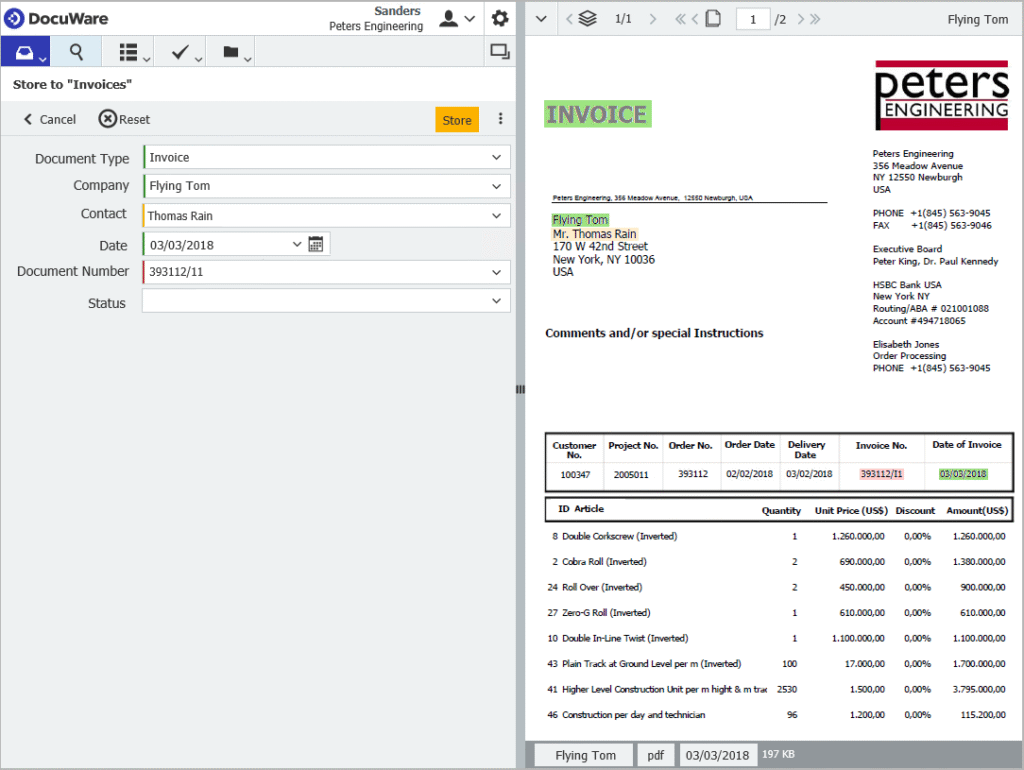
Although DocuWare has strong AI-powered indexing and includes AI-powered data extraction and handwriting recognition, it doesn’t include native advanced document capture or OCR technology.
This means that you would have to integrate third-party tools to extract and digitize information from scanned documents, or invoices, or do so manually.
So if you manage large amounts of paper documents, this is something you should take into consideration.
Secure document management
DocuWare also offers features such as role-based access control, audit trails, and document versioning to make sure your sensitive information is protected while it is still accessible to authorized users, while avoiding security breaches.
If you’re operating in a regulated industry, DocuWare supports compliance with GDPR, HIPAA, and other standards.
You can also sign and edit your documents directly from the app to avoid moving documents from one tool to another and so these actions are also saved in the audit trails.
Intelligent document processing (IDP), splitting and classification
DocuWare’s IDP automatically separates batch scans into individual documents, which is useful if you need to process many invoices, contracts, or forms.
This feature eliminates the need for manual sorting and reduces erros.
Additionally, IDP classification automatically identifies document types and stores them in the correct folder.
Document import and email integration
DocuWare’s file import features take documents from emails or other digital folders and indexes them automatically to store them in the appropriate folder.
With DocuWare you can import your document directly from productivity tools such as Microsoft Office. Instead of manually saving and uploading files, you can send them straight into your file cabinets making it easy to capture contracts, proposals, reports, or any other content created by your team.
Emails and attachments can be captured automatically and stored alongside other business content, ensuring important correspondence doesn’t get lost in personal inboxes.
Additionally, DocuWare integrates with Microsoft Teams, enabling documents shared in chat or collaboration spaces to be archived securely.
DocuWare Forms
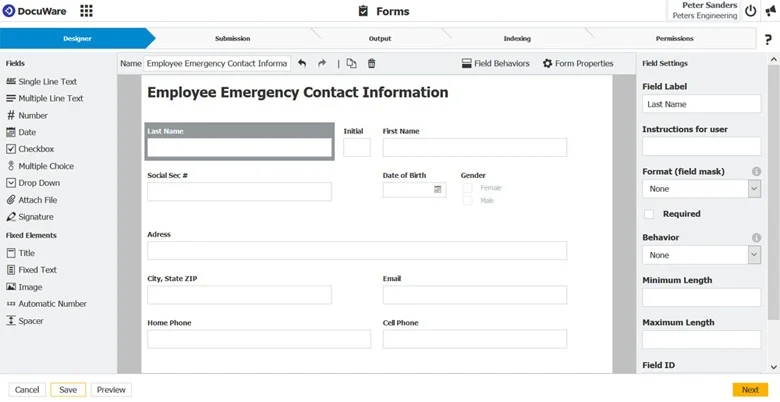
Finally, with DocuWare you can also create web-based forms with drag-and-drop, no-code interface.
In these forms you can include text boxes, dropdown menus, checkboxes, calendar inputs, and upload files. This will help you capture exactly the information you need for your workflows.
You can decide which fields are required, adjust labels and positioning, and structure the form to match your company’s needs. This self-service approach allows departments like HR, Finance, or Sales to build their own forms quickly.
Once a form is created, you can generate a secure URL to distribute it however and with whomever you decide. You can optimize your forms for mobile devices to guarantee your audience can complete them at anytime.
Submitted forms are stored in DocuWare, indexed, and routed to their appropriate workflows.
Note: These are not the only features you can find in DocuWare, we have merely gathered the more useful ones for this article.
Users’ Reviews
let’s get down to the gist of this article: What actual users have to say about DocuWare.
Ratings ⭐⭐⭐⭐⭐
G2 4.4/5 | Capterra 4.6/5 | Gartner 4.6/5
Most users use DocuWare to keep collaboration and efficiency when team members work remotely, thanks to the Cloud DMS.
Additionally, it is a good choice for teams who are implementing a new paper-based system or who are migrating from other digital storage solutions, thanks to the import features.
Users also consider that DocuWare has a clean interface, however, if you have never used a DMS before, you will need assistance.
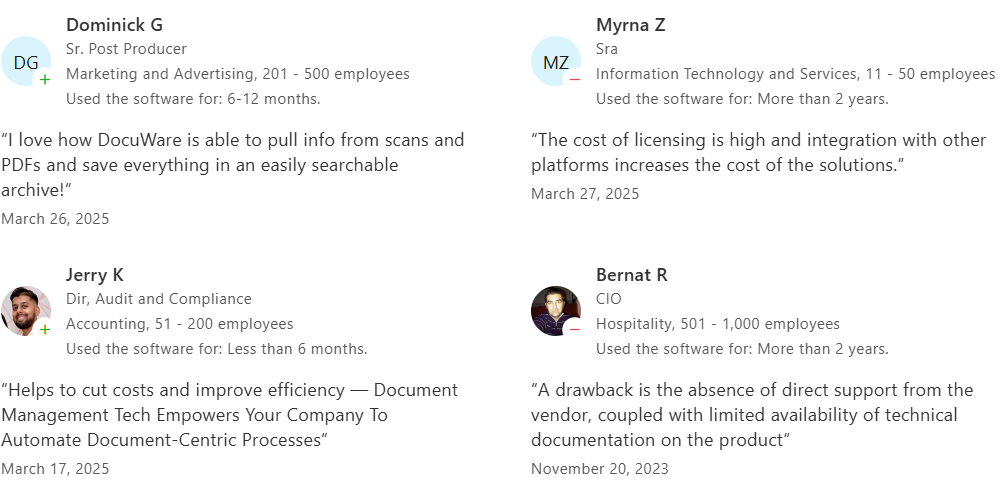
These are some examples of users’ reviews:
Pros
Users tend to use electronic forms a lot
Constant access to all files
Useful workflow automation
Easy navigation
Strong integrations
Cons
High learning curve
Log files can get jammed when they grow too much
Pricing scales too much
Lacks offline access on mobile app
Unresponsive customer service
DocuWare vs. Dokmee
Although DocuWare is a good and popular choice, other tools like Dokmee may be a better fit for your business.
Dokmee and DocuWare are both DMS and ECM systems, however, they differ in flexibility, customization, and the level of support offered to end users.
While both platforms provide solid document management and workflow automation tools, Dokmee offers stronger document capture, OCR, and role-based security features.
DocuWare, on the other hand, focuses on team collaboration and task management but offers less depth in customization and responsiveness in customer service.
DocuWare includes a user-friendly workflow builder designed for straightforward automation of approval processes, document routing, and task management. On the other hand, Dokmee offers both a standard workflow builder and a more advanced, technical workflow engine.
This allows organizations with IT expertise to design intricate, large-scale workflows tailored to highly specific business processes.
Dokmee also provides extensive options for assigning roles and permissions, which can be customized to very granular levels. This flexibility supports compliance with industry regulations and enhances document security.
Additionally, DocuWare forms are easy to design and integrate into workflows but are somewhat limited in customization and adaptability.
Dokmee forms, on the other hand, allow more flexibility in design and data capture, supporting a wider range of use cases and user experiences.
In this table you can find some more differences between both tools!
Feature | Dokmee | DocuWare |
|---|---|---|
Workflow Builder | Standard + advanced/technical builder; can design complex workflows with IT support or Dokmee team assistance | Simple, user-friendly builder focused on basic routing and approvals |
Document Capture & OCR | Built-in capture and OCR capabilities for automated indexing and data extraction | Lacks native OCR; requires third-party integrations |
Roles & Permissions | Highly customizable, granular role assignments for compliance and security | Role-based access available but less flexible |
Forms | Flexible and customizable forms for varied business use cases | Easy-to-use forms but limited in customization |
Customer Service | Responsive, proactive, and hands-on support (helps build workflows) | Reported as unresponsive or slow according to user reviews |
Customization | Strong adaptability for complex business processes | More rigid, less adaptable to advanced customization |
Best Fit For | Organizations needing compliance, advanced workflows, and OCR | Businesses seeking simplicity and out-of-the-box workflows |
Is DocuWare the Perfect Fit For you?
DocuWare is a solid choice with many features and capabilities that can help you manage your documents and simplify collaboration between teams.
However, if you’re looking for the best security measures, advanced workflows, OCR, and an ECM solution, you might consider contacting Dokmee right now.
If you’re still on the fence, make sure you check out the 10 best DMS software currently available.