How to Achieve Office Automation With a DMS
Written by Christina Miranda · Reviewed by  Dokmee
Sorting paper receipts and manually routing invoices drains valuable administrative hours. Integrating a DMS brings structured office automation directly to these repetitive tasks. It secures your information while moving files seamlessly through approval chains.
Office automation has a hidden problem. The more documents your business creates, the more time your team can spend managing them rather than using the information they contain.
Filing invoices, tracking down contracts, entering data, and chasing approvals all take time away from work that moves your business forward.
Office automation can change that by reducing repetitive administrative work and making business information easier to manage. From automated data extraction to document routing and AI-powered search, the right technologies help you spend less time handling files and more time putting them to use.
The most efficient way to build an automated office is through a DMS or an ECM platform.
What is office automation?
Office automation refers to the use of technology to handle administrative tasks, process information, and manage everyday office activities. It can be as simple as automatically filing incoming documents or as involved as routing contracts through multiple approval stages without requiring someone to coordinate every step manually.
In practice, office automation covers tasks that are’nt billable but keep your business running.
You can automate document filing, extract data from invoices and forms, retrieve records through searchable repositories, distribute documents to the right people, and trigger notifications when a file needs review or approval.
Office automation and business process automation are closely related, but they typically operate at different levels. Office automation often focuses on individual administrative tasks, such as organizing employee records or processing incoming paperwork.
BPA coordinates broader workflows that may span multiple departments and software systems. For example, automating the filing of an invoice is an office automation task, while managing the entire invoice approval and payment process across finance, procurement, and accounting is a broader business process.
Document management plays a central role in both. Contracts, invoices, employee records, forms, and reports contain information that employees need to access, review, share, and act on. If these documents are scattered across email inboxes, shared drives, and paper filing cabinets, even a well-designed workflow can become difficult to manage.
A DMS platform helps you centralize these records, organize them for easy retrieval, control access, and automate document-related workflows. This gives your office a more consistent way to manage information and creates a foundation for more extensive automation.
What technologies are included in office automation?
Office automation relies on several technologies that work together to manage business information. Some help you store and organize documents, while others extract data, control access, move files through approval processes, or help employees find the information they need.
You can adopt these technologies individually, but their value increases when they work together. For example, extracting data from an invoice is more useful when you can index the document, store it securely, route it for approval, and retrieve it later from the same system.
Document storage and organization
Digital storage is the foundation of office automation. It gives you a place to keep business documents in a place you (and your AI) can access them easily later on. Cloud storage and shared repositories also allow employees to access files from different locations.
However, we do feel we need to add a little caveat here.
Storing documents in your server or in a basic cloud storage service doesn't automatically make them easy to manage, nor does this mean that your office is automated. When files accumulate across shared drives, email attachments, and individual folders, finding the right version can still take time.
This is where a DMS shines. a dedicated platform adds structure to digital storage through features such as document classification, indexing, metadata, and version control.
Metadata describes a document using details such as its title, creation date, supplier, department, or document type. These details help you organize records and locate them without opening files one by one. Version control, meanwhile, helps employees identify the current document and track changes over time.
Automated data extraction and processing
Many office tasks involve transferring information from documents into another format or system. For example, inputting invoice details into accounting software, copy information from forms into a database, or review contracts to identify important dates. Automated data extraction reduces the amount of this work that needs to be done manually.
OCR converts text in scanned documents and images into machine-readable text. This makes paper records and image-based PDFs searchable and allows software to process their contents. OCR alone doesn't necessarily identify which pieces of information matter; it primarily makes the text available for further processing.
Automated data extraction takes the next step by identifying specific information within a document. For example, your DMS can capture an invoice number, supplier name, payment due date, and total amount, making these fields available for review or transfer into another application.
IDP combines technologies such as OCR, classification, data extraction, and AI-assisted processing to handle documents with different layouts and content. Depending on the system and configuration, it can identify document types, extract relevant fields, and send information into a predefined workflow.
Automated indexing then helps organize the resulting documents and data so employees can find them later. A newly processed invoice, for instance, could be indexed by supplier, invoice date, and number.
These technologies reduce repetitive data entry and make information available sooner.
Document protection and information governance
As you digitize and automate office processes, you also need to control who can access business information, what they can do with it, and how long records should be retained.
Access permissions and role-based access controls help restrict documents to authorized users. For example, HR staff needs access to employee records that other departments shouldn't be able to view. Applying permissions at the document or file cabinet level helps maintain these boundaries as information is shared and workflows progress.
Encryption helps protect information from unauthorized access while it is stored or transferred. Audit trails provide another layer of oversight by recording activities such as document access, edits, and workflow actions, depending on the system's capabilities. Version history can also help you identify changes and recover earlier versions when necessary.
Records retention and document lifecycle management address what happens to documents over time. Your organization will need to retain different records for defined periods, review them periodically, archive them, or dispose of them according to established policies. Automating parts of this process helps apply consistent rules and reduces dependence on employees remembering every deadline.
These protection controls are especially important when documents contain confidential business information, personal data, or records subject to regulatory requirements. A DMS or ECM platform can bring access controls, audit trails, and lifecycle policies into the same environment used to store and process documents.
Document transfer and workflow automation
Documents rarely stay in one place throughout their lifecycle. An invoice might arrive by email, pass through finance for verification, go to a department manager for approval, and then reach accounting for payment. Without automation, employees may need to forward attachments, send reminders, and check manually who has completed each step.
Document routing and workflow automation help coordinate these activities according to predefined rules. Your DMS sends a document to the appropriate reviewer, assigns an approval task, notifies the next person when action is required, and records the outcome.
Secure document sharing and distribution help employees provide access to the right people without creating unnecessary copies or losing track of the original. Notifications and task assignments make outstanding work easier to monitor, particularly when several people need to review or approve a document.
Integrations connect document management tools with other business applications, including ERP, CRM, and HR systems. For example, information extracted from an invoice could be passed to an accounting or ERP system, while the supporting document remains available in the document repository.
These technologies reduce manual handoffs and help make processes more consistent. They also improve visibility into where a document sits in a workflow, who needs to act on it, and whether an approval is still pending.
Document search and retrieval
Storing documents centrally is only useful if employees can find the information they need. Search and retrieval technologies make that possible by allowing users to locate documents through their contents and identifying details.
Full-text search finds words and phrases within a document's contents, while metadata-based search lets users narrow results using fields such as document type, date, supplier, or department.
AI-powered search can extend these capabilities by allowing employees to search using natural-language questions rather than exact keywords. Depending on the platform, it may identify relevant documents based on context, summarize their contents, or help users find specific information across a collection of records. Access controls remain important: search results and document content should respect the user's permissions.
For example, if you’re looking for a supplier agreement and can’t recall vendor name and contract date, an AI-powered search tool can locate the relevant document by natural language searches and queries.
Effective search reduces the time employees spend tracking down records and makes the information stored across your organization more useful. When combined with extraction, indexing, and document management, it turns a collection of digital files into an accessible source of business information.
How can DMS and ECM platforms automate your office?
You can automate individual office tasks with separate tools, but managing each part of the document lifecycle in a different system can create unnecessary friction.
Your files might live in cloud storage, OCR software might extract information separately, and employees might handle approvals through email. This makes it harder to have consistent access controls, track document versions, and see where a document sits in a workflow. It also adds extra risk of transferring information between applications manually, adding work to processes that were supposed to save time.
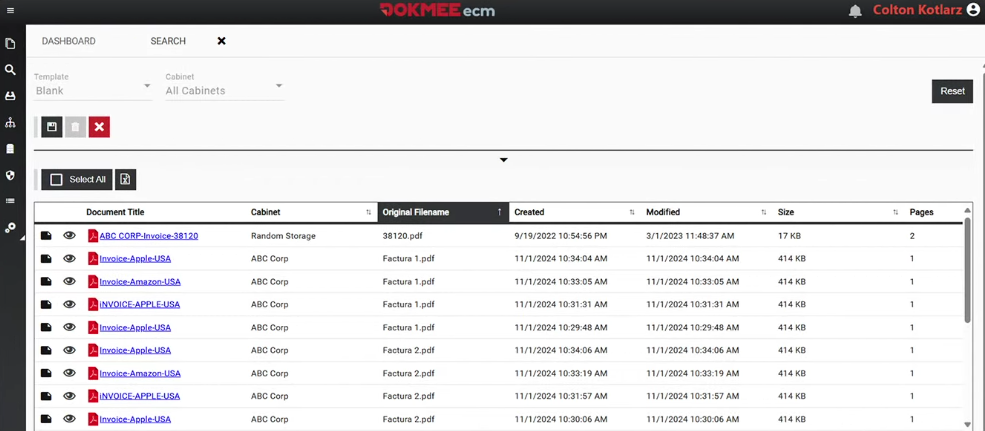
A DMS platform brings these activities together in a central environment where you can capture documents from different sources, organize them with metadata and indexing, retrieve them through search, and control who can view or modify them. Workflow automation adds another layer by routing documents for review, assigning approval tasks, and notifying employees when action is required.
An ECM platform takes a broader approach by managing different types of organizational content throughout their lifecycle. Alongside document storage and retrieval, an ECM platform may include electronic forms, records management, retention policies, and more extensive business process workflows. This makes it useful when you need to coordinate information and processes across departments, particularly when multiple teams depend on the same documents and records.
Dokmee automates document-driven office processes with document management and ECM solutions that include document capture, OCR, AI-powered search, and workflow functionality. You can digitize paper records, make document contents searchable, organize information in a central repository, and automate how documents move through your organization. AI-powered search also makes it easier to locate relevant information using natural-language queries, depending on the features available in your solution.
How to implement an automated office
Implementing office automation starts with understanding where your current processes create unnecessary work.
You don't need to automate everything at once. Focus on the tasks that consume the most time, involve repeated manual handling, or make it difficult for employees to access reliable information.
From there, you can choose the right technologies, connect your systems, and expand automation as your needs evolve.
Step 1. Identify repetitive tasks and document bottlenecks
Start by reviewing how your team handles everyday administrative work. Look for tasks such as manually filing documents, entering the same information into multiple systems, searching for records across different folders, chasing approvals, and forwarding files between departments.
Pay attention to where delays occur and which tasks are most prone to human error.
For example, if employees regularly spend time locating signed contracts or entering invoice details into accounting software, document storage and data extraction could be good places to start.
Prioritize processes that occur frequently and have a clear opportunity for improvement. This gives you a practical starting point and makes it easier to measure whether automation is delivering results.
Step 2. Map document workflows
Before choosing your tools, map how documents move through the processes you've identified. Determine where each document originates, who needs to review or approve it, what information must be extracted, and where the final record belongs.
Consider an employee onboarding process. Documents tend to arrive through digital forms, require review by HR, and then need to be stored securely alongside other employee records. Mapping each step helps you identify where information is entered more than once, where employees must manually transfer files, and where tasks can be automated.
This step also clarifies which people need access to specific documents and which actions require human approval. The result is a clearer picture of what your automation system needs to do.
Step 3. Choose the right automation technologies
Choose technologies based on the problems you've identified rather than adopting tools simply because they offer automation features.
OCR can make scanned documents searchable, while automated data extraction can capture information from invoices, contracts, and forms. Workflow automation can route documents for review, assign approval tasks, and send notifications when action is required.
A DMS combines all these capabilities with centralized storage, indexing, search, and access controls. If your organization manages a wider range of business content and needs broader records management or process automation capabilities, an ECM platform may be a better fit.
Consider how well each option integrates with your existing systems, supports your document volumes, and meets your security requirements. The right combination should address your current needs while leaving room for additional automation as your business grows.
Step 4. Integrate systems and establish document controls
Office automation becomes more useful when information can move between the systems you already have in place. Consider how your document management platform will connect with applications such as accounting software, ERP, CRM, or HR systems.
For example, extracted invoice data could be transferred to an accounting system while the original document remains stored in a central repository. This reduces duplicate data entry and keeps supporting records accessible.
Establish document controls before automating these processes. Define access permissions, classification rules, version control, retention periods, and audit requirements. Make sure integrations and automated workflows respect these rules so that information reaches the right people without exposing sensitive records unnecessarily.
Step 5. Keep an eye on your results
Once your automated workflow is running, compare its performance with the original process. Useful indicators include document retrieval time, manual data entry requirements, processing errors, approval turnaround times, and the number of tasks completed without manual intervention.
Choose metrics that relate directly to the problem you wanted to solve. If employees previously spent hours searching for documents, measure how quickly they can now retrieve them. If approval delays were the main issue, track the time between submission and final approval.
Use these results to identify what needs improvement and which processes to automate next. You might begin with invoice processing, then apply the same principles to contracts, employee records, or other document-heavy workflows.
Expanding gradually gives you time to refine your approach and build on what works.
Automate an efficient office with Dokmee
An automated office depends on how well you manage the information behind your daily operations. Digital storage, data extraction, document security, search, and workflow automation all play a role, but managing them through disconnected tools leaves the same manual tasks and information gaps.
A document management system or enterprise content management platform brings these capabilities into a more connected environment. You can organize documents centrally, retrieve information more easily, apply consistent access controls, and automate the processes that move records between employees and departments.
Dokmee helps you put these capabilities into practice. With document capture, OCR, AI-powered search, and workflow functionality, Dokmee's document management and ECM solutions give you tools to digitize records, make information easier to find, and manage document-driven processes more consistently.
Whether you're replacing paper-based filing, reducing manual data entry, or coordinating approvals across departments, start by identifying the processes that take up the most time. Then consider how a centralized document management platform can help you automate them.
Book a free demo with Dokmee today and see how it can fit your organization's needs.