Avis FileHold 2026 : Vaut-il son étiquette d'entreprise ?
Looking for an honest FileHold review? We analyze FileHold features, total cost of ownership, and how it compares to faster, cost-effective options.
Si votre équipe cherche encore des contrats signés ou des factures du trimestre dernier dans des disques partagés, des boîtes de réception ou des classeurs, vous savez déjà combien cela coûte en temps perdu, en approbations manquées et en risques d'audit. Cette quête d'ordre vous a probablement amené à cet avis sur FileHold.
Ci-dessous, nous détaillons ce que fait la plateforme, ses performances pour les utilisateurs réels, son coût et si elle convient à votre flux de travail.
👍 Si vous cherchez plutôt d'excellentes alternatives à FileHold, nous avons également couvert ce sujet.
Oui, pour la bonne équipe. Voici la version rapide si vous n'avez qu'une minute :
FileHold est un système de gestion de documents (SGD) conçu pour un classement numérique structuré, sécurisé et facilement consultable.
Évalué 4,6 sur 5 sur G2 (plus de 30 avis) et 4,7 sur 5 sur Capterra (plus de 55 avis).
Convient le mieux aux petites et moyennes organisations des industries réglementées : santé, juridique, gouvernement et finance.
Fort sur les pistes d'audit, la sécurité basée sur les rôles et le support client.
Moins adapté si vous souhaitez spécifiquement une classification de documents basée sur l'IA intégrée ou une interface entièrement moderne et native du cloud dès le départ.
Qu'est-ce que FileHold ?
FileHold est un système de gestion de documents qui aide les organisations à capturer, stocker, sécuriser et récupérer des documents numériques.
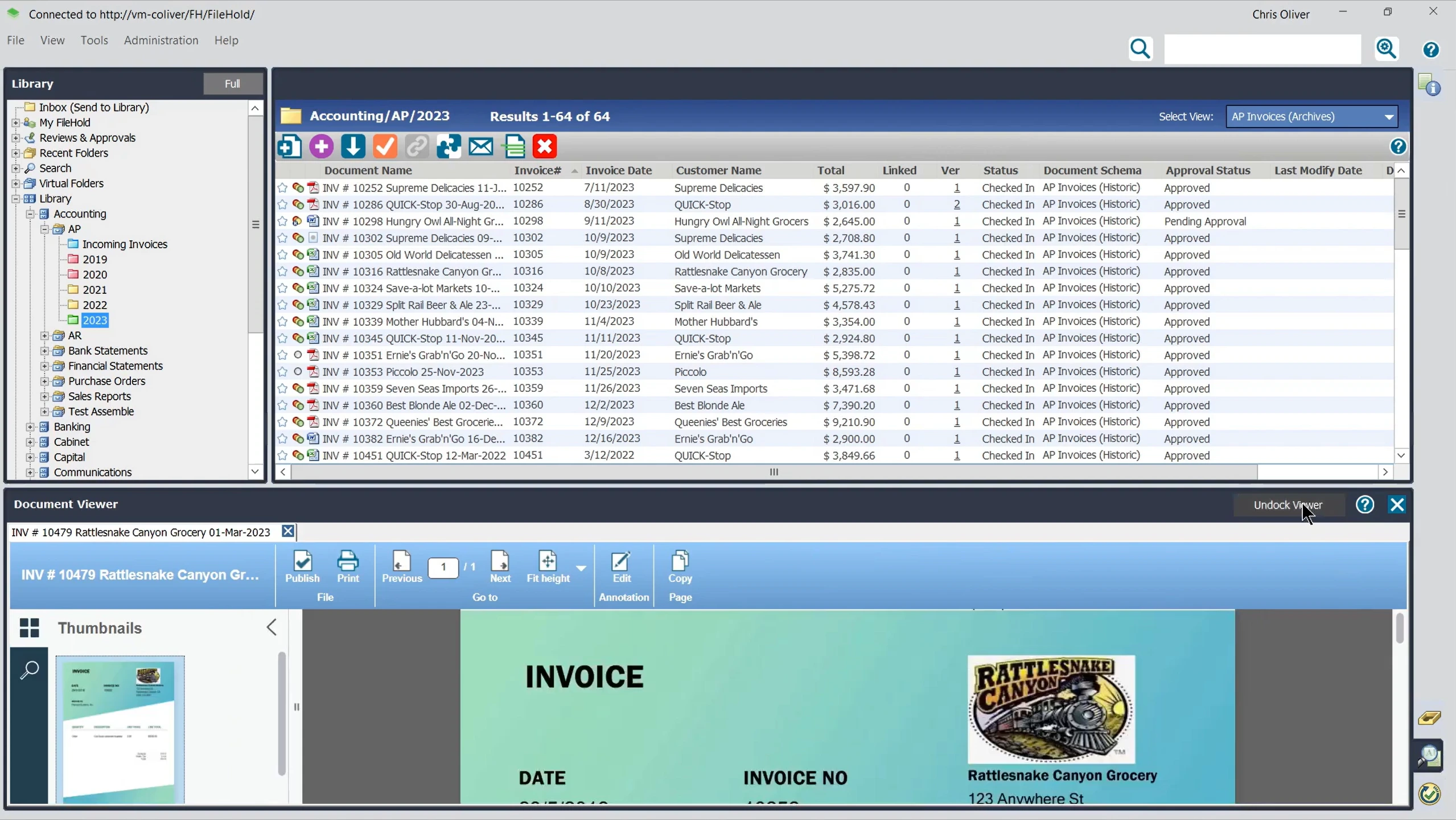
Il remplace les disques partagés et les classeurs désordonnés par un système structuré et consultable, construit autour de classeurs, tiroirs et dossiers virtuels. C'est la même hiérarchie que la plupart des bureaux utilisent déjà sur papier, mais numérisée et consultable en quelques secondes au lieu de minutes.
Il est utilisé dans les secteurs de la santé, du droit, de l'éducation, de la finance, de la fabrication et du gouvernement. Ces industries accordent une grande importance à la conformité et à l'intégrité des documents.
✅ FileHold peut être déployé sur site, dans le cloud via FileHold Cloud, ou sous forme hybride, afin que les organisations puissent garder les dossiers sensibles sous contrôle direct tout en permettant aux équipes distantes d'y accéder lorsque cela est pertinent.
Quelles sont les principales fonctionnalités de FileHold ?
L'ensemble des fonctionnalités de FileHold couvre l'intégralité du cycle de vie des documents, du stockage et du flux de travail à la sécurité et aux intégrations.
Voici ce que fait chaque fonctionnalité principale, ainsi que ce à quoi il faut faire attention en fonction des retours d'utilisateurs réels.
Stockage et organisation des documents
Chaque document réside dans une hiérarchie structurée qui reflète le classement physique, afin que les équipes puissent s'adapter rapidement sans avoir à réapprendre comment les documents sont organisés.
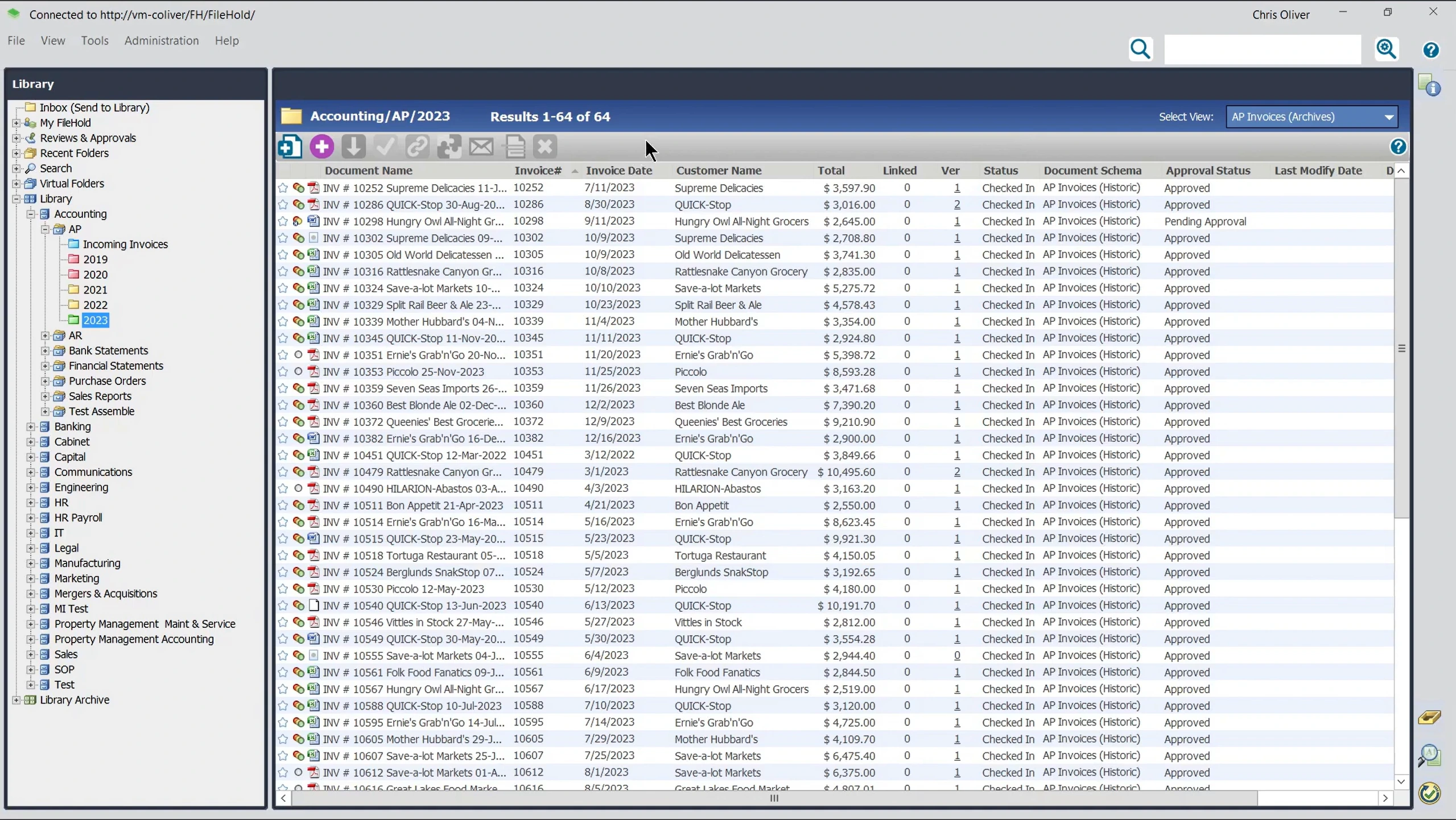
Classeurs, tiroirs et dossiers virtuels au lieu d'un simple dépôt de fichiers
Balises de métadonnées personnalisées, telles que le nom du client, le numéro de dossier ou le service
Contrôles d'enregistrement et de retrait qui empêchent deux personnes d'écraser les modifications de l'autre
Historique de version automatique pour chaque document
Dossiers virtuels qui regroupent les documents liés de toute la bibliothèque dans une seule vue, plus la liaison de document à document
👍 Conseil : Prenez le temps de planifier votre schéma de métadonnées avant de migrer des documents en masse. Plusieurs évaluateurs ont noté qu'il est difficile de revenir sur les décisions initiales concernant les métadonnées sans un nettoyage manuel ultérieur.
Flux de travail et approbations
Les administrateurs peuvent créer des flux de travail de révision et d'approbation sans avoir besoin d'un développeur.
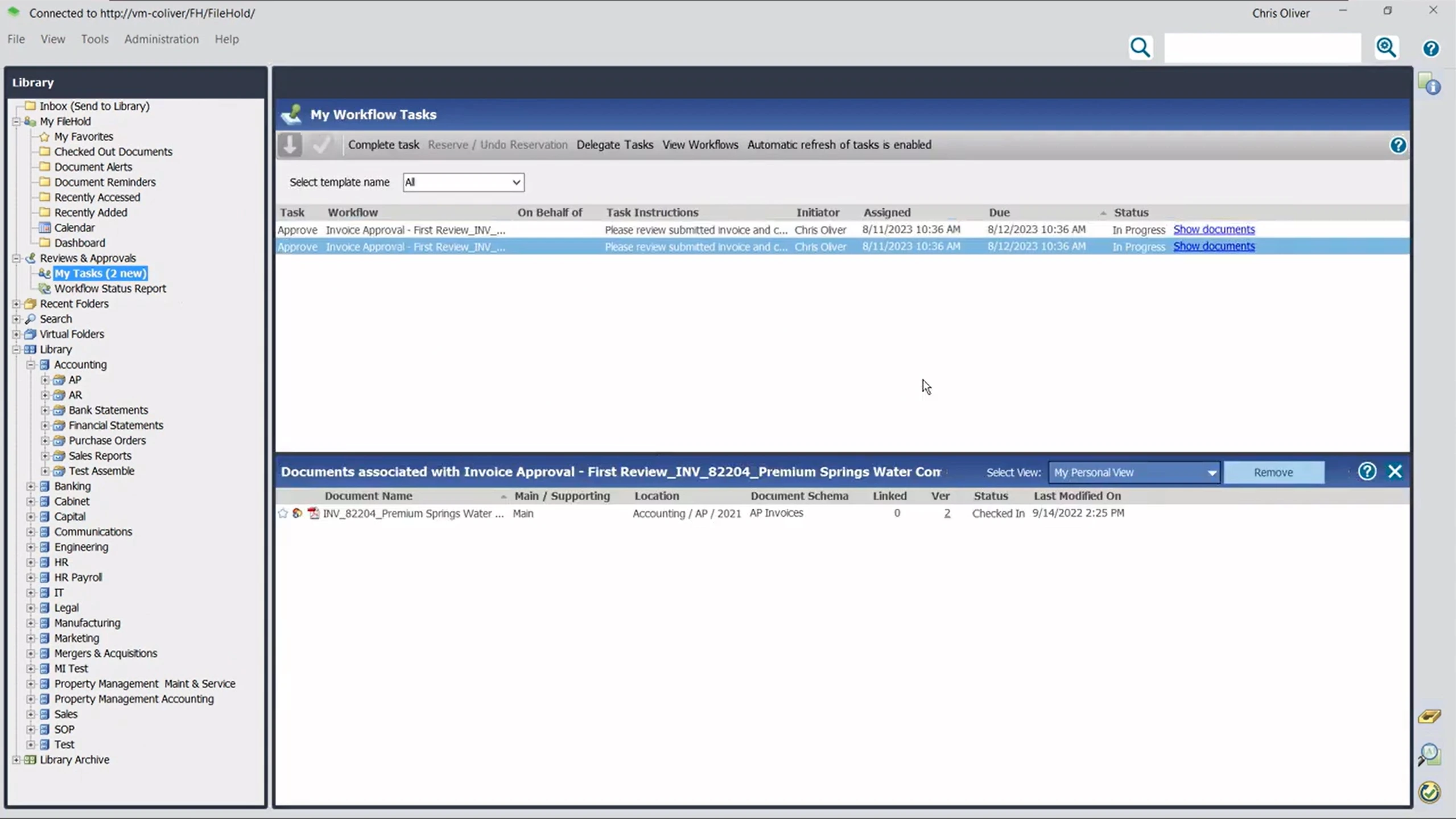
Générateur de flux de travail sans code, par glisser-déposer
Jusqu'à 20 tâches séquentielles par flux de travail
Les tâches peuvent être acheminées vers une personne, plusieurs personnes ou n'importe quel membre d'un groupe.
Signatures numériques basées sur mot de passe pour les approbations
Rappels automatiques avant et après qu'une tâche soit en retard
Les documents finaux approuvés peuvent être verrouillés au format PDF pour l'archivage.
⚠️ Attention : Quelques évaluateurs ont mentionné que les outils de routage des flux de travail nécessitaient un certain temps de prise en main pour être configurés correctement, en particulier pour les chaînes d'approbation plus ramifiées. Prévoyez du temps pour les tests avant de déployer un flux de travail à l'échelle de l'entreprise.
Sécurité et audit
FileHold est conçu pour les industries réglementées, ce qui se manifeste le plus clairement dans ses autorisations et sa journalisation.
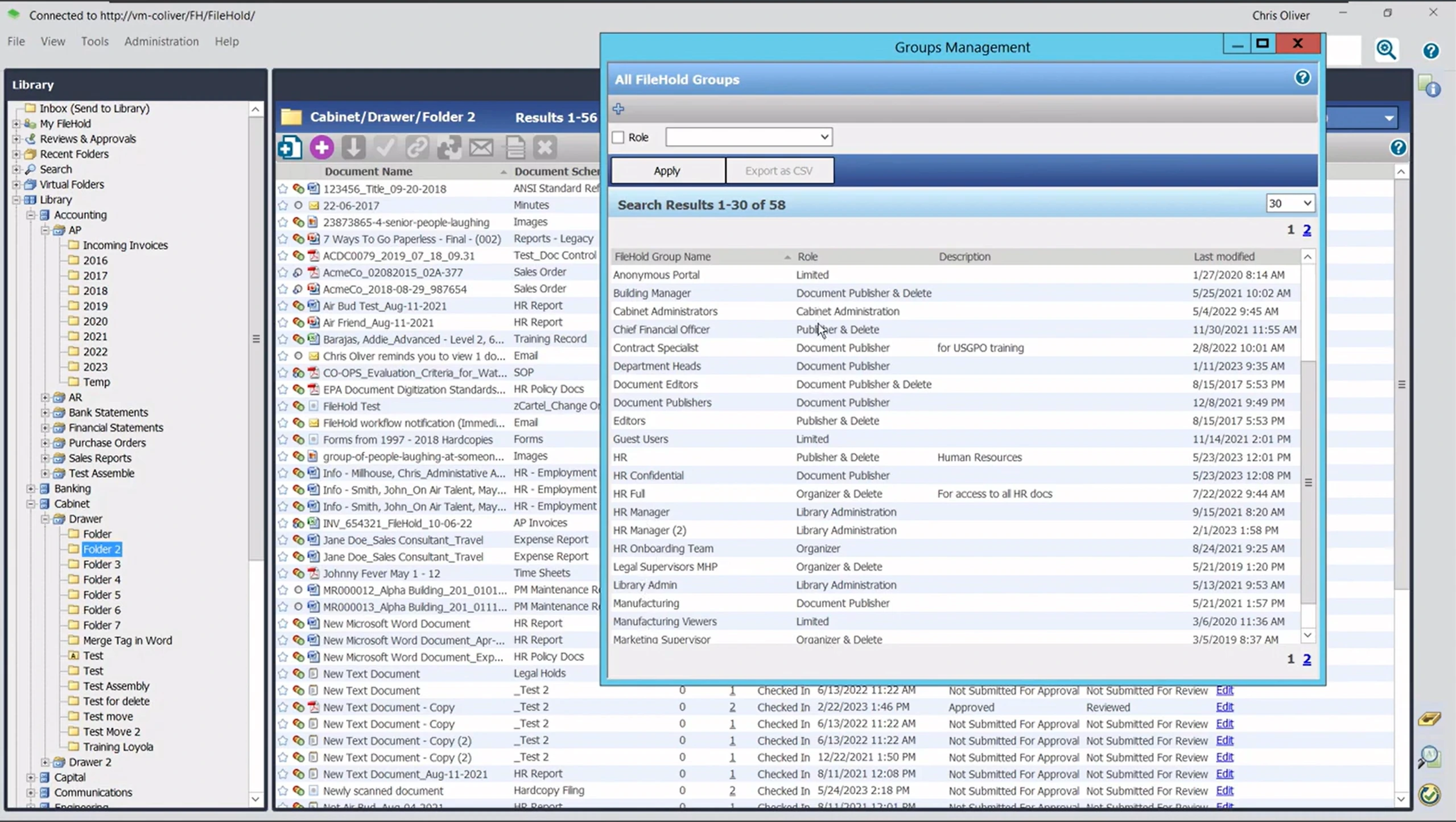
12 rôles de sécurité utilisateur prédéfinis, de l'accès limité à l'administration complète du système
Journaux d'audit inviolables couvrant la visualisation, l'édition, l'impression, la suppression et la signature
Chiffrement conforme à la norme FIPS-140 pour les licences et les mots de passe
Rapports intégrés pour les audits de conformité et le suivi de l'utilisation
👍 Conseil : Si votre organisation doit prouver la chaîne de traçabilité pour les audits, ce qui est courant dans les secteurs de la santé et du gouvernement, testez la génération de rapports du journal d'audit pendant toute période d'essai.
Capture et numérisation de documents
Chaque achat de FileHold est livré avec une licence SmartSoft Capture, couvrant la numérisation basée sur l'OCR pour les volumes quotidiens.
SmartSoft Capture est inclus gratuitement, adapté à environ 100 numérisations par jour.
Une option de mise à niveau vers SmartSoft Capture Plus est disponible pour l'OCR à double moteur sur les documents de qualité inférieure.
Il fonctionne avec les scanners compatibles TWAIN, testés et certifiés avec le matériel Fujutsu fi Series.
⚠️ Attention : Un évaluateur basé dans un hôpital a noté que son installation ne permet qu'à un seul utilisateur de numériser des documents à la fois. Confirmez les détails de la licence à l'avance si votre équipe a besoin de plusieurs stations de numérisation simultanées.
Recherche de documents
La recherche de documents de FileHold est la fonctionnalité la plus mentionnée dans les avis.
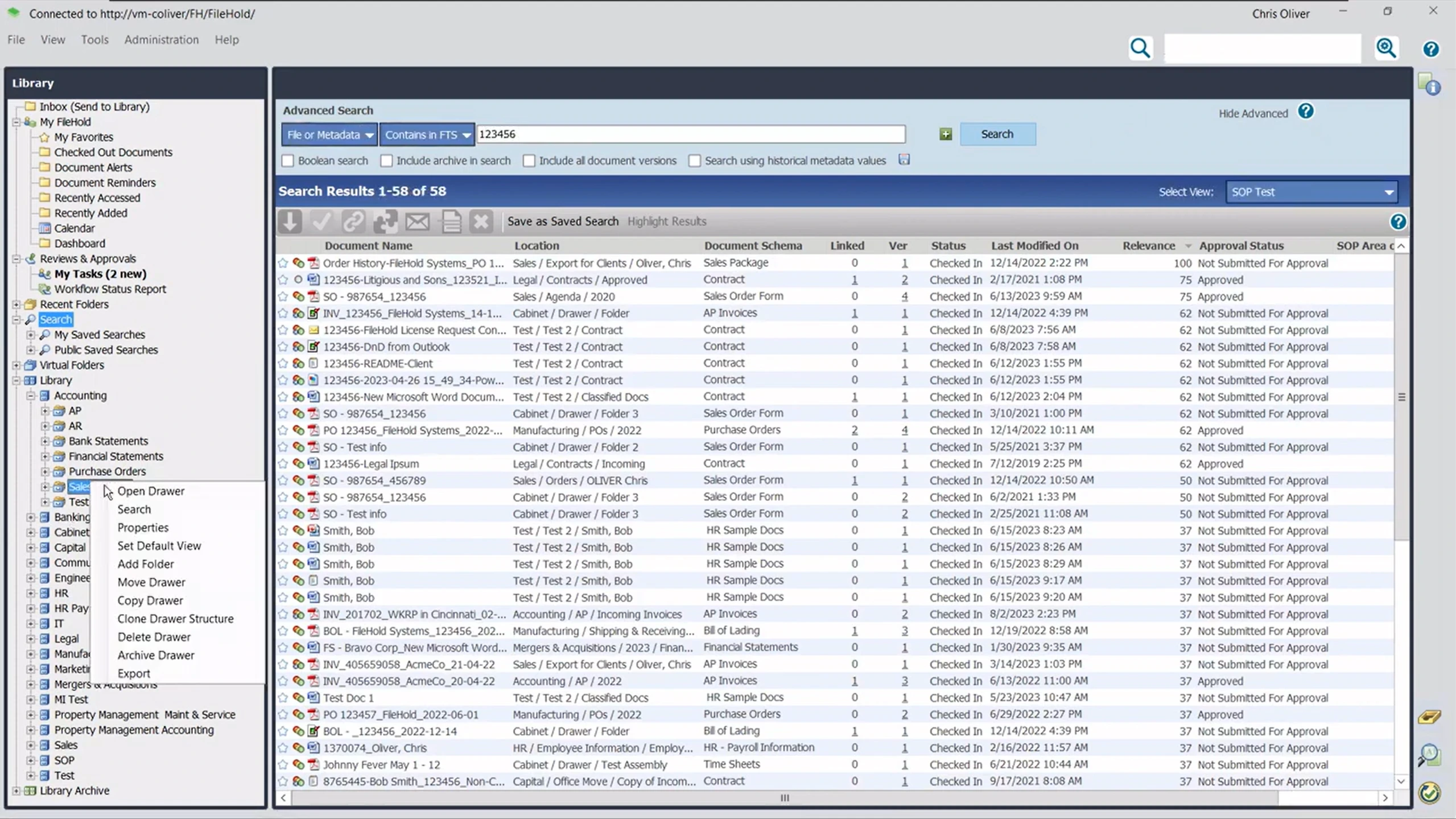
Recherche simple par mots-clés, similaire à Google
Recherche avancée utilisant des filtres de métadonnées
Recherches enregistrées pouvant être réutilisées comme rapports récurrents
Prend en charge l'indexation de plus de 80 types de fichiers (documents Office, PDF, e-mails avec pièces jointes, multimédia et archives zip), pas seulement les noms de fichiers
La recherche prend en charge la logique booléenne, les caractères génériques, les synonymes et la correspondance floue, avec une pondération de pertinence pour prioriser les balises par rapport au texte intégral
Module complémentaire FastFind optionnel pour l'accès à la recherche en dehors du client web principal
⚠️ À surveiller : La plupart des utilisateurs qualifient la recherche de puissante et rapide, mais plusieurs ont signalé qu'elle peut nécessiter des mots complets et exacts plutôt que des correspondances partielles ou floues.
Formulaires électroniques et partage sécurisé de documents
Deux fonctionnalités étendent FileHold au-delà du stockage interne : InForm pour les formulaires et Courier pour le partage.
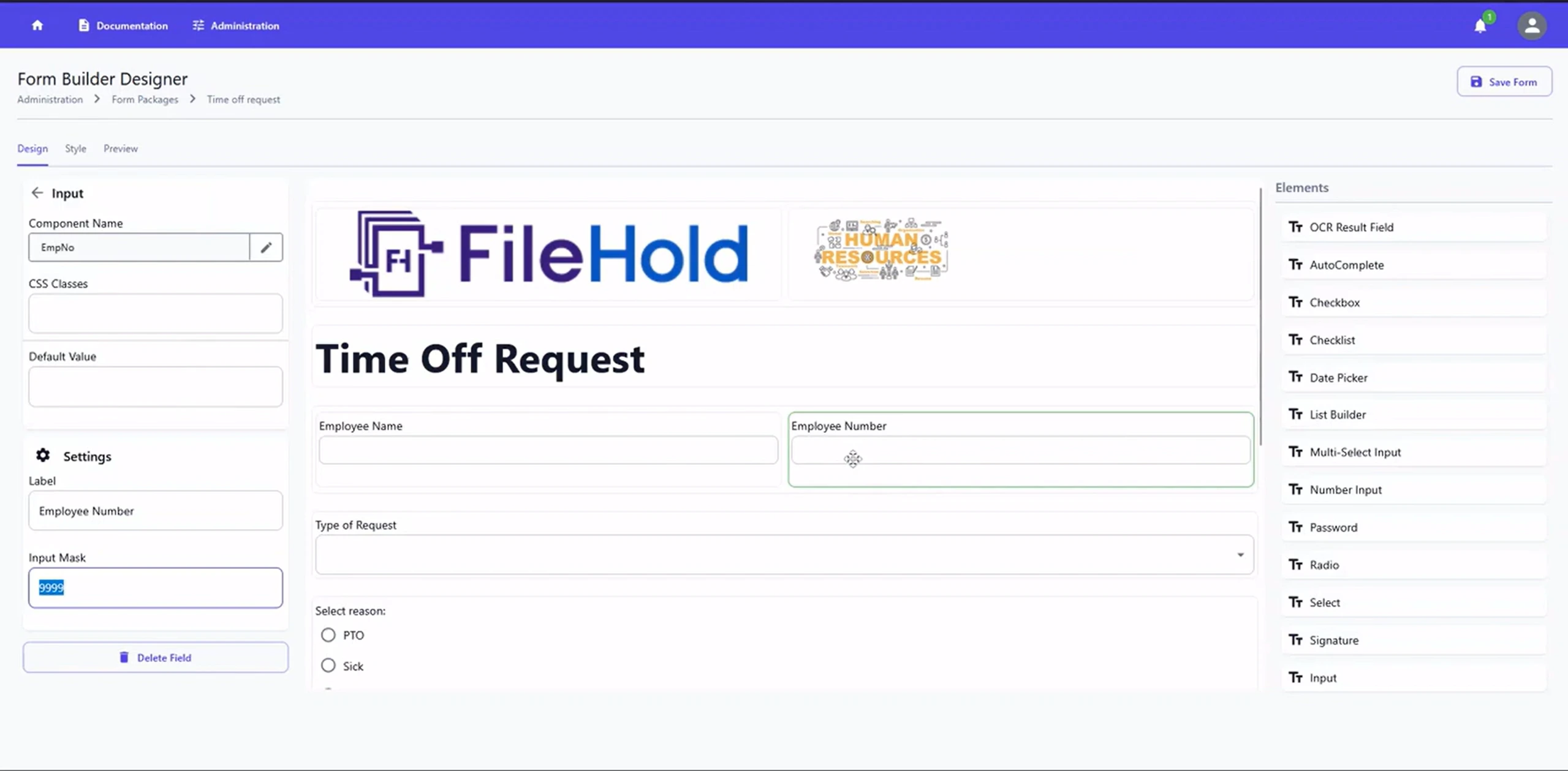
InForm transforme les formulaires papier, les demandes, les requêtes et la documentation de conformité en formulaires web
Les données du formulaire sont automatiquement extraites dans les champs de métadonnées de FileHold lors de la soumission.
Courier envoie des liens de documents suivis avec preuve de livraison au lieu de pièces jointes non sécurisées par e-mail
Les abonnements aux dossiers informent automatiquement les utilisateurs lorsqu'un document est modifié.
Déploiement sur site et dans le cloud
FileHold n'impose pas un modèle d'hébergement unique, ce qui est l'un de ses avantages les plus pratiques.
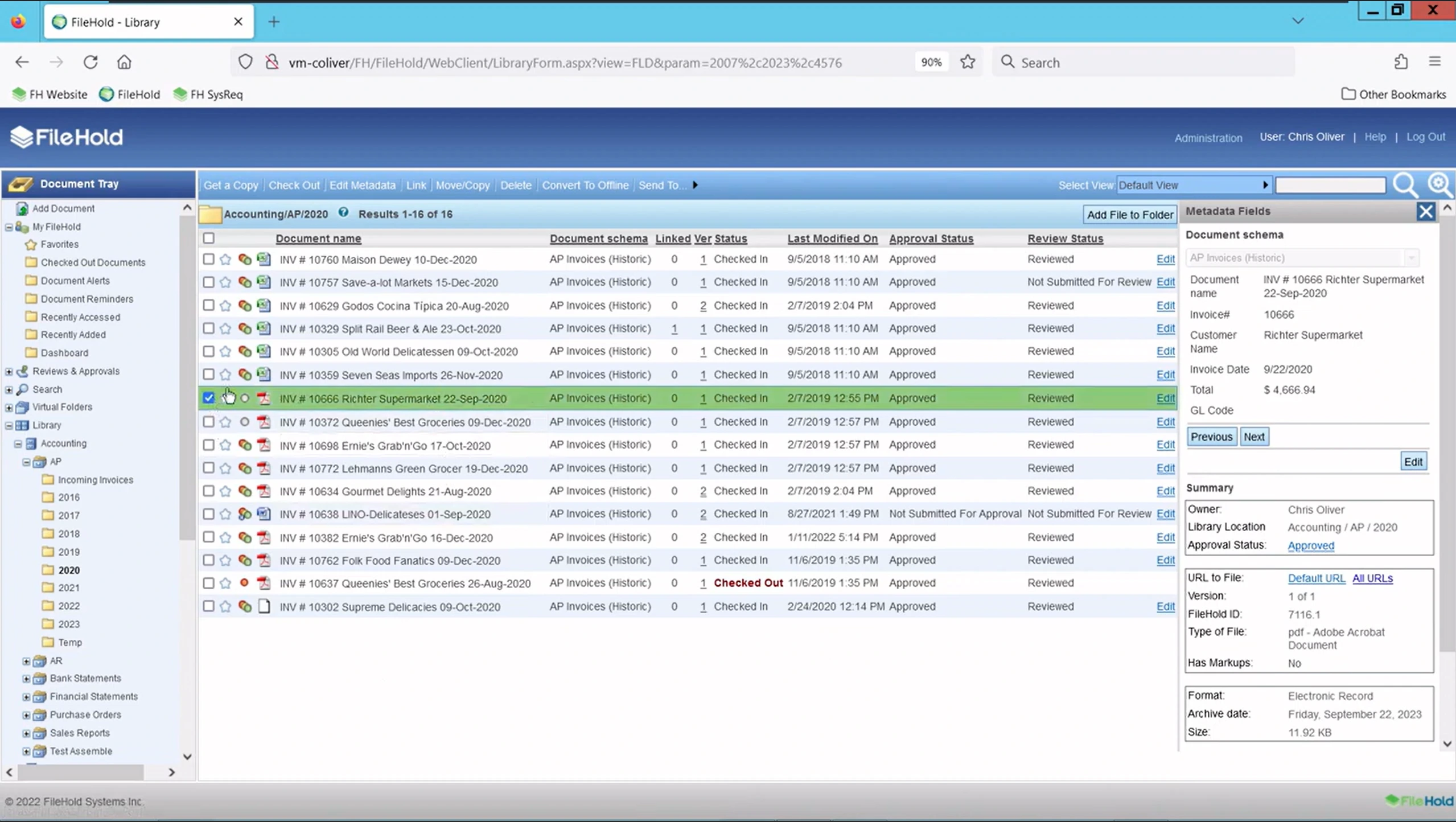
Sur site : contrôle total, adapté aux exigences strictes de conformité ou de résidence des données
FileHold Cloud : hébergé sur Azure, avec un SLA de disponibilité de plus de 99 % et des correctifs automatiques
Hybride : les enregistrements sensibles restent sur site tandis que les flux de travail moins sensibles s'exécutent dans le cloud.
Le client mobile prend en charge l'accès hors ligne ; les utilisateurs extraient un document localement et synchronisent les modifications une fois reconnectés
Le déploiement sur site n'est pas compatible avec Mac ; l'accès cloud/navigateur est la solution de contournement pour les équipes macOS
⚠️ À surveiller : Un évaluateur a signalé que l'application de bureau n'est pas particulièrement portable. La déplacer vers une nouvelle machine demande un certain effort manuel, ce qui doit être pris en compte dans la planification informatique autour des cycles de renouvellement du matériel.
Intégrations d'outils
FileHold se connecte aux outils que la plupart des équipes de bureau utilisent déjà au quotidien, notamment :
Microsoft Office, Microsoft Teams, SharePoint et Active Directory
Outils de signature électronique, tels que DocuSign et Adobe Acrobat Sign
ERP et comptabilité, tels que SAP, Sage 300, QuickBooks, Microsoft Dynamics GP et JD Edwards
CRM, tel que Salesforce
Une API de services web documentée est disponible sans coût supplémentaire pour les intégrations personnalisées.
Quels sont les avantages et les inconvénients de FileHold ?
La réputation de FileHold se maintient sur deux des plus grandes plateformes d'évaluation indépendantes, avec un écart inhabituellement faible entre elles.
Plateforme | Évaluation | Ce qu'elle reflète |
|---|---|---|
G2 | Plus de 30 avis, dont la majorité sont des 5 étoiles | |
Capterra | Plus de 55 avis, axés sur la facilité d'utilisation et la qualité du service client |
Maintenant que les notes sont claires, voici ce que les utilisateurs pensent réellement de la plateforme :
Ce que les évaluateurs apprécient | Ce dont les évaluateurs avertissent |
|---|---|
✅ Facilité d'utilisation une fois la configuration initiale terminée, le thème le plus répété sur les deux plateformes. | ❌ L'interface semble datée à certains utilisateurs par rapport aux concurrents plus récents, natifs du cloud. |
✅ Recherche rapide et fiable et récupération basée sur les métadonnées. | ❌ La recherche peut nécessiter des correspondances exactes ou des mots complets plutôt que des correspondances floues. |
✅ Support client constamment qualifié de réactif et impliqué, certains évaluateurs citant des corrections le jour même. | ❌ La licence par utilisateur peut devenir coûteuse à mesure que les effectifs augmentent. |
✅ Excellente adéquation aux industries réglementées grâce aux pistes d'audit et aux autorisations granulaires. | ❌ La configuration initiale et la planification des métadonnées nécessitent une courbe d'apprentissage, surtout sans support informatique dédié. |
✅ Intégration approfondie avec Microsoft Office, particulièrement appréciée par les équipes financières et administratives. | ❌ Manque de classification de documents basée sur l'IA intégrée que certains nouveaux concurrents proposent désormais. |
La plupart des utilisateurs décrivent FileHold comme fiable et facile à utiliser au quotidien, surtout une fois la configuration initiale passée.
Un évaluateur de G2 l'a dit simplement : FileHold "facilite la numérisation, le stockage et l'indexation des documents." Un évaluateur de Capterra a qualifié la plateforme de "très bien structurée."
Les problèmes, lorsqu'ils surviennent, ont tendance à être initiaux : planification des métadonnées, configuration du flux de travail et coûts par utilisateur à mesure que les équipes grandissent, plutôt que l'utilisabilité quotidienne.
Combien coûte FileHold ?
FileHold ne publie pas de prix fixes sur son site web. Comme de nombreux fournisseurs de gestion de documents d'entreprise, il utilise un modèle "nous contacter" : vous demandez un devis basé sur le nombre d'utilisateurs, le type de déploiement et les modules optionnels dont vous avez besoin.
La page de tarification de FileHold confirme comment la facturation fonctionne, même sans chiffres exacts :
Disponible sous forme de licence (paiement unique) ou d'abonnements par utilisateur
Aucune limite sur le volume de numérisation ou de documents
Disponible auto-hébergé ou via FileHold Cloud
Support illimité et assistance à la mise à niveau sur les plans d'abonnement
Les plans d'abonnement incluent FileCare, des packs de services continus, des mises à jour de fonctionnalités et la possibilité d'ajouter des licences à mesure que vous grandissez
Crédits disponibles pour le remplacement d'un système existant, ce qui peut compenser les coûts de transition
FileHold offre un essai gratuit de deux semaines, toutes fonctionnalités incluses, pour un maximum de 10 utilisateurs, comprenant deux heures de support technique gratuit
Les fonctionnalités optionnelles et personnalisées sont facturées séparément, vous ne payez donc pas pour un ensemble dont vous n'avez pas besoin
👍 Conseil : La liste G2 de FileHold indique que FileHold Cloud commence à 50 $ par mois et par utilisateur, avec un minimum de 5 utilisateurs. Ce chiffre n'est pas publié sur le site de FileHold, il doit donc être considéré comme une estimation indicative plutôt qu'un devis confirmé, et vérifiez-le directement auprès de l'équipe commerciale de FileHold avant de l'intégrer à votre budget.
Qui devrait utiliser FileHold ?
FileHold n'est pas conçu pour être tout pour tout le monde, et cette focalisation est précisément ce qui le rend efficace pour les bonnes équipes.
Bonne adéquation | Pourquoi |
|---|---|
Industries réglementées nécessitant des pistes d'audit (santé, juridique, gouvernement, finance) | La journalisation inviolable et les autorisations de rôle à 11 niveaux prennent en charge les exigences de conformité dès la sortie de la boîte |
Équipes passant du papier ou des disques partagés | La structure de classeurs, tiroirs et dossiers reflète le classement physique familier, facilitant l'adoption |
Organisations souhaitant une flexibilité de déploiement | Options sur site, cloud ou hybride, plutôt qu'une plateforme uniquement cloud |
Petites et moyennes équipes qui apprécient un support personnalisé | Les évaluateurs citent constamment un service client rapide et réactif |
Qui ne devrait pas utiliser FileHold ?
Les mêmes caractéristiques qui rendent FileHold fiable peuvent également en faire le mauvais choix pour certaines équipes.
Mauvaise adéquation | Pourquoi |
|---|---|
Équipes souhaitant une classification intégrée basée sur l'IA | Les évaluateurs notent qu'il s'agit d'une lacune par rapport à certains nouveaux concurrents |
Organisations s'attendant à une interface utilisateur entièrement moderne et "mobile-first" | Plusieurs utilisateurs décrivent l'interface comme fonctionnelle mais datée |
Très petites équipes sensibles aux coûts par utilisateur | Licence minimale de 5 utilisateurs, plus les frais de licence peuvent s'accumuler rapidement à mesure que les effectifs augmentent |
Équipes ne souhaitant aucun investissement de configuration | La planification des métadonnées et la configuration initiale nécessitent un certain effort initial |
Équipes ayant besoin d'un support téléphonique | Le support est limité aux e-mails et aux tickets web ; il n'y a pas de canal téléphonique |
Comment FileHold se compare-t-il à Dokmee ?
FileHold et Dokmee couvrent tous deux les fondamentaux de la gestion sécurisée des documents : stockage structuré, sécurité basée sur les rôles et déploiement flexible.
Leurs principales différences résident dans l'indexation, l'économie de la numérisation et la transparence des prix de chaque fournisseur.
FileHold | Dokmee | |
|---|---|---|
Déploiement | Sur site, cloud, hybride | Sur site, cloud, hybride |
Indexation | Balises de métadonnées et recherche par mots-clés, avec un module complémentaire FastFind optionnel | Indexation magique (assistée par l'IA) plus scriptage IA pour une logique de classification personnalisée |
Numérisation | SmartSoft Capture inclus, niveau Plus pour un volume plus élevé | Numérisation illimitée incluse, sans frais par clic |
Flux de travail | Générateur sans code, jusqu'à 20 tâches par flux de travail | Générateur glisser-déposer sans code, ou construit par l'équipe Dokmee sur demande |
Rôles de sécurité | 12 rôles utilisateur prédéfinis | Autorisations basées sur les rôles, y compris le filigrane automatique au téléchargement |
Prix de départ | Non publié ; contacter pour un devis | 39 $/mois par utilisateur pour Dokmee Cloud |
Transparence des prix | Devis uniquement pour tous les plans | Tarification échelonnée publiée : 39 $ Cloud, 59 $ Cloud+, Entreprise sur devis |
Si la numérisation illimitée sans frais par clic, l'indexation assistée par l'IA, ou simplement la connaissance du prix avant de parler aux ventes sont plus importants pour votre équipe que les modules complémentaires de capture échelonnés de FileHold, Dokmee mérite d'être inclus dans votre liste restreinte.
Avis FileHold : FileHold est-il le bon choix pour votre équipe ?
FileHold mérite ses évaluations honnêtement : il est fiable, sécurisé et simple une fois configuré, ce qui en fait un choix solide pour les équipes réglementées qui ont besoin de pistes d'audit solides.
Cependant, là où il montre son âge, c'est dans le traitement automatisé moderne. À mesure que les volumes de documents augmentent, s'appuyer sur le balisage de métadonnées standard plutôt que sur l'indexation native par IA crée un goulot d'étranglement notable, et sa tarification uniquement sur devis laisse les coûts totaux en suspens.
Vous voulez une recherche automatisée par IA, une numérisation illimitée et une tarification transparente ? Passez à une plateforme moderne conçue pour gérer de lourdes charges de documents sans les goulots d'étranglement.