Análise do Filehold 2026: Vale a Pena o Rótulo Empresarial?
Looking for an honest FileHold review? We analyze FileHold features, total cost of ownership, and how it compares to faster, cost-effective options.
Se sua equipe ainda está procurando em unidades compartilhadas, caixas de entrada ou arquivos físicos para encontrar um contrato assinado ou a fatura do último trimestre, você já sabe o quanto isso custa em tempo desperdiçado, aprovações perdidas e risco de auditoria. Essa busca por ordem é provavelmente o que o trouxe a esta análise do FileHold.
Abaixo, detalhamos o que a plataforma faz, como ela se comporta para usuários reais, quanto custa e se é a opção certa para o seu fluxo de trabalho.
👍 Se você está procurando ótimas alternativas ao FileHold, também temos isso coberto.
Sim, para a equipe certa. Aqui está a versão rápida se você tiver apenas um minuto:
FileHold é um sistema de gestão de documentos (DMS) construído para arquivamento digital estruturado, seguro e facilmente pesquisável.
Classificado com 4.6 de 5 no G2 (mais de 30 avaliações) e 4.7 de 5 no Capterra (mais de 55 avaliações).
Mais adequado para organizações de pequeno e médio porte em indústrias regulamentadas: saúde, jurídico, governo e finanças.
Forte em trilhas de auditoria, segurança baseada em funções e suporte ao cliente.
Menos adequado se você deseja especificamente classificação de documentos baseada em IA integrada ou uma interface totalmente moderna e nativa da nuvem pronta para uso.
O que é o FileHold?
FileHold é um sistema de gestão de documentos que ajuda as organizações a capturar, armazenar, proteger e recuperar documentos digitais.
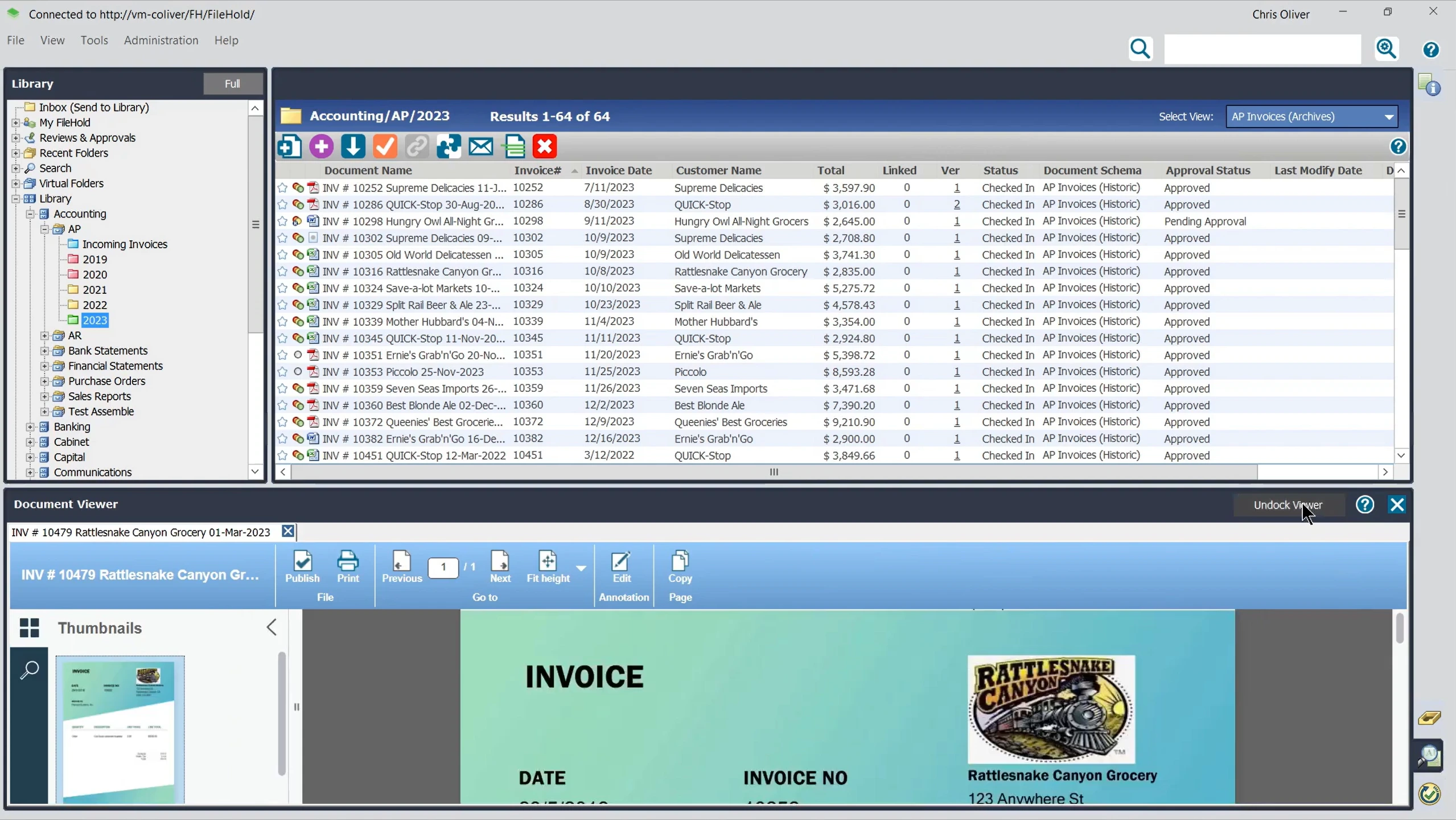
Ele substitui unidades compartilhadas e arquivos físicos desorganizados por um sistema pesquisável e estruturado, construído em torno de armários, gavetas e pastas virtuais. Essa é a mesma hierarquia que a maioria dos escritórios já usa em papel, apenas digitalizada e pesquisável em segundos, em vez de minutos.
É usado em saúde, jurídico, educação, finanças, manufatura e governo. Essas indústrias priorizam muito a conformidade e a integridade dos documentos.
✅ O FileHold pode ser implementado no local (on-premises), na nuvem através do FileHold Cloud, ou como um híbrido de ambos, para que as organizações possam manter registros sensíveis sob controle direto, enquanto ainda dão acesso a equipes remotas onde faz sentido.
Quais são os principais recursos do FileHold?
O conjunto de recursos do FileHold abrange todo o ciclo de vida do documento, desde o armazenamento e fluxo de trabalho até a segurança e integrações.
Aqui está o que cada recurso principal faz, juntamente com o que observar com base no feedback real do usuário.
Armazenamento e Organização de Documentos
Cada documento vive em uma hierarquia estruturada que espelha o arquivamento físico, para que as equipes possam se adaptar rapidamente sem precisar reaprender como os documentos são organizados.
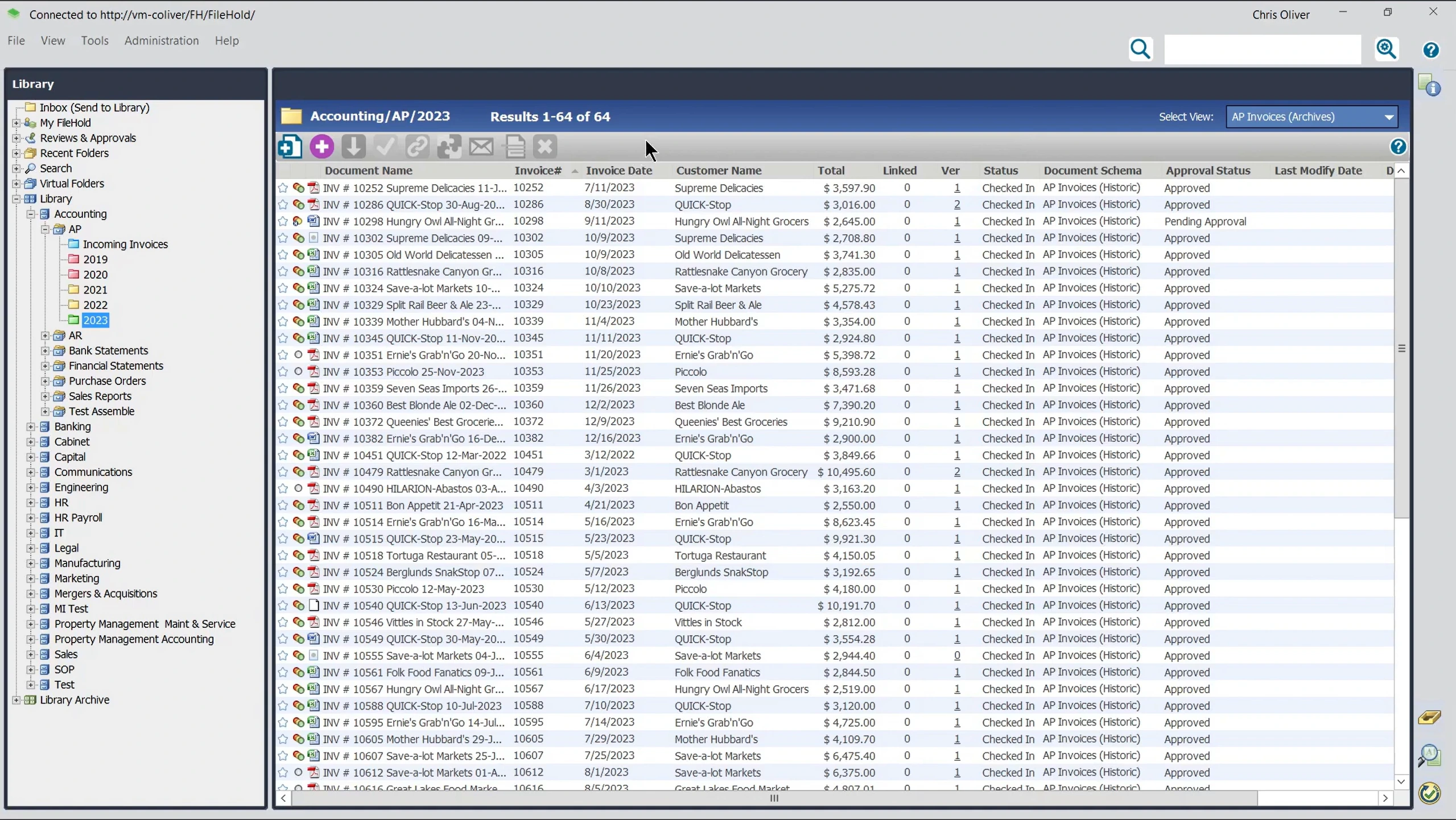
Armários, gavetas e pastas virtuais em vez de um despejo de arquivos plano
Marcação de metadados personalizada, como nome do cliente, número do caso ou departamento
Controles de check-in e check-out que impedem que duas pessoas sobrescrevam as edições uma da outra
Histórico de versão automático para cada documento
Pastas virtuais que puxam documentos relacionados de toda a biblioteca para uma única visualização, além de vinculação de documento a documento
👍 Dica: Dedique tempo para planejar seu esquema de metadados antes de migrar documentos em massa. Vários revisores notaram que as decisões iniciais de metadados são difíceis de reverter mais tarde sem uma limpeza manual.
Fluxo de Trabalho e Aprovações
Os administradores podem construir fluxos de trabalho de revisão e aprovação sem a necessidade de um desenvolvedor.
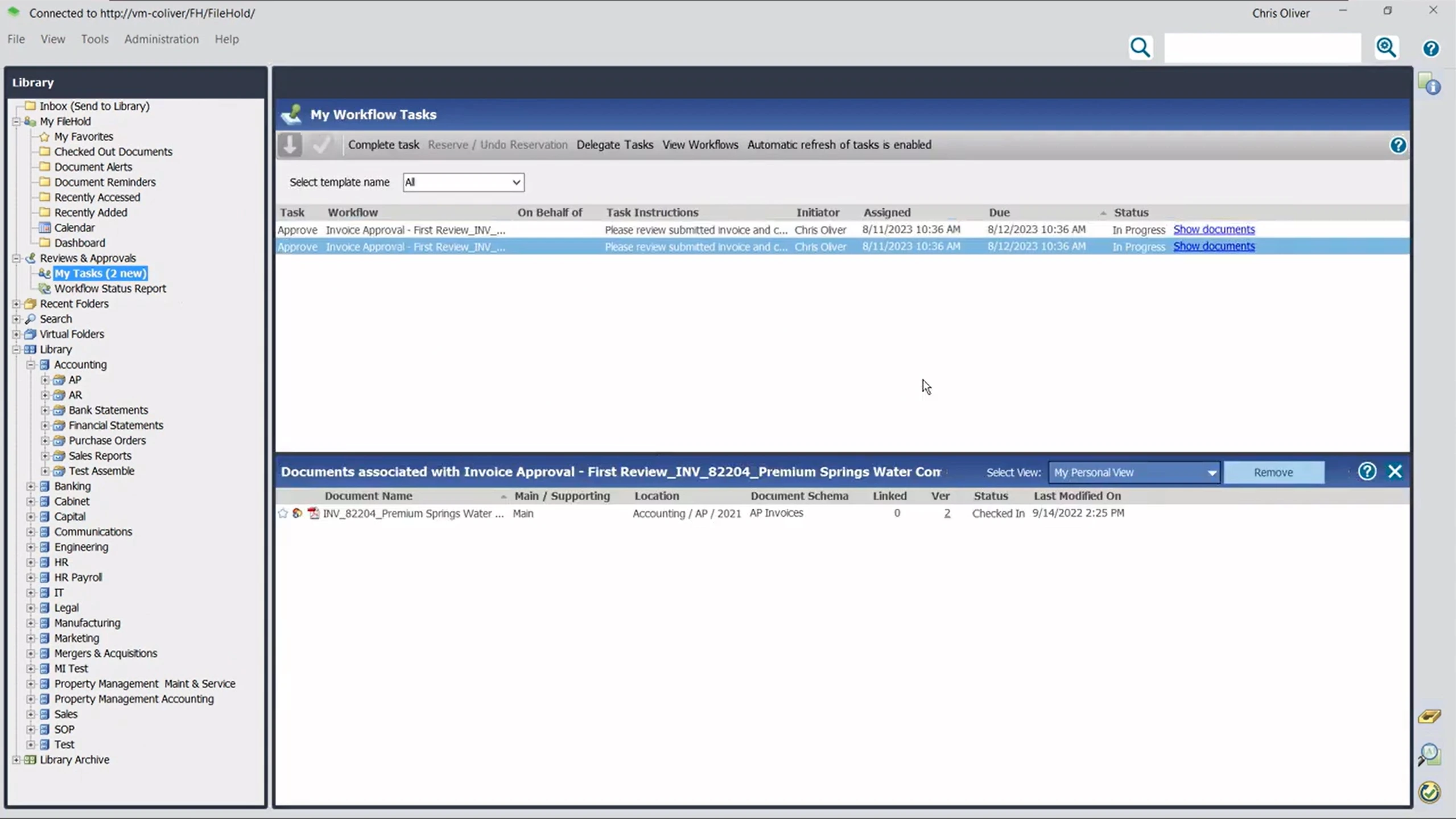
Construtor de fluxo de trabalho sem código, arrastar e soltar
Até 20 tarefas sequenciais por fluxo de trabalho
As tarefas podem ser roteadas para uma pessoa, várias pessoas ou qualquer um de um grupo.
Assinaturas digitais baseadas em senha para aprovações
Lembretes automáticos antes e depois que uma tarefa se torna atrasada
Documentos finais aprovados podem ser bloqueados como PDF para registro.
⚠️ Atenção: Alguns revisores mencionaram que as ferramentas de roteamento de fluxo de trabalho levaram algum tempo para serem configuradas corretamente, particularmente para cadeias de aprovação mais ramificadas. Reserve tempo para testes antes de implementar um fluxo de trabalho em toda a empresa.
Segurança e Auditoria
O FileHold é construído pensando em indústrias regulamentadas, o que se manifesta mais claramente em suas permissões e registro.
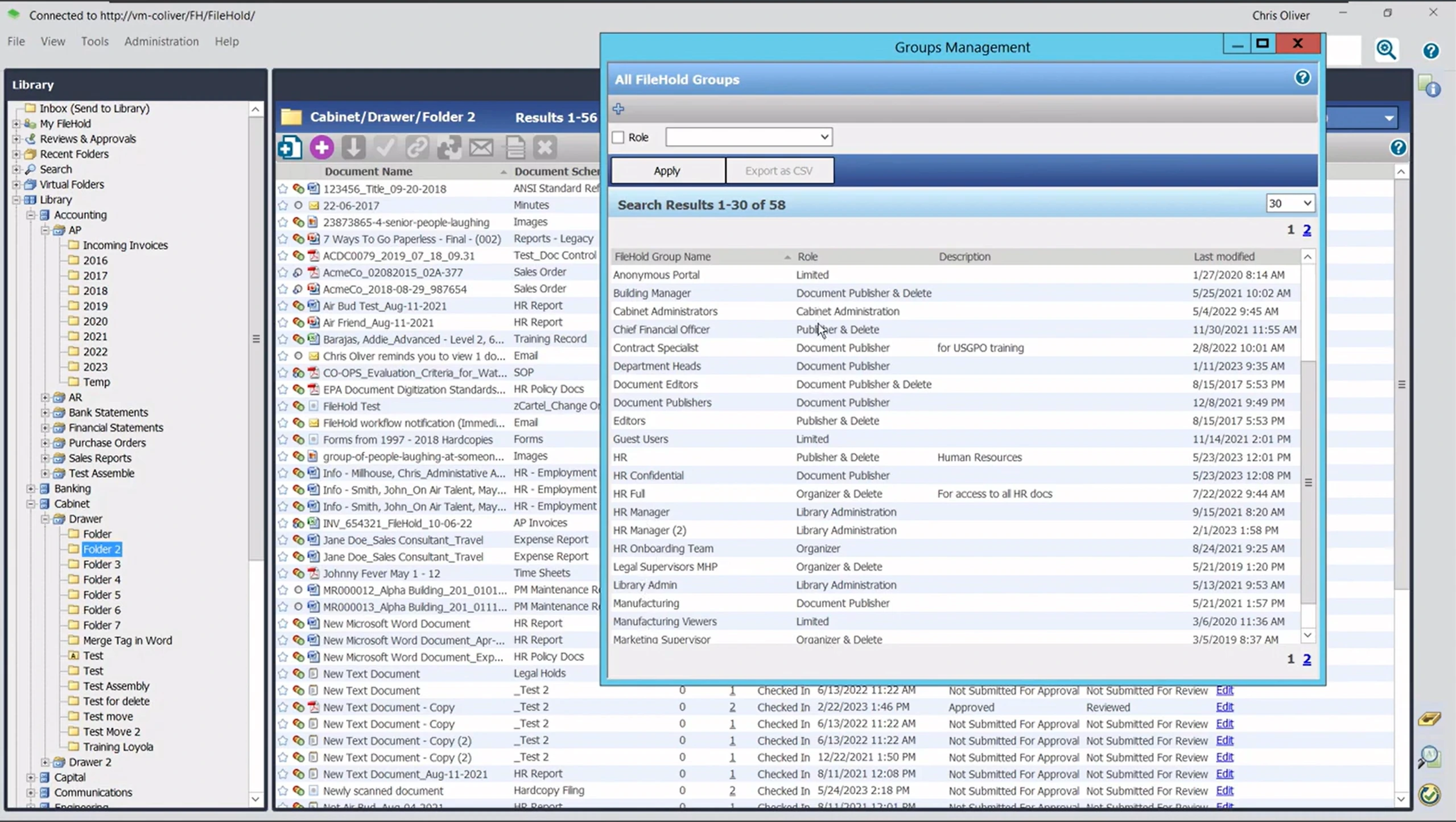
12 funções de segurança de usuário predefinidas, desde acesso limitado até administração completa do sistema
Registros de auditoria à prova de adulteração cobrindo visualização, edição, impressão, exclusão e assinatura
Criptografia compatível com FIPS-140 para licenças e senhas
Relatórios integrados para auditorias de conformidade e rastreamento de uso
👍 Dica: Se sua organização precisa comprovar a cadeia de custódia para auditorias, comum em saúde e governo, teste a geração de relatórios do log de auditoria durante qualquer período de teste.
Captura e Digitalização de Documentos
Cada compra do FileHold vem com uma licença do SmartSoft Capture, cobrindo a digitalização baseada em OCR para volumes diários.
O SmartSoft Capture está incluído gratuitamente, adequado para aproximadamente 100 digitalizações por dia.
Uma opção de atualização para o SmartSoft Capture Plus para OCR de motor duplo em documentos de menor qualidade está disponível.
Funciona com scanners compatíveis com TWAIN, testados e certificados com hardware Fujutsu fi Series.
⚠️ Atenção: Um revisor de hospital notou que sua instalação permite que apenas um usuário digitalize documentos por vez. Confirme os detalhes de licenciamento antecipadamente se sua equipe precisar de várias estações de digitalização simultâneas.
Pesquisa de Documentos
A pesquisa de documentos do FileHold é o recurso mais mencionado nas análises.
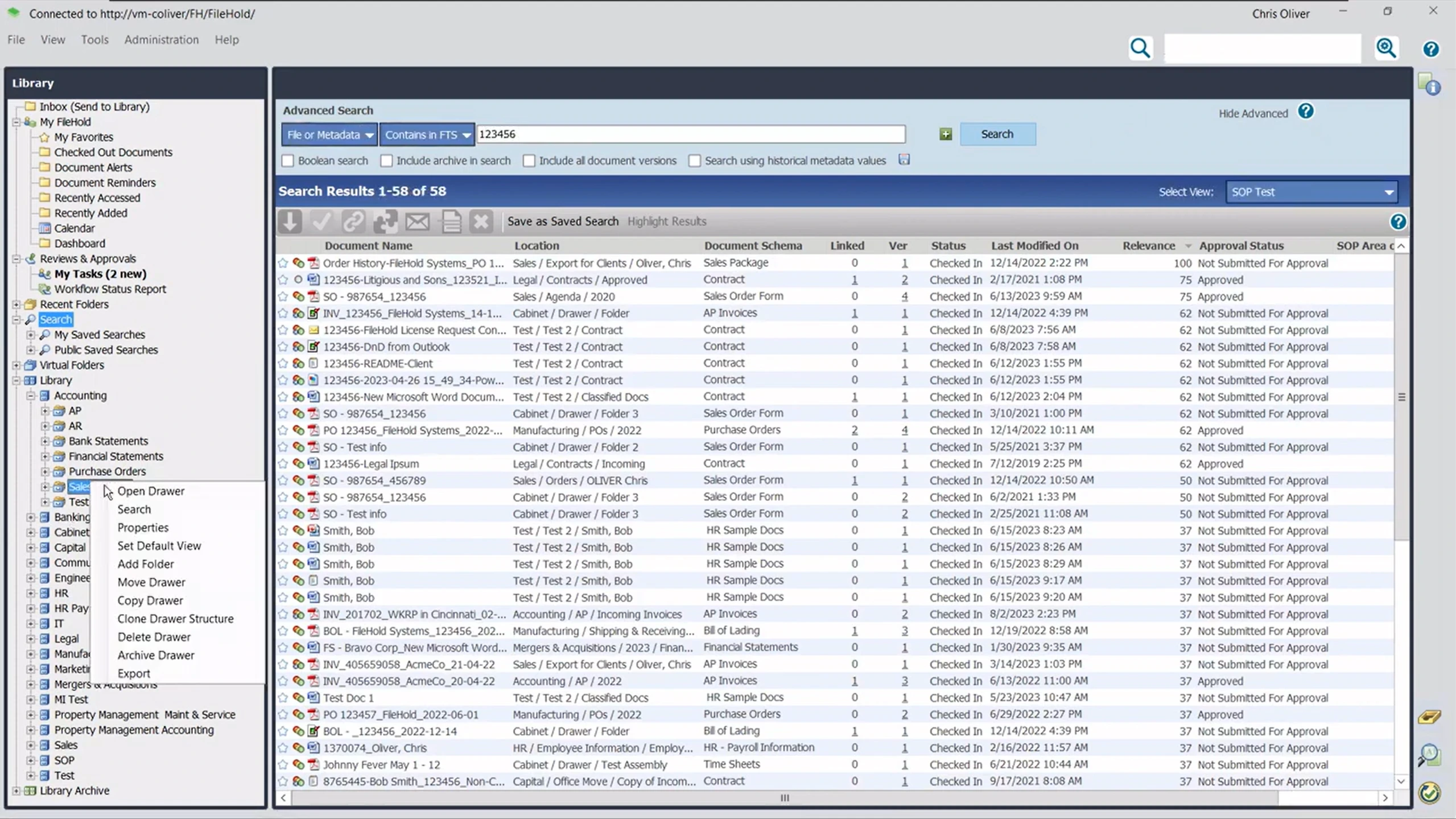
Pesquisa simples por palavra-chave, semelhante ao Google
Pesquisa avançada usando filtros de metadados
Pesquisas salvas que podem ser reutilizadas como relatórios recorrentes
Suporta indexação em mais de 80 tipos de arquivo (documentos do Office, PDFs, e-mails com anexos, multimídia e arquivos zip), não apenas nomes de arquivo
A pesquisa suporta lógica booleana, curingas, sinônimos e correspondência difusa, com ponderação de relevância para priorizar tags vs. texto completo
Complemento FastFind opcional para acesso à pesquisa fora do cliente web principal
⚠️ Observar: A maioria dos usuários considera a pesquisa poderosa e rápida, mas vários sinalizaram que ela pode exigir palavras completas e exatas, em vez de correspondências parciais ou difusas.
Formulários Eletrônicos e Compartilhamento Seguro de Documentos
Dois recursos estendem o FileHold além do armazenamento interno: InForm para formulários e Courier para compartilhamento.
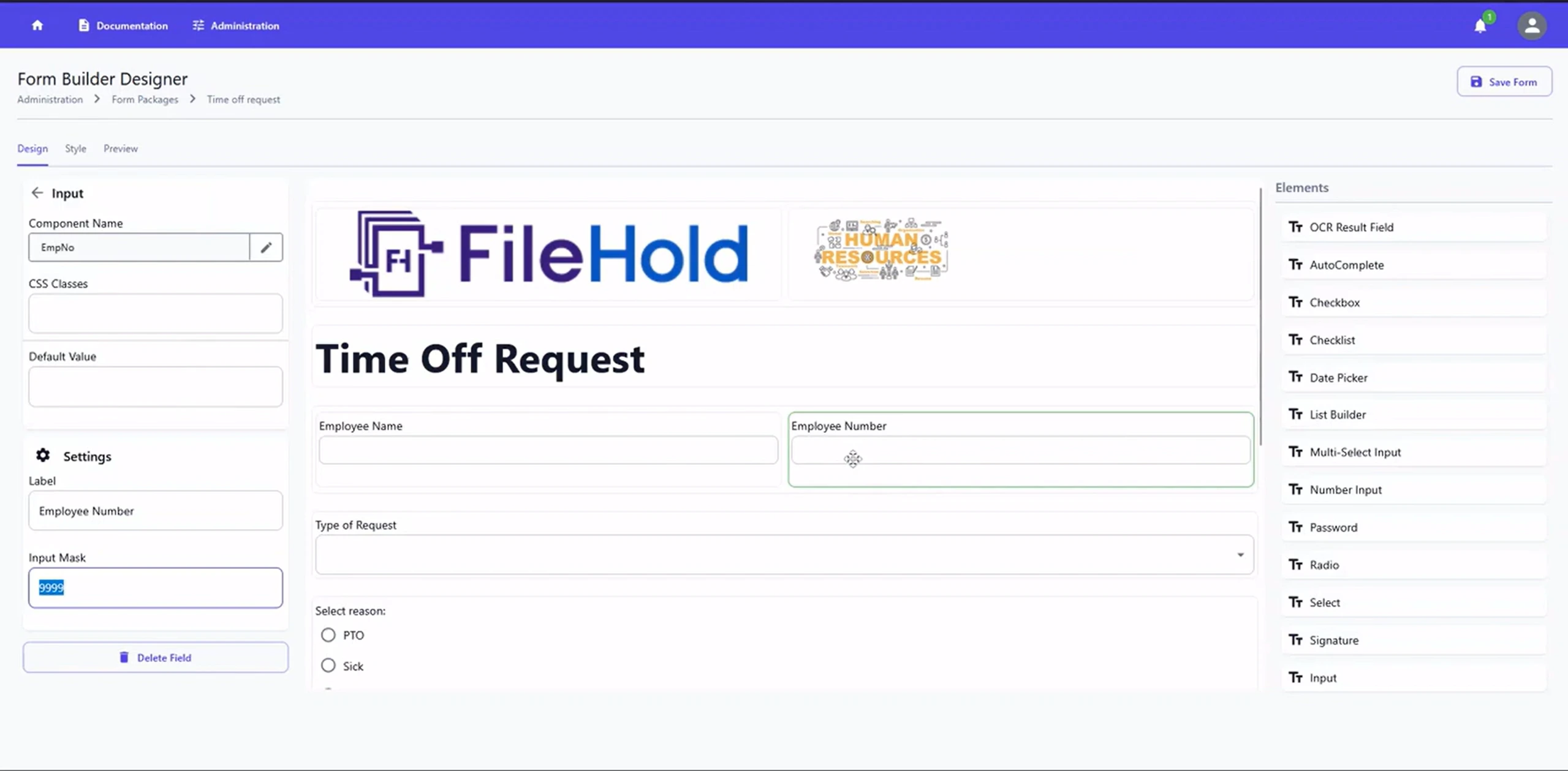
O InForm transforma formulários, aplicativos, solicitações e documentação de conformidade baseados em papel em formulários web
Os dados do formulário são automaticamente extraídos para os campos de metadados do FileHold no envio.
O Courier envia links de documentos rastreados com prova de entrega em vez de anexos de e-mail inseguros
As assinaturas de pasta notificam os usuários automaticamente quando um documento é alterado.
Implantação On-Premise e na Nuvem
O FileHold não impõe um único modelo de hospedagem, o que é uma de suas vantagens mais práticas.
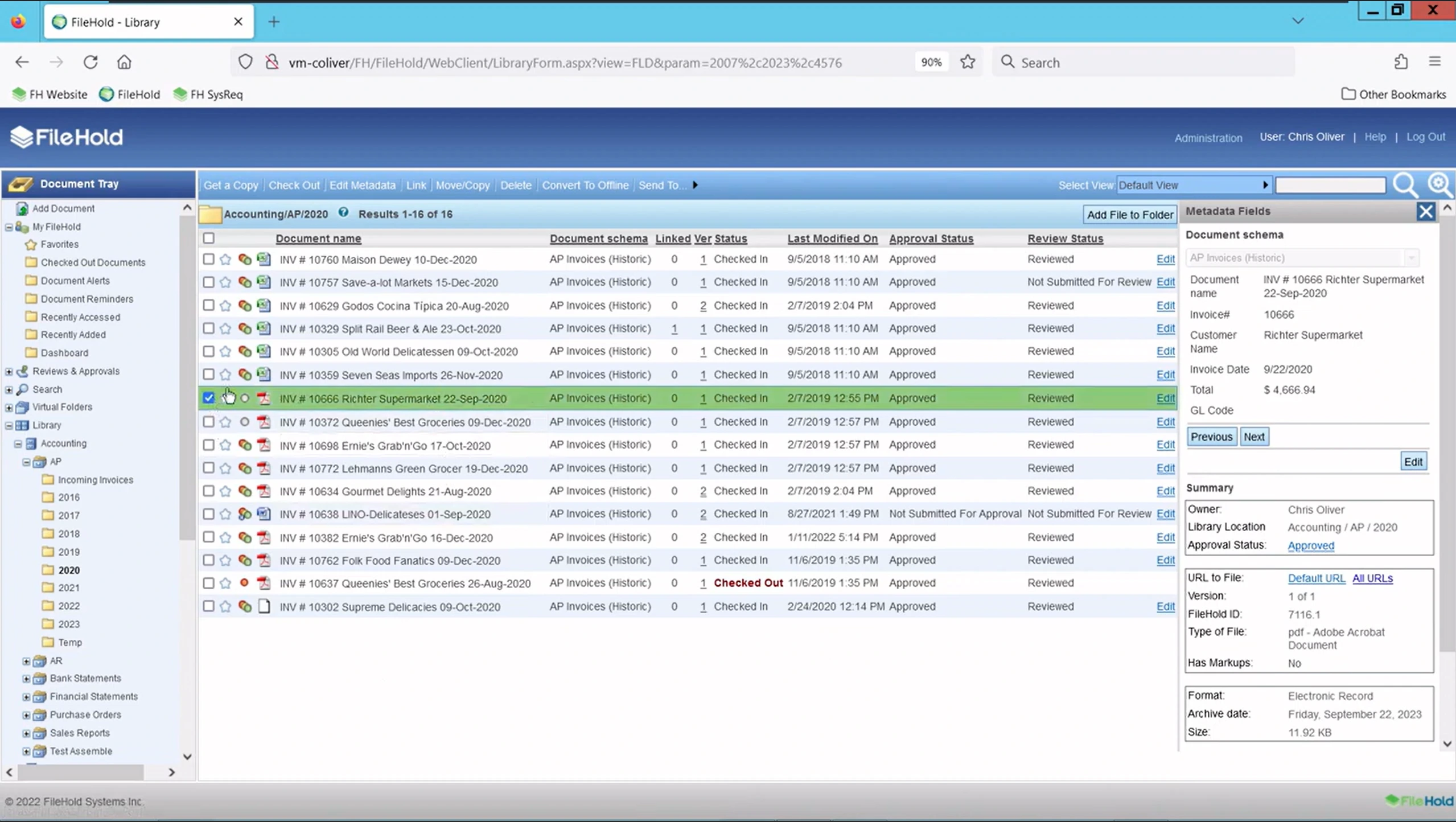
On-premise: controle total, adequado para conformidade estrita ou necessidades de residência de dados
FileHold Cloud: hospedado no Azure, com um SLA de tempo de atividade de 99%+ e aplicação automática de patches
Híbrido: registros sensíveis permanecem on-premise enquanto fluxos de trabalho de menor sensibilidade são executados na nuvem.
O cliente móvel suporta acesso offline; os usuários fazem check-out de um documento localmente e sincronizam as alterações uma vez reconectados
A implantação on-premises não é compatível com Mac; o acesso via nuvem/navegador é a solução alternativa para equipes macOS
⚠️ Atenção: Um revisor sinalizou que o aplicativo de desktop não é especialmente portátil. Movê-lo para uma nova máquina exige algum esforço manual, o que vale a pena considerar no planejamento de TI em torno dos ciclos de atualização de hardware.
Integrações de Ferramentas
O FileHold se conecta às ferramentas que a maioria das equipes de escritório já usa no dia a dia, incluindo:
Microsoft Office, Microsoft Teams, SharePoint e Active Directory
Ferramentas de assinatura eletrônica, como DocuSign e Adobe Acrobat Sign
ERP e contabilidade, como SAP, Sage 300, QuickBooks, Microsoft Dynamics GP e JD Edwards
CRM, como Salesforce
Uma API de serviços web documentada está disponível sem custo adicional para integrações personalizadas.
Quais são os prós e contras do FileHold?
A reputação do FileHold se mantém em duas das maiores plataformas de avaliação independentes, com uma diferença incomumente pequena entre elas.
Plataforma | Classificação | O que Reflete |
|---|---|---|
G2 | Mais de 30 avaliações, a maioria de 5 estrelas | |
Capterra | Mais de 55 avaliações, com foco na facilidade de uso e qualidade do atendimento ao cliente |
Com a classificação por estrelas fora do caminho, aqui está o que os usuários realmente pensam da plataforma:
O que os Avaliadores Gostam | O que os Avaliadores Alertam |
|---|---|
✅ Facilidade de uso após a configuração inicial, o tema mais repetido em ambas as plataformas. | ❌ A interface parece datada para alguns usuários em comparação com concorrentes mais novos e nativos da nuvem. |
✅ Pesquisa rápida e confiável e recuperação baseada em metadados. | ❌ A pesquisa pode exigir correspondências exatas ou de palavras completas, em vez de correspondência difusa. |
✅ Suporte ao cliente consistentemente chamado de responsivo e prático, com alguns revisores citando correções no mesmo dia. | ❌ O licenciamento por usuário pode ficar caro à medida que o número de funcionários cresce. |
✅ Forte adequação para indústrias regulamentadas graças a trilhas de auditoria e permissões granulares. | ❌ A configuração inicial e o planejamento de metadados têm uma curva de aprendizado, especialmente sem suporte de TI dedicado. |
✅ Integração profunda com o Microsoft Office, particularmente valorizada por equipes financeiras e administrativas. | ❌ Carece de classificação de documentos baseada em IA integrada que alguns concorrentes mais novos agora oferecem. |
A maioria dos usuários descreve o FileHold como confiável e fácil de usar no dia a dia, especialmente após a configuração inicial.
Um revisor do G2 disse simplesmente: O FileHold "facilita a digitalização, armazenamento e indexação de documentos." Um revisor do Capterra chamou a plataforma de "muito bem estruturada."
Os problemas, quando aparecem, tendem a ser iniciais: planejamento de metadados, configuração de fluxo de trabalho e custos por usuário à medida que as equipes crescem, em vez de usabilidade diária.
Quanto custa o FileHold?
O FileHold não publica preços fixos em seu site. Como muitos fornecedores de gestão de documentos empresariais, ele usa um modelo de contato: você solicita uma cotação com base na contagem de usuários, tipo de implantação e quais módulos opcionais você precisa.
A própria página de preços do FileHold confirma como o faturamento funciona, mesmo sem números exatos:
Disponível como licença (única) ou assinaturas pagas por usuário
Sem limites de volume de digitalização ou documentos
Disponível auto-hospedado ou através do FileHold Cloud
Suporte ilimitado e assistência de atualização em planos de assinatura
Os planos de assinatura incluem FileCare, pacotes de serviço contínuos, atualizações de recursos e a capacidade de adicionar licenças à medida que você cresce
Créditos disponíveis para substituir um sistema legado, o que pode compensar os custos de transição
O FileHold oferece um teste gratuito de duas semanas, com todos os recursos, para até 10 usuários, incluindo duas horas de suporte técnico gratuito
Recursos opcionais e personalizados com preços separados, para que você não pague por um pacote que não precisa
👍 Dica: A listagem do FileHold no G2 afirma que o FileHold Cloud começa em US$ 50 por mês, por usuário, com um mínimo de 5 usuários. Esse valor não é publicado no próprio site do FileHold, então trate-o como uma estimativa direcional, em vez de uma cotação confirmada, e verifique-o diretamente com a equipe de vendas do FileHold antes de orçar com base nele.
Quem deve usar o FileHold?
O FileHold não foi construído para ser tudo para todos, e esse foco é exatamente o que o faz funcionar bem para as equipes certas.
Boa Adequação | Porquê |
|---|---|
Indústrias regulamentadas que precisam de trilhas de auditoria (saúde, jurídico, governo e finanças) | Registro à prova de adulteração e permissões de função de 11 níveis suportam os requisitos de conformidade prontos para uso |
Equipes que estão migrando de papel ou unidades compartilhadas | A estrutura de armário, gaveta e pasta espelha o arquivamento físico familiar, facilitando a adoção |
Organizações que desejam flexibilidade de implantação | Opções on-premise, nuvem ou híbridas, em vez de uma plataforma apenas na nuvem |
Equipes de pequeno a médio porte que valorizam o suporte prático | Os revisores citam consistentemente um atendimento ao cliente rápido e responsivo |
Quem NÃO deve usar o FileHold?
As mesmas características que tornam o FileHold confiável também podem torná-lo a escolha errada para certas equipes.
Má Adequação | Porquê |
|---|---|
Equipes que desejam classificação baseada em IA integrada | Os revisores notam que esta é uma lacuna em comparação com alguns concorrentes mais novos |
Organizações que esperam uma UI totalmente moderna e mobile-first | Vários usuários descrevem a interface como funcional, mas datada |
Equipes muito pequenas sensíveis aos custos por usuário | Licença mínima de 5 usuários, além de taxas de licenciamento que podem aumentar rapidamente à medida que o número de funcionários cresce |
Equipes que desejam investimento zero em configuração | O planejamento de metadados e a configuração inicial exigem algum esforço inicial |
Equipes que precisam de suporte por telefone | O suporte é limitado a e-mail e tickets web; não há canal telefônico |
Como o FileHold se compara ao Dokmee?
Tanto o FileHold quanto o Dokmee cobrem bem os fundamentos da gestão segura de documentos: armazenamento estruturado, segurança baseada em funções e implantação flexível.
Onde eles mais diferem é na indexação, economia de digitalização e na forma como cada fornecedor compartilha abertamente seus preços.
FileHold | Dokmee | |
|---|---|---|
Implantação | On-premise, nuvem, híbrido | On-premise, nuvem, híbrido |
Indexação | Marcação de metadados e pesquisa por palavra-chave, com um complemento FastFind opcional | Magic Indexing (assistido por IA) mais AI Scripting para lógica de classificação personalizada |
Digitalização | SmartSoft Capture incluído, nível Plus para maior volume | Digitalização ilimitada incluída, sem cobranças por clique |
Fluxo de Trabalho | Construtor sem código, até 20 tarefas por fluxo de trabalho | Construtor de arrastar e soltar sem código, ou construído pela equipe Dokmee mediante solicitação |
Funções de segurança | 12 funções de usuário predefinidas | Permissões baseadas em função, incluindo marca d'água automática no download |
Preço inicial | Não publicado; entre em contato para cotação | US$ 39/mês por usuário para Dokmee Cloud |
Transparência de preços | Apenas cotação em todos os planos | Preços em camadas publicados: US$ 39 Cloud, US$ 59 Cloud+, Enterprise por cotação |
Se a digitalização ilimitada sem custos por clique, a indexação assistida por IA, ou simplesmente saber o preço antes de falar com as vendas for mais importante para sua equipe do que os complementos de captura em camadas do FileHold, vale a pena colocar o Dokmee na mesma lista de opções.
Análise do FileHold: O FileHold é a escolha certa para sua equipe?
O FileHold ganha suas classificações honestamente: é confiável, seguro e direto uma vez configurado, tornando-o uma escolha sólida para equipes regulamentadas que precisam de trilhas de auditoria sólidas.
Onde ele mostra sua idade, no entanto, é no processamento automatizado moderno. À medida que os volumes de documentos crescem, depender da marcação de metadados padrão em vez da indexação nativa por IA cria um gargalo perceptível, e seu preço apenas por cotação deixa os custos totais no ar.
Quer pesquisa automatizada por IA, digitalização ilimitada e preços transparentes? Atualize para uma plataforma moderna construída para lidar com grandes cargas de documentos sem gargalos.