How to Build a Paperless Office to Improve Document Storage in 2026
Written by Christina Miranda
A paperless office can cut costs, improve efficiency, and reduce your carbon footprint. Learn how to digitize your office today.
Many businesses still rely heavily on paper, despite the cost.
The average office worker uses 10,000 sheets of paper per year, and up to 7.5% of all documents are lost.
On top of that, companies spend an estimated $20 in labor to file a document, $120 to find a misfiled one, and up to $220 to reproduce a lost document.
The solution is simpler than you could imagine: a paperless office.
A paperless office replaces paper-based systems with digital tools that improve how information is stored, accessed, and managed. Instead of dealing with filing cabinets, misplaced documents, and manual workflows, you can centralize your data and automate processes.
Is going paperless worth the effort? For most businesses, yes, going paperless is worth it, but not in the all-or-nothing way it sounds. Here’s what to keep in mind:
"Paperless" is rarely 100% paper-free, and it doesn't need to be to deliver real value.
The realistic goal is usually "paper-light": digitizing the workflows that actually cost you time, not eliminating every sheet of paper on principle.
Software matters less than planning; a good tool with no rollout plan still fails.
The benefits of going paperless compound over time: faster retrieval, lower storage costs, stronger security, and easier audits.
Expect weeks of planning and training for anything beyond a single small team, not a weekend project.
What is a Paperless Office?
A paperless office is a work environment that is hosted on software such as document management systems or ECMS.
The goal of a paperless office is to replace manual and paper-based processes with digital workflows.
Instead of storing files in cabinets, you would capture, store, and manage documents electronically, making them accessible from anywhere, at any time, and on any device.
Going paperless is more than scanning documents.
A paperless office involves transforming how information flows through your organization: paper documents are converted into digital files, manual approvals become automated workflows, and document storage shifts to centralized systems.
It is a step toward full digital transformation, improving how your business manages, accesses, and uses information.
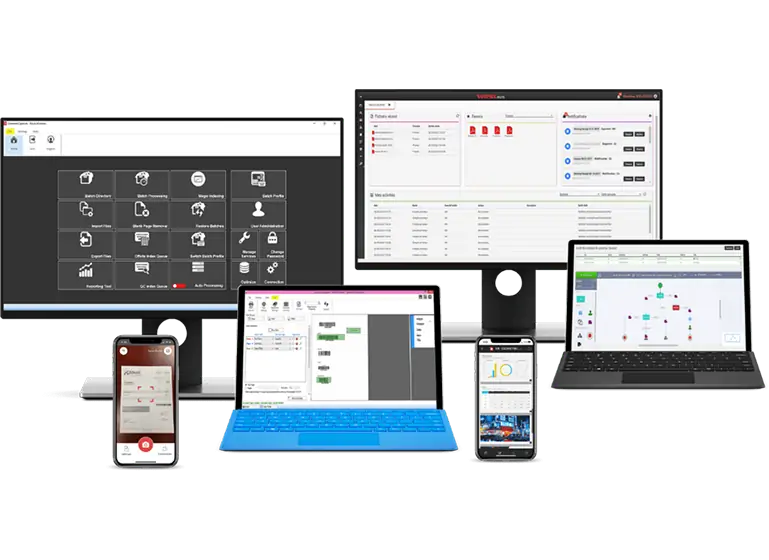
How does a paperless document system work?
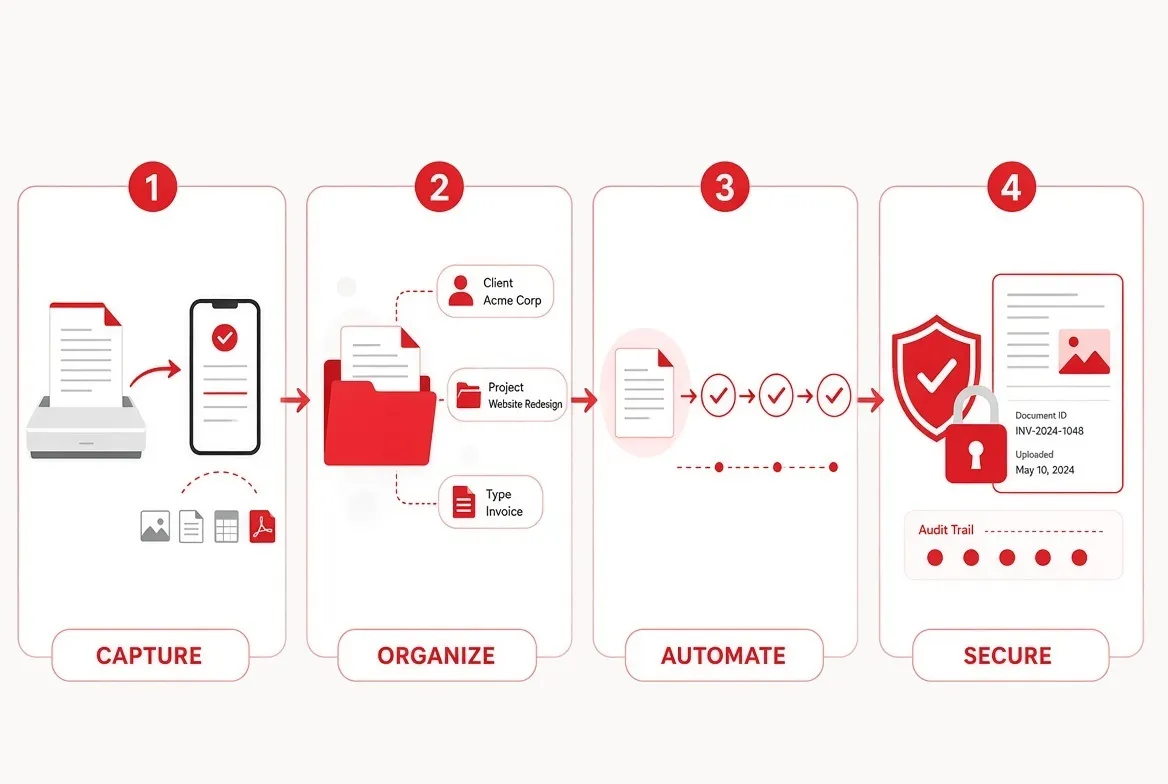
For a paperless office to work efficiently, you will need four essential components: Document capture, organization, automation, and security.
Capture
Scanning, mobile capture, or email import brings documents in.
OCR converts scanned images into searchable text, not just pictures of documents.
The key here is to use proper OCR technology. Simply using scanned documents or images will be as ineffectual as keeping them locked inside a cabinet.
Organize
Metadata tags, client, project, and document type do the real work, not folder location alone. Consistent naming and tagging rules are what make search actually reliable later.
Automate
Documents move through predefined approval or review steps automatically instead of manual email chains, the core of any real document management workflow.
Secure
Encryption, permissions, and audit trails control who can see, edit, or share each document, the backbone of real document management security.
What Are The Benefits of Having a Paperless Office?
Having a paperless office offers operational, financial, and environmental benefits.
One of the most important advantages is the ability to reduce your carbon footprint. After all, 40% of harvested wood goes to paper production.
Paper production consumes large amounts of water, energy, and trees, while printing and storage add further environmental costs. By digitizing documents and reducing reliance on paper, you can significantly lower waste and contribute to more sustainable operations.
Beyond sustainability, organizations benefit from:
Lower operational costs
Reduced spending on paper, printing, storage, and physical archiving. Paper storage could be costing you up to $7,000 per year.
Improved productivity
Employees spend less time searching for documents and more time on high-value work.
The average employee spends between 1-2 hours per day only searching for documents. And most of the time, lost documents have to be duplicated,
Better accessibility
Documents are available instantly, from any location. A strong DMS platform files and organizes your documents thanks to metadata tags and index fields, meaning you can pull up any document by using several simple keywords.
Enhanced security and compliance
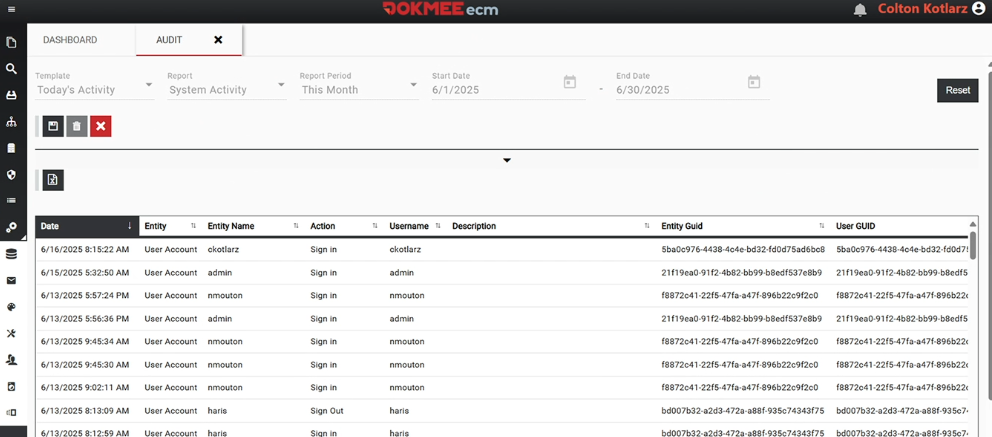
Digital systems offer access controls, audit trails, and encryption.
Stronger collaboration
All teams and departments can work on the same documents in real time and avoid endless email chains where documents usually get lost.
Single source of truth
Centralized digital storage typically offers version control so you avoid accessing duplicate or outdated files.
Paper-based processes are slow, error-prone, and difficult to scale. Digitization removes these limitations and creates a more agile, efficient workplace.
How to Create a Paperless Office
Digitizing your office requires a structured approach. Simply scanning everything with no rhyme or reason will only lead you to digital chaos.
The goal is not just to scan documents, but to redesign workflows around digital processes.
You can build you process following these seven steps:
Step 1: Identify paper-heavy processes
Start by pinpointing where paper creates friction in your daily operations.
Focus on repetitive, document-intensive tasks like invoicing, contract management, employee onboarding, compliance documentation, and approvals.
Look for signs such as delayed processing times, lost documents, duplicate data entry, or reliance on physical storage. These are your highest-impact opportunities for digitization.
Use this free estimator to get a better sense of where you stand:
*{margin:0;padding:0;box-sizing:border-box}body{font-family:-apple-system,BlinkMacSystemFont,'Segoe UI',Roboto,sans-serif;background:#f8f9fa;color:#1a1a2e}.tool-container{max-width:500px;margin:0 auto;padding:24px;background:#fff;border-radius:12px;box-shadow:0 4px 20px rgba(0,0,0,.08)}.tool-title{font-size:20px;font-weight:700;color:#1a1a2e;margin-bottom:4px;text-align:center}.tool-subtitle{font-size:13px;color:#666;text-align:center;margin-bottom:20px}.tabs{display:flex;gap:0;margin-bottom:16px;border:1.5px solid #e0e0e0;border-radius:8px;overflow:hidden}.tab-btn{flex:1;padding:10px 0;font-size:13px;font-weight:600;background:#fafafa;color:#666;border:none;cursor:pointer;transition:all .2s}.tab-btn:first-child{border-right:1.5px solid #e0e0e0}.tab-btn.active{background:#c41230;color:#fff}.tab-panel{display:none}.tab-panel.active{display:block}.visual-input{background:#fafafa;padding:20px;border-radius:10px;margin-bottom:16px;border:1px solid #eee}.visual-label{font-size:13px;font-weight:600;color:#333;margin-bottom:12px;display:block}.cabinet-grid{display:flex;gap:8px;flex-wrap:wrap}.cabinet-btn{width:60px;height:70px;border:2px solid #e0e0e0;border-radius:8px;background:#fff;cursor:pointer;display:flex;flex-direction:column;align-items:center;justify-content:center;transition:all .2s;font-size:10px;color:#666}.cabinet-btn:hover{border-color:#c41230;background:#fef7f8}.cabinet-btn.active{border-color:#c41230;background:#c41230;color:#fff}.cabinet-btn svg{width:24px;height:24px;margin-bottom:4px;fill:currentColor}.input-group{margin-bottom:14px}.input-label{display:block;font-size:13px;font-weight:600;color:#333;margin-bottom:6px}.input-field{width:100%;padding:12px 14px;border:1.5px solid #e0e0e0;border-radius:8px;font-size:14px;transition:border-color .2s}.input-field:focus{outline:none;border-color:#c41230}.input-hint{font-size:11px;color:#888;margin-top:4px}.row{display:flex;gap:12px}.row .input-group{flex:1}.calc-btn{width:100%;padding:14px;background:linear-gradient(135deg,#c41230 0%,#a00f28 100%);color:#fff;border:none;border-radius:8px;font-size:15px;font-weight:600;cursor:pointer;transition:transform .15s,box-shadow .15s;margin-top:8px}.calc-btn:hover{transform:translateY(-1px);box-shadow:0 4px 12px rgba(196,18,48,.3)}.results{display:none;margin-top:20px}.results.show{display:block}.results-header{text-align:center;padding:16px;background:linear-gradient(135deg,#1a1a2e 0%,#2d2d4a 100%);border-radius:10px 10px 0 0;color:#fff}.results-header h3{font-size:14px;opacity:.8;margin-bottom:4px}.results-header .big-num{font-size:36px;font-weight:700}.results-body{background:#fef7f8;padding:20px;border:1px solid #f5d5da;border-top:none;border-radius:0 0 10px 10px}.metrics-row{display:grid;grid-template-columns:repeat(3,1fr);gap:10px;margin-bottom:16px}.metric{background:#fff;padding:12px;border-radius:8px;text-align:center;border:1px solid #eee}.metric-icon{font-size:20px;margin-bottom:4px}.metric-value{font-size:18px;font-weight:700;color:#1a1a2e}.metric-label{font-size:10px;color:#666;margin-top:2px}.timeline{background:#fff;padding:16px;border-radius:8px;border:1px solid #eee}.timeline-title{font-size:12px;font-weight:600;color:#333;margin-bottom:12px}.timeline-bar{height:24px;background:#e9ecef;border-radius:12px;overflow:hidden;position:relative}.timeline-fill{height:100%;background:linear-gradient(90deg,#c41230 0%,#ff6b6b 100%);border-radius:12px;display:flex;align-items:center;justify-content:flex-end;padding-right:8px;font-size:10px;color:#fff;font-weight:600;transition:width .5s}.timeline-labels{display:flex;justify-content:space-between;margin-top:6px;font-size:10px;color:#888}.cost-compare{margin-top:12px;display:grid;grid-template-columns:1fr 1fr;gap:10px}.cost-box{padding:12px;border-radius:8px;text-align:center}.cost-box.old{background:#ffebee;border:1px solid #ffcdd2}.cost-box.new{background:#e8f5e9;border:1px solid #c8e6c9}.cost-box .label{font-size:10px;color:#666;margin-bottom:4px}.cost-box .value{font-size:16px;font-weight:700}.cost-box.old .value{color:#c62828}.cost-box.new .value{color:#2e7d32}.cta-section{margin-top:16px;padding:14px;background:#f8f9fa;border-radius:8px;text-align:center}.cta-text{font-size:12px;color:#666;margin-bottom:8px}.cta-link{display:inline-block;padding:10px 20px;background:#c41230;color:#fff;text-decoration:none;border-radius:6px;font-size:13px;font-weight:500;transition:background .2s}.cta-link:hover{background:#a00f28} Paper-to-Digital Volume Estimator Plan your document digitization project 📄 by Pages 📁 by Cabinets 📁 How many filing cabinets? Or enter number of boxes/drawers 1 drawer ≈ 2,500 pages | 1 banker's box ≈ 2,000 pages Enter the number of pages Scanner Speed (pages/min) Basic (30 ppm) Standard (60 ppm) High-speed (100 ppm) Production (150 ppm) Hours/Day Scanning Estimate My Project Total Pages to Digitize - 💾 - Storage Needed 📅 - Business Days ⏱️ - Scan Hours Project Timeline (at current pace) - Start - Physical Storage/Year - Digital Storage/Year - Let Dokmee Capture handle the heavy lifting See Document Capture → let selectedCabinets=0; let activeTab='pages'; const grid=document.getElementById('cabinetGrid'); for(let i=1;i ${i}`; btn.onclick=()=>{ selectedCabinets=i; document.querySelectorAll('.cabinet-btn').forEach((b,idx)=>{b.classList.toggle('active',idx b.classList.toggle('active',i===(tab==='pages'?0:1))); document.getElementById('tab-cabinets').classList.toggle('active',tab==='cabinets'); document.getElementById('tab-pages').classList.toggle('active',tab==='pages'); document.getElementById('results').classList.remove('show'); } function calculate(){ const speed=parseInt(document.getElementById('scanSpeed').value); const hoursPerDay=parseInt(document.getElementById('hoursDay').value)||6; let totalPages=0; if(activeTab==='cabinets'){ const boxesVal=parseInt(document.getElementById('boxes').value)||0; if(selectedCabinets>0 && boxesVal===0){ // 1 cabinet = 10,000 pages totalPages=selectedCabinets*10000; } else if(boxesVal>0){ totalPages=boxesVal*2500; } else { alert('Please select cabinets or enter number of boxes/drawers');return; } } else { totalPages=parseInt(document.getElementById('directPages').value)||0; if(totalPages
Step 2: Build internal alignment
A successful transition requires buy-in across the organization.
Assign a small project team that includes decision-makers and representatives from key departments (e.g., finance, HR, operations). Clearly communicate the goals (cost savings, efficiency, compliance, and sustainability) and set expectations early.
Without alignment, adoption will be inconsistent and slow.
Step 3: Map current workflows
Break down how documents move from creation to storage.
Who creates them? Who reviews and approves them? Where are they stored?
This step helps uncover inefficiencies such as unnecessary handoffs, manual approvals, or duplicated work. Mapping workflows also makes it easier to redesign them into streamlined digital processes.
Step 4: Define your digital strategy
Before implementing any tools, establish clear standards for how documents will be managed.
This includes file naming conventions, folder structures, metadata/indexing rules, retention policies, and access permissions. A well-defined structure will help you achieve consistency and searchability, and prevents chaos as your digital repository grows.
You will also have to decide if you want a DMS for a more basic approach or if you need an ECM for advanced automation.
What is the difference between a DMS and an ECM?
Step 5: Choose and implement a document management system
Deploy a centralized system to store and manage all documents.
This platform should support secure access, version control, indexing, and integration with your existing tools. A strong system becomes the backbone of your paperless office. It will be the one and only tool that make your documents easy to retrieve, share, and govern.
Make sure to have this step ready before you begin the actual digitization.
Most tools, such as Dokmee, offer capture and automated indexing so you can guarantee the process is done efficiently and at the cheapest price, with no redos.
Step 6: Digitize existing documents
Convert your physical records into digital files using high-quality scanning and OCR.
OCR is one of the most important technologies here, it makes documents searchable and usable, not just stored as images.
Prioritize active or frequently accessed documents first, then move to archival records. This phased approach prevents overwhelming your team.
Use tools such as Dokmee Capture.
Step 7: Automate processes
Once documents are digitized, eliminate manual steps by introducing automation.
Set up workflows for approvals, notifications, routing, and document lifecycle management.
For example, invoices can be automatically routed for approval, contracts can trigger alerts for renewal dates, and HR documents can follow predefined onboarding flows. Automation reduces errors, speeds up processes, and ensures consistency across the organization.
Best Software For Your Paperless Office
Choosing the right software is critical to successfully becoming a paperless office.
Dokmee provides a comprehensive and scalable approach through its DMS and ECM platforms.
Dokmee offers both DMS and ECM solutions designed to handle the full document lifecycle:
Document capture and OCR to digitize paper records
Centralized storage with structured and automated indexing
Workflow automation to streamline approvals and processes
Advanced search and AI capabilities for faster information retrieval
Security and compliance tools to protect sensitive data
Powerful integrations to connect your current tool stack
Collaboration tools like editing and eSignatures
With features like AI Search and AI Document Summary, Dokmee goes beyond storage and implements advanced automation to help you analyze, summarize, and extract insights from documents in real time.
If you’re unsure where to start, Dokmee also provides a free ECM readiness tool that evaluates your current processes and identifies opportunities for digitization.
This helps will help you build a clear roadmap toward becoming fully paperless.
05-ecm-readiness-assessment.html
Example of a Paperless Law Firm
Paperless offices can be applied to almost any industry, but law firms are one of the most impactful examples due to their heavy reliance on sensitive documentation.
In a traditional law firm, case files, contracts, and correspondence are stored in physical folders.
This creates challenges around storage space, document retrieval, and collaboration. A paperless law firm replaces these systems with digital solutions.
How can a paperless system impact a law firm?
Digital case files: All client documents are scanned and stored in a centralized system
Searchable contracts: Lawyers can instantly locate clauses, dates, or keywords
Automated workflows: Document approvals, reviews, and filings are routed digitally
Remote access: Attorneys can securely access files from court, home, or the office
eSignatures: Contracts are signed electronically, eliminating printing and mailing
For example, take a lawyer who is handling multiple cases. With a DMS, they can search for all documents related to a specific client in seconds.
Instead of manually reviewing each file, AI tools can summarize contracts and highlight key terms such as expiration dates or obligations. Billing and compliance tracking also become more accurate through automated systems.
Is This Your Sign To Go Paperless?
Yes, it is.
A paperless office is much more than an efficiency upgrade, it’s a competitive necessity.
By digitizing documents, implementing the right software, and adopting AI-powered tools, organizations can reduce costs, improve productivity, and significantly lower their environmental impact while preparing for the future of work.
Take the ECM readiness test above to see if you’re ready for it, and contact the Dokmee team for more information and guidance.