Published Pricing
Cloud rates are listed upfront, so you can estimate costs before talking to sales.
Box DMS in 2026
Box has grown well beyond cloud file storage. It now combines document collaboration with AI-assisted content management, automation, and enterprise governance.
Its relatively low starting prices and unlimited-storage Business plans make it attractive, but unlimited storage doesn't mean unlimited bandwidth.
Box places monthly limits on data transfers, including downloads and migrations, which can create problems for businesses handling large document archives.
We've compared eight Box DMS alternatives for 2026, examining their features, pricing, and document management capabilities. We'll also explain how Box's bandwidth restrictions work and what to consider before switching.
Here's out shortlist of the best alternatives to Box DMS:
Dokmee is best for structured document management, indexing, and approvals.
Egnyte is most suitable for secure file collaboration across cloud and hybrid setups.
Microsoft SharePoint is suitable for teams who already work in Microsoft 365.
M-Files focuses on metadata-driven document retrieval.
Dropbox and Google Workspace are suitable for simple syncing and everyday file sharing.
Laserfiche and DocuWare are best for advanced workflows, forms, and records control.
Box is a capable content management platform, especially for businesses that collaborate across departments and external organizations. Its strengths include Microsoft 365 and Google Workspace integrations, document versioning, permission controls, and enterprise governance options.
Still, there are several reasons a company might look elsewhere.
Business subscriptions require at least three paid seats
Box's Business and Enterprise plans have a three-user minimum, even if only one or two employees need those capabilities. The advertised per-user rate therefore isn't the minimum subscription cost.
More advanced capabilities can require higher plans or separate purchases
Box includes document-level AI features in its Business offerings, but advanced AI agents, certain governance tools, and additional API or AI usage have different entitlements. If your requirements extend beyond the base plan, the subscription can become more complicated.
External collaboration affects your licensing decisions
Business Plus and higher tiers advertise unlimited external collaborators, while Business has different paid-account requirements. The difference between employees, outside collaborators, and shared-link recipients can influence which plan you need.
Unlimited storage doesn't mean unlimited data transfers
Box has a separate Fair Use Policy covering bandwidth, including uploads, downloads, previews, and migrations. Businesses handling large archives or frequently distributing substantial files should understand those limits.
You may need a different type of document management
Box supports workflows and structured content management, but a company focused on scanning invoices, indexing records, or managing specialized approval processes may prefer a platform designed around those daily activities.
Customer feedback outlines some of these considerations.
G2 Rating: 4.2/5 (⭐⭐⭐⭐)
Filip K., a project manager, praised Box's collaboration tools and version history but noted that:
The biggest downside of Box is that some advanced features and integrations are locked behind higher-priced plans… Overall, the platform is reliable, but the pricing and the complexity of certain settings still leave room for improvement.”
— Filip K., Project Manager, G2, October 2026
Krista W., a media and branding manager, also appreciated Box's branding options and access controls but complained about persistent sales outreach encouraging upgrades.
I dislike the constant sales emails from so-called account managers who are only interested in upselling me an Enterprise account or selling more seats, when I'm perfectly capable of adding seats as I need them. I'm not going to add seats just to keep them empty.
— Krista W., Media and Branding Manager, G2, October 2026
Both reviews were marked as incentivized.
These are individual experiences, not evidence that every Box customer encounters the same problems. If you're already using Box successfully, review your current plan and actual usage before committing to a migration.
Box publishes per-user prices for its Business plans, but the actual cost depends on how many licenses you need and whether you choose monthly or annual billing. According to its November 2026 pricing page, the standard Business tiers cost:
Box plan | Annual billing, per user/month | Monthly billing, per user/month | Minimum seats |
|---|---|---|---|
Business | $17.30 | $24 | 3 |
Business Plus | $28.70 | $39 | 3 |
Enterprise | $40.30 | $54 | 3 |
Enterprise Plus | $57.50 | Annual only | 3 |
Annual-billing prices are monthly equivalents under a twelve-month commitment. Prices reflect Box's November 8, 2026 pricing page.
The minimum matters when you're comparing the advertised prices.
For example, Box Business starts at $17.30 per user/month with annual billing. But because you must purchase at least three licenses, the minimum annual subscription is $622.80, even if only one or two employees need access.
Enterprise Plus costs $57.50 per user/month and is only available with annual billing. Three licenses therefore cost $2,070 per year.
Box also offers Business Starter at $5.80 per user/month with annual billing, but it's a smaller-team product with 100 GB of storage, a three-seat minimum, and a maximum of ten users. It isn't equivalent to the unlimited-storage Business plans.
For organizations needing more advanced automation, Box separately advertises Enterprise Advanced, though its pricing is quote-based.
The subscription price is only part of the comparison. Business and Enterprise plans differ in their file-upload limits, external collaboration, version histories, and included platform resources.
Feature | Business | Business Plus | Enterprise | Enterprise Plus |
|---|---|---|---|---|
Minimum seats | 3 | 3 | 3 | 3 |
Maximum file upload | 5 GB | 15 GB | 50 GB | 150 GB |
External collaborators | Paid-account requirements | Unlimited | Unlimited | Unlimited |
File version history | 50 versions | 50 versions | 100 versions | Unlimited |
Monthly API allowance | 50,000 calls | 50,000 calls | 100,000 calls | 100,000 calls |
Box Governance | Additional purchase | Additional purchase | Additional purchase | Included |
Plan entitlements can change. Confirm your requirements for AI usage, signature integrations, security, and support against the applicable subscription.
Box has also expanded its AI and workflow features. Its current offering includes Box AI for document questions and content generation, while more advanced capabilities depend on the subscription.
Box Automate supports processes involving conditional routes, parallel steps, and connected content tools. Box also offers retention and legal-hold functionality through its Governance product.
So, it's inaccurate to describe Box as nothing more than a shared folder.
Box advertises unlimited storage on its Business plans, but its Fair Use Policy, effective 26 June 2026, limits monthly bandwidth to 1 TB per user. Business accounts also receive a combined monthly allowance of 1 TB per purchased license.
Bandwidth covers uploads, downloads, file previews, and migrations, including transfers through third-party tools.
For example, a business with five paid licenses has a combined allowance of 5 TB per month. If it needs to export an 8 TB document archive, that migration could exceed its allowance, even though Box permits it to store the files. Individual user limits also apply.
Exceeding the limits can trigger restrictions such as throttling or temporary suspension. Box doesn't specify a fixed automatic bandwidth-overage fee.
If you're planning a large migration, calculate the transfer volume and agree on the process with Box beforehand.
The options below serve different requirements. Some are close alternatives for file sharing and collaboration, while others focus on document control or business processes.
Platform | Best for | Starting US price |
|---|---|---|
Dokmee | Structured document management, indexing, and approvals | $47/user/month, billed annually |
Egnyte | Secure file collaboration and hybrid access | $22/user/month, billed annually |
Microsoft SharePoint | Document collaboration in Microsoft 365 | From $7/user/month through Business Basic |
M-Files | Metadata-driven document management | $65/seat/month |
Dropbox Business | File syncing and external sharing | Standard $15/user/month, billed annually |
Google Workspace | Google-native file collaboration | Business Starter $7/user/month, annual commitment |
Laserfiche | Advanced workflow automation and records management | Professional $875/user/year, minimum 5 users |
DocuWare | Document capture and automated business processes | Custom quote |
Published starting prices aren't equivalent configurations. Annual commitments, minimum seats, additional modules, and implementation services can affect the total.
Dokmee is an enterprise content management platform built for businesses that need more structure around their documents than conventional file sharing provides.
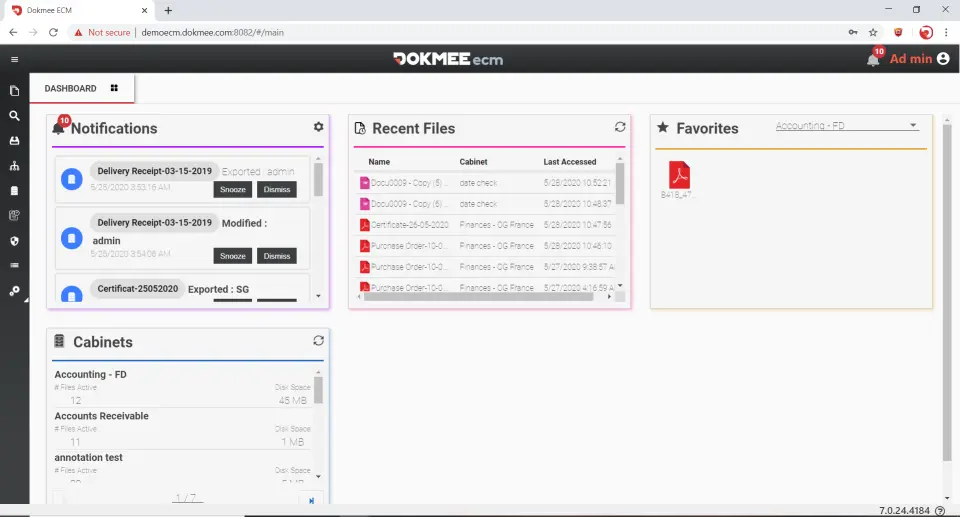
Instead of treating every file primarily as something to store and share, Dokmee helps teams organize business records, control access, and move documents through configured processes.
For example, a company handling supplier invoices can use Dokmee to organize incoming records, assign searchable index information, and route documents for approval.
Its main capabilities include:
Document management: Metadata indexing, full-text search, version control, and configurable document organization.
Workflow automation: Document routing, approval tasks, notifications, and activity tracking.
Electronic forms: Data collection that connects with document-management processes.
Security controls: User permissions, audit trails, and document access management.
AI-assisted functionality: AI Search and RPA Auto Indexing.
Deployment flexibility: Cloud subscriptions, with dedicated and on-premises options through Enterprise.
Both platforms support document workflows, but Dokmee puts indexing and document processing at the center of its experience. It helps teams organize records and route them for approval. It’s a stronger fit for businesses handling invoices, forms, and other structured documents.
Dokmee also has a separate Capture product for specialized scanning and document ingestion. Businesses handling high-volume document capture can evaluate it alongside the ECM platform.
Customer feedback is positive overall.
Software Advice Rating: 4.7/5 (⭐⭐⭐⭐⭐)
A verified reviewer in design praised Dokmee’s document management features, ease of use, and the collaboration it enables:
With Dokmee ECM, everything is organized and easily accessible at our fingertips. It has saved us an immense amount of time and allowed us to be more productive. Collaboration and communication within our team have also greatly improved since implementing Dokmee ECM. Now, we all have access to the same platform, making it effortless to share documents and exchange data.
— Verified Reviewer, Design, Software Advice, June 2023
That's worth considering if you're moving from a long-established Box environment. Configuring metadata, permissions, and approval workflows will still take planning.
Dokmee publishes its Cloud subscription rates upfront, while its Enterprise offering requires a custom quote. This makes it easier to estimate your subscription costs before contacting sales.
Plan | Price | Main inclusions |
|---|---|---|
Dokmee Cloud, annual billing | $47/user/month | Document management, Workflow, Forms, AI Search, RPA Auto Indexing, and 2 TB advertised storage |
Dokmee Cloud, monthly billing | $59/user/month | Cloud offering with monthly billing |
Dokmee Enterprise | Custom quote | Dedicated/private cloud or on-premises deployment, custom integrations, and broader configuration |
At the annual-billing rate, ten Dokmee Cloud users cost $5,640 per year, excluding additional services.
Cloud includes document workflows and indexing tools in its advertised package. Enterprise provides more flexibility for businesses with specialized deployment or integration requirements.
Egnyte is one of the more direct Box alternatives for businesses that still want cloud file collaboration but need flexibility in how employees access documents. It combines centralized file management with granular permissions, integrations, and options for hybrid environments.
That can be useful for businesses where employees work between office networks, cloud applications, and remote locations.
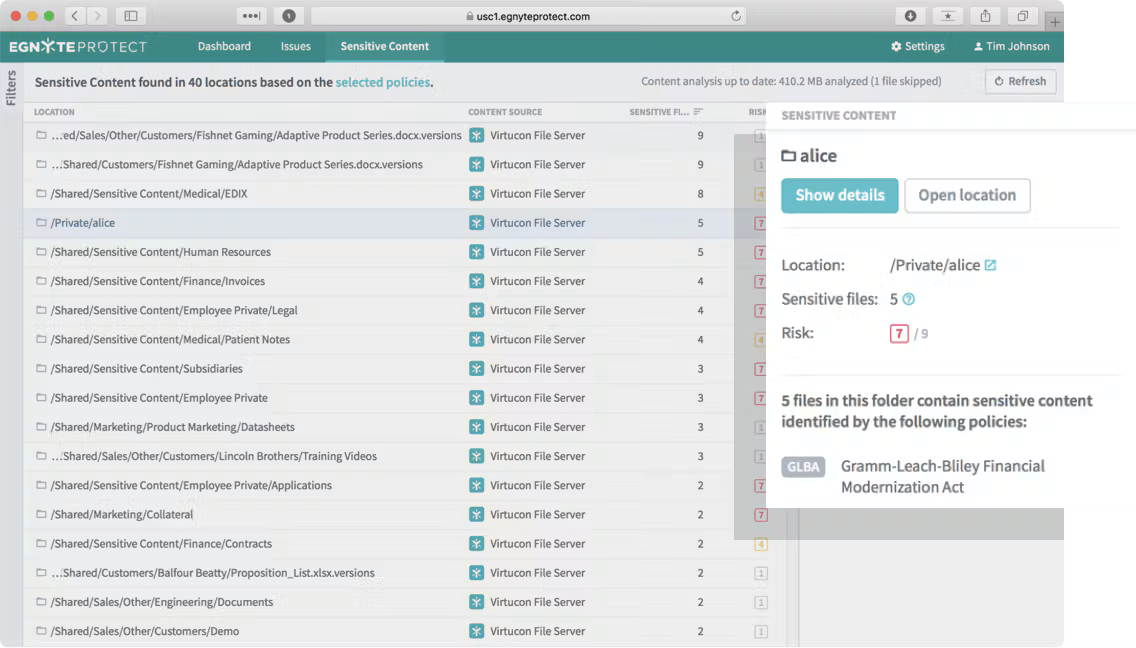
Egnyte integrates with Microsoft 365 and Google Workspace, allowing employees to work with familiar productivity tools while using Egnyte for content management.
Its plans also offer capabilities such as:
File sharing with permission controls
Document search and AI assistance
Content lifecycle management
Workflow automation and electronic signatures on higher tiers
Security monitoring and advanced governance options
The main attraction is keeping a familiar file-oriented working environment while changing the security or access model.
However, not every governance capability comes with the entry-level subscription. For example, Enterprise Lite adds lifecycle management and advanced workflows, while Elite introduces more advanced AI and security features.
Customer feedback is generally favorable.
G2 Rating: 4.4/5 (⭐⭐⭐⭐)
Jacquelyn P., a billing and payroll coordinator, highlighted Egnyte's document retrieval and security:
Secure, user friendly, exactly what I need it to be. I love the search feature, I love that you can make folder templates.
— Jacquelyn P., Billing and Payroll Coordinator, G2, September 2026
Another accounting-industry reviewer praised secure client sharing but described the online interface as occasionally cumbersome.
There's also a migration consideration. Egnyte documents a Box migration connector, but it was listed as Limited Availability in our research, and permissions weren't supported for migration through that route.
If your Box environment has complicated external-access rules, plan to rebuild and test them carefully.
Egnyte publishes the following annual-billing rates:
Plan | Price per user/month | Main considerations |
|---|---|---|
Business | $22 | File collaboration, permissions, single-document AI Q&A |
Enterprise Lite | $39 | Content lifecycle management, advanced workflows, threat detection |
Elite | $48 | Advanced AI, e-signatures, additional security capabilities |
Ultimate | Custom | Sensitive-content controls and more advanced protection |
The published Business price works out to $2,640 annually for ten users, before additional services. Confirm the complete licensing and feature requirements in your quote, particularly if you're replacing Box's external collaboration or governance functionality.
Egnyte is one of the closest Box alternatives for businesses that want secure file sharing with greater flexibility across cloud and hybrid environments. Its familiar collaboration tools make it easier to consider as a direct replacement, although advanced governance and automation features require higher-priced plans.
Microsoft SharePoint is an obvious alternative if your organization already works extensively with Microsoft 365. It supports document libraries, team sites, version management, metadata, and collaborative editing through applications such as Word and Excel.
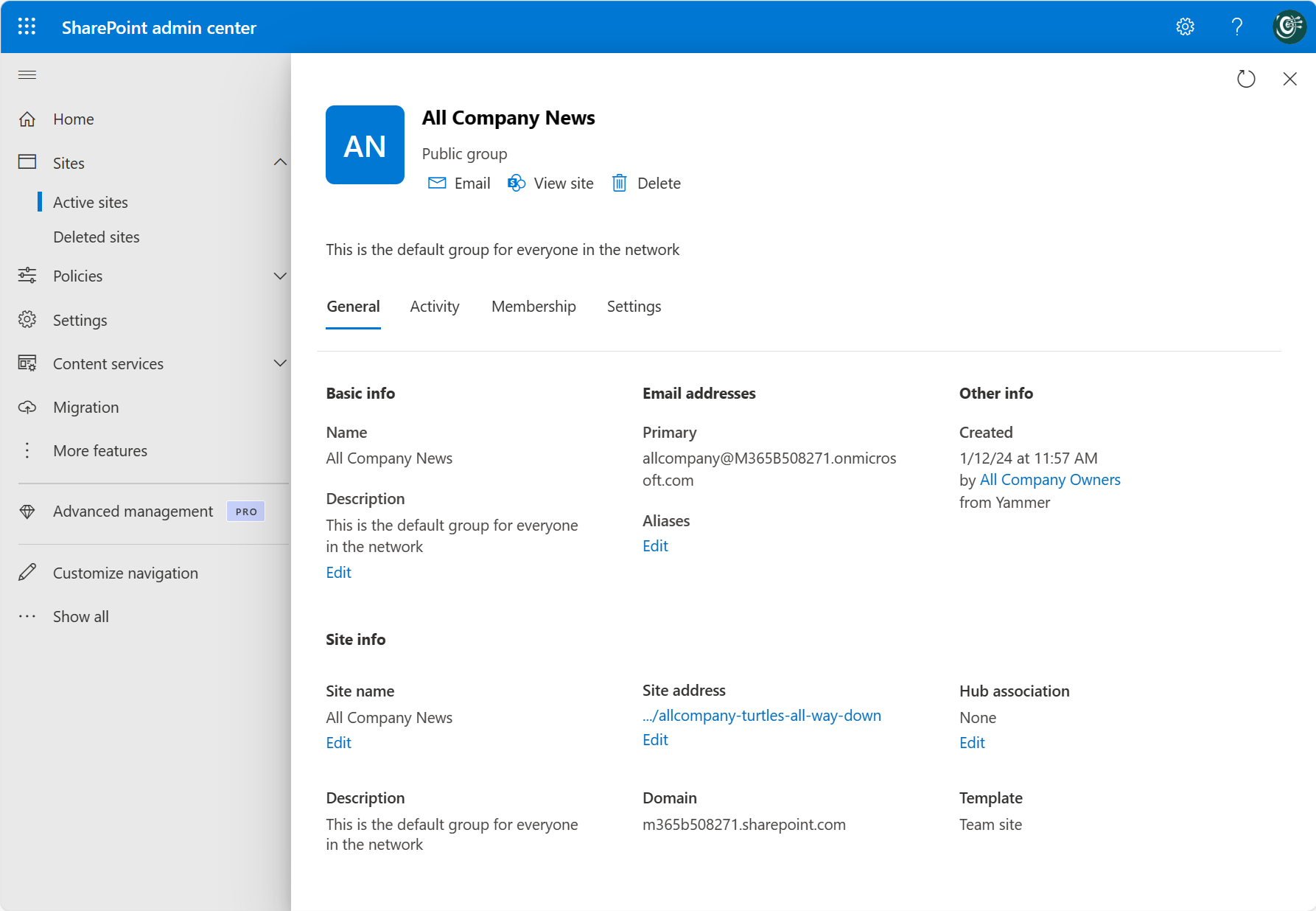
If your staff manages most documents in Teams and Microsoft applications, SharePoint may reduce the need for a separate content platform. However, the replacement depends on what you're actually using Box for.
Basic sharing and co-authoring are relatively straightforward requirements. Recreating specialized document processing, retention policies, or extensive external permissions can involve considerably more work.
Microsoft offers supporting services for those needs:
Power Automate for approval processes and automation
Microsoft Purview for retention and records-related controls
SharePoint OCR for extracting text through pay-as-you-go document processing
Microsoft Entra ID for identity and access management
Some of these capabilities require additional licensing or configuration.
SharePoint's customer feedback reveals both the convenience of Microsoft integration and the learning curve of larger document environments.
G2 Rating: 4.0/5 (⭐⭐⭐⭐)
Michelle C., an advocacy committee member, appreciated centralized file sharing but said:
It can be confusing to navigate, especially when trying to locate specific documents or manage multiple folders. The interface can feel overwhelming at times, and some features take a while to learn. I also think the search functionality and file organization could be more user-friendly. Simplifying the navigation would make the overall experience much better.
— Michelle C., Advocacy Committee Member, G2, October 2026
For a Microsoft-heavy team, that may be an acceptable trade-off. But administrators will still need to design sensible libraries, permissions, and navigation.
SharePoint is included in eligible Microsoft 365 subscriptions.
Microsoft 365 Business Basic was listed at $7 per user/month with annual billing in our November 2026 US research.
Plan | Pricing |
|---|---|
Microsoft 365 Business Basic (no Teams) | $5.40/user/month |
Microsoft 365 Business Standard with Copilot (no Teams) | $20.30/user/month |
Microsoft 365 Business Premium with Copilot (no Teams) | $28.80/user/month |
Microsoft 365 Business Basic | $7/user/month |
Microsoft 365 Business Standard with Copilot | $23.50/user/month |
Microsoft 365 Business Premium with Copilot | $32/user/month |
With Microsoft 365 Business Basic (Teams), ten users reach an annualized subscription cost of $840, before additional services.
If your company already pays for suitable Microsoft 365 licenses, the incremental subscription cost of using SharePoint may be low. However, don't treat the existing subscription as proof that the entire replacement is free.
Advanced workflow licensing, OCR consumption, retention requirements, and migration services can change the overall cost.
SharePoint makes the most sense for companies already using Microsoft 365, particularly when document collaboration is the main priority. Existing licenses can make it an economical choice, but replacing Box's more advanced workflows and governance controls may require additional Microsoft services and configuration.
M-Files takes a different approach to organizing business information. Rather than relying mainly on folders, it uses metadata to connect documents with the customers, projects, contracts, or other business records they concern.
That can be useful when employees need to find related documents without remembering which department or folder originally stored them.
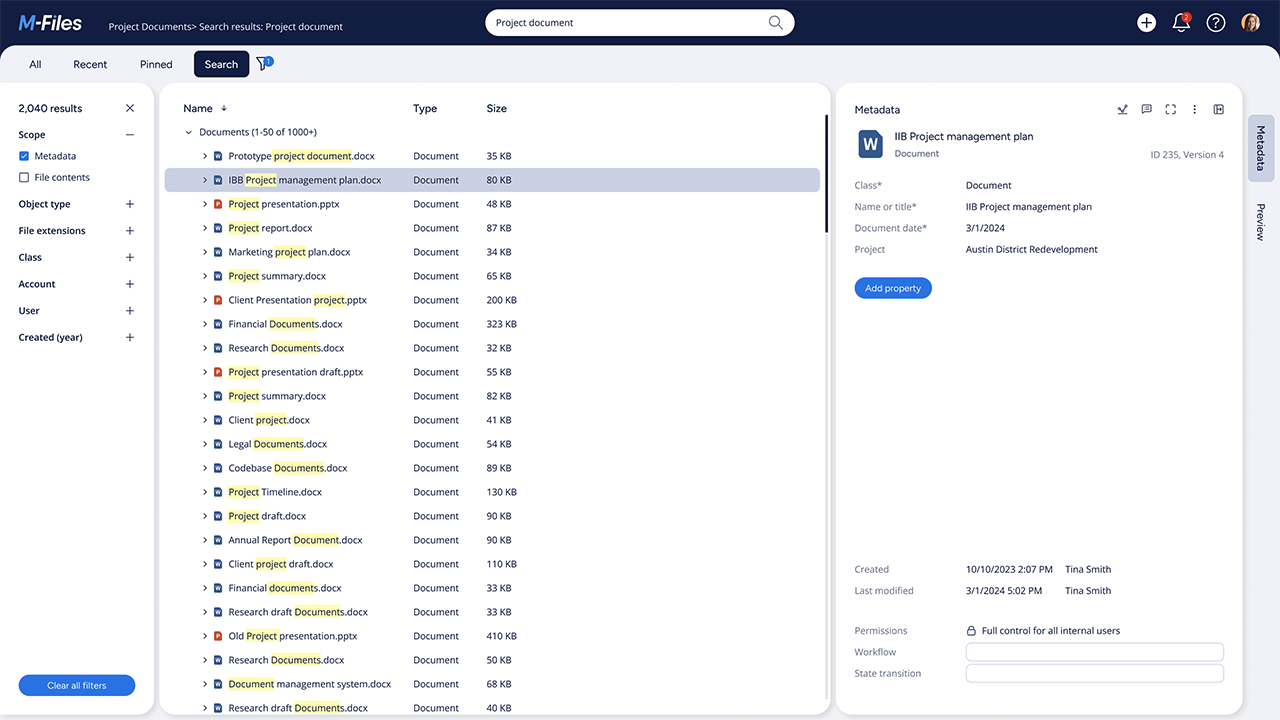
M-Files also supports document workflows, version management, permissions, and integrations with Microsoft applications.
Its Aino AI capabilities help users work with document content, although more advanced automation and governance features depend on the edition.
For a business moving from Box, the main question is whether metadata-driven organization would improve how employees retrieve information.
There's a cost to introducing that structure, though. Your team needs to define appropriate document classes and metadata fields. Existing files may need to be reclassified, and employees must learn to apply the new system consistently.
Customer feedback notes that balance.
G2 Rating: 4.4/5 (⭐⭐⭐⭐)
Kaleem A., a software engineer, reported that after his team improved its tagging practices:
Once people started tagging documents properly, finding what I needed became much faster than the old folder-based approach. I also appreciated being able to check document history when someone updated something, because it cut down on a lot of those “who changed this?” conversations that usually pop up in team chats.
— Kaleem A., Software Engineer, G2, May 2026, updated June 2026
He also warned that inconsistent tagging made search results less useful.
Before switching from Box, test M-Files with a sample of your actual document types and metadata requirements. The benefit depends partly on how well your organization maintains those relationships.
M-Files lists Essentials at €65 per seat/month, while Enterprise requires a custom quote.
Essentials includes the core metadata-based document management experience, workflows, and everyday AI assistance. Enterprise provides more advanced capabilities around security, governance, automation, and AI agents.
Ten Essentials seats would represent a €7,800 annualized run rate, excluding implementation.
Confirm the billing commitment and full configuration costs before relying on the estimate.
M-Files is a strong choice for document-heavy organizations that want to find information through metadata rather than traditional folder structures. The approach can improve document retrieval, but getting there requires thoughtful setup and consistent tagging practices across your team.
Dropbox is a practical alternative when a team mainly needs to store, synchronize, and share files without adopting a more elaborate document management platform. Its desktop and mobile applications keep files accessible across devices, while business plans add team administration and security features.
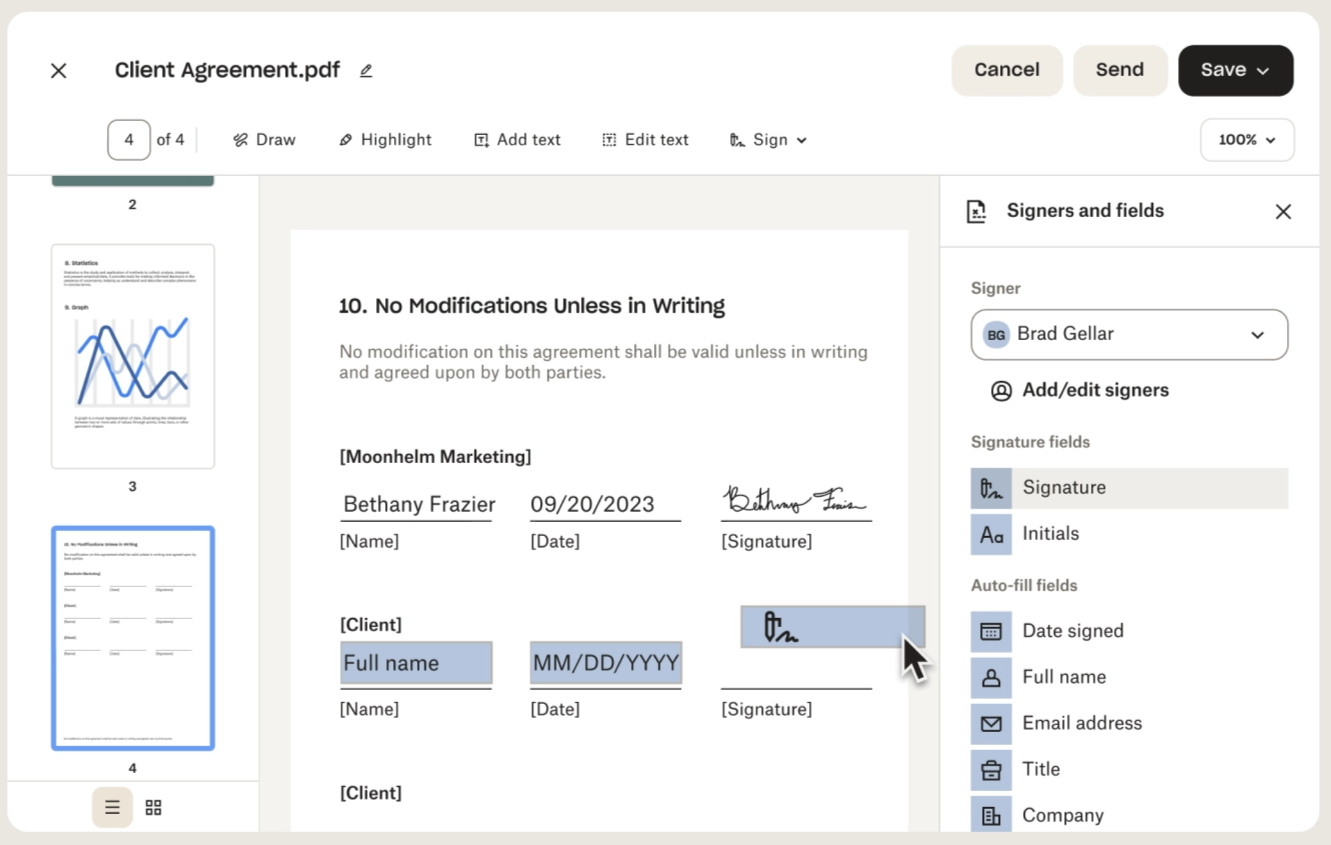
Dropbox Standard supports shared folders, version history, and external file delivery. Advanced extends recovery periods and adds more administrative controls.
For companies exchanging files with clients or working across laptops and desktops, those capabilities may cover most of the required workflow.
However, Dropbox shouldn't be treated as a complete replacement for every Box Enterprise configuration. A shared folder and file recovery history aren't equivalent to a formal retention schedule, legal hold, or specialized document approval process.
If you're using Box Governance or extensive workflow automation, compare the exact Dropbox configuration before switching.
Customer feedback reflects the convenience of file syncing, with some complaints about performance and navigation.
G2 Rating: 4.4/5 (⭐⭐⭐⭐)
Nathalie L., a support professional, appreciated being able to keep documents organized across devices but complained about the following:
What really gets frustrating is when large files take forever to sync, or when the search feature doesn’t surface a document you know is buried in there somewhere.
— Nathalie L., UMI Intake and Support, G2, October 2026
That's one user's experience, rather than a measured performance comparison with Box.
Dropbox publishes these US business rates:
Plan | Annual-billing price | Users | Storage |
|---|---|---|---|
Basic | Free | 1 | 2 GB |
Plus | $9.99/month | 1 | 2 TB |
Standard | $15/user/month | 1 or more | Starts at 3 TB per team |
Advanced | $24/user/month | 3 or more | Starts at 15 TB per team |
Enterprise | Custom | Quoted | Custom |
The Basic and Plus plans aren’t suitable for an organization looking to replace a document management system, as they’re limited to one user only.
At the published annual rate, ten Standard users would cost $1,800 per year. Standard includes 180-day version history, while Advanced extends it to one year. Advanced also has a three-user minimum. Unlike Box Business, the current Dropbox Standard plan is advertised for one or more users.
For straightforward sharing, Dropbox may offer a lower-cost subscription. But businesses requiring formal records management or more advanced security controls should evaluate those separately.
Dropbox Business is worth considering if your team mainly uses Box to sync files, share documents with clients, and collaborate across devices. Its published pricing is accessible, but businesses relying on Box's formal governance or complex workflows will need something more capable.
Google Workspace is a productivity and collaboration suite, not a dedicated document management or enterprise content management system.
Google Drive and shared drives can replace Box for everyday file storage and collaborative editing, especially for teams already using Docs and Gmail. However, businesses that need structured document capture or complex approval workflows will generally need additional tools.
Google Vault provides retention and discovery capabilities on eligible plans, but it doesn't turn Workspace into a complete ECM replacement.
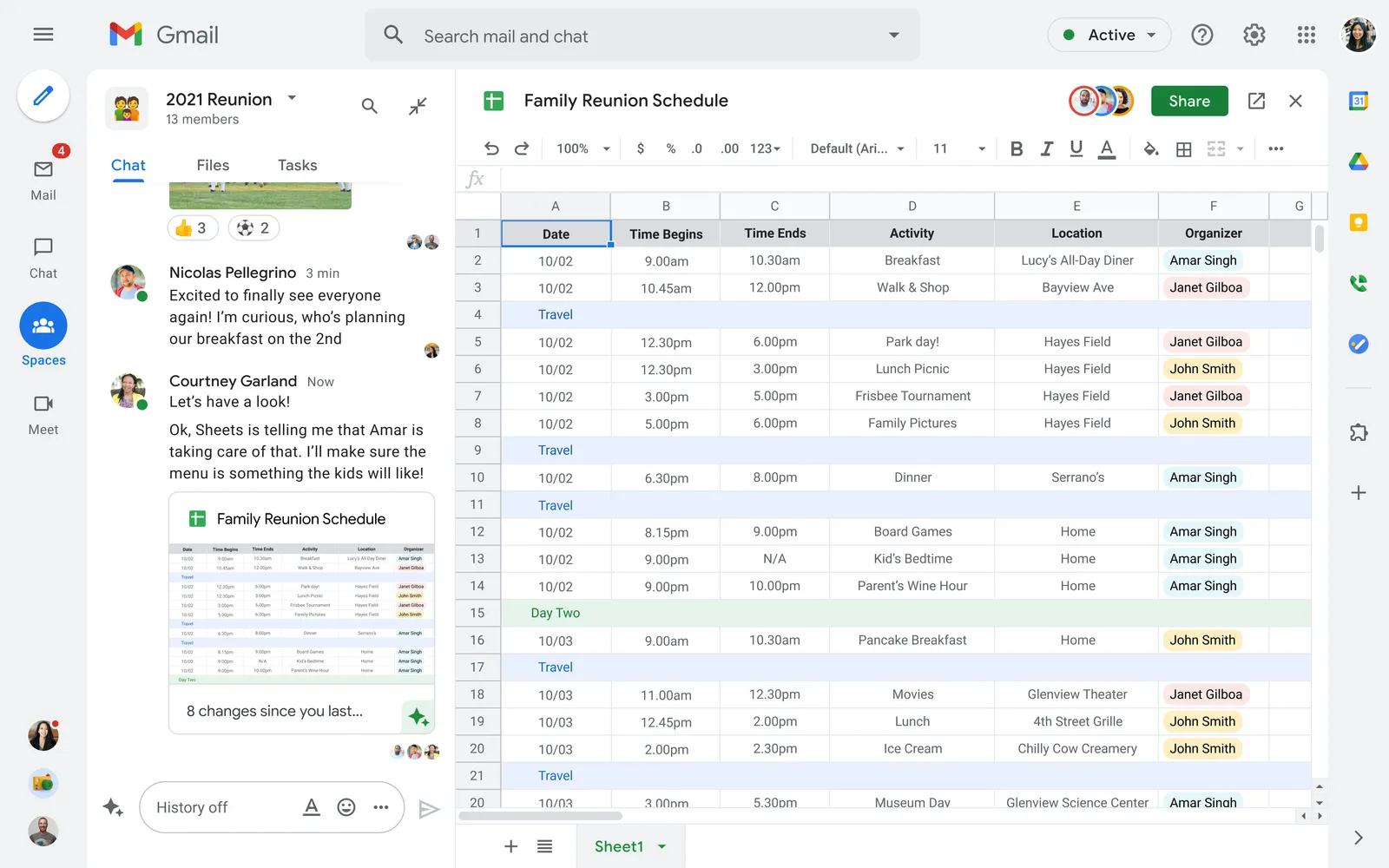
For businesses that already rely on Google's productivity tools, using Drive as the primary document environment may be simpler than maintaining a separate Box subscription.
More advanced features depend on the edition. Business Standard includes additional document-management and productivity capabilities, while Business Plus adds Google Vault for retention and discovery requirements.
However, Vault isn't a complete substitute for every Box Governance configuration. You still need to establish the relevant policies and permissions.
Customer feedback generally emphasizes convenient collaboration, though larger document collections can become difficult to organize.
G2 Rating: 4.6/5 (⭐⭐⭐⭐⭐)
Raj K., a software developer, praised the way Workspace connected technical documentation with team communication. He also described difficulties managing large volumes of shared files and spreadsheets.
In larger development projects, there tends to be an overload of shared documents and spreadsheets and the challenge becomes figuring out which resource is the most up-to-date. Using spreadsheet for documentation becomes somewhat inconvenient as well in case if there is any need for logic to be applied or automation to be performed."
— Raj K., Full Stack Developer, G2, August 2026
That challenge is worth anticipating if you're migrating a complex Box folder structure into Drive.
Google's current US business rates distinguish annual commitments from flexible monthly billing.
Plan | Annual commitment, per user/month | Flexible billing, per user/month | Pooled storage |
|---|---|---|---|
Business Starter | $7 | $8.40 | 30 GB per user |
Business Standard | $14 | $16.80 | 2 TB per user |
Business Plus | $22 | $26.40 | 5 TB per user |
For ten users, Business Standard costs $1,680 annually under the annual-commitment rate. Business Plus costs $2,640 annually and includes Vault.
An annual commitment may be billed monthly without becoming a cancel-anytime subscription. Check those terms before comparing the price with Box.
Google Workspace is a suitable Box alternative for everyday file collaboration, particularly for teams already using Google's productivity tools. It isn't a direct replacement for a dedicated DMS or ECM platform when document processing and formal workflows are central requirements.
Laserfiche is worth considering if your organization needs to move beyond general-purpose collaboration into more structured business processes. It combines document repositories with electronic forms, workflow automation, document capture, and records management.
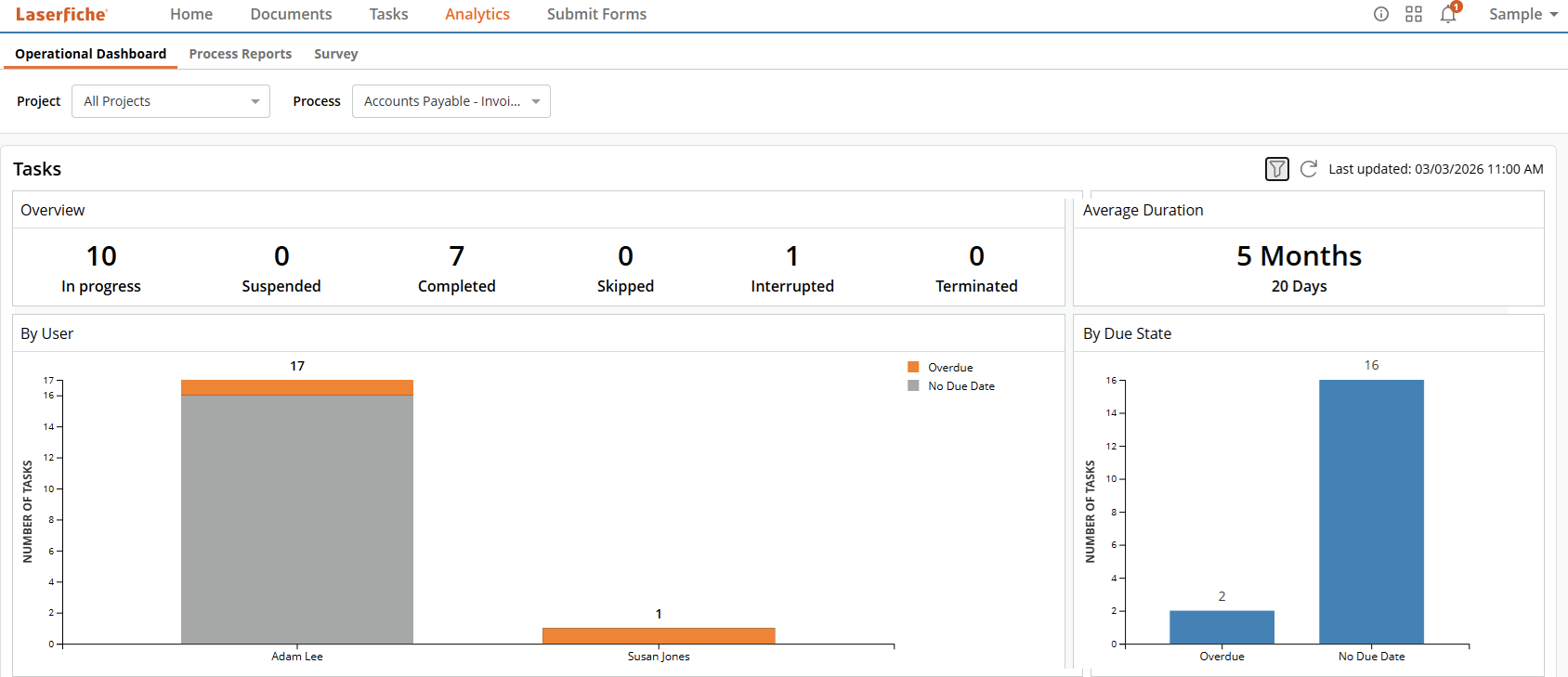
Administrators can configure document routing and approvals through graphical tools, allowing teams to formalize processes without coding everything from scratch.
Laserfiche also provides cloud and self-hosted offerings, although their licensing and capabilities differ.
For a company currently using Box, Laserfiche may be attractive if document intake, business process automation, or formal records controls are becoming central requirements. However, those capabilities come with licensing commitments and implementation work.
Customer reviews are generally favorable.
G2 Rating: 4.7/5 (⭐⭐⭐⭐⭐)
Holly V., a systems analyst, praised Laserfiche's customization options but noted:
A bit expensive. Sometimes the ala-cart module options can be confusing. It's nice to not have to pay for things you aren't going to use, but if you have most of the modules like we do, it can be a little tricky to navigate all of the systems to see how they are working together. Sometimes the repository searches are slow.”
— Holly V., G2, March 2025, updated April 2026
The review doesn't establish a universal search-performance problem, but it gives buyers something practical to test during a demonstration.
Laserfiche publishes annual Cloud pricing with different minimum-user commitments:
Plan | Annual price per user | Minimum users |
|---|---|---|
Professional | $875 | 5 |
Business | $1,115 | 25 |
Business+ | $500 | 500 |
Professional starts at $4,375 per year for five users. Business requires at least 25 licenses, bringing its minimum annual subscription to $27,875. Business+ has a lower per-user rate, but its 500-user minimum makes it a substantially larger commitment.
These prices exclude professional services and some additional requirements.
Smaller organizations leaving Box should pay attention to the minimum license commitment.
Laserfiche is better suited to businesses that need structured approval processes, electronic forms, and formal records management rather than simple file sharing. Its capabilities are extensive, but the minimum license commitments and implementation requirements can make it more than smaller teams need.
DocuWare is another option for businesses that want document processing to be a central part of their DMS. It supports document capture, indexing, approvals, and controlled storage, with particular applications in finance and HR.
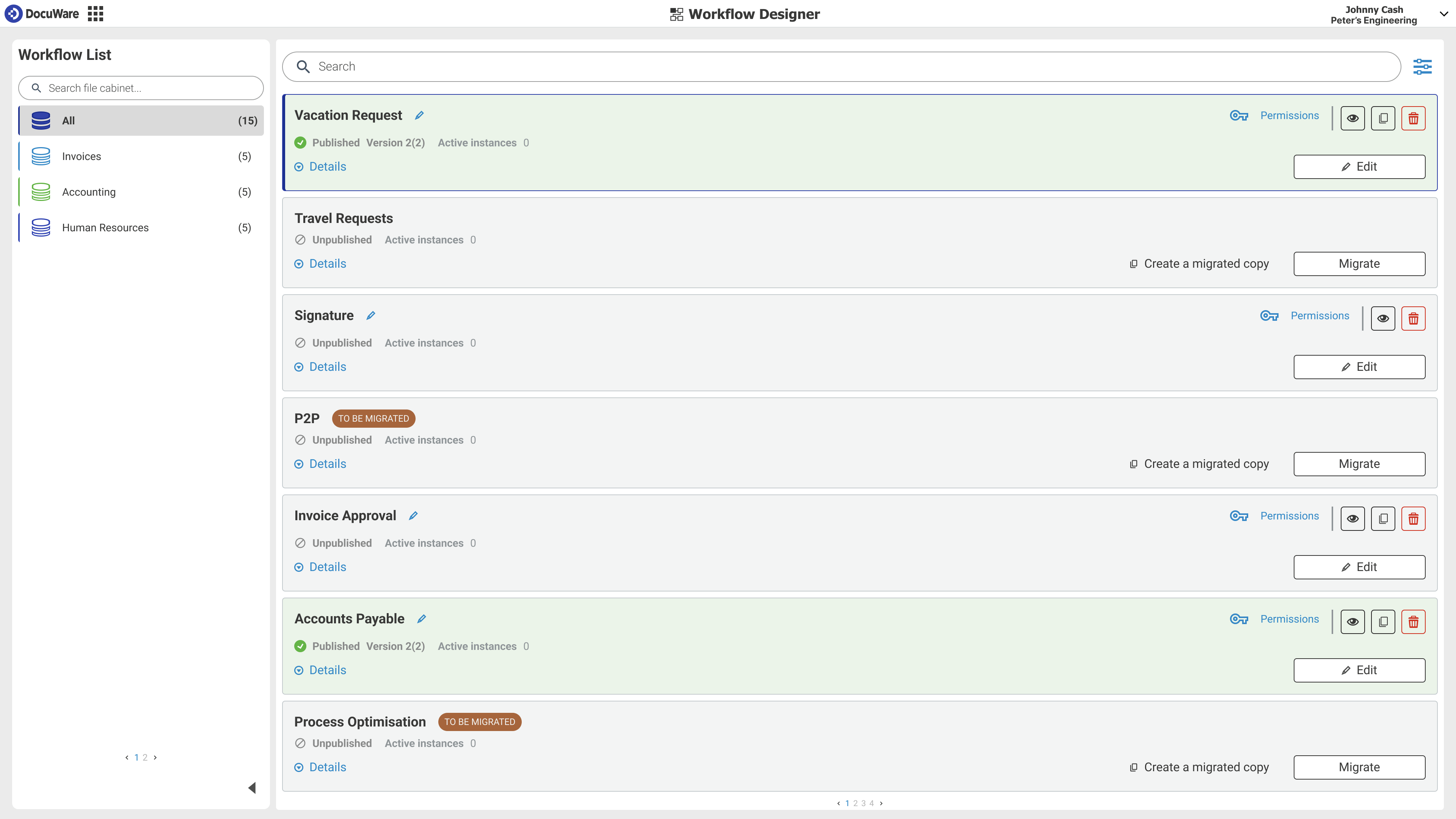
DocuWare Cloud includes Intelligent Indexing, Workflow Manager, and Forms. Those capabilities help businesses create structured processes for handling invoices, employee records, and other documents that need review or approval.
More advanced Intelligent Document Processing, certain integrations, and electronic signature services can require additional products or purchases.
DocuWare also made substantial product announcements in 2026. Its redesigned interface and Aura AI assistant began rolling out to Cloud customers in stages from October. Aura supports natural-language interaction with repository documents, while some additional intelligent processing capabilities have separate usage or availability requirements.
Customer experiences highlight both the advantages of automation and the planning involved.
G2 Rating: 4.4/5 (⭐⭐⭐⭐)
Nicholas B., a systems administrator, noted:
It helped my existing team work more efficiently and get more done with the same resources. It has a UI I like and they seem to be adding features like AI to improve the product more.”
— Nicholas B., Systems Administrator, G2, May 2026
He also explained that workflow configuration required preparation and that one should start with a clear picture of their processes, folder structure, and user permissions to get the most out of DocuWare.
For a business replacing Box, DocuWare is worth examining when the main need is processing documents through a defined business workflow.
DocuWare doesn't publish fixed US prices for its Cloud packages. Instead, it offers packages with specified user and storage allowances:
Package | Included users | Storage |
|---|---|---|
Cloud 4 | 4 | 20 GB |
Cloud 15 | 15 | 50 GB |
Cloud 40 | 40 | 500 GB |
Cloud 100 | 100 | 1,000 GB |
DocuWare's general US guidance describes typical costs of approximately $30 to $125 or more per user/month, depending on configuration.
That's not a guaranteed subscription price. Your actual quote should cover user types, storage, required document-processing features, integrations, and implementation.
Unlike Box's unlimited-storage business plans, DocuWare's Cloud packages have explicit storage allocations. Factor in archive growth when comparing the products.
DocuWare is worth evaluating when your priority is capturing incoming documents and moving them through defined business workflows. Its indexing and automation capabilities are well suited to departments such as finance and HR, but quote-based pricing and storage allocations make careful planning important, especially when migrating from Box's unlimited-storage plans.
To move away from Box, you'll need to account for document versions, metadata, permissions, and any approval workflows your team relies on.
Dokmee supports importing existing documents and organizing them through metadata, indexing, and configurable workflows. Its separate Dokmee Capture product can also process large batches of files and extract information before sending documents into an ECM system.
However, Dokmee doesn't publicly document a native Box-to-Dokmee migration connector. You'll need to confirm how your exported files will enter Dokmee and which information can be preserved, and the team can demonstrate the migration process.
We recommend that you plan your migration in four steps:
Audit your Box environment: Identify the documents you need to transfer, including previous versions, restricted files, and records subject to retention requirements.
Choose an export method: Box supports file downloads and API-based exports. For large archives, check its bandwidth limits before scheduling transfers.
Configure Dokmee: Import a sample of documents, map the required metadata, and establish access permissions. Recreate any approval workflows that won't transfer automatically.
Test before switching: Confirm that employees can find the documents, access controls work, and essential records remain available.
Other destinations have different migration limitations. Microsoft's documented Box migration route, for example, transfers only the latest file version.
Don't cancel Box until you've checked the migrated documents and confirmed that your replacement workflows work.
There's no universal winner because businesses use Box for different jobs. A company sharing project files with customers may need something very different from a legal department maintaining controlled records.
Here's how to narrow down the options:
Your situation | Best option to consider |
|---|---|
You want structured document management, indexing, and configurable approval workflows | Dokmee |
You need secure file collaboration across cloud and hybrid environments | Egnyte |
Your organization already uses Microsoft 365 extensively | Microsoft SharePoint |
Employees need metadata-based access to related business documents | M-Files |
You mainly need file syncing and external sharing | Dropbox Business |
Your team collaborates primarily through Google applications | Google Workspace |
You need advanced processes, electronic forms, and formal records management | Laserfiche |
Your business processes large volumes of invoices and other incoming documents | DocuWare |
Your existing Box setup already meets your needs and migration costs outweigh the benefits | Keep Box or review your current subscription |
Before switching, identify the problem you want to solve.
If employees mostly complain about confusing folders, a different repository might help. But if your organization depends on Box's integrations or legal-hold controls, replacing the platform could mean rebuilding important functionality.
Have your shortlisted vendors demonstrate the same workflow using your requirements. That gives you a more meaningful comparison than counting features on a pricing page.
If your team mainly needs a place to share files, Box may already do the job well.
But if employees spend their day indexing incoming records, tracking approvals, and searching for the right documents, it's worth considering a system built around those processes.
Dokmee brings document organization, permissions, search, and configurable workflows into one environment, with published Cloud pricing and Enterprise options for more specialized requirements.
Bring a sample of your current Box documents and approval processes to a Dokmee demonstration. We'll show you how the platform handles those requirements and help identify what would need to be migrated or configured.
See Dokmee in action and find out whether a more structured document workflow is right for your business.
How we researched this: Dokmee publishes this comparison and is one of the products featured below. We consulted official vendor documentation, published pricing, contractual terms, and customer reviews from G2 and Software Advice. Our research reflects information available in November 2026.
Cloud rates are listed upfront, so you can estimate costs before talking to sales.
AI Search and RPA Auto Indexing tag and find documents without manual filing.
Route approvals and collect data in the same platform as your records.
Choose Cloud, dedicated cloud or on-premises through Enterprise.
Role-based permissions and audit trails keep every document accountable.
Bring in existing files and process large batches with Dokmee Capture.