Modern Interface
Dokmee replaces DocuShare’s dated and clunky interface with a clean, user-friendly layout. This significantly reduces employee training time and accelerates user adoption across every department.
DocuShare
Years ago, DocuShare was a modern DMS and gained the trust of many users.
However, as we reach 2026 you may noticed that it seems outdated compared with other, more modern, solutions.
How can you tell if you need to try DocuShare alternatives?
If your team is spending more time navigating the software than actually completing tasks, it may be a sign that your ECM is holding you back and it’s time for a change.
If you're looking to move away from Xerox DocuShare's dated interface, heavy IT maintenance, and complex configuration, here is a quick summary of how the top 5 alternatives compare:
Dokmee is best for teams wanting a modern, modular ECM with powerful OCR capture, drag-and-drop workflow design, and flexible on-premise or cloud hosting.
Laserfiche is best for government, education, and healthcare organizations needing enterprise-scale process automation, records lifecycle management, and deep compliance tools.
M-Files is best for document-heavy professional firms wanting to ditch static folder structures in favor of AI-assisted, metadata-driven search.
Microsoft SharePoint is best for businesses already invested in Microsoft 365 prioritizing team collaboration, real-time co-authoring, and intranet functionality.
DocuWare is best for finance and HR departments seeking a cloud-first DMS focused on automated invoice processing, smart data capture, and approval routing.
DocuShare is Xerox's ECM and document management platform. It helps organizations store, organize, share, and manage business documents while supporting collaboration and workflow automation.
It is commonly used by small and mid-sized organizations, particularly in sectors such as government, education, healthcare, and professional services where documents play a central role in daily operations.
Typical use cases include:
Managing employee and HR records
Organizing contracts and legal documents
Processing permits and public records
Maintaining student and faculty records
Managing policies, procedures, and compliance documentation
DocuShare provides document storage, version control, metadata tagging, full-text search, and role-based permissions to help teams locate and manage information efficiently.
The platform also includes workflow automation, document capture, audit trails, retention policies, and integrations with business applications, allowing organizations to automate routine document-driven processes while supporting compliance requirements.
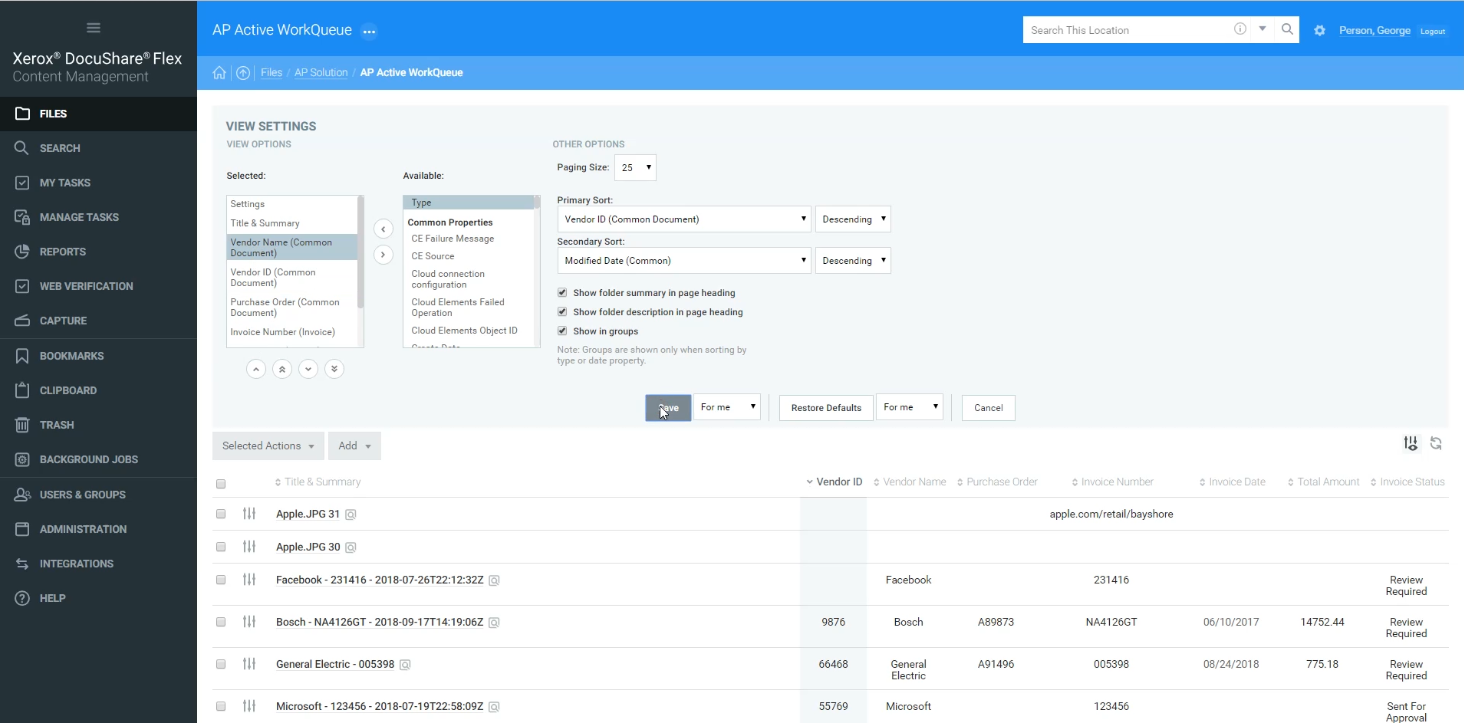
Although DocuShare is a capable document management platform, some organizations choose to evaluate alternatives based on usability, deployment requirements, or evolving business needs.
Many users have reported issues with the user interface. Compared with many newer cloud-based ECM platforms, DocuShare's interface seems less intuitive, which can increase training requirements and slow user adoption.
Organizations also report that configuring advanced workflows, integrations, or custom business processes may require additional technical expertise.
While DocuShare supports workflow automation and APIs, more complex implementations can involve IT resources or implementation partners.
Regarding integrations, DocuShare connects with a range of business tools, including the Microsoft package, but some organizations require broader out-of-the-box integrations or lower-code configuration than the platform currently provides.
Finally, organizations that are planning significant growth may evaluate whether DocuShare's licensing, deployment model, and administrative requirements align with their long-term needs.
Businesses looking for faster implementation, simpler administration, or cloud-native architecture often compare DocuShare with newer ECM platforms.
If these considerations match your organization's priorities, exploring alternative document management solutions may help you find a platform that's a better fit for your workflows, technical resources, and future growth.
Each of these DocuShare alternatives support modern document management, workflow automation and cloud deployment, although their focus, complexity and ideal use cases are different.
Platform / Feature | Automation level | Data capture | Best for | Best feature | Downsides |
|---|---|---|---|---|---|
DocuShare | Basic to moderate | Basic OCR | Governments, education, regulated sectors | Governance & control | Outdated UX; high IT load |
Dokmee | Strong OCR & workflow automation | Strong OCR | Small-to-mid orgs needing modular ECM | Flexibility & modular design | Less enterprise customization than Laserfiche |
Laserfiche | Very advanced enterprise workflows | AI-driven capture & extraction | Large enterprises, public institutions | Full enterprise automation | Higher cost; requires expertise |
M-Files | High, metadata-driven automation | Intelligent metadata automation | Professional firms, engineering, legal | Metadata-based organization | Metadata learning curve |
SharePoint | Moderate via Power Automate | Basic OCR | Organizations already on Microsoft 365 | Collaboration & co-authoring | On-premise being phased out |
DocuWare | Advanced, especially for HR & finance | Smart capture for invoices & forms | Mid-to-large orgs wanting cloud-first workflows | Cloud-native workflow templates | Limited deep customization |
⭐⭐⭐⭐⭐ Ratings
G2 4.5/5 | Capterra 4.7/5
Why is Dokmee a good choice?
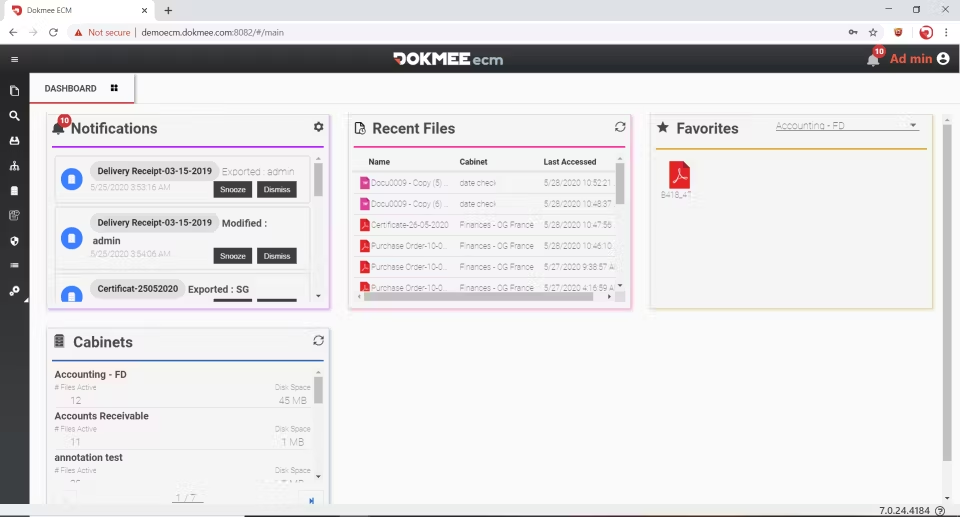
Dokmee is an ECM and DMS platform designed to balance usability with flexibility.
Dokmee can be deployed in the cloud, on-premises, or in a private cloud, while configuring document structures, permissions, metadata, and workflows to fit their business processes.
The platform includes document management, OCR, workflow automation, audit trails, and advanced search capabilities with AI features.
Organizations can also add products such as Dokmee Capture or eForms if additional functionality is needed. This modular system guarantees you only pay for what you need.
Dokmee offers both a drag-and-drop workflow builder for common business processes and a more advanced workflow designer for organizations with more complex automation requirements.
For example, a municipality can digitize paper archives and begin with document storage and OCR before gradually introducing automated indexing and approval workflows.
When is Dokmee the better choice?
Dokmee is well suited for organizations that want a configurable ECM platform without the implementation complexity associated with some enterprise systems.
It is particularly suitable for organizations that want flexible deployment options, straightforward administration, and the ability to expand automation over time.
⭐⭐⭐⭐⭐ Ratings
G2 4.7/5 | Capterra 4.5/5
Why is Laserfiche a good choice?
Laserfiche combines enterprise content management with workflow automation, document capture, and records management.
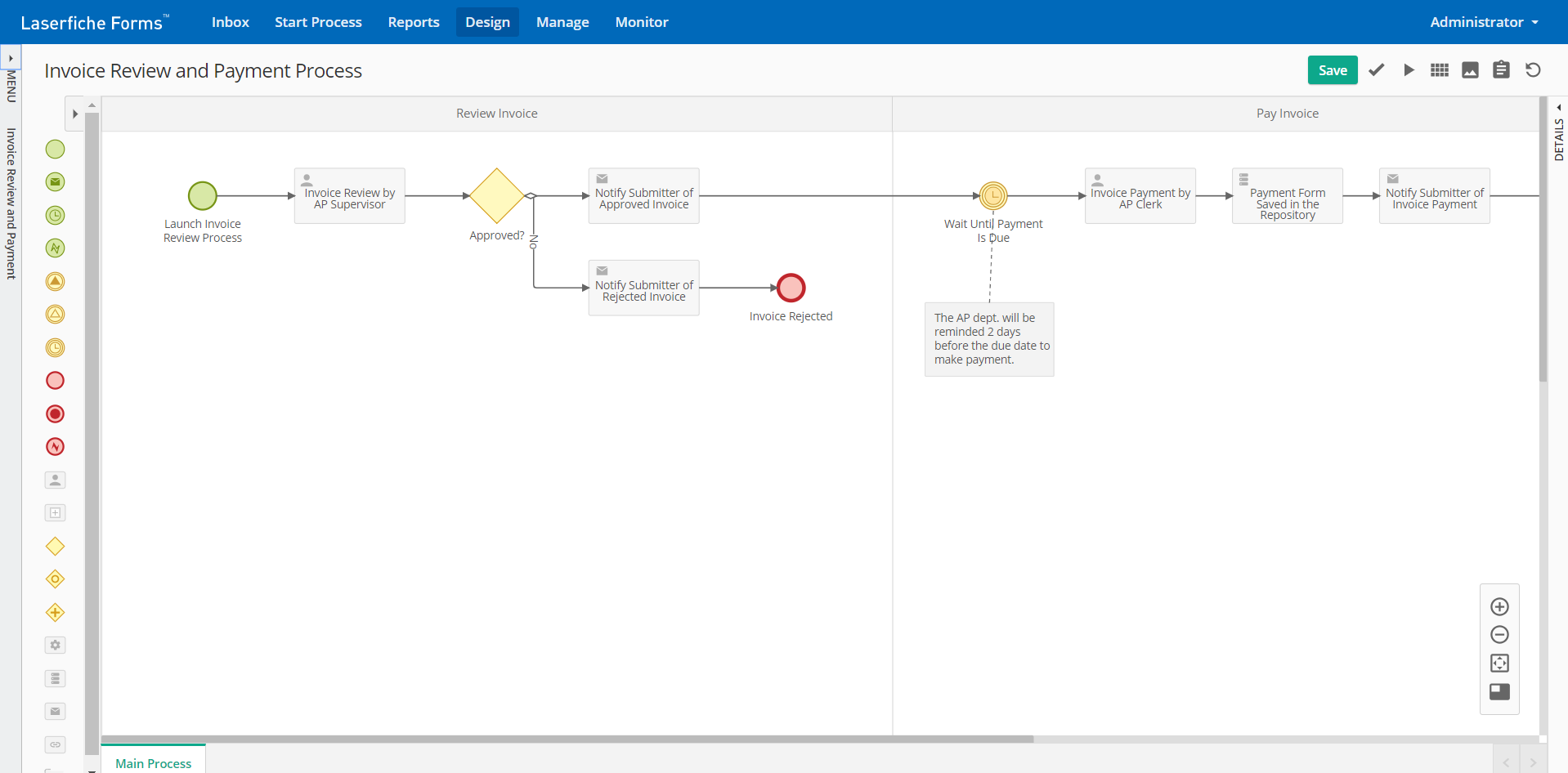
Its workflow tools allow organizations to automate document routing, approvals, and business processes, while AI-assisted capture can extract information from documents to reduce manual data entry.
Laserfiche also includes governance features such as audit trails, records management, and retention policies, making it a common choice in highly regulated industries.
The platform integrates with Microsoft 365, Salesforce, Oracle, and other enterprise applications.
When is Laserfiche the better choice?
Laserfiche is a good fit for organizations with complex workflows, strict compliance requirements, or large document repositories.
It is commonly used by government agencies, educational institutions, healthcare organizations, and large enterprises.
⭐⭐⭐⭐ Ratings
G2 4.4/5 | Capterra 4.4/5
Why is M-Files a good choice?
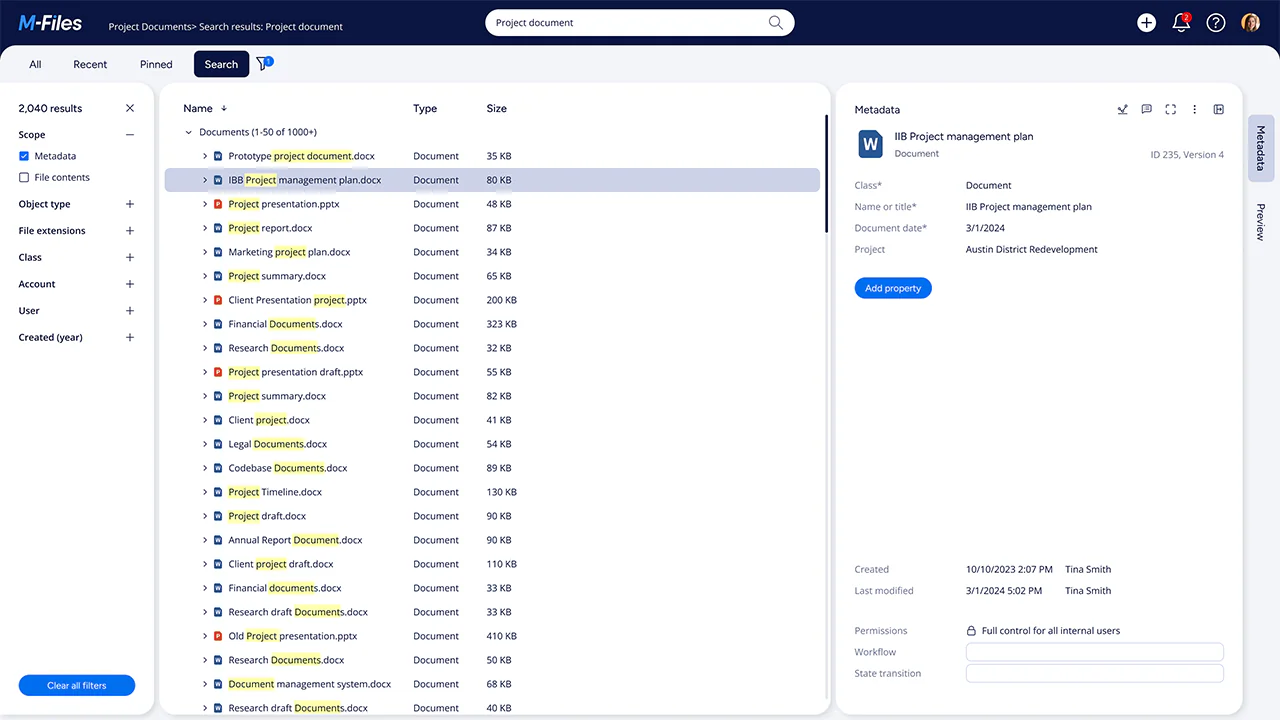
M-Files changes traditional static folders and, instead, organizes documents using metadata.
Instead of browsing folders, users search for documents based on information such as customer, project, document type, or status. This approach can reduce duplicate files and make documents easier to locate across departments.
The platform also includes version control, workflow automation, permissions management, and AI-assisted document classification.
Organizations in consulting, engineering, legal services, and other document-intensive industries often use M-Files to manage large volumes of project documentation.
Moving from a traditional folder-based system to a metadata-driven approach typically requires planning, particularly when designing metadata structures and migrating existing documents.
When is M-Files the better choice?
M-Files is well suited for organizations that struggle with duplicate documents, inconsistent folder structures, or complex information management.
It is particularly valuable when metadata and search are more important than maintaining traditional folder hierarchies.
⭐⭐⭐⭐ Ratings
G2 4/5 | Capterra 4.4/5
Why is SharePoint a good choice?
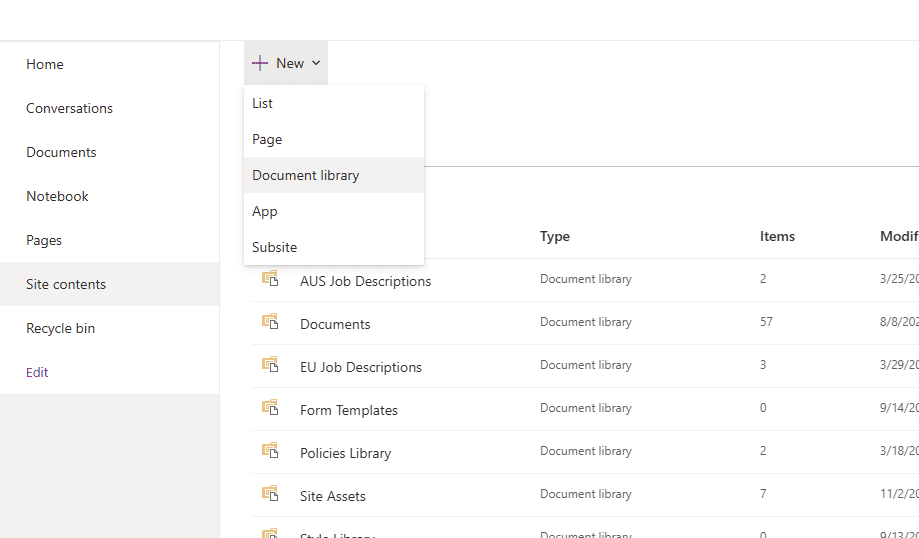
SharePoint is Microsoft's collaboration and document management platform and is included with many Microsoft 365 plans.
It allows organizations to store documents, create team sites and intranets, collaborate through Microsoft 365 tools (such as Teams or Outlook), and automate workflows using Power Automate.
Because SharePoint integrates closely with Teams, Outlook, OneDrive, Word, Excel, and other Microsoft applications, it is often the default document management platform for organizations already using Microsoft 365.
While SharePoint includes document management capabilities, organizations with advanced records management or enterprise content management requirements may need additional Microsoft services or third-party solutions.
When is SharePoint the better choice?
SharePoint is a strong choice for organizations that already use Microsoft 365 and prioritize collaboration alongside document management.
It is particularly well suited for distributed teams and businesses looking to centralize documents within the Microsoft ecosystem.
⭐⭐⭐⭐⭐ Ratings
G2 4.4/5 | Capterra 4.6/5
Why is DocuWare a good choice?
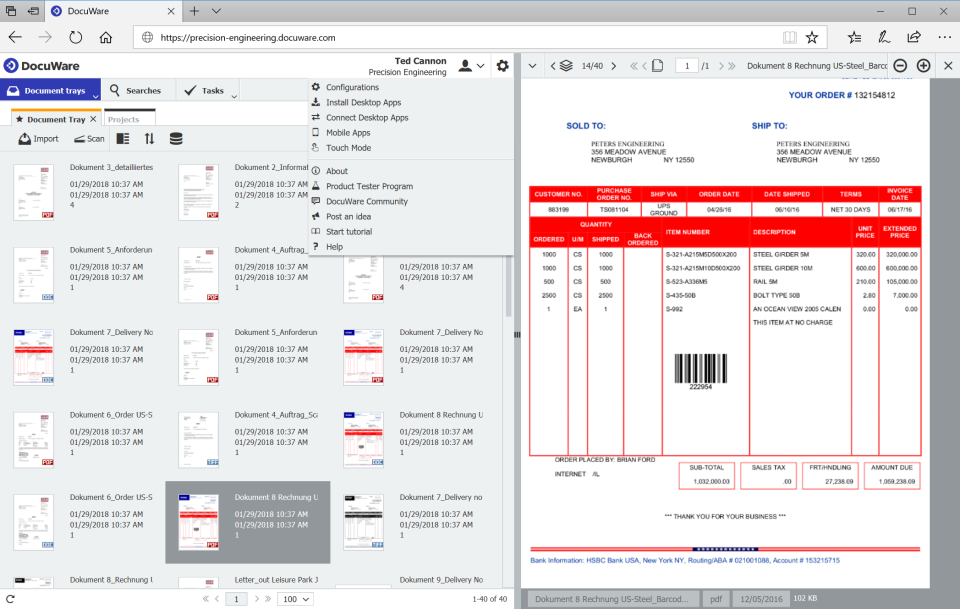
DocuWare combines document management with task management.
It is widely used to automate administrative processes such as invoice processing, employee onboarding, contract management, and approval workflows.
The platform includes OCR, intelligent indexing, workflow automation, version control, and integrations with ERP, CRM, and HR systems.
Compared with many enterprise ECM platforms, DocuWare emphasizes ease of deployment and automation.
When is DocuWare the better choice?
DocuWare is well suited for organizations that want to automate document-driven business processes without extensive custom development.
It is commonly used by finance, HR, and operations teams that process large volumes of business documents.
Whether you should replace DocuShare depends on your organization's requirements.
If your current implementation meets your document management, collaboration, and compliance needs, there may be little reason to migrate.
However, if you're looking for broader automation, simpler administration, more flexible deployment options, or modern integration capabilities, it may be worth evaluating alternative platforms.
Each of the alternatives we have provided has different strengths.
M-Files emphasizes metadata-driven document management
Laserfiche focuses on enterprise automation and compliance
SharePoint integrates closely with Microsoft 365
DocuWare is known for streamlining document-centric business processes.
Dokmee offers a combination of document management, workflow automation, OCR, and flexible deployment in a platform designed to scale as organizational requirements evolve.
If you want to know more, contact the Dokmee team for a demo.
Dokmee replaces DocuShare’s dated and clunky interface with a clean, user-friendly layout. This significantly reduces employee training time and accelerates user adoption across every department.
Dokmee provides high-accuracy OCR and automated indexing out of the box, whereas DocuShare’s capture capabilities often feel basic. It allows teams to digitize, classify, and search large volumes of paper or digital files effortlessly.
Dokmee gives you identical features whether deployed on-premises, in a private cloud, or as a public SaaS solution. Organizations leaving DocuShare maintain full control over data sovereignty without sacrificing modern cloud capabilities.
Dokmee allows you to license only the tools you actually need—such as Capture, eForms, or advanced workflows, without paying for shelfware. This keeps total cost of ownership predictable compared to DocuShare’s rigid enterprise licensing.
Dokmee includes both a drag-and-drop builder for everyday approvals and an advanced designer for complex business logic. This eliminates the heavy IT overhead and third-party consulting fees typically required to configure DocuShare workflows.
Unlike DocuShare, which often demands dedicated IT resources for routine administration and updates, Dokmee is simple to manage internally. Non-technical administrators can adjust folder structures, index fields, and permissions with ease.