SharePoint vs OneDrive: Which One Does Your Business Need?
OneDrive handles personal storage and sync, while SharePoint powers team intranets and collaboration, but both lack native OCR and automated retention. Here’s how to choose the right fit.
The SharePoint vs OneDrive question usually gets framed as a straight comparison. It isn’t, really. Both are Microsoft 365 tools, and most businesses end up using both for different jobs rather than picking one.
This guide breaks down what each one is actually built for, where they overlap, and where neither one is enough.
Is SharePoint or OneDrive right for you? It’s rarely one or the other. If you’ve only got a minute, here’s the quick version:
OneDrive is personal and team file storage: sync, back up, and access your own files from anywhere.
SharePoint is a team collaboration and intranet platform: shared sites, document libraries, and structured content for groups.
At the individual tier, only OneDrive exists as a standalone product.
At the business tier, both come bundled in the same Microsoft 365 plans, so it's rarely a matter of cost.
Neither is a dedicated document management system: no OCR, no automated retention, and Copilot's AI isn't built for document classification the way a purpose-built DMS is.
Who Is OneDrive Built For?
OneDrive is Microsoft's personal and team cloud storage tool, designed around one person's files rather than shared organizational content.

Individuals and freelancers who need reliable file backup and sync across devices
Remote workers who need offline access to their own working files
Small teams that just need a shared drive without building out a full intranet
Anyone already paying for Microsoft 365 Personal or Family, since Copilot and up to 1TB of storage come included
Who Is SharePoint Built For?
SharePoint is built for organizations, not individuals. It’s a collaboration and content platform for teams, departments, and company-wide knowledge.
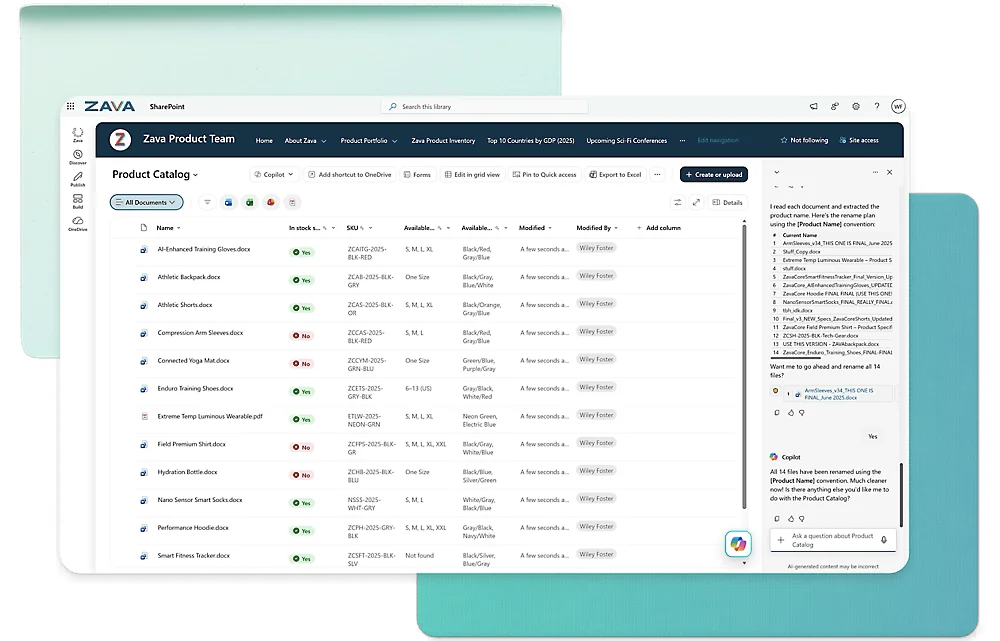
Departments building shared document libraries, wikis, or policy repositories
Companies that want an internal intranet with news, announcements, and dashboards
Teams that need structured metadata, permissions, and workflow automation through Power Automate
Organizations already standardized on Microsoft 365 that want to avoid a separate collaboration tool
How Do OneDrive and SharePoint Compare on Storage and File Management?
Both OneDrive and SharePoint store files in the cloud, but the underlying model is different.
OneDrive | SharePoint |
|---|---|
Personal cloud storage tied to one user's account | Centralized Document Libraries shared across a team or site |
Files organized in personal folders | Files organized with metadata (project, department, and document type), not just folders |
Version history for the last 30 days | Full version history with check-in and check-out controls |
Personal Vault for sensitive files with extra identity verification | Granular permissions at the site, library, folder, or document level |
How Do OneDrive and SharePoint Compare on Collaboration?
Both platforms support real-time co-authoring since they run on the same underlying Microsoft 365 infrastructure, but the collaboration model differs.
OneDrive | SharePoint |
|---|---|
Best for sharing individual files or folders with specific people | Best for ongoing team collaboration: shared sites, calendars, task lists, and announcements |
Real-time co-authoring in Word, Excel, and PowerPoint | Same co-authoring, plus dedicated team sites and communication sites |
Sharing is link-based and ad hoc | Sharing is structural, built around persistent team or department sites |
This difference matters for anything beyond casual file sharing; real document collaboration at team scale usually needs the site-and-library model SharePoint provides, not just shared folders.
How Do OneDrive and SharePoint Compare on Search and AI?
Both OneDrive and SharePoint plug into the same Microsoft 365 Copilot, but what each one actually surfaces is different.
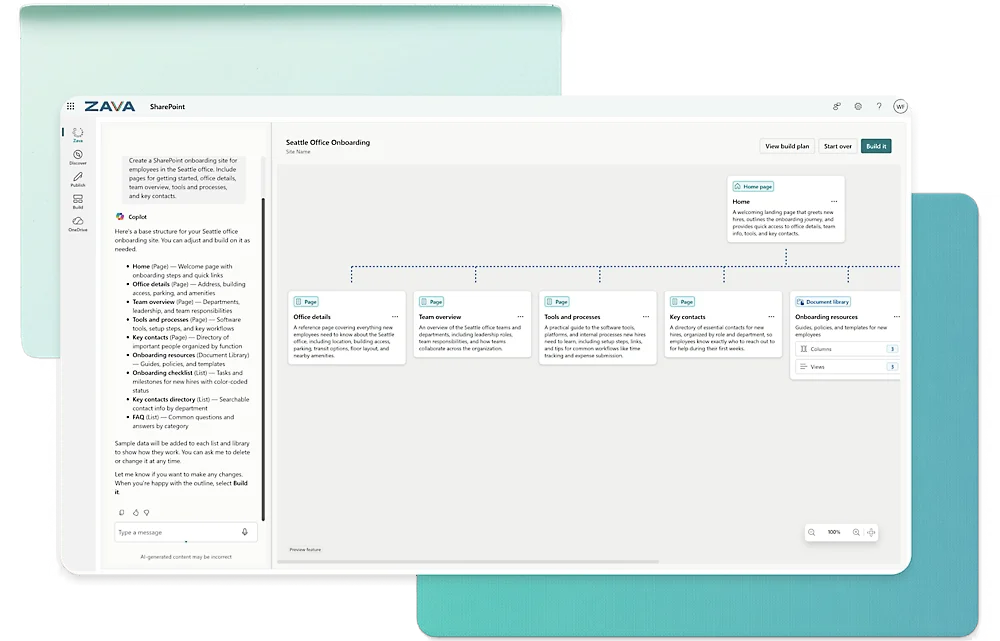
OneDrive search covers your own files and anything shared directly with you.
SharePoint search, and Microsoft Search more broadly, spans team sites, libraries, and organizational content, and can ground Copilot in company knowledge through Work IQ.
Copilot is included with Microsoft 365 Personal, Family, and Business Standard or Premium plans on both tools.
⚠️ Watch Out: Copilot and Microsoft Search are strong for finding and summarizing content, but neither function as document-level classification. Metadata still must be applied and maintained by someone.
How Do OneDrive and SharePoint Compare on Security and Compliance?
SharePoint and OneDrive have a baseline level of document management security, but it depends heavily on deliberate setup.
OneDrive | SharePoint |
|---|---|
Personal Vault, ransomware detection, file recovery, end-to-end encryption | Granular permissions at every level, plus Microsoft Purview for DLP, retention, sensitivity labels, and legal holds |
Governance is mostly personal-account level | Governance is organization-wide, and gets more complex as sites multiply |
Watch Out: SharePoint’s flexibility is also its biggest governance risk. Without a deliberate site and permissions structure from the start, document libraries and access rules tend to sprawl as an organization grows.
How Do OneDrive and SharePoint Compare on Deployment and Access?
Both OneDrive and SharePoint are accessible through desktop apps, a web browser, and mobile apps, but there are a few differences to keep in mind:
OneDrive is cloud-only; there’s no on-premises version of the personal or business product today.
SharePoint offers both SharePoint Online (cloud) and SharePoint Server (on-premises), though Microsoft’s investment has shifted almost entirely to the cloud version.
SharePoint Server’s 2019’s extended support has already ended. That’s worth knowing if your organization still runs an on-premises deployment.
How Much Do OneDrive and SharePoint Cost?
This is where the versus framing breaks down completely: at the business tier, you don’t choose between them; they come in the same plan.
OneDrive Personal Pricing
Free: $0/mo., 5GB storage
Microsoft 365 Basic: $1.99/mo., 100GB storage
Microsoft 365 Personal: $9.99/mo., 1TB storage plus Copilot
Microsoft 365 Family: $12.99/mo., up to 6TB shared across 6 people
SharePoint has no equivalent personal or standalone consumer tier; it’s a business product only.
Microsoft 365 Business Pricing
Plan | Price (without Teams) | Price (with Teams) | What You Get |
|---|---|---|---|
Business Basic | $5.40/user/mo. | $7.00/user/mo. | 1TB OneDrive storage per user, SharePoint sites, web and mobile Office apps |
Business Standard with Copilot | $20.30/user/mo. | $23.50/user/mo. | Adds desktop apps and work-grounded Copilot across OneDrive and SharePoint content |
Business Premium with Copilot | $28.80/user/mo. | $32.00/user/mo. | Adds advanced device management and threat protection |
👍 Note: Microsoft 365 Business plans are yearly subscriptions. Every plan includes both OneDrive storage and SharePoint access at the same price.
What Are the Pros and Cons of OneDrive and SharePoint?
OneDrive currently holds a 4.3/5 rating on G2 across 10,400+ reviews. It’s praised for smooth MS 365 integration and reliable access across devices, though users complain about its inconsistent sync, especially with large files.
Similarly, SharePoint holds 4/5 stars on G2 across nearly 9,000 reviews. Users love how it centralizes team knowledge and its deep MS integrations, though they find the learning curve and administration complex.
OneDrive Pros and Con
Pros | Cons |
|---|---|
✅ Native Microsoft 365 integration and real-time co-authoring | ❌ Syncing can be inconsistent, especially with large files or shared folders |
✅ Reliable file access across devices, including offline | ❌ Performance and resource usage can lag on larger libraries |
✅ Straightforward for anyone already comfortable with Windows and Office | ❌ Multiple accounts or SharePoint-backed libraries can get confusing |
✅ Strong security: Personal Vault, ransomware detection, encryption | ❌ Free tier storage fills up quickly |
SharePoint Pros and Cons
What Reviewers Like | What Reviewers Warn About |
|---|---|
✅ Centralizes team documents and knowledge in one place | ❌ Steep learning curve for administrators |
✅ Deep Microsoft 365 integration across Teams, Outlook, and Office | ❌ Permissions and site structure get complex at scale |
✅ Flexible enough to build intranets, sites, and workflows without custom development | ❌ Advanced workflow automation depends on Power Automate |
✅ Strong permissions and compliance tooling through Purview | ❌ Performance can suffer with very large document libraries |
Which Platform Fits Your Situation?
In practice, you’ll likely find yourself switching between OneDrive and SharePoint depending on the task at hand, rather than using just one.
Solo User or Freelancer
If you're working alone or in a very small team, OneDrive covers what you need: file backup, sync across devices, and enough storage to skip physical drives entirely.
SharePoint's team-site infrastructure has nothing to offer a single user.
Small Business Already on Microsoft 365
Most small businesses use both without thinking about it: OneDrive for individual working files and SharePoint (often without realizing it, since Teams channels are backed by SharePoint sites) for shared team content.
The plans already include both, so there's no separate purchase decision to make here.
Growing Organization Building an Intranet or Knowledge Base
Once a company needs an internal knowledge base, policy library, or department structure, SharePoint's team sites and communication sites are the right tool.
Running a company knowledge base out of shared OneDrive folders tends to fall apart once more than a handful of people are involved.
Regulated Industries Needing Document Governance
For healthcare, legal, finance, and government organizations, both tools get uncomfortable fast. SharePoint's permissions and Purview compliance tools can get there, but only with dedicated governance planning most IT teams don't have the bandwidth for.
This is usually the point where a dedicated document management platform is worth evaluating alongside, or instead of, either Microsoft tool.
Where Do OneDrive and SharePoint Hit Their Ceiling?
Price and feature differences aside, OneDrive and SharePoint share the same structural limits once document management becomes a compliance requirement rather than a convenience.
No Dedicated Document Capture or OCR
Neither tool scans, extracts, or indexes paper documents. Getting a physical filing cabinet into either system means manually uploading files that are already digitized.
No Native Retention Automation Outside Purview
Automated document retention policy schedules, legal holds, and records management exist, but only through Microsoft Purview, a separate layer of licensing and configuration, not something built into OneDrive or SharePoint by default.
Governance Complexity Grows With Scale
SharePoint's flexibility is also its biggest long-term cost. Site structures, permissions, and metadata schemes that aren't planned carefully from the start tend to sprawl, and untangling that later is a real project, not a settings change.
No AI Classification
Copilot and Microsoft Search are useful for finding and summarizing content, but neither is built to automatically classify, tag, or route documents the way a purpose-built document management AI is.
When Should You Consider a Document Management Platform?
There’s no universal threshold, but a few signs tend to show up together:
Your team spends time each week untangling SharePoint permissions or site structure.
Physical documents still need to be scanned, OCR'd, and indexed before they're usable.
Compliance requires documented retention schedules and audit trails, not just version history.
You're paying for Microsoft Purview add-ons just to get baseline records management.
Finding a document increasingly means asking a colleague where it's filed, not searching for it.
How Does Dokmee Compare to OneDrive and SharePoint?
When both Microsoft tools hit the same ceiling, the question becomes what a purpose-built document management system looks like instead. Here’s the direct comparison.
OneDrive | SharePoint | Dokmee | |
|---|---|---|---|
Primary focus | Personal and team file storage | Team collaboration and intranet | Purpose-built document management and ECM |
Deployment | Cloud only | Cloud, on-premises, or hybrid | Cloud, on-premises, or hybrid |
Document capture and OCR | Not included | Not included natively | Built-in OCR and document capture |
Retention and records management | Not included | Via Microsoft Purview (additional licensing) | Built-in retention policies |
AI capabilities | Copilot (general assistant) | Copilot plus Work IQ grounding | Built-in AI Search and AI-powered document classification |
Workflow automation | Not included | Via Power Automate | Native visual workflow designer |
Starting price | Free; personal plans from $1.99/mo. | Bundled into Microsoft 365 Business, from $5.40/user/mo. | $39/mo. per user (Dokmee Cloud) |
👍 For a direct comparison, check out our Dokmee vs. Sharepoint breakdown. For a complete review, check out our dedicated Dokmee review.
SharePoint vs OneDrive: Which One Is Right for Your Business?
For most businesses, this isn’t really a choice. OneDrive handles individual file storage and sync; SharePoint handles team collaboration and intranets. Most organizations end up using both for exactly what each is built for.
However, they lack OCR, native retention automation, and AI classification. That’s a huge gap when compliance, audits, or high-volume document control enter the picture.
If your documents are mostly working files, Microsoft gets the job done. But if you're managing regulated records or audit-ready retention, you'll likely outgrow what they offer natively.
Stop stitching together multiple tools and expensive add-ons. Choose a platform built for document management from the ground up.
Request Your Free Dokmee Demo Today. →